JANETS_INM.pdf - 第589页
J aN et s Inst ructi on Manual 15 . Log Control Tool 15 -3 15.1.3 T ree Vi ew for applications Figure 15.1 -3 Tree View screen fo r appl icat ion s 15.1.3.1 Setting range of items Figure 15.1 -4 Tr ee V ie w for applic a…
JaNets Instruction Manual 15. Log Control Tool
15-2
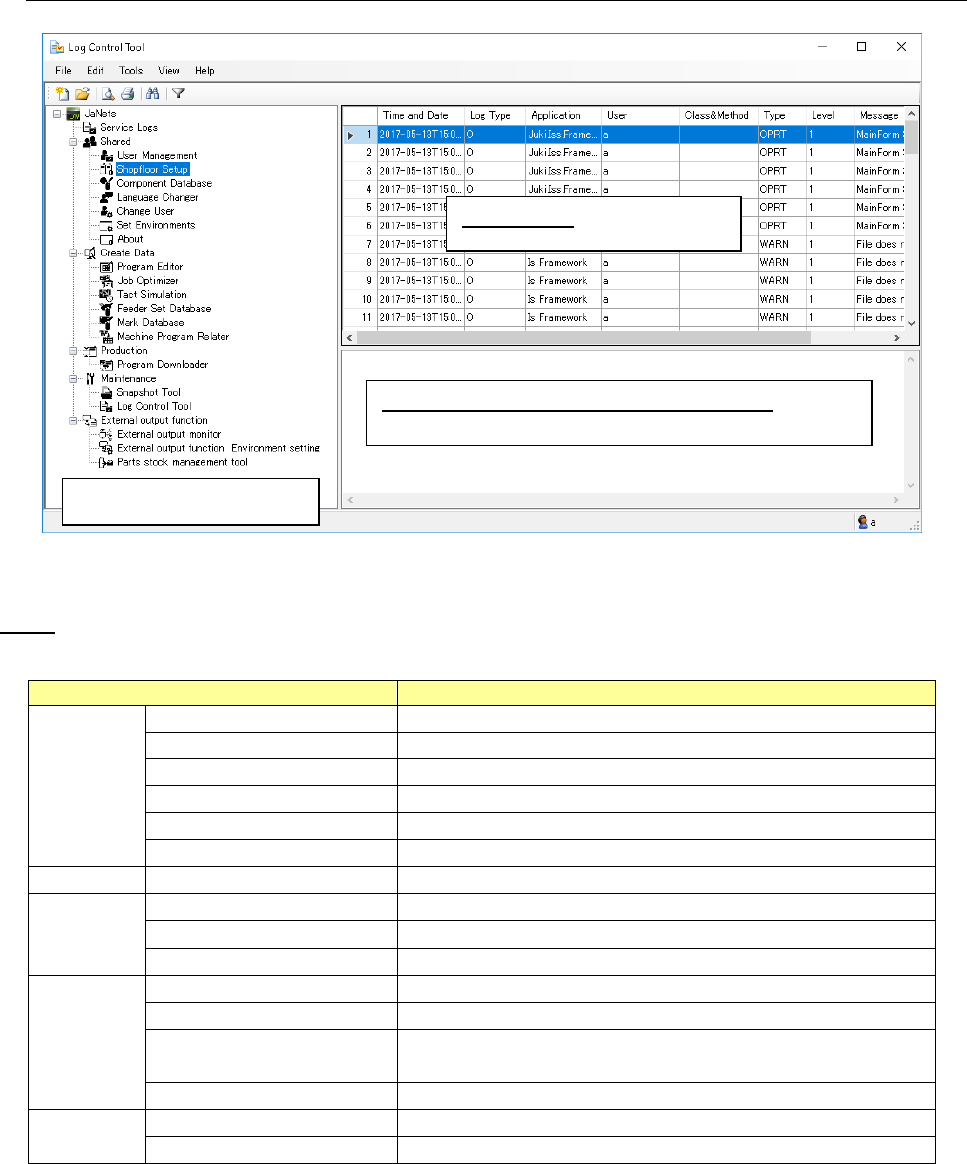
15.1.2 Configuration of the “Log Control Tool” screen
Figure 15.1-2 “Log Control Tool” screen
Menu
Table 15.1-1 Description of each menu item
Menu Item
Description
File (F)
View New Log File (N)
Starts up the dialog box for selecting a new log file.
Add Log File (A)
Starts up the dialog box for adding a log file.
Preview (V)
Starts up the “Print Preview” dialog box.
Print (P) Ctrl + P
Starts up the “Print” dialog box.
Save as Text (T)
Starts up the “Save as Text” dialog box.
End (X)
Quits the Log Control Tool.
Edit (E)
Search (F) Ctrl + F
Starts up the “Search Strings” dialog box.
Tools (T)
Filter (F)
Starts up the “Filter Setup” dialog box.
Log Setup (S)
Starts up the “Log Setup” dialog box.
Environment Settings(E) …
Starts up the “Environment Settings” dialog box.
View (V)
Tree View (T)
Displays/hides the Tree View for an application.
Information View (E)
Displays/hides the Information View.
Refresh (R) F5
Reads the log file being displayed at the present into the Viewer
again to display it again.
Erase current view (S)
Erases the log file currently being displayed on the viewer.
Help (H)
Help (H) F1
Refers to the help file.
About (A)
Displays the version information on this tool.
Tree View for applications
Log Viewer: log display area
Information View (detailed information view):
Displays the details of a log selected in the log display
JaNets Instruction Manual 15. Log Control Tool
15-3
15.1.3 Tree View for applications
Figure 15.1-3 Tree View screen for applications
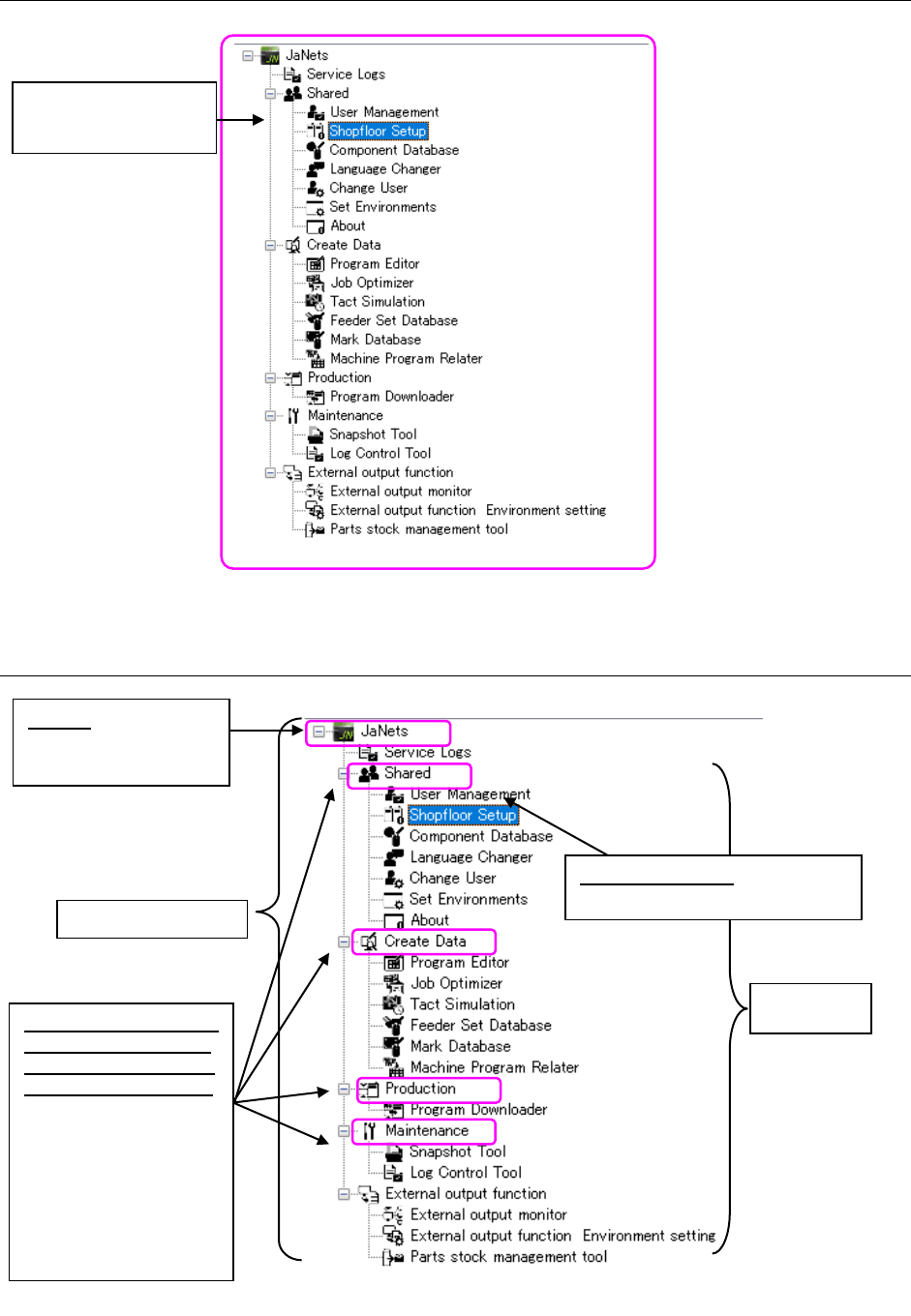
15.1.3.1 Setting range of items
Figure 15.1-4 Tree View for applications
Setting range
of the name
Displays the installed
applications.
Application name: Controls a
log of the selected application.
JaNets: Controls logs
of all installed
applications
JaNets setting range
Common function/data
creation/maintenance
function/production/ex
ternal output function:
The logs of all
applications contained
by the common function,
data creation,
maintenance function,
production, and external
output function are
collectively controlled.
JaNets Instruction Manual 15. Log Control Tool
15-4
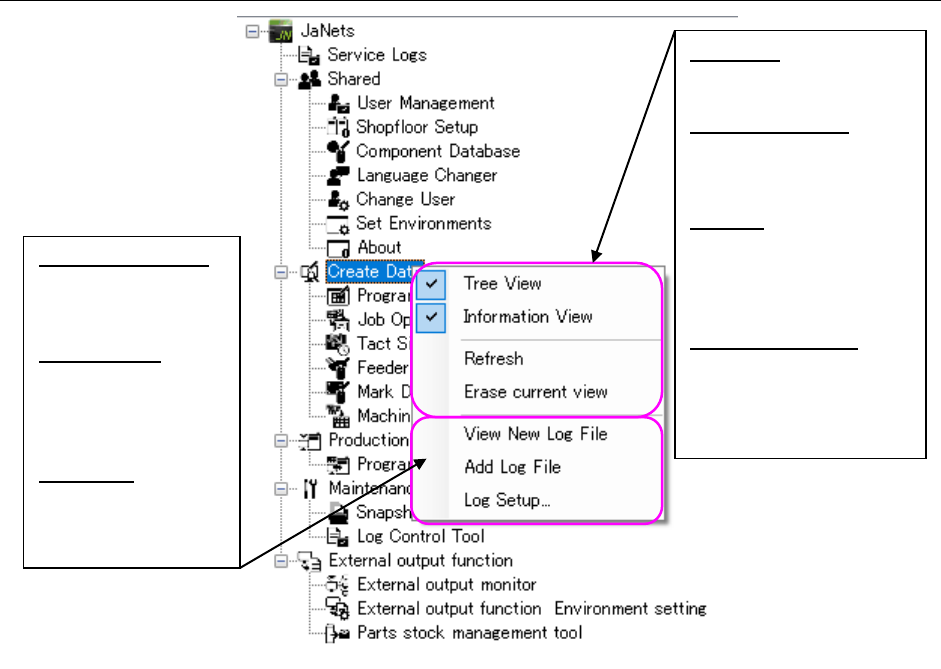
15.1.3.2 Menu displayed when you click the right button of a mouse on the Tree View
for applications
Figure 15.1-5 Menu displayed when you click the right button of a mouse
View New Log File:
Newly displays a
log of the selected
item in the Viewer.
Add Log File:
Additionally
displays a log of
the selected item in
the Viewer.
Log Setup: Displays
the “Log Setup”
dialog box for the
selected item.
Tree View:
Displays/hides the Tree
View for applications.
Information View:
Displays/hides the
detailed information
view of logs.
Refresh:
Reads a log file being
displayed in the Log
Viewer again to display
it again.
Erase current view:
Erases the log file
currently being
displayed on the
viewer.