JANETS_INM.pdf - 第600页
J aN et s Inst ructi on Manual 15 . Log Control Tool 15 - 14 15.3 Logs T abl e 15.3 -1 Des c ript ion of e ac h log dis play ite m No. Log displ ay item Descripti on ① Dat e Displ ays the tim e whe n t he corresponding l…
JaNets Instruction Manual 15. Log Control Tool
15-13
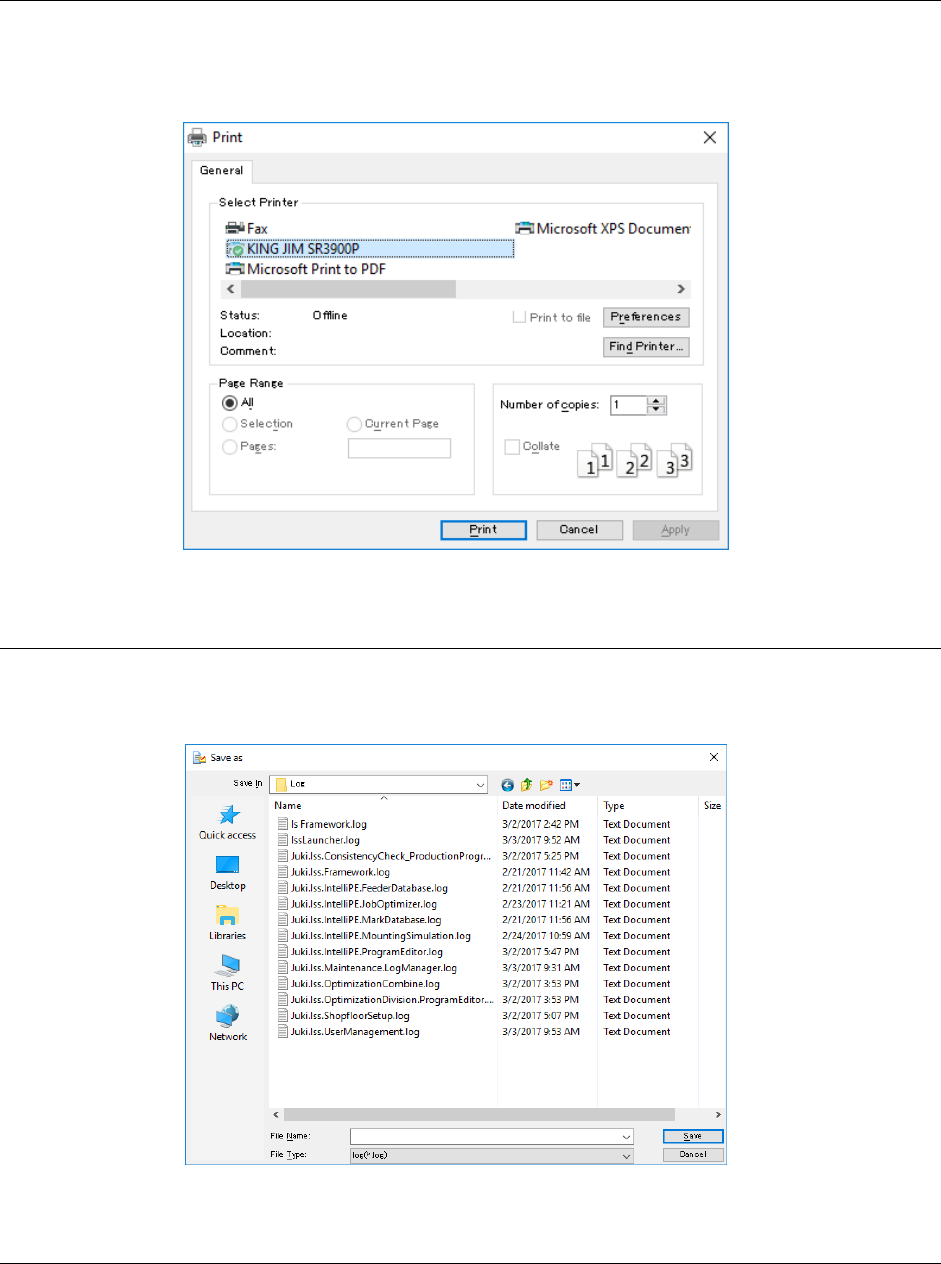
15.2.10 Printing
Select the [File] command from the menu bar, and then the [Print] command from the “File” menu.
The “Print” dialog box appears on the screen. After you make settings for printing a log(s), the
system starts printing it (them). You can print only a log(s) being displayed in the Viewer. (Logs
not displayed under the conditions specified with the filter will not be printed.)
Figure 15.2-10 “Print” dialog box
15.2.11 Outputting a log as text
Select the [File] command from the menu bar, and then the [Save as Text] command from the
“File” menu. You can output only a log(s) being displayed in the Viewer. (Logs not displayed under
the conditions specified with the filter will not be output.)
Figure 15.2-11 Dialog box for outputting a log as text
15.2.12 Searching a character string
When you select the [Edit] command from the menu bar, and then the [Search] command from
the “Edit” menu, the dialog box for searching a character string appears on the screen, and you
can search the desired character string.
After you execute this search function, the cursor jumps to the line of the character string that was
searched in the Viewer.
JaNets Instruction Manual 15. Log Control Tool
15-14
15.3 Logs
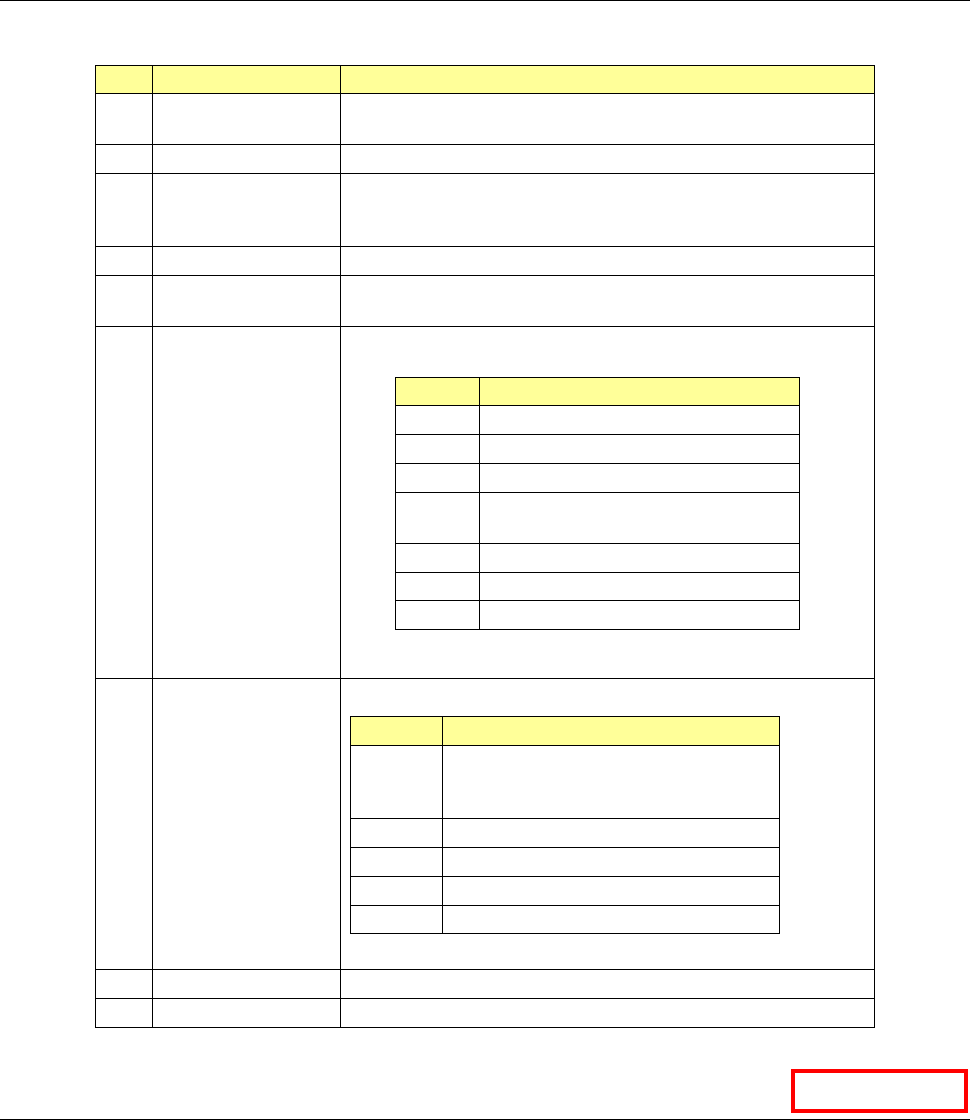
Table 15.3-1 Description of each log display item
No.
Log display item
Description
① Date Displays the time when the corresponding log was output.
(That is, the time indicated with the PC that output the log.)
②
Log Type
” “O”: Operation logs “S”: Service logs
③ Application Displays which application’s log is displayed on the screen.
(In case of a service log, the system displays the name of an
application that invoked the service.)
④
User
Displays the login name.
⑤ Class & Method Displays which program was executed to generate the
corresponding log.
⑥ Type Displays the output data type (such as an operation and an
error).
Item
Description
OPRT
Operations
EROR
Error
WARN
Details of a warning
EXCP Details of the circumstance under
which an exception occurred
PROC
Method invoke port
METH
Method IN/OUT port
DBUG
Debug message for development
⑦ Level Displays the following data by each number.
Level
Description
1 Operation, process, error, or details of
the circumstance under which an
exception occurred
2
Input/output data
3
Method invoke port
4
Method IN/OUT port
5
Debug message for development
⑧
Message
Displays the log output message.
⑨
Information
Displays the detailed information on the message.
15.4 Service Log
You can manage a service log when the system is set to be connected to a server.
Although the operation is the same as that of a log for other application programs, you cannot
execute the [Log Setup] command.
Data Manager
JaNets Instruction Manual 16 Component Database
16-1
16. Component Database
What is the component database?
Component data and adhesion data recorded in the database can be read, revised and canceled.
Starting and closing the component database
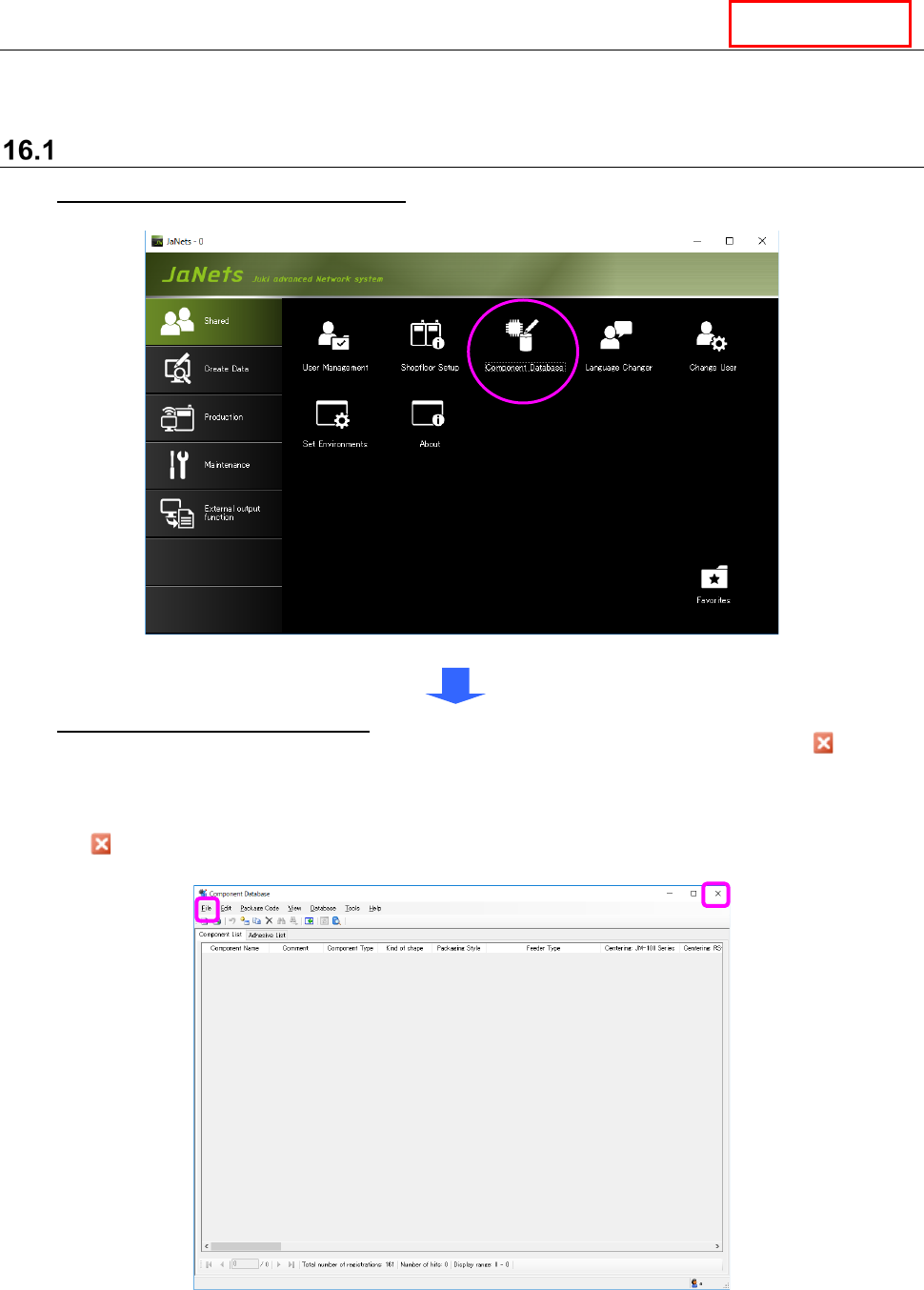
To start up the Component Database: Go to JaNets Launcher [Shared] - [Component
Database] and double click.
Figure 16.1-1 JaNets launcher screen
To quit the Component Database: Select the [File] command from the menu bar, and then
the [Close component database] command from the “File” menu, or select the Close ( ) button
displayed on the title bar at the upper right corner of the screen.
* The “Search through Component Database” screen is displayed when the database is started
up for the first time. Therefore, select the <Cancel> button on this screen or select the Close
( ) button displayed on the title bar at the upper right corner of the screen, then perform the
operation described above.
Figure 16.1-2 Initial start screen
The search screen for a component database appears when the component database starts or by
selecting the “Database” – “Research” commands.”
DataManager