JANETS_INM.pdf - 第613页
JaNets In structio n Manual 16 Component D ataba se 16 - 13 Verify setti ngs Gener al se tting These are item s for t he general s etting of a ll current ly recorde d comp onents. Figure 16.3 -6 IFS Gen eral Settin g Spl…
JaNets Instruction Manual 16 Component Database
16-12
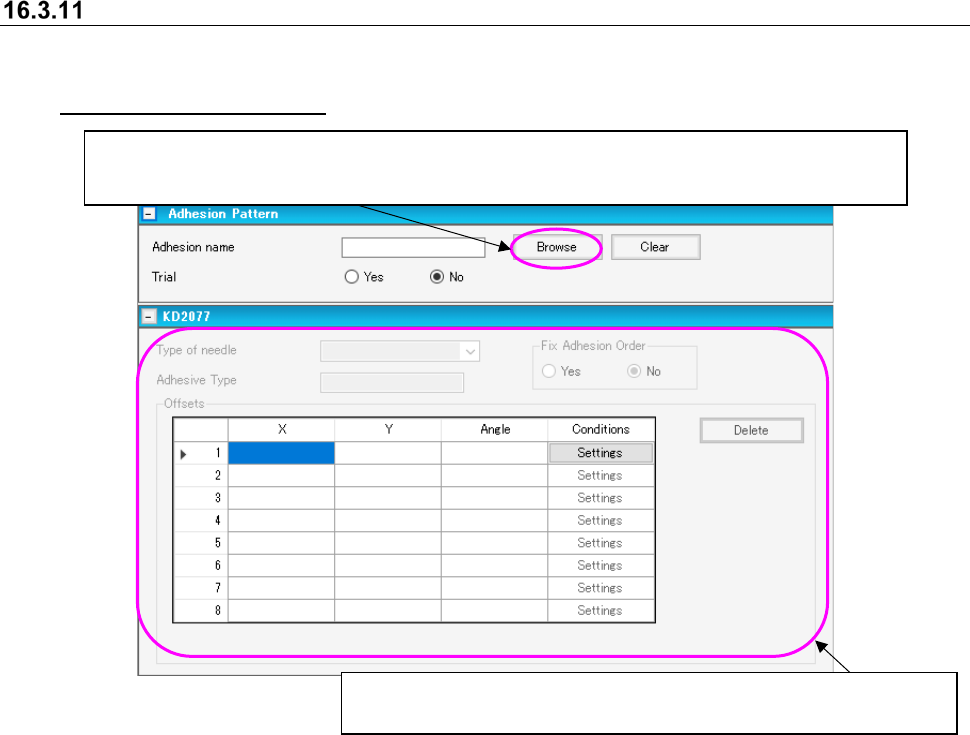
Adhesion pattern screen
The adhesion pattern screen sets the adhesion data for corresponding components. It is displayed
by going to the component data editor screen and clicking on the title bar item [Dispense]. (See
16.3.2 “Basic setting screen”)
Figure 16.3-5 Adhesion pattern screen
Displays a list of adhesion data created on the “Adhesive Pattern” screen.
You can select an adhesion pattern to be applied from the adhesion data list screen.
When you select a pattern, the corresponding adhesion pattern name is displayed on the screen.
When you set the “Adhesion name,” you can edit data displayed here.
See Section 7.4.4.2 “Adhesive data” for how to enter data.
JaNets Instruction Manual 16 Component Database
16-13
Verify settings
General setting
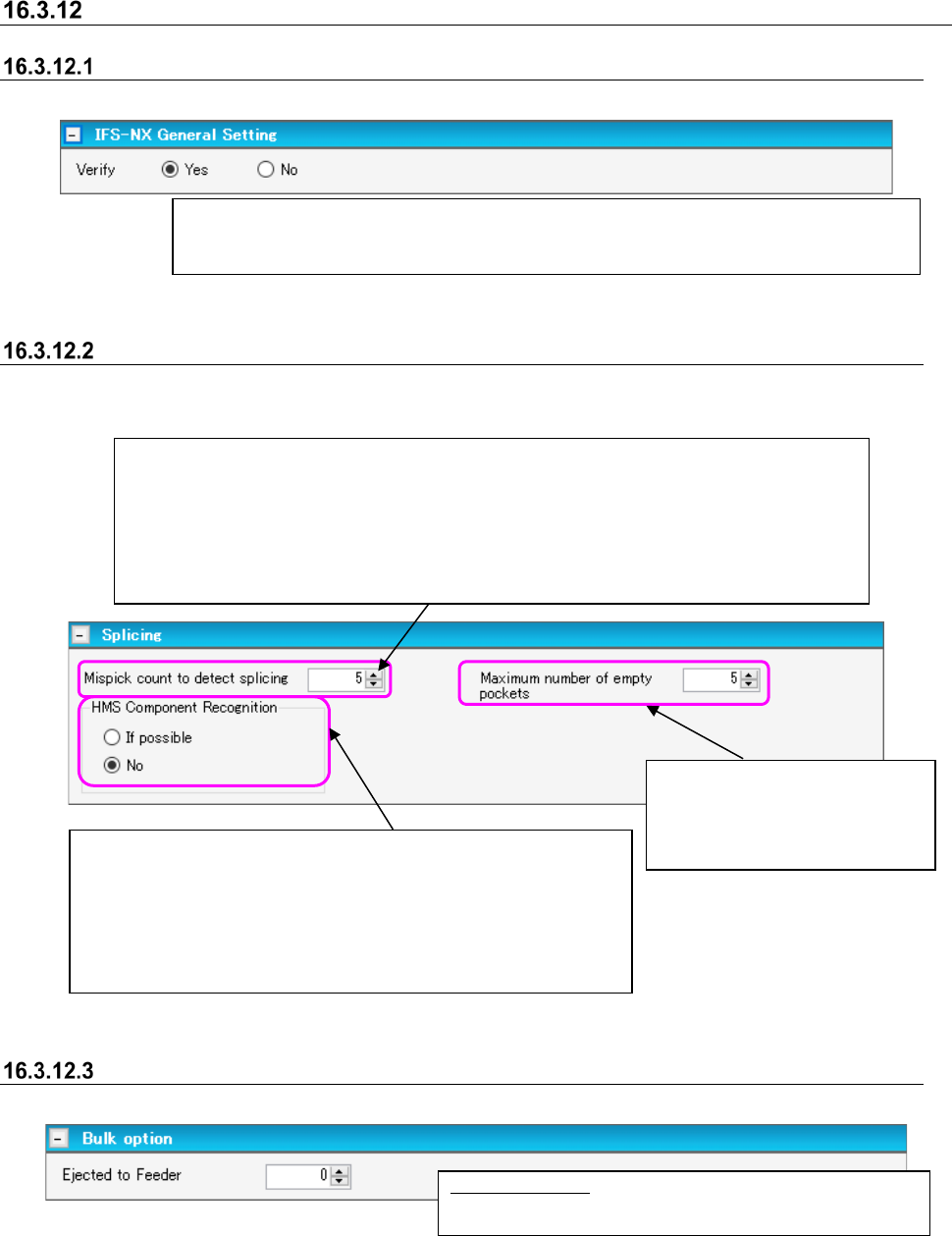
These are items for the general setting of all currently recorded components.
Figure 16.3-6 IFS General Setting
Splicing settings
This item should be specified when the package style is tape. Note that this item is not applied to
a 32-mm adhesive paper tape.
Figure 16.3-7 Splicing settings
Bulk option
This item only makes settings for bulk components.
Figure 16.3-8 Bulk option
Ejected to Feeder: Enter the number of components
loaded in one bulk.
After the splicing operation, if the pickup error is counted by the same number of times as the
specified number here, the system informs the server that the spliced point has been detected
as the position of changing components.
* Since this setting becomes effective when a component is loaded to the mounter, the
corresponding setting of components already loaded to the mounter is not changed.
Input range: From the number of 1 to 100
Specify whether to inspect the component with the HMS, when the
spliced point is detected by the mispick count.
If possible: Inspects the component if the machine has the HMS.
No: Does not inspect.
* Setting of the “HMS Component Recognition” is applied to
components whose size is equal to that of a 1005 or larger.
This sets whether or not verification takes place at the position where a component is fixed
when verifying with a mounter or verifying outside setup with the setup explorer. Setting [No]
allows production to begin with the mounter even with status unverified.
Input the maximum number of the
space pocket.
Default: 5
Setable range: 1-100
JaNets Instruction Manual 16 Component Database
16-14
External Output Function Setting of feeder setup control
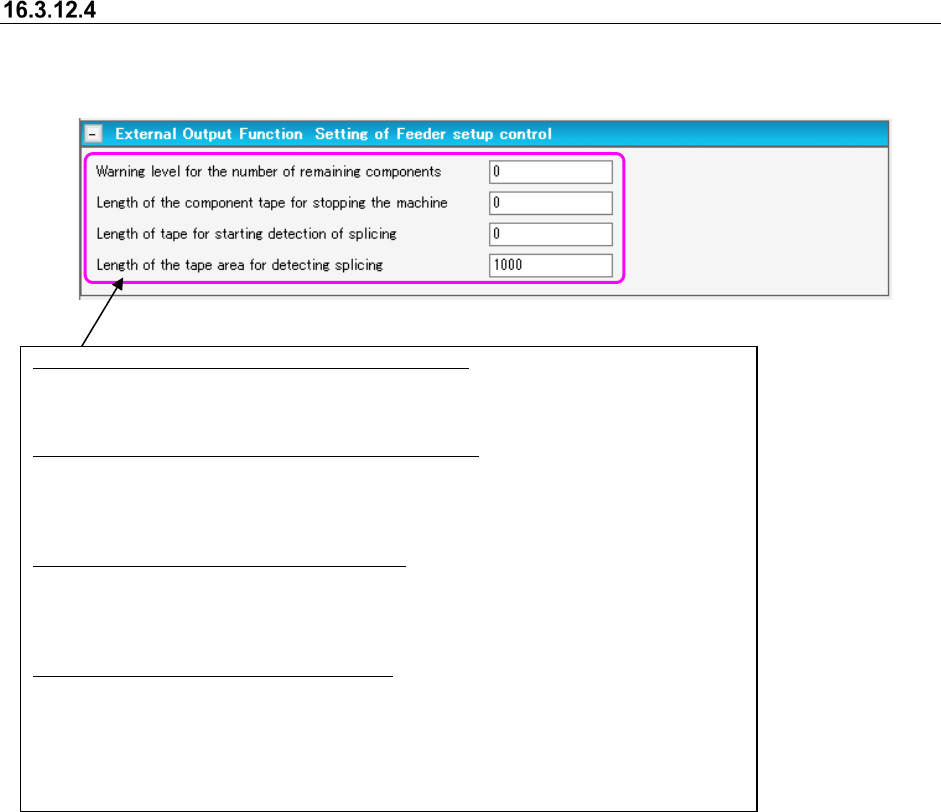
This item is set for the component whose packaging style is the “Tape.” However, it does not
apply to a 32-mm paper adhesive tape.
Figure 16.3-9 External Output Function Setting of feeder setup control
Warning level of the number of remaining components:
Specify the number of remaining components for issuing a component shortage warning.
Input range: 0 – 1000000
Length of the component tape for stopping the machine:
Specify the remaining component tape length for stopping the machine from producing a
PWB.
Input range: 0 – 1000000 mm
Length of tape for starting detection of splicing:
Specify the remaining component tape length for starting an area where continuous empty
pockets are to be detected.
Input range: 0 – 1000000 mm
Length of the tape area for detecting splicing:
Specify the tape length for deciding a splicing area detection over error.
The default value is set on the “Set Environments” screen.
Input range: 1 – 1000000 mm
The respective default values of all items are set on the “Set Environments” screen.