JANETS_INM.pdf - 第641页
JaNets In structio n Manual 16 Component D ataba se 16 - 41 Item Description Default N ozzle Sele ction Select with the corre sponding r adio button whether to set a No. 500 nozzle without ch anging it or set a No. 502/ …
JaNets Instruction Manual 16 Component Database
16-40
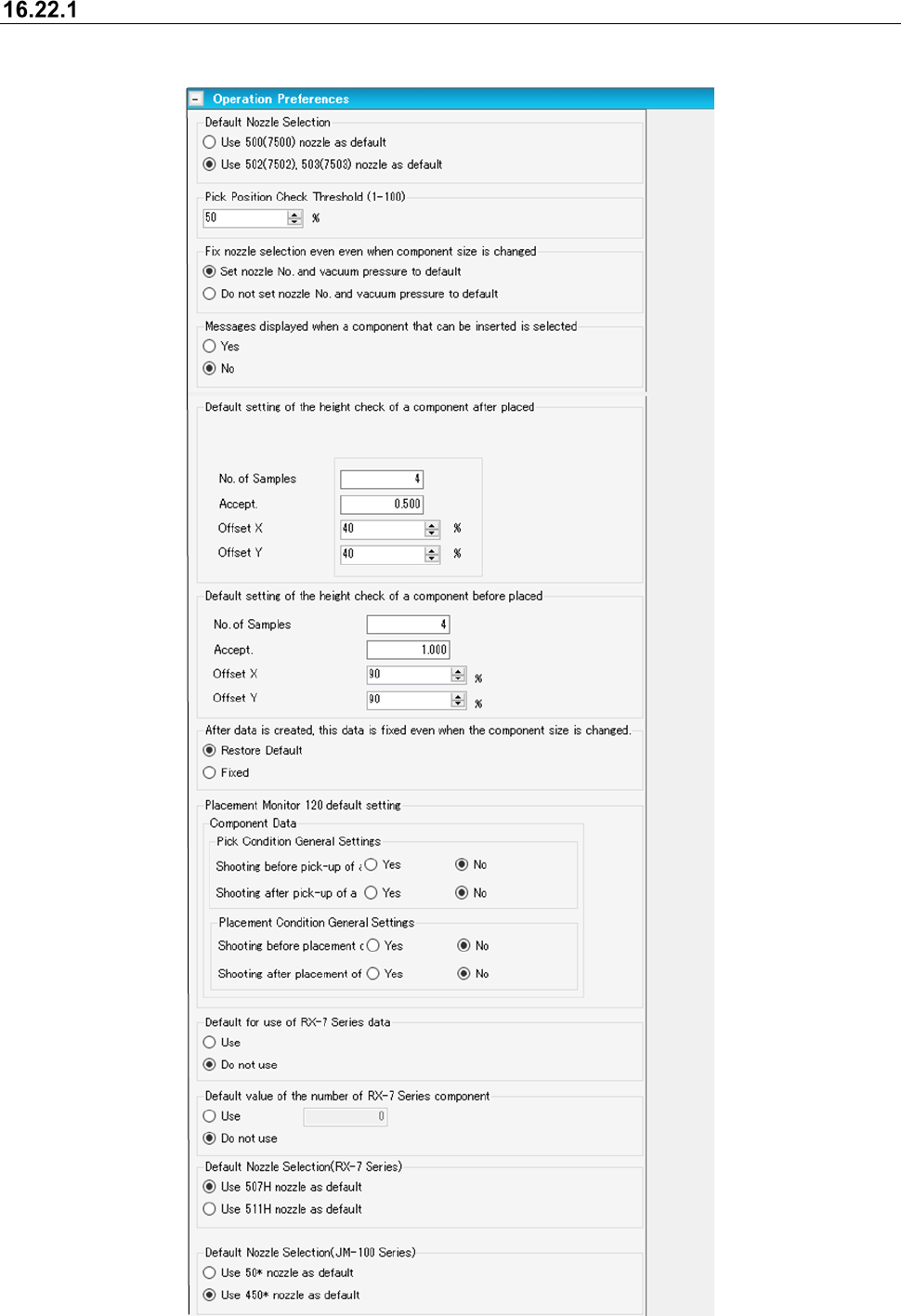
Operation preferences
Operations can be set for when recording component data.
Figure 16.22-2 Operation preferences
JaNets Instruction Manual 16 Component Database
16-41
Item
Description
Default Nozzle Selection
Select with the corresponding radio button whether to set a No. 500 nozzle
without changing it or set a No. 502/503 nozzle when Component data
specifies a No. 500 nozzle. This item is about setting of the default value of a
nozzle number to be applied when Component data is created.
The radio button “Use 500 (7500) nozzle as default” is selected by default.
A No. 7500 or 7502/7503 nozzle shall be used by default when an RS-1 is
used.
Pick Position Check Threshold
Enter a value to be used to calculate a threshold value for judging whether a
component pick-up position is shifted or not. The input range is from 1 to
100 %. The default value is 50 %.
Fix nozzle selection even when
component size is changed
Select whether to restore the nozzle number and the vacuum pressure to their
default values respectively when you change the dimensions of a component.
The radio button “Set nozzle No. and vacuum pressure to default” is selected
by default.
Message displayed when an
insertable component is selected
Select whether to display the confirmation message when a component type
requiring judgment whether a component can be inserted is selected.
The “Yes” radio button is selected by default.
Default setting of the height check
of a component after placed
You can set the default values of the placed component height check for two
types methods: SMT and MI. You can specify which type is used in data
being edited also. However, the default value for MI is set for a component
whose type is insertion component or INS electrolytic capacitor.
Initial value for SMT Initial value for MI
No. of Samples: 4 2
Accept.: 0.500 mm 1.000 mm
Offset X: 40 % 90 %
Offset Y: 40 % 90 %
Default setting of the height check
of a component before placed
Set default values to be used for a check of the height of a component before
it is placed on a board.
No. of Samples: 4
Accept.: 1.000 mm
Offset X: 90 %
Offset Y: 90 %
Data is fixed when the outer
dimensions are changed after
Component data on an insertion
component is created completely.
Select whether to fix data if you change the outer dimensions after
Component data on an insertion component is created completely, “Return to
Default” or “Fixed.” When you select “Fixed,” the default is not set again.
However, when you change either of the outer dimensions, length or width, of
the pick-up position offset, this setting is returned to the default values.
Placement Monitor 120 default
setting
Specify the default settings made in the “Placement Monitor 120” column to be
applied when you create new data.
Default for use of RX-7 Series data
Specify the default setting for whether to check off the “Use” check box of the
menu item “RX-7 Series” or not when you create new Component data.
When you select the “Yes” radio button here, the “Use” check box of the menu
item “RX-7 Series” is checked off by default.
Default value of the number of
RX-7 Series components
Select whether to specify the initial value of the number of components when
you use RX-7 series data.
When you select the “No” radio button, the initial value is not set, and the data
is not created completely.
When you select the “Yes” radio button, the initial value is to be set.
Default Nozzle Selection
(RX-7 Series)
Select with the corresponding radio button whether to set a No. 507H nozzle
without changing it or set a No. 511H nozzle when Component data specifies
a No. 507H nozzle. This item is about setting of the default value of a nozzle
number to be applied when Component data of an RX-7 series is created.
The radio button “Use 507H nozzle as default” is selected by default.
Default Nozzle Selection
(JM-100 Series)
This relates to the nozzle default value setting at JM-100 series component
data preparation and selects whether to set 50* numbered as it is or 450*
number nozzle by the radio button.
“Use 50* numbered nozzle as default” has been selected as default.
Package Code Setting
- Specify whether to register a comment also when a package code is
registered.
- Specify whether to load a comment also when a package code is assigned.
JaNets Instruction Manual 16 Component Database
16-42
Item
Description
Association of a needle with
adhesive agent
Specify association of a needle with adhesive agent.
Confirmation for overwriting data at
import
Select whether to overwrite data or not if Component data with the same
name already exists when the data is imported.
Data of a machine model whose corresponding check box is checked off is to
be overwritten.
External Output Function Default
setting for Feeder Setup control
Specify the respective default values to be used with the settings of the feeder
setup control function of the External Output Function. The default values
are shown below:
Warning level of the number of remaining components: 0
Length of the component tape for stopping the machine: 0
Length of tape for starting detection of splicing: 0
Length of the tape area for detecting splicing: 1000
Display settings
List display settings
This sets the items for display in each list. By selecting setting lists from the tree view, list display
settings can be switched.
Figure 16.22-3 List display settings (Component List)
Figure 16.22-4 List Display settings (Adhesive List)
Maximum number of pages to be displayed:
Maximum number of component data records that
can be displayed on the Component data list after
the system searches the Component Database