JANETS_INM.pdf - 第654页
JaNets In structio n Manual 17 Program Expl orer 17 -2 D escriptions of the screens About the program expl orer The Program Explorer h as the following s cree ns: “ Manag e, ” “ Productio n Program , ” “ Reser vatio n Fi…
JaNets Instruction Manual 17 Program Explorer
17-1
17. Program Explorer
What is the Program Explorer?
The Program Explorer displays the list of production programs and/or reservation files controlled
with the database of server, or the floor configuration. You can use the Program Explorer to store
a production program, a reservation file and/or a divided file into the database, or obtain such a
file from the database. You can also check whether each file stored in the database used with
another client/another user is used or not on the Program Explorer scree.
The number of reservation files to be registered, that of production programs and that of the
divided files are not restricted. They vary depending on the unoccupied space of the server
database.
Overview of the Operations
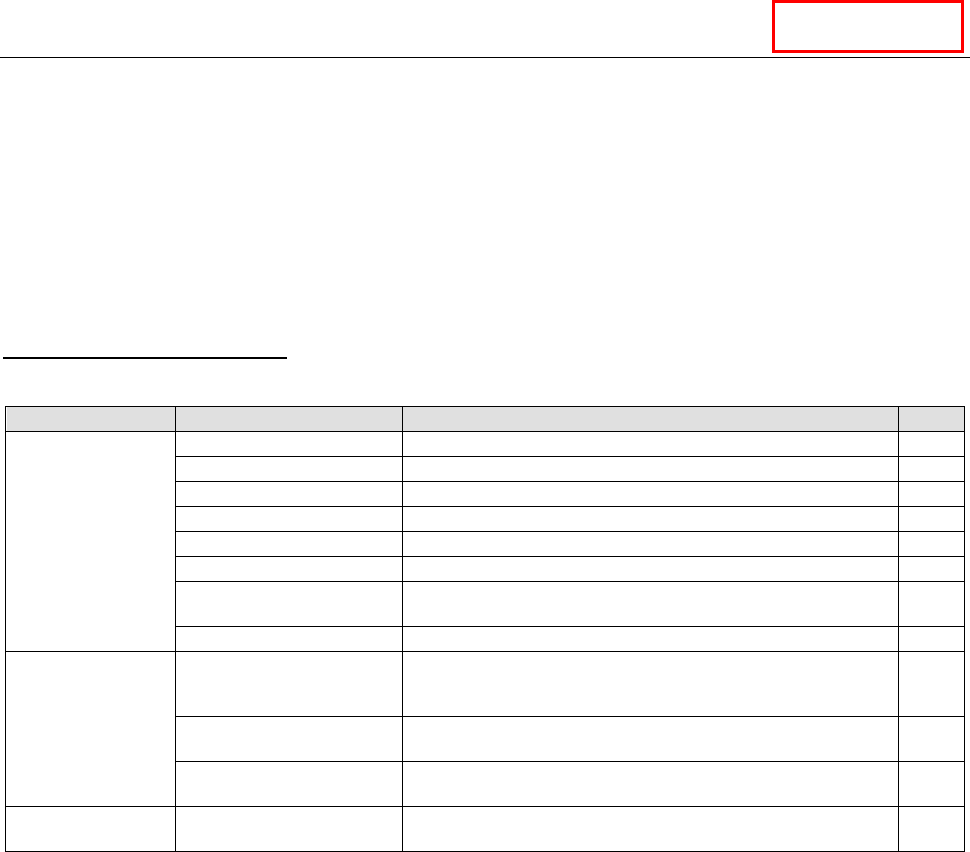
Table 17-1 Overview of the operations
Operation
Description
Level
Operation of the
database
Registration of a file
Registers a file in the database.
*
Deleting of a file
Deletes a file from the database.
*
Moving of a file
Moves a file between folders.
*
Creation of a folder
Creates a folder in the database.
*
Renaming of a folder
Renames a folder in the database.
*
Deleting of a folder
Deletes a folder from the database.
*
Registration of master file
The production program in the database is registered as a
master file.
*
Cancellation of master file
The registered master file in the database is cancelled.
*
Operation of a file
Checking out
Copies a file located in the database to a local folder, and
passes its path to the application (locks the file in the
database).
*
Checking in
Stores a checked-out production program in the database
(unlocks the file in the database).
*
Specifying where to
check out a file
Specifies where to check out a file.
*
Operation of the
floor configuration
Privilege for editing Edits a floor, a production line and/or a machine. *
* The level varies depending on the privilege level of the application into which the Program
Explorer is incorporated.
DataManager
JaNets Instruction Manual 17 Program Explorer
17-2
Descriptions of the screens
About the program explorer
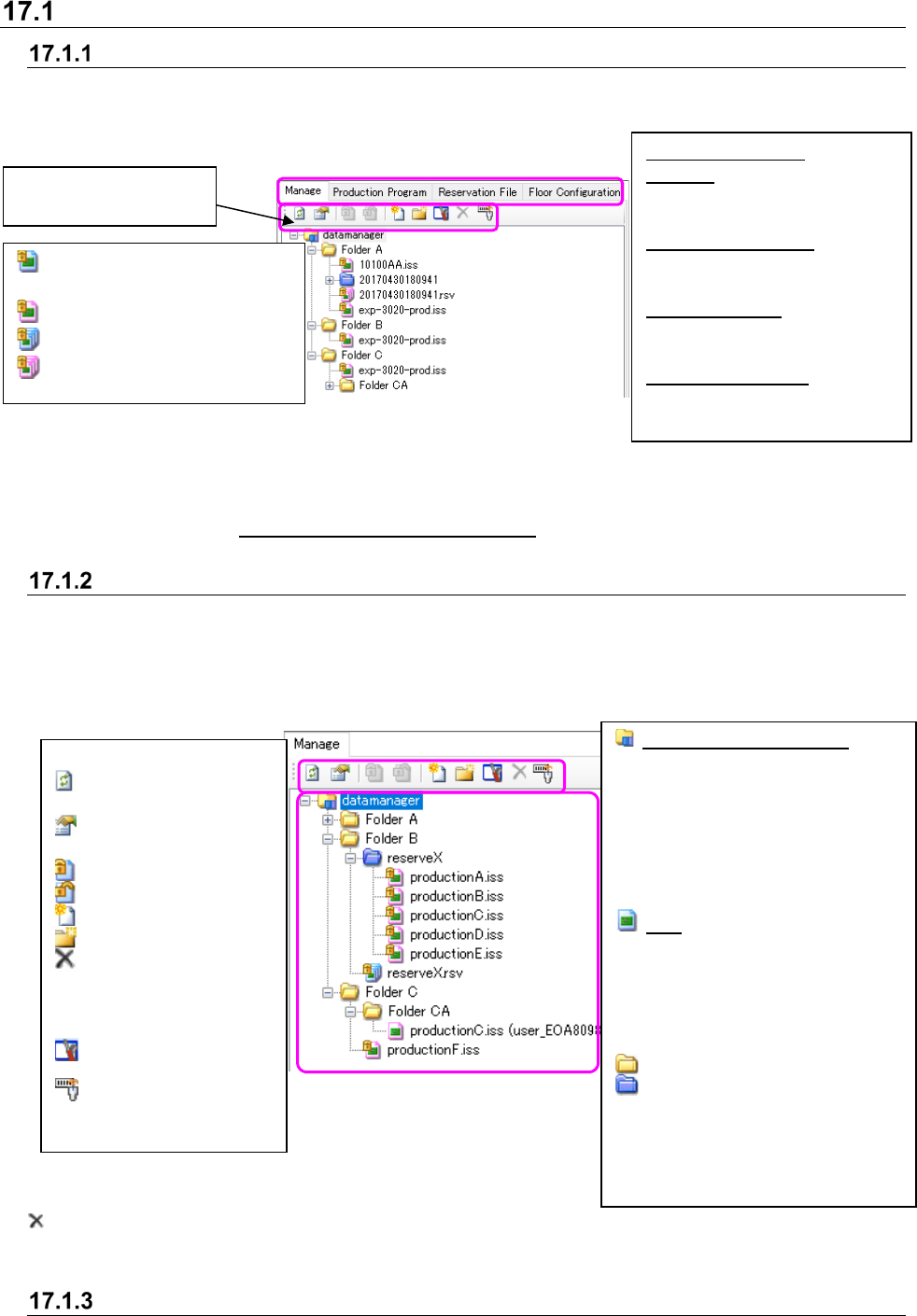
The Program Explorer has the following screens: “Manage,” “Production Program,” “Reservation
File” and “Floor Configuration” (*1). When you select each tab, the screen is switched to the
corresponding screen.
Figure 17.1-1 Program Explorer screen
*1 The kinds of screens displayed with the Program Explorer are set according to the application
(See Section 17.4 “Specifications of the Applications” for the screens to be set).
Description of the “Manage” screen
This screen displays all files controlled with the database (production programs and reservation
files). You can perform operations of the database, such as adding and deleting of a file to/from
the database. A user can create a folder, store a file in the folder and control it. You can select
two or more files so that they can be moved or deleted in/from the database at a time.
Figure 17.1-2 “Manage” screen
is displayed when the “Delete” check box is set to ON of the setting menu “Display/hide of the tool
buttons” on the “Set Environments” screen, or not displayed when the check box is set to OFF.
Operation menu items
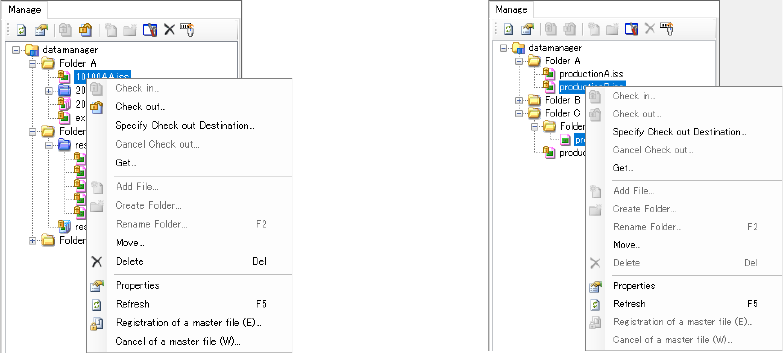
When you click the right button of a mouse on the “Manage” screen, the pop-up menu appears on
: Production program not
optimized
: Optimized production program
: Reservation file not optimized
: Optimized reservation file
<Details of each tab>
Manage: Displays files
(production programs and
reservation files)
Production Program: Displays
production programs by
category.
Reservation File: Displays
reservation files by floor or by
production line.
Floor Configuration: Displays
the configuration of a floor, a
production line or a machine.
Toolbar for the Program
Explorer
Server name (root folder):
Displays the root of the database
(reference point of the hierarchy
structure). When the IS is
installed, only this item is
displayed on the screen at first.
You can neither move nor delete
this item. You can register a file or
create a folder only.
File: Displays registered files. The
displayed file icon varies
depending on the type or
condition of a file. See the section
“About data controlled with the
database” for the icons displayed
here.
: Displays a folder.
: Displays a reservation folder. This
is a folder in which production
program files registered in a
reservation file are stored. You
can neither move nor delete the
reservation folder itself.
<Descriptions of the toolbar>
: Updates the screen to
the latest one.
: Displays/hides the
“Properties” screen.
: Checks in a file.
: Checks out a file.
: Registers a file.
: Creates a folder.
: Deletes the selected
file or folder.
You can select two or
more files or folders.
: Environment setting
: Association of a serial
code
JaNets Instruction Manual 17 Program Explorer
17-3
the screen. You can select an item that satisfies the display conditions from this pop-up menu.
No production program registered in a reservation file can be operated from this pop-up menu.
Figure 17.1-3 Pop-up menu (displayed when
only one file is selected)
Figure 17.1-4 Pop-up menu (displayed
when two or more files are selected)