JANETS_INM.pdf - 第681页
JaNets In structio n Manual 17 Program Expl orer 17 - 29 17.3.8.2 Display of the production program registered as a master file On the manag ement display scr een and pr oduct ion program scr een, “ M” is dis played aft …
JaNets Instruction Manual 17 Program Explorer
17-28
Master file management
When checking in the reservation file/production program file in the program explore, this function
checks in not only the target production program but also the production program with the same
name registered in the master file.
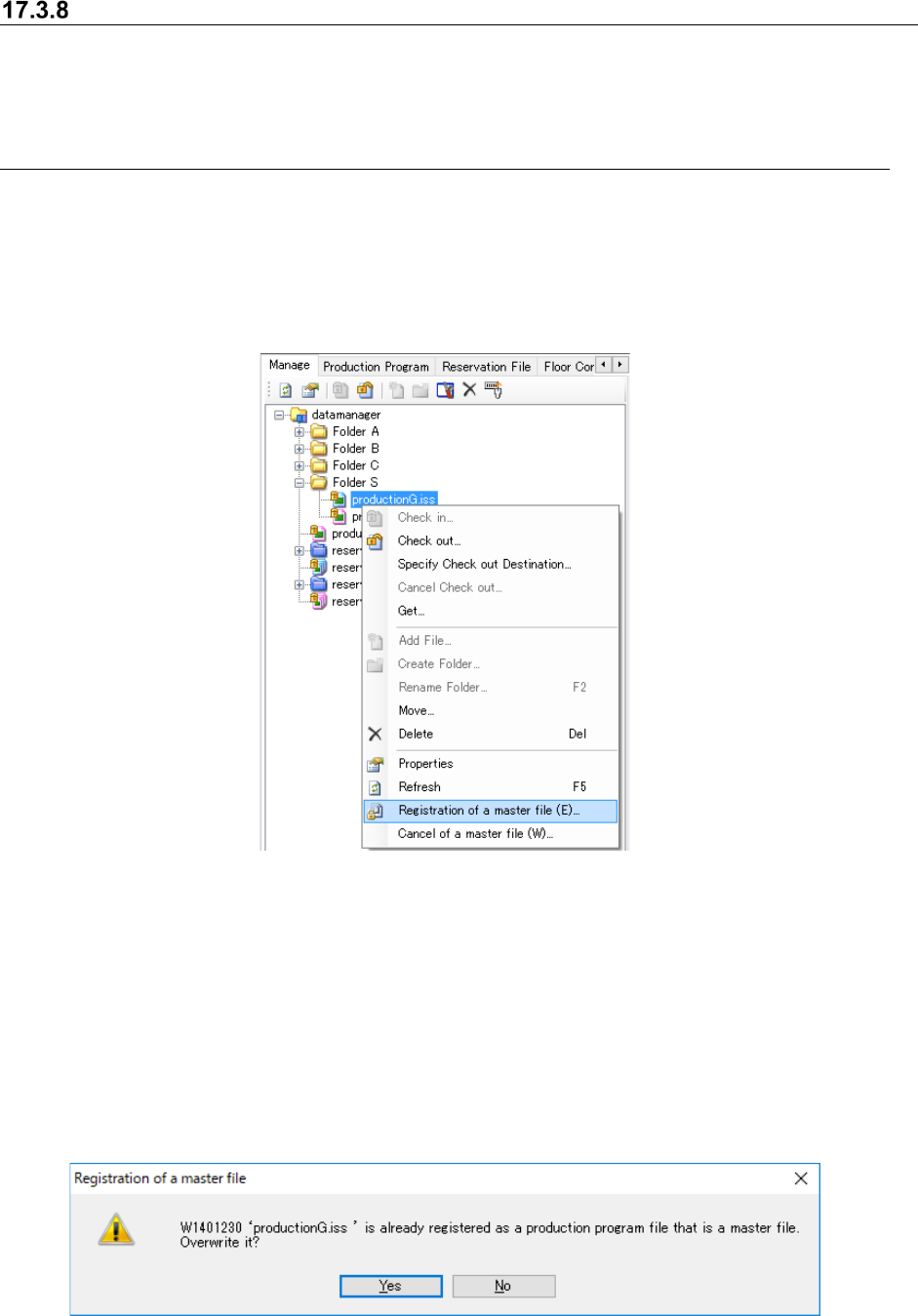
17.3.8.1 Registration/cancellation of a master file
On the management display screen, select an optional production program and then select
“Registration of a master file” in the menu displayed by clicking the right mouse button. Then,
the production program file can be registered as a master file.
Select the production program file registered as a master file, and then select “Cancel of a master
file” in the menu displayed by clicking the right mouse button. Then, the registration of a master
file can be cancelled.
Figure 17.3-31 Registration and cancellation of a master file
* The production program file registrable as a master file is only a production program file that is
not included in reservation files. The production file belonging to reservation files cannot be
selected between registration and cancellation.
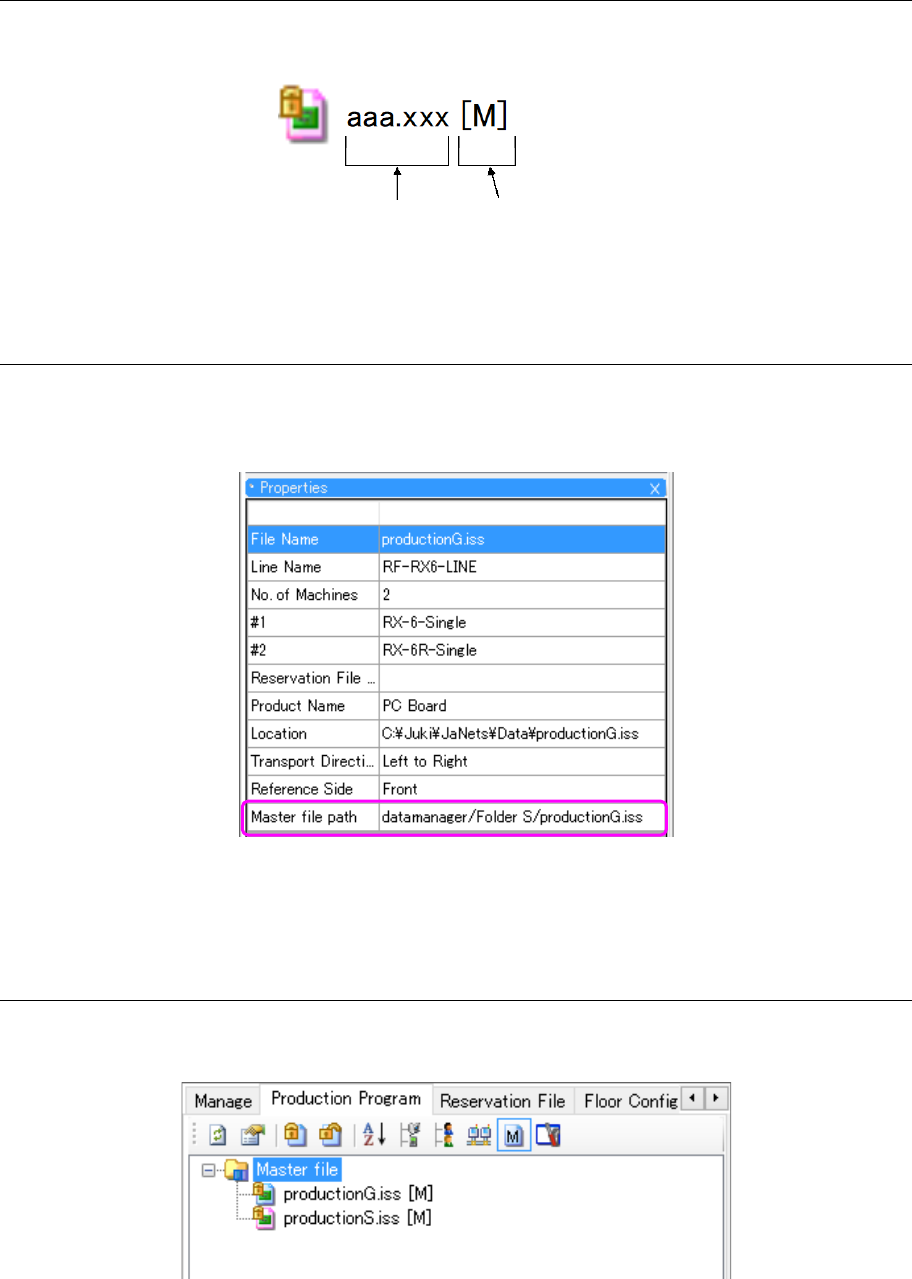
* Regarding a production program file whose name is duplicated cannot be registered as a
master file. If such a duplicated production program file is registered, the following warning
message is displayed. When you select “Yes”, the destination of master file registration can
be changed.
* It is impossible to select multiple program programs and register or cancel them correctively
as master files
Figure 17.3-32 Warning message displayed when master file registration is duplicated.
JaNets Instruction Manual 17 Program Explorer
17-29
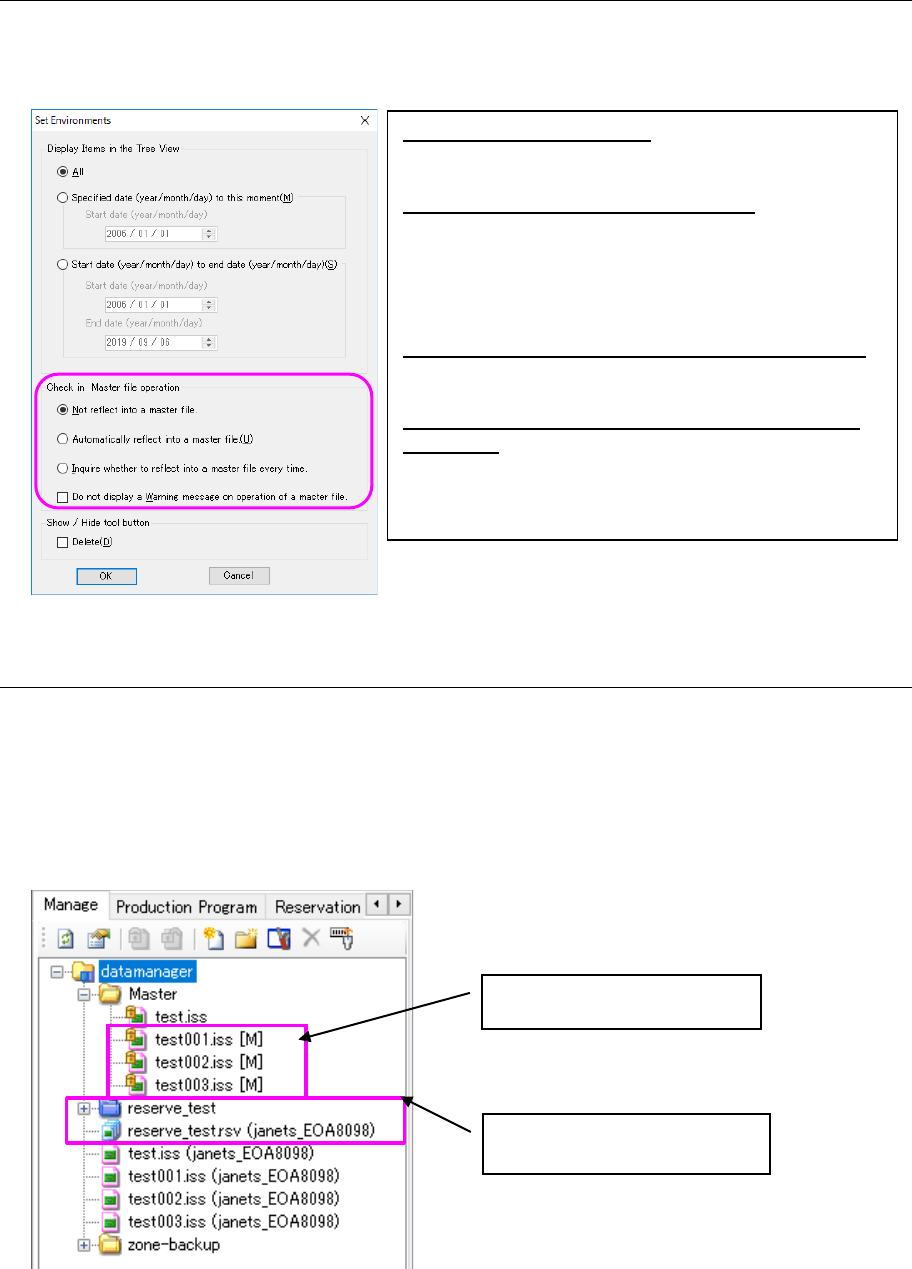
17.3.8.2 Display of the production program registered as a master file
On the management display screen and production program screen, “M” is displayed after the file
name and extension as a mark of a production program file registered as a master file.
Figure 17.3-33 Master file registration status
17.3.8.3 Display of the master file path in Properties
On the “Management”, “Production program” or “Reservation file” screen, select a production
program file to display the Properties screen. In the item of Master file path, the registration
destination of the master file to which the production program file belongs is displayed.
Figure 17.3-34 Master file path
* If no master file is registered, this item is blank.
17.3.8.4 Display of an extracted master file
Select the icon of master file in the tool bar. Then, only the production program files registered
as master files in the database are extracted and displayed.
Figure 17.3-35 Display of extracted master files
Master file registration
File name and extension
JaNets Instruction Manual 17 Program Explorer
17-30
17.3.8.5 Environment setting/check-in/master file operation
On the “Management”, “Production program”, or “Reservation file” screen, select the icon of
environment setting in the tool bar to display the environment setting screen. Then, you can
perform setting for a reflecting operation into a master file.
Figure 17.3-36 Environment setting check-in master file operation
17.3.8.6 Execution of check-in to a master file
For checking in by changing the contents through a check-out operation of the reservation
file/production program file, the changed contents can be reflected into not only the production
program but also the production program with the same name registered in the master file.
<How to reflect into a master file>
[Preparation] Register the production program file to be checked in into a master file. Check
out the reservation file/production program file.
Figure 17.3-37 Setting example on the management screen
① For the reservation file/production program file under check-out processing, perform check-in
processing.
Not reflected to a master file: Even if a master file is
registered, it is not overwritten to the master file. On
the check-in dialog, any change is disabled.
Automatically reflected into a master file: When a master
file is registered, a file is overwritten to the master file.
On the check-in dialog, any change is disabled.
* Only when there are multiple production program files
with the same name in overwriting a reservation file,
this item can be selected.
Inquire whether to reflect into a master file every time:
When a master file is registered, it is selected whether to
overwrite data to the master file.
Do not display a Warning message on operation of a
master file:
Any warning message related to master file operations
is not displayed.
Registration in the master file
The target file is checked out.