JANETS_INM.pdf - 第689页
JaNets In structio n Manual 17 Program Expl orer 17 - 37 ② Check out/ Chec k in/Canc el the Chec k out/G et data/ O peratio n Client PC Database ( server P C) Check out Production program : edi table Production program: …
JaNets Instruction Manual 17 Program Explorer
17-36
17.8 Operation for Controlling a Production Program
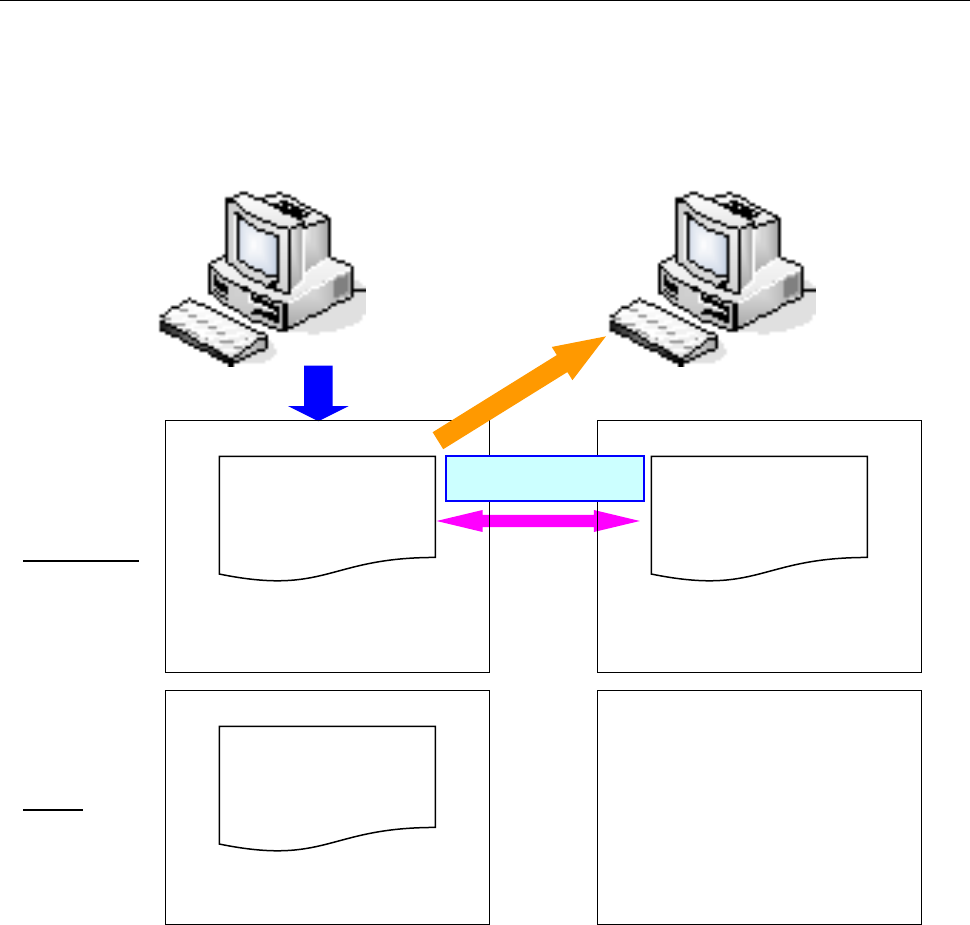
This section describes the data condition of the client PC and that of the server PC (database)
when you control a production program with the Program Explorer.
① Registration and deleting
Client PC
Database (server PC)
Registration in the
server PC
Registration
The production program “A”
does not exist in the server PC
(database). This deleting
operation deletes a production
program in the database. (This
application operates a file
registered in the database
( server).)
A production program “A” is
created.
A.iss
(production program)
Delete
A.iss
(production program)
A.iss
(production program)
The same file exists.
JaNets Instruction Manual 17 Program Explorer
17-37
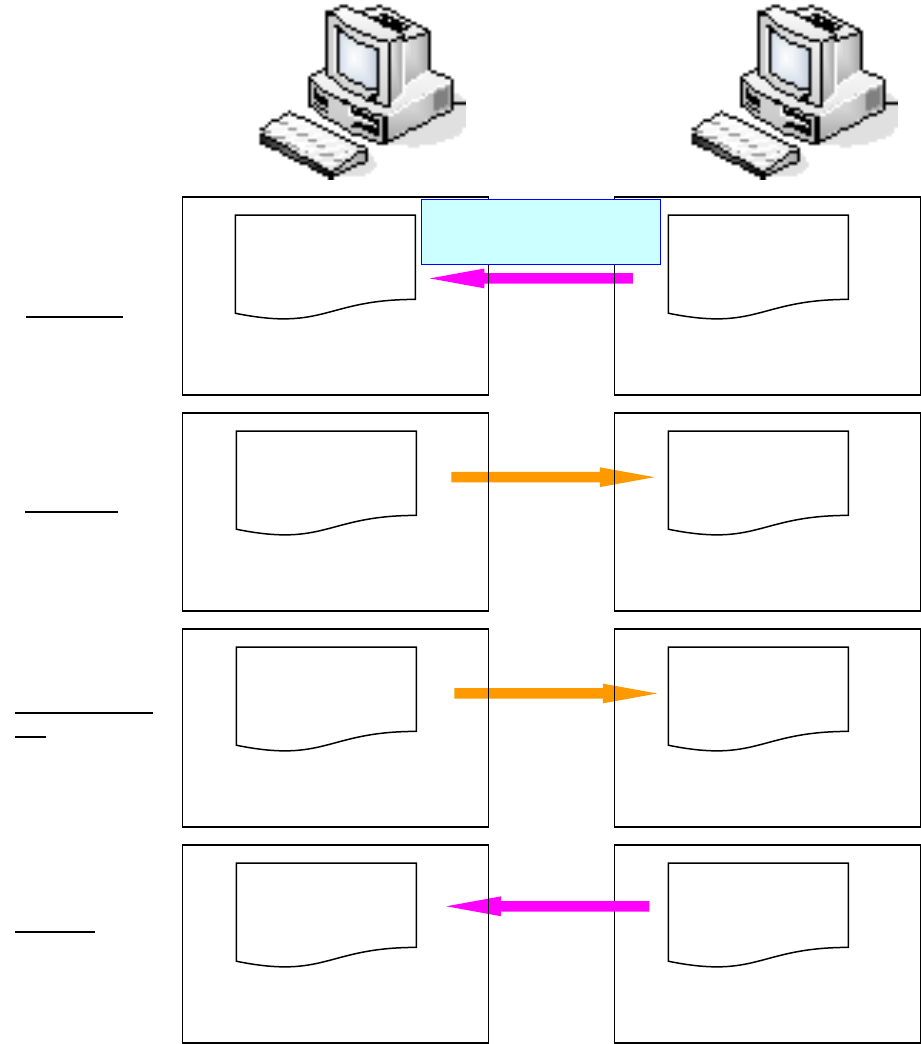
② Check out/Check in/Cancel the Check out/Get data/Operation
Client PC
Database (server PC)
Check out
Production program: editable
Production program: locked
(another user/client cannot edit it.)
A.iss
(production program)
Production program:
editing is finished.
Production program: unlocked
(updated to the data edited with
the client.)
Production program: unlocked
(Not updated to the data edited
with a client.)
Production program: unlocked
Production program: its
copy is created, but is not
reflected in the server PC.
Check in
Cancel check
out
Get data
Production program:
editing is finished.
A production program is
edited with the client PC.
A.iss
(production program)
A.iss
(production program)
A.iss
(production program)
A.iss
(production program)
A.iss
(production program)
A.iss
(production program)
A.iss
(production program)
JaNets Instruction Manual 17 Program Explorer
17-38
17.9 Case Example
The general operation of the file management is described below, using the "Program Editor" as
an example.
(1) Example A: Check out and Check in
① Check out a production program file:
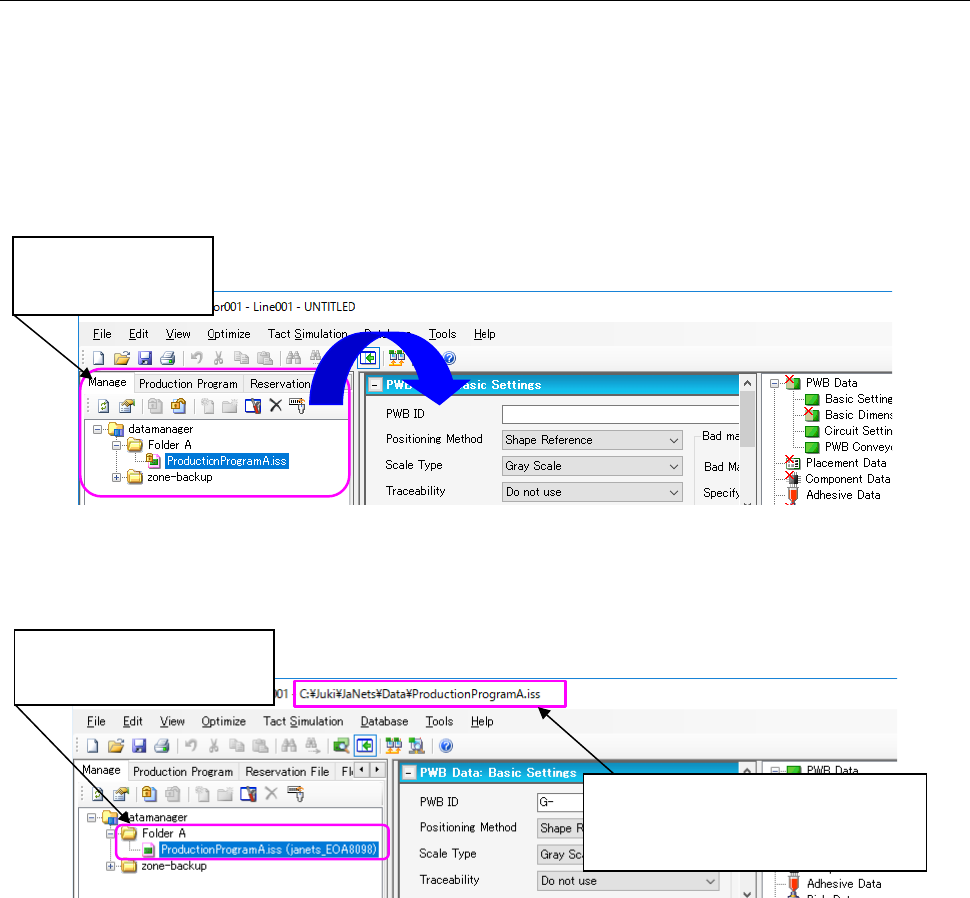
Click-hold on the production program file “ProductionProgramA.iss” at the Program
Explorer area, and drag and drop it on the application area.
(* To “Check out” a file, the file has to be in the checked-in state.)
Figure 17.9-1 Before checking out (drag and drop a file)
Once you checked out the file, it is copied to the client PC, and Program Editor loads it
automatically.
Figure17.9-2 After checking out
* In this state, contents of the file “ProductionProgramA.iss” in the database and in a client PC
are the same.
(When you check out a production program file, if the client PC already has a file that has the
same name with a different date of update, a dialog message appears asking whether you
want to overwrite it or not.)
* Since the file “ProductionProgramA.iss” on the database has already been checked out,
you cannot check it out from the database.
② Edit the file “ProductionProgramA.iss” by the Program Editor and save it.
* Contents of the file “ProductionProgramA.iss” in the database and in a client PC are now
different.
Displays information
managed by the
database.
Location of the file that is being edited
by Program Editor.
(Shows which file is being checked
out, and loaded by Program Editor.
The state of the file
changed; it is currently being
checked out.