JANETS_INM.pdf - 第693页
JaNets In structio n Manual 18 . N ozzle Dat a V iewer 18 -1 18. No zzle Data View er What is the No zzle D ata V iewer? The Nozz le Data V iewer c ollects dat a on eac h nozz le output by a mou nter to disp lay it. Star…
JaNets Instruction Manual 17 Program Explorer
17-40
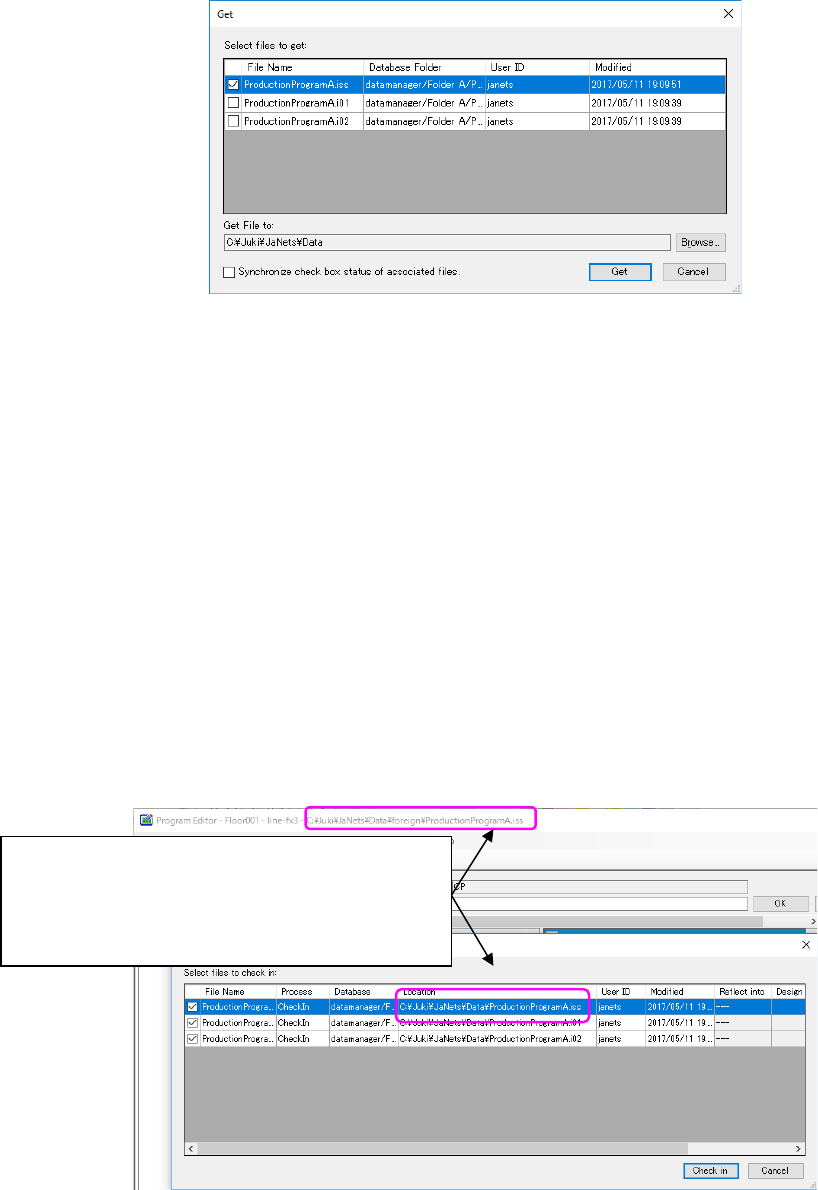
Figure 17.9-5 “Get” a file: confirmation dialog
* It is not allowed to specify a location that already has a checked-out file with the same
name. In that case, specify a different location, check in the checked-out file, or cancel the
check out of the checked-out file.
(This is the same with the "Check out” operation; it is not allowed to check out a file when a
specified location already has a checked-out file with the same name.)
Once you click <Get> on this screen, the file is copied to the client PC, and Program Editor
loads the file.
(When you “Get” a file, if the client PC already has a file with the same name, a message
appears asking whether you want to overwrite it or not.)
③ Edit the file “ProductionProgramA.iss” by Program Editor and save it.
* You are now editing the file that is copied to the client PC by the “Get” operation. (A file
copied by the “Check-out” and a file copied by the “Get” operation is stored in different
locations on a client PC.)
④ If you do the "Check in" operation on the Program Explorer area; the file
"ProductionProgramA.iss", which you checked out on procedure ①, is to be checked in to
the database.
Firgure17.9-6 “Check in” a file: confirmation dialog
* The "Check in" operation applies to a file copied to a client PC by the "Check out" operation.
* The “Check in” operation does NOT apply to a file copied to a client PC by the “Get” operation.
When you need to store the file into the database, register it as a new file. The newly
registered file is treated as another production program file, which is not related to the original
file “ProductionProgramA.iss” in the database.
The location of the file being edited and that of the
file being checked out are different.
The file name of both files is the same
(ProductionProgramA.iss), but each file belongs to a
different location.
JaNets Instruction Manual 18. Nozzle Data Viewer
18-1
18. Nozzle Data Viewer
What is the Nozzle Data Viewer?
The Nozzle Data Viewer collects data on each nozzle output by a mounter to display it.
Starting Up And/Or Quitting the Nozzle Data Viewer
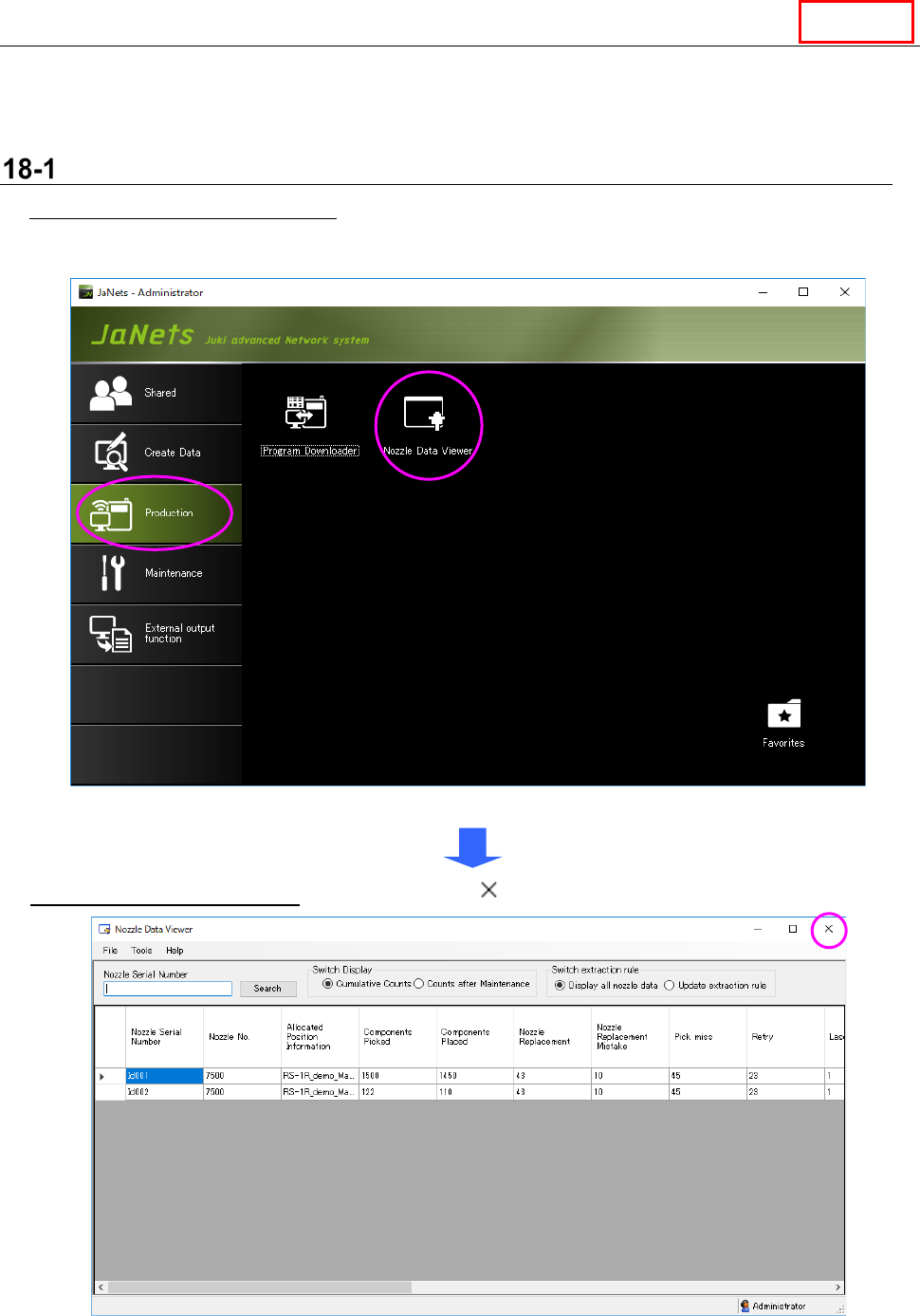
To start up the Nozzle Data Viewer: Double-click the “Nozzle Data Viewer” icon on the “Production”
tab of the JaNets Launcher.
Figur 18-1-1 JaNets Launcher screen
To quit the Nozzle Data Viewer: Select the close ( ) button on the upper right corner of the title bar.
Figur 18-1-2 Main screen
Line
JaNets Instruction Manual 18. Nozzle Data Viewer
18-2
18-1-1 Warnings and errors at start-up
A warning or an error occurs at start-up in the following cases:
① While the “Shopfloor Setup” is starting up -> Quit the “Shopfloor Setup.”
② If any nozzle data cannot be obtained at start-up, the message “Nozzle data acquisition was failed.”
appears on the screen, and the Viewer starts up without data.
18-1-2 Menu items
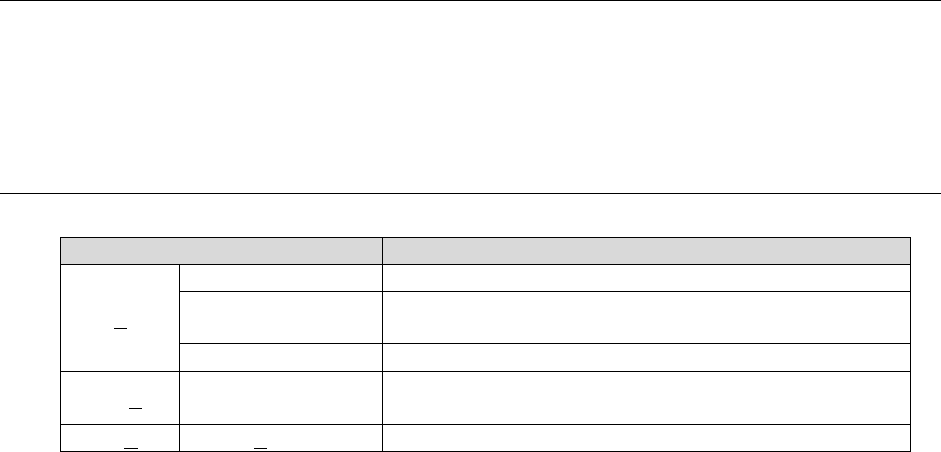
Table 18-1-1 Table of items displayed on the menu bar
Menu item
Description
File (F)
Data Reacquisition
Reacquires nozzle data.
CSV File Output
Outputs nozzle data displayed with the Viewer as a CSV
file.
Read extraction rule
Loads the extraction rule.
Tools (T) Extraction rule
Displays the “Extraction rule” screen for creating an
extraction rule.
Help (H)
About (A)
Displays the version information.