JANETS_INM.pdf - 第703页
JaNets In structio n Manual 19 T ra ceMonitor 19 -4 19 -3-2 Fl oor information 19 -3-2-1 When a produc tion line to be monitored is changed When you ch ange the set ting of a prod uction l ine to be mon itored, r estart …
JaNets Instruction Manual 19 TraceMonitor
19-
3
19-3 How to Operate TraceMonitor
19-3-1 Selecting the date
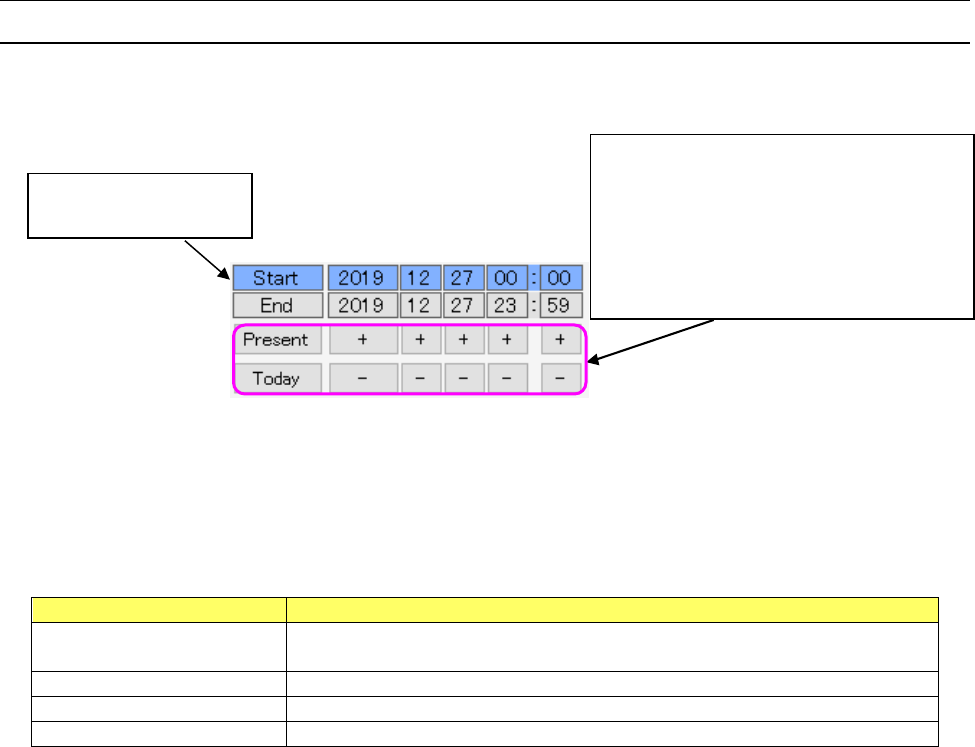
You can specify the start time and end time of the error information collecting period.
When you click the year, month, day, hour or minute of the start date and time or of the end date and
time, you can select the time period for collecting data.
Figure 19-3-1 Selecting the date (when the start time is being selected)
You can change the time period to be entered by default at start-up on the setting screen. You can
select one of four settings shown in the table below. “Start-up day” is selected by default.
Table 19-3-1 Setting items of the menu item
“Search period at start-up” (on the “Set Environments” screen)
Item
Description
Search period at the last
shut-down
Period while information was searched at the end when you shut down
TraceMonitor the last time.
Start-up day
00:00 to 23:59 on the start-up day
1 week (specify the day)
One week from the specified day of the week including the start-up day
Most recent day
Specified number of days including the start-up day
<Button operations>
Present: Set the current date and time to the
selected time period.
Today: Set twelve o’clock of the current date.
+: Increases the year, month, day, hour and
minute of the selected time period.
-: Decreases the year, month, day, hour and
minute of the selected time period.
The period being selected
is displayed in blue.
JaNets Instruction Manual 19 TraceMonitor
19-4
19-3-2 Floor information
19-3-2-1 When a production line to be monitored is changed
When you change the setting of a production line to be monitored, restart TraceMonitor.
19-3-2-2 Display of floor information
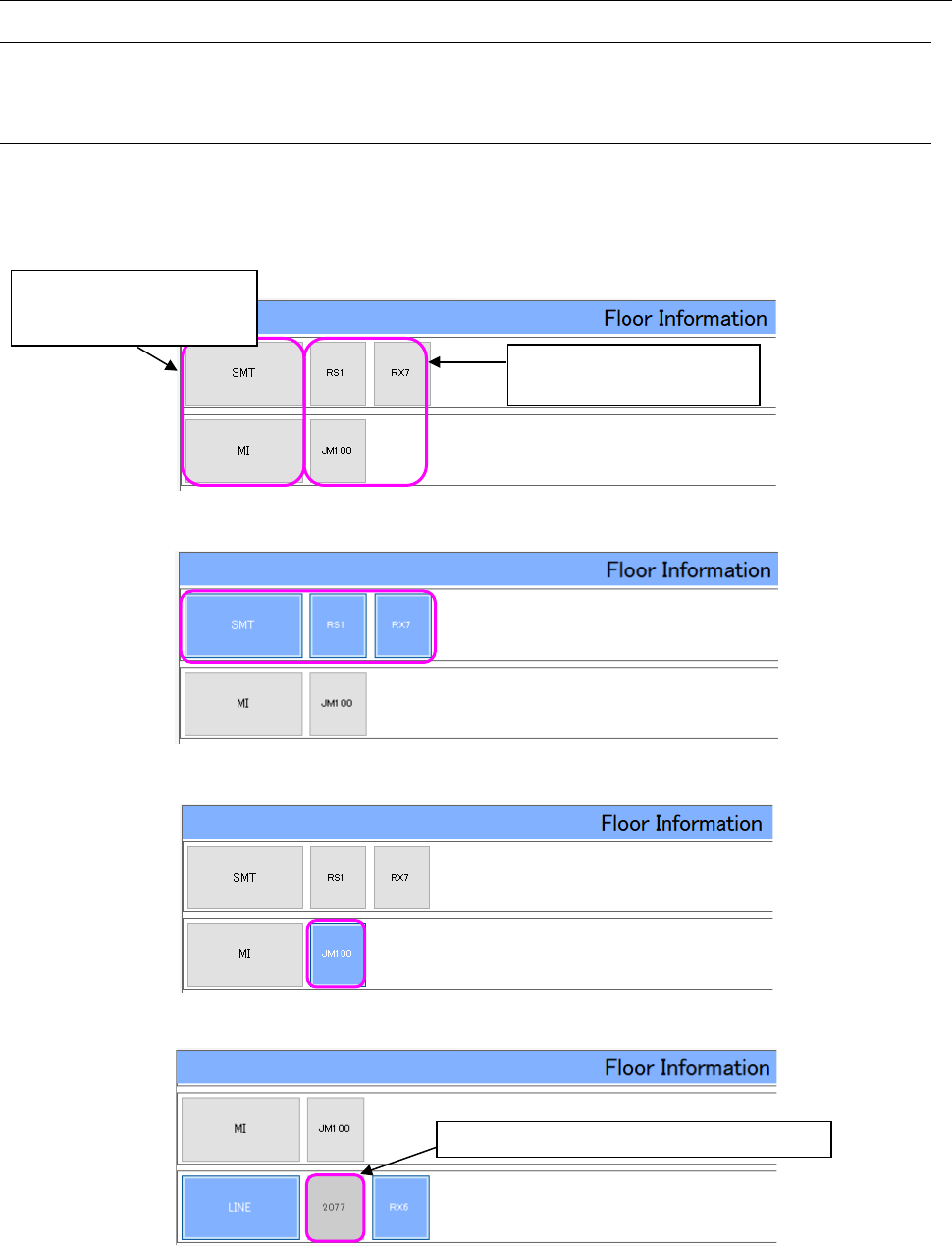
The “Floor Information” screen shows a monitored production line set with Shopfloor Setup.
You can select a production line or a machine from the “Floor Information” screen.
If any machine not supported is included in a monitored production line, the corresponding machine
icon is not selected on the screen so that you cannot select it.
Figure 19-3-2 “Floor Information” screen
Figure 19-3-3 “Floor Information” screen (when a production line is being selected)
Figure 19-3-4 “Floor Information” screen (when a machine is being selected)
Figure 19-3-5 “Floor Information” screen (An unsupported machine is displayed.)
Select one of these buttons to
select a machine.
You cannot select any unsupported machine.
Select either of these buttons
to select the corresponding
production line.
JaNets Instruction Manual 19 TraceMonitor
19-5
19-3-3 Updating alarm information
19-3-3-1 Update button
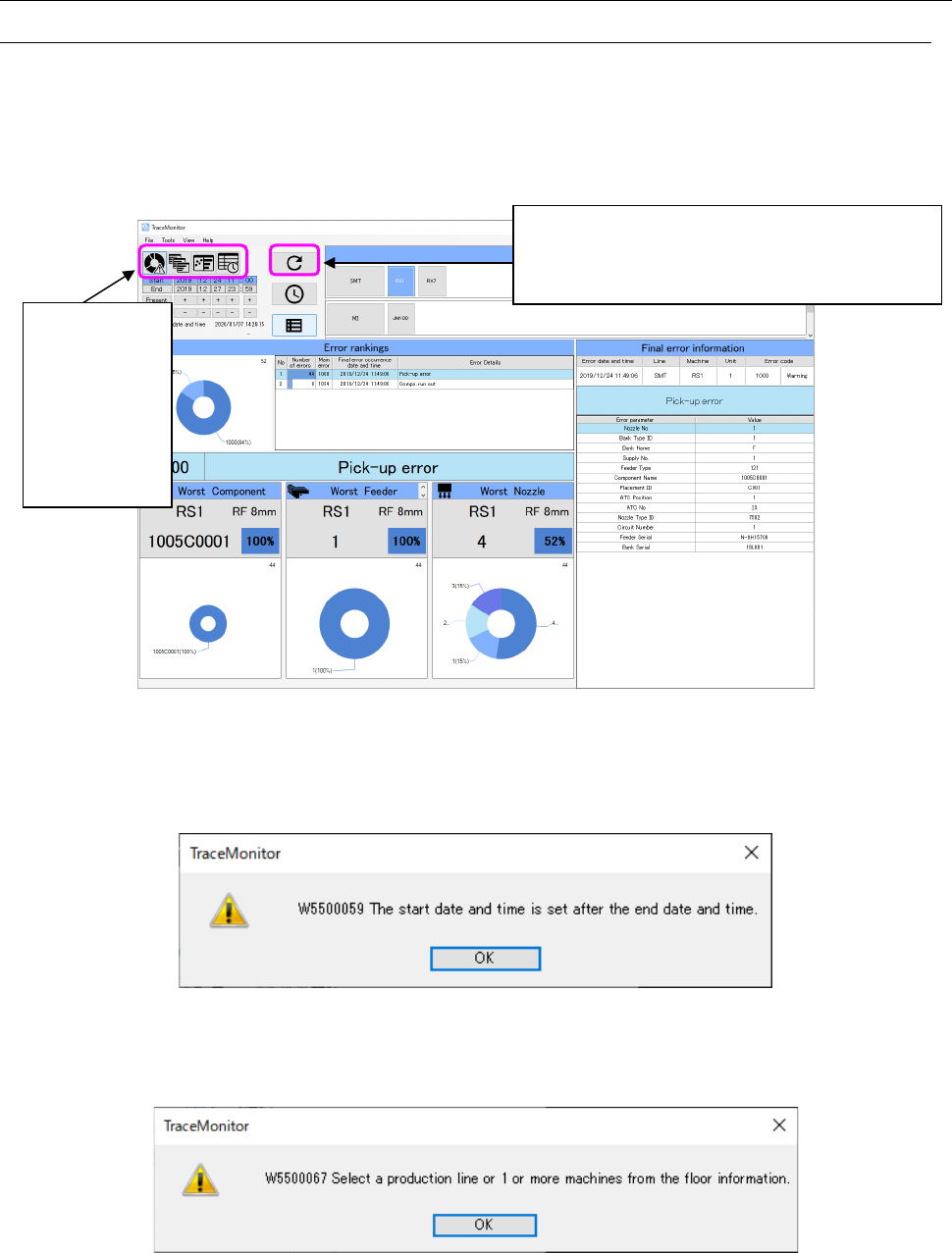
When you select a production line or a machine from the “Floor Information” screen and specify the
data collection period with the menu item “Search period at start-up,” and then press the Update
button, alarm data satisfying the search conditions are displayed on the screen.
When alarm information is updated successfully, the panel switch icons are enabled, and they allow
you to switch the panels among “Error rankings,” “Individual ranking,” “Timeline” and “Error history.”
Figure 19-3-6 TraceMonitor screen (after alarm data is updated)
If the start date and time for searching data within the data collection period exceeds the end date,
the following message appears on the screen.
Figure 19-3-7 Warning message issued when the start date and time exceeds the end date and time
If neither a production line nor a machine is selected, the following message appears on the screen.
Figure 19-3-8 Warning message issued when neither a production line nor a machine is selected
When you press the Update button, the TraceMonitor
retrieves data on the selected production line or
machine within the data collection period, and then
displays matched data.
You can switch
the displayed
panel to each of
“Error rankings,”
“Individual
ranking,”
“Timeline” and
“Error history.”