JANETS_INM.pdf - 第711页
JaNets In structio n Manual 19 T ra ceMonitor 19 - 12 19 -3-5 I ndividual rank ing screen The individua l ranking scr een ap pears whe n you select t he indivi dual rank ing panel of the panel switches. Figure 19 -3- 20 …
JaNets Instruction Manual 19 TraceMonitor
19-11
19-3-4-3 Final error information
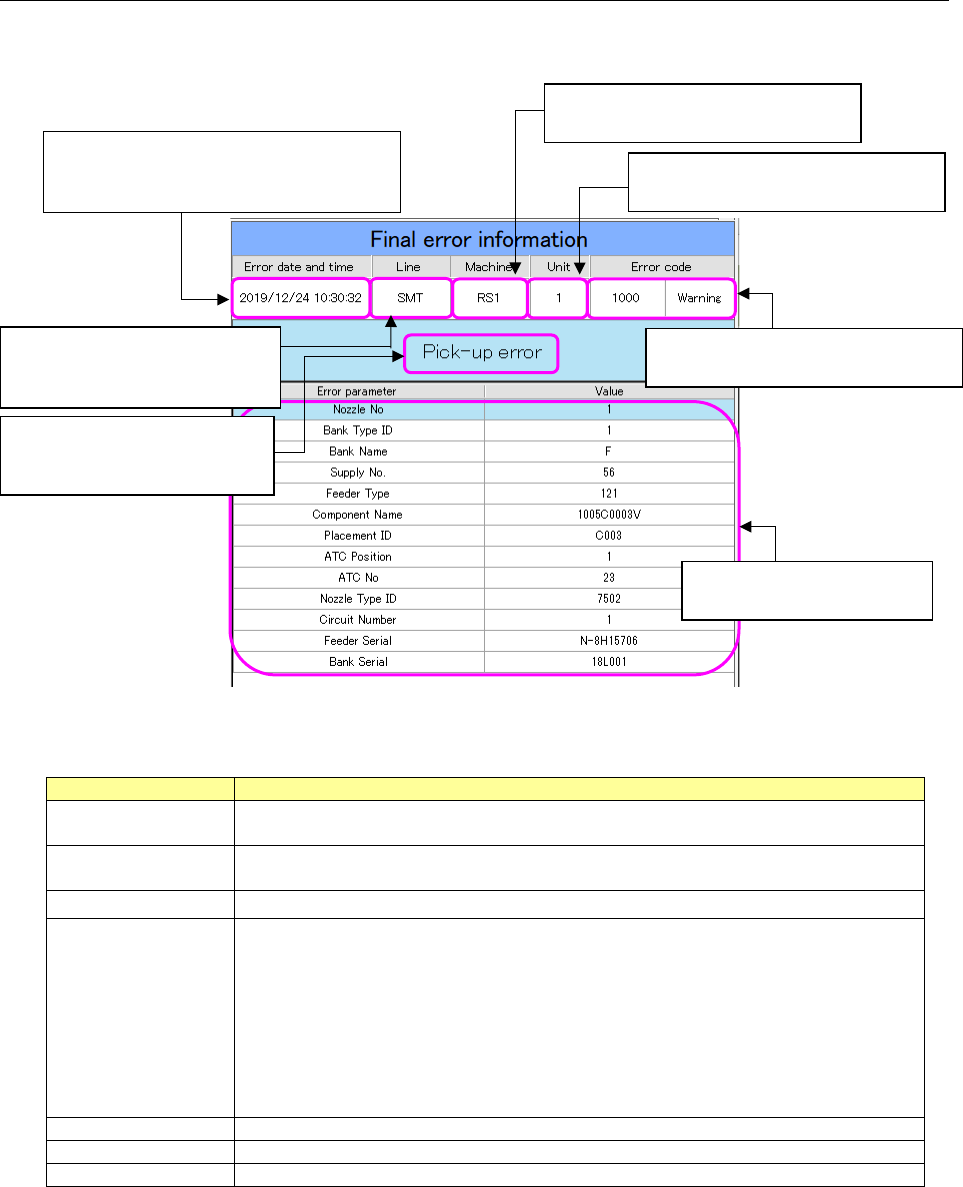
The “Final error information” screen shows information on the error that occurred the last time as for
an error selected on the “Error rankings” screen.
Figure 19-3-19 “Final error information” screen
Table 19-3-3 Items of the “Final error information” screen
Item
Description
Error date and time
Displays the date and time when the last error occurred as for the error code
selected on the “Error rankings” screen.
Line
Displays the name of a production line including a machine at which the last error
occurred.
Machine
Displays the name of a machine at which the last error occurred.
Unit
Displays a unit of a machine at which the last error occurred.
1- to 4-digit error code
RX-7 0: Entire machine 1: Right side 2: Left side
RX-6 1: Front head 2: Rear head
RS-1/JM-100 1: Head, entire machine
6-digit error code
RX-6/RS-1/JM-100 1: Entire machine
RX-7 No 6- digit error code is applied to the RX-7.
Error code
Displays the main error code and alarm type of the last error.
Error description
Displays the description of the main error code of the last error.
Error parameter
Displays each error parameter of the last error.
The date and time when the last error
occurred as for an error code selected in
the “Error rankings” list are displayed here.
The main error code and alarm type
of the last error are displayed here.
The name of a production line to
which a machine causing the last
error belongs is displayed here.
Description of the main error
code of the last error is
displayed here.
The name of a machine at which the
last error occurred is displayed here.
A unit of a machine at which the last
error occurred is displayed here.
Each error parameter of the
last error is displayed here.
JaNets Instruction Manual 19 TraceMonitor
19-12
19-3-5 Individual ranking screen
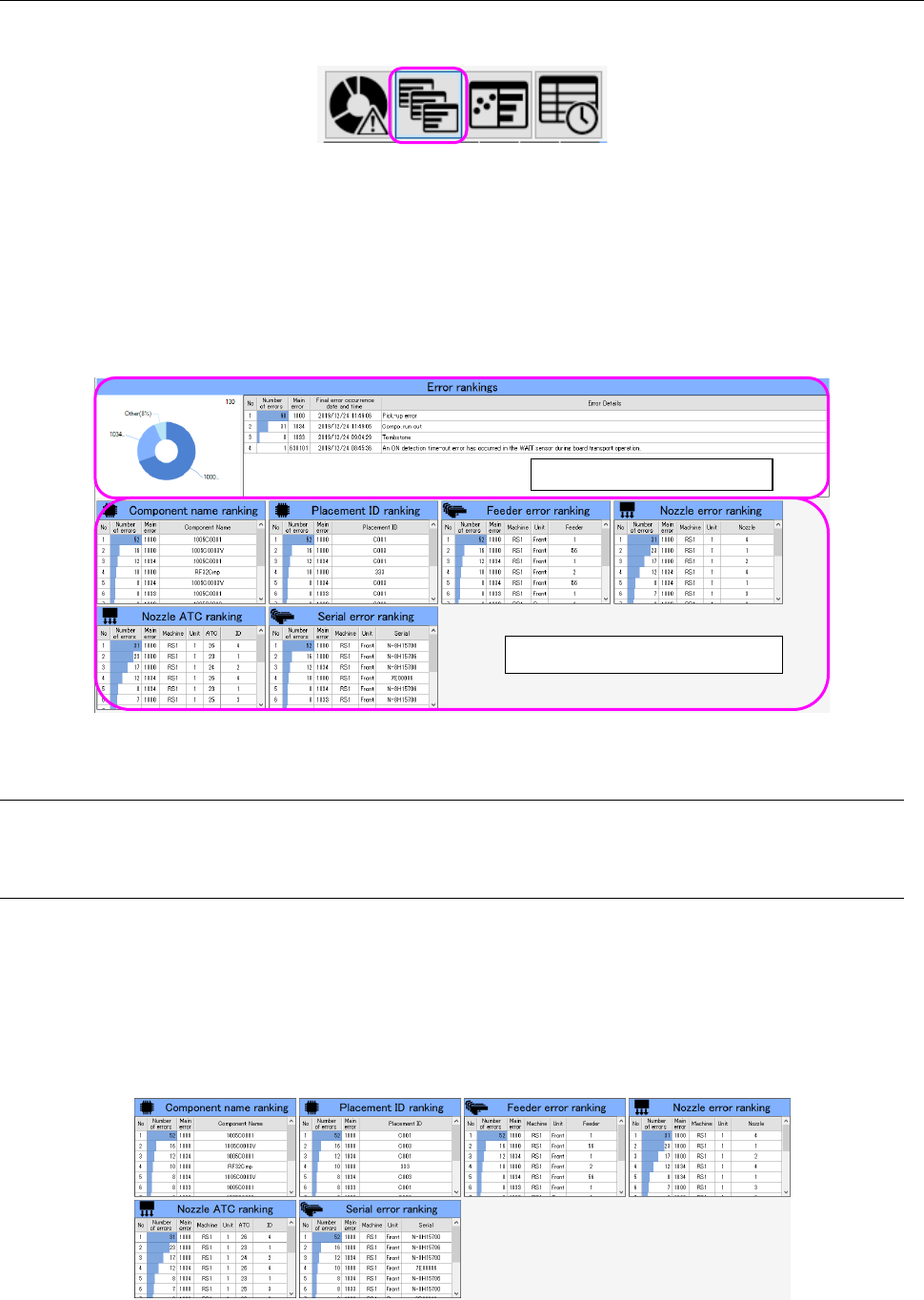
The individual ranking screen appears when you select the individual ranking panel of the panel
switches.
Figure 19-3-20 Panel switches
The individual ranking screen shows two types of information: error ranking information and
individual ranking information both of which are on a production line or machine selected in the “Floor
Information” list.
The individual ranking information on the error selected in the “Error rankings” information list is
displayed.
If you do not select any error, information on all error codes are displayed on the screen.
When you re-select the selected line while pressing the CTRL button, it is deselected.
Figure 19-3-21 Individual ranking screen
19-3-5-1 Error rankings information
See Section 19-3-4-1 “Error rankings information.”
19-3-5-2 Individual ranking information
The individual ranking information shows the rankings for component names, placement IDs, feeder,
nozzle errors, nozzle ATC s and serial errors.
TraceMonitor narrows down information by an error code selected in the “Error rankings” information
list.
When any error is not selected, TraceMonitor displays rankings for all error codes.
When any data is too long to be displayed in the corresponding column, it is shortened. It can be
displayed completely with the tool tip.
Figure 19-3-22 Individual ranking information
“Error rankings” information
Individual ranking information
JaNets Instruction Manual 19 TraceMonitor
19-13
19-3-5-3 Component name ranking information
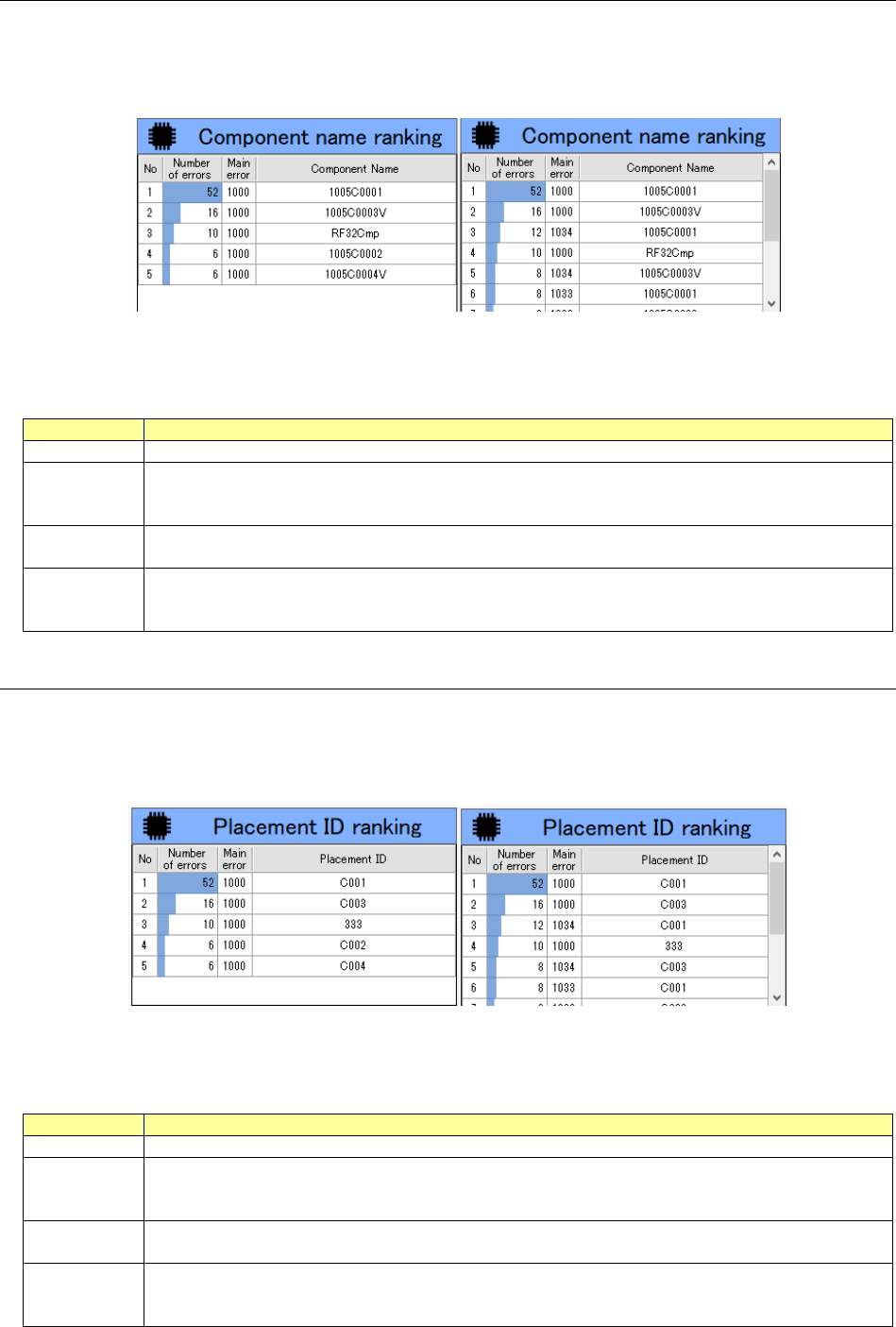
The “Component name ranking” screen shows the ranking for each component name according to
the error code selected in the “Error rankings” information list.
When any error code is not selected in the “Error rankings” information list, this screen shows the
component name ranking for all error codes.
Figure 19-3-23 “Component name ranking” information
(Left: when an error code is selected/Right: when any error code is not selected)
Table 19-3-4 Items of the “Component name ranking” information
Item
Description
No
Displays a serial number
Number of
errors
Displays the number of errors counted for each component name as for the selected error code.
When any error code is not selected, this column shows the number of errors counted for each
component name as for all error codes.
Main error
Displays the main error for the selected error code.
When any error code is not selected, this column shows the main errors for all error codes.
Component
Name
Displays a component name included in an error as for the selected error code.
When any error code is not selected, this column shows a component name included in each
error as for all error codes.
19-3-5-4 Placement ID ranking information
The “Placement ID ranking” information shows the ranking for each placement ID according to the
error code selected in the “Error rankings” information list.
When any error code is not selected in the “Error rankings” information list, this screen shows the
placement ID ranking for all error codes.
Figure 19-3-24 “Placement ID ranking” information
(Left: when an error code is selected/Right: when any error code is not selected)
Table 19-3-5 Items of the “Placement ID ranking” information
Item
Description
No
Displays a serial number
Number of
errors
Displays the number of errors counted for each placement ID as for the selected error code.
When any error code is not selected, this column shows the number of errors counted for each
placement ID as for all error codes.
Main error
Displays the main error for the selected error code.
When any error code is not selected, this column shows the main errors for all error codes.
Placement
ID
Displays a placement ID at which an error occurred as for the selected error code.
When any error code is not selected, this column shows each placement ID at which an error
occurred as for all error codes.