JANETS_INM.pdf - 第729页
JaNets In structio n Manual 19 T ra ceMonitor 19 - 30 Selected screen Item Sub item Descript ion Nozzle A TC ranking Number of err ors Number of err ors per A TC Machine nam e Name of a m achine at w hich a n error occur…
JaNets Instruction Manual 19 TraceMonitor
19-29
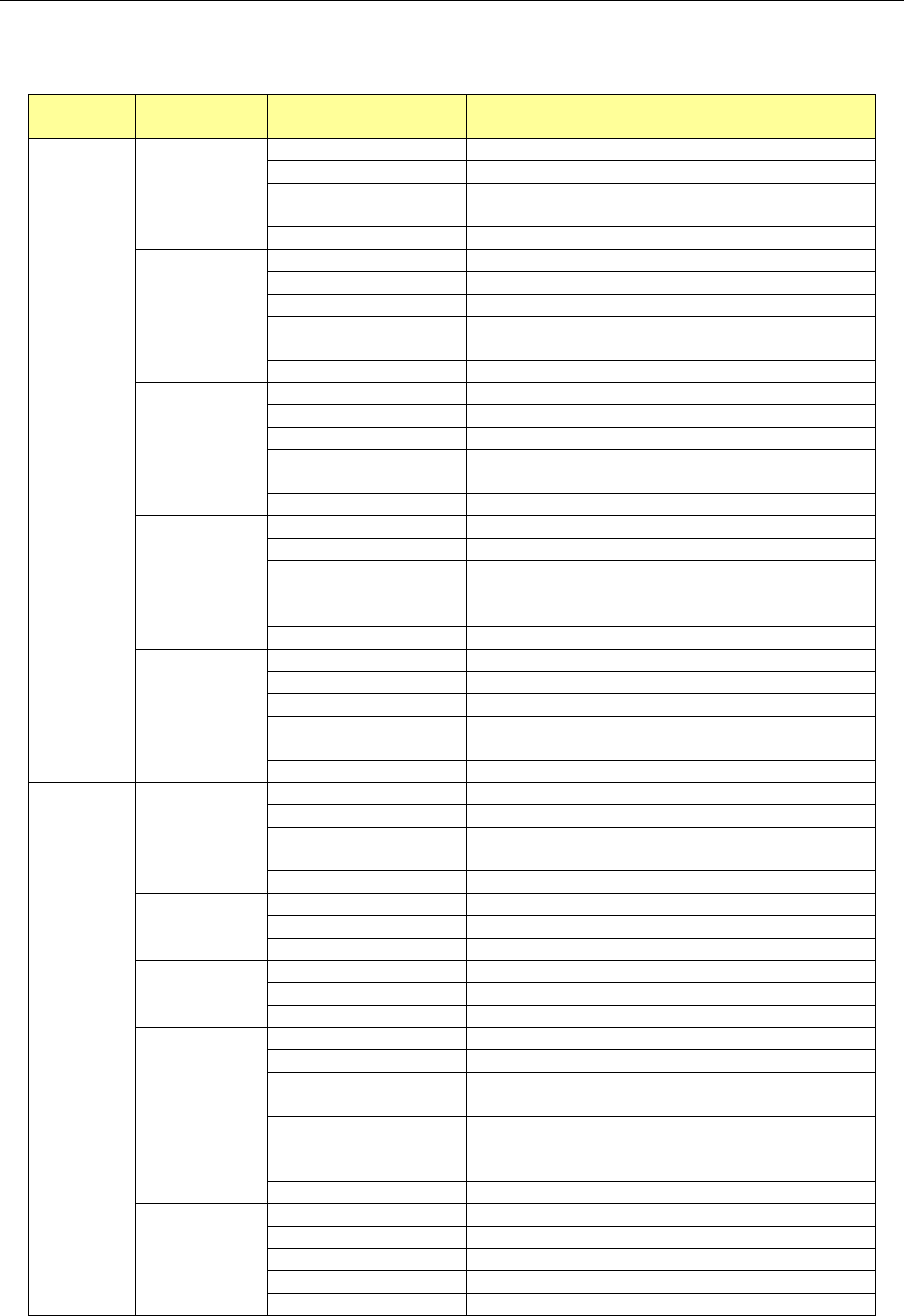
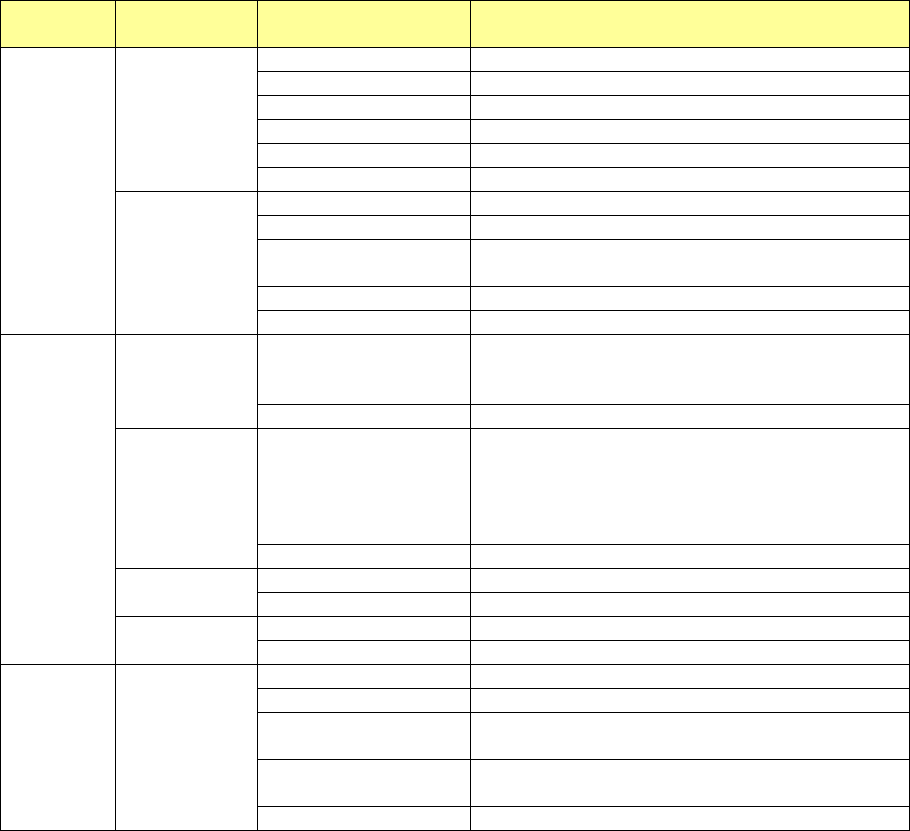
19-4 List of Output Data
Data to be output from the selected screen is shown in the table below.
Table 19-4-1 List of output data
Selected
screen
Item Sub item Description
Worst
ranking
Error rankings
Number of errors
Number of main errors that occurred
Main error
Error code of an error that occurred
Final error occurrence
date and time
Date and time when the last error occurred
Error details
Description of an error that occurred
Worst
Component
Number of errors
Number of errors that occurred
Machine name
Name of a machine at which an error occurred
Machine type
Model name of a machine
Unit
Name of a unit of a machine at which an error
occurred
Component name
Name of a component at which an error occurred
Worst Feeder
Number of errors
Number of errors that occurred
Machine name
Name of a machine at which an error occurred
Machine type
Model name of a machine
Unit
Name of a unit of a machine at which an error
occurred
Feeder
Position of a feeder at which an error occurred
Worst Feeder
Serial
Number of errors
Number of errors that occurred
Machine name
Name of a machine at which an error occurred
Machine type
Model name of a machine
Unit
Name of a unit of a machine at which an error
occurred
Feeder serial
Serial number of a feeder at which an error occurred
Worst Nozzle
Number of errors
Number of errors that occurred
Machine name
Name of a machine at which an error occurred
Machine type
Model name of a machine
Unit
Name of a unit of a machine at which an error
occurred
Nozzle
Number of a nozzle at which an error occurred
Individual
ranking
Error rankings
Number of errors
Number of main errors that occurred
Main error
Error code of an error that occurred
Error occurrence date
and time
Date and time when the last error occurred
Error details
Description of an error that occurred
Component
name ranking
Number of errors
Number of errors per component name
Component Name
Name of a component at which an error occurred
Main error
Main error code selected in the “Error rankings” list
Placement ID
ranking
Number of errors
Number of errors per placement ID
Placement ID
Placement ID at which an error occurred
Main error
Main error code selected in the “Error rankings” list
Feeder error
ranking
Number of errors
Number of errors per feeder
Machine name
Name of a machine at which an error occurred
Unit
Name of a unit of a machine at which an error
occurred
Feeder
Position of a feeder at which an error occurred
(When a Holder/DTS/MTC/MTS is used, “supply
position#supply device sub-index” is displayed.)
Main error
Main error code selected in the “Error rankings” list
Nozzle error
ranking
Number of errors
Number of errors per nozzle
Machine name
Name of a machine at which an error occurred
Unit
Unit of a machine at which an error occurred
Nozzle
Head number of a nozzle at which an error occurred
Main error
Main error code selected in the “Error rankings” list
JaNets Instruction Manual 19 TraceMonitor
19-30
Selected
screen
Item Sub item Description
Nozzle ATC
ranking
Number of errors
Number of errors per ATC
Machine name
Name of a machine at which an error occurred
Unit
Unit of a machine at which an error occurred
ATC
Hole number of an ATC at which an error occurred
ID
Head number of a nozzle at which an error occurred
Main error
Main error code selected in the “Error rankings” list
Feeder serial
error ranking
Number of errors
Number of errors per feeder serial number
Machine name
Name of a machine at which an error occurred
Unit
Name of a unit of a machine at which an error
occurred
Feeder
Serial number of a feeder at which an error occurred
Main error
Main error code selected in the “Error rankings” list
Timeline
Production tact
Production tact
When a production line is selected: none
When a machine is selected: production tact
averaged per hour
Date and time
Data and time in units of hours
PWB Count
PWB Count
When a production line is selected: total number of
PWBs produced per hour
When a machine is selected: number of PWBs
produced with a machine located at the end of a
production line
Date and time
Data and time in units of hours
Error Count
Error Count
Number of errors that occurred
Date and time
Data and time in units of hours
Event Label
Event
Name of a generated event
Data and time
Date and time when an event occurred
Error
history
Error stop
timing
Error date and time
Date and time when an error occurred
Machine
Name of a machine at which an error occurred
Unit
Name of a unit of a machine at which an error
occurred
Stop Time
Time period while the system was stopping due to
an error
Error Details
Description of an error that occurred
JaNets Instruction Manual A. Patch Version Installation Tool
A-1
< Appendix >
A. Patch Version Installation Tool
What is the patch version installation tool?
This tool “Patch Installer” installs software that is modified only a little on the current JaNets
software.
Operations A.1
<Note>
Only a user who has the “administrator’s privilege” should start up the “Patch Installer.”
A.1.1 Starting up and quitting the Patch Installer
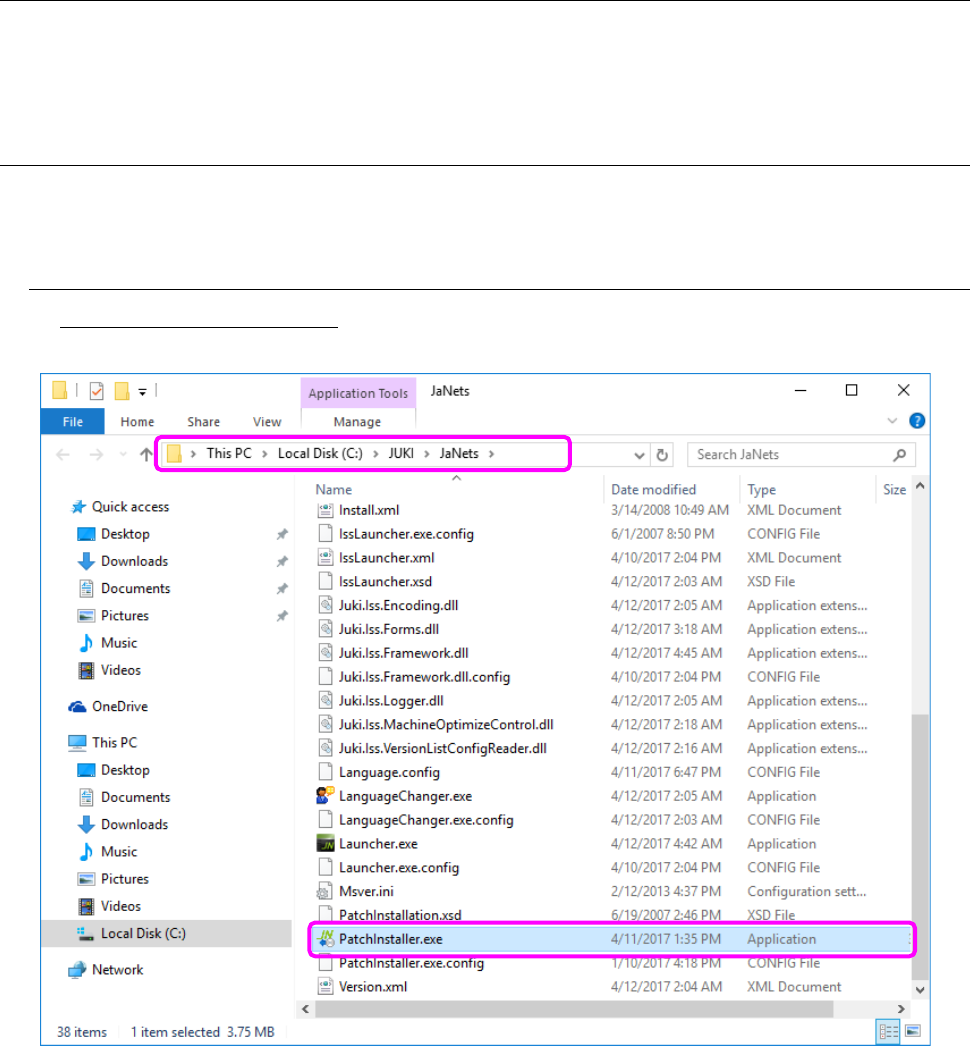
To start up the Patch Installer: Double-click PatchInstaller.exe immediately under the JaNets
installation folder.
Figure A.1-1 Screen for the Patch Installer
* Before starting up the Patch Installer, close all the MI-related applications except for the
Language Changer. Since this tool itself responds to the real time language switching of the
Language Changer, it cannot start up. To install the patch version Language Changer, quit the
Language Changer in advance.
If no MI application operates after this tool starts up, the following dialog box appears on the
screen.