JANETS_INM.pdf - 第746页
JaNe ts Inst ruction Manua l C . Data bas e Manage m ent T ool C-1 <A ppen di x> C. Dat abase M anag ement T ool Wh at is the Dat abase M an agemen t T oo l ? This t ool is us ed t o sav e da ta of th e datab ase o…
JaNets Instruction Manual B. Troubleshooting
B-12
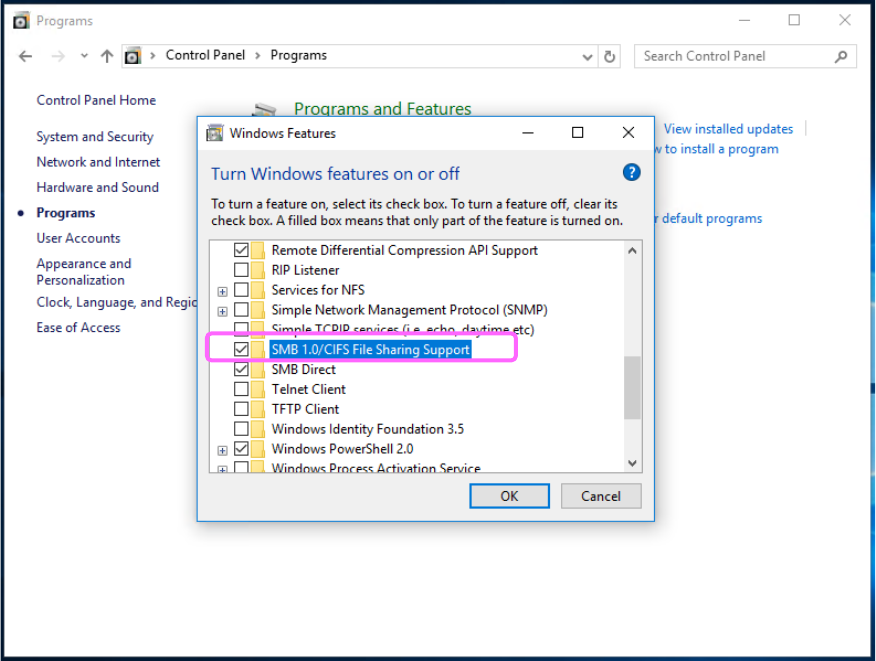
Click “Programs” from the “Control Panel,” and then “Turn Windows features on or off.”
When the list of the Windows functions appears on the screen, check off the check box “SMB
1.0/CIFS File Sharing Support,” and then click the <OK> button. When you are prompted to
restart the PC, restart it.
JaNets Instruction Manual C. Database Management Tool
C-1
<Appendix>
C. Database Management Tool
What is the Database Management Tool?
This tool is used to save data of the database onto any other medium in order to avoid a risk of
irreparable inconsistent data or data loss. It is also used to restore the backed up data.
C.1 Starting up or Quitting the Tool
How to start up the tool: When you click [Start] -> [Juki] and then “Data Manager Tool” on the
PC on which Data Manager is installed, this tool starts up.
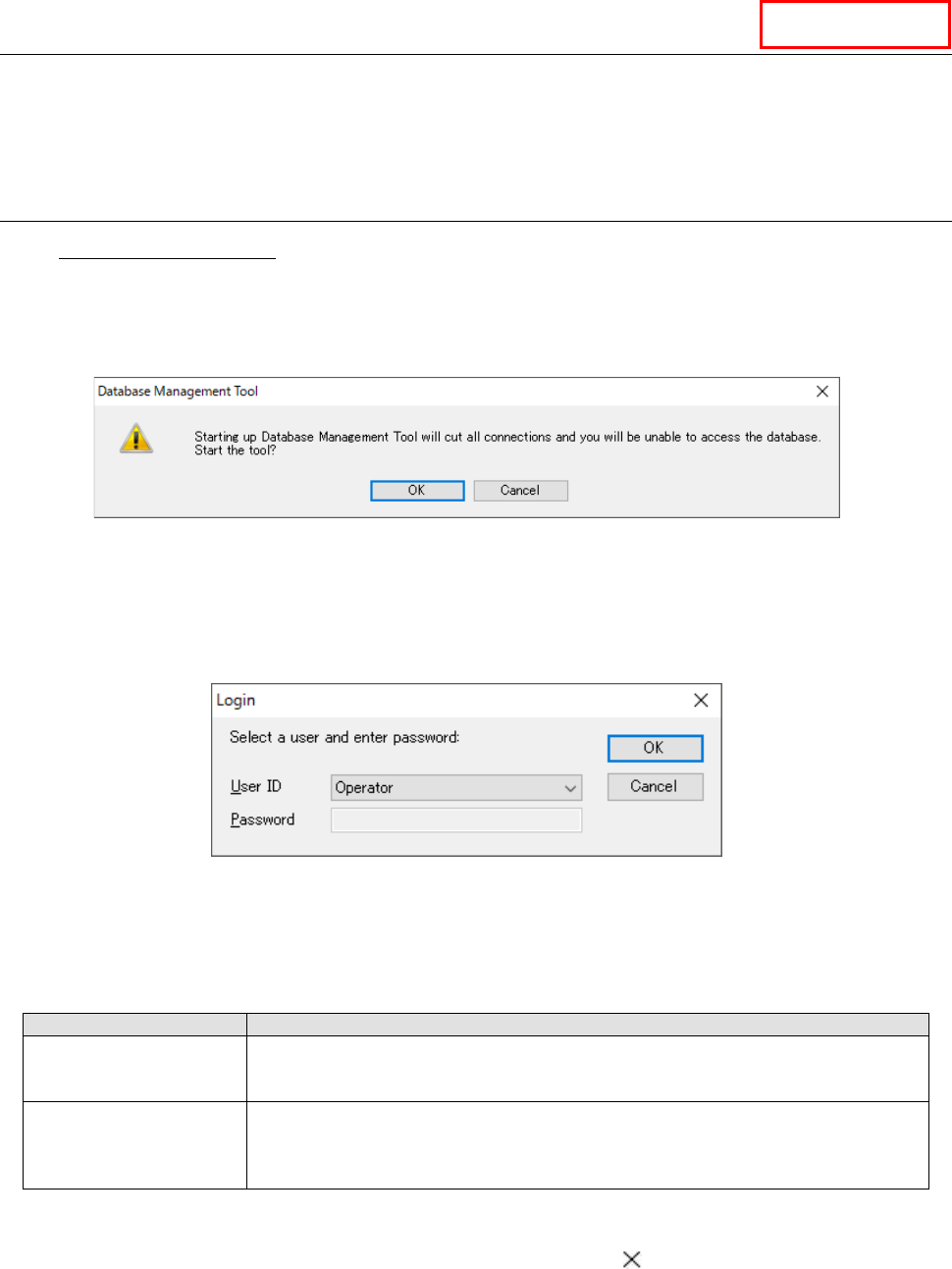
When you start up the “Database Management Tool,” all connections to the databases are
disconnected.
Figure C.1-1 Dialog box for confirmation of start-up
When you press the <OK> button on the dialog box for confirmation of start-up, the “Login”
dialog box appears on the screen.
When you press the <Cancel> button, the system stops starting up the “Database Management
To o l . ”
Figure C.1-2 “Login” dialog box
Regardless of user management of the JaNets, login as a user who has one of the following
privileges.
Table C.1-1 Differences between privileges unique to user IDs
User
Privilege
Operator
This type of user can back up/restore the database or make settings of the automatic
back-up function.
This type of user does not enter any password to login.
Maintenance engineer
This type of user can maintain the database, import/export a table of data, move
database data as well as perform the operations the “Operator” user above can
perform. Since this type of user may damage the system due to his/her operational
mistake, this user ID is supposed to be used by our service engineer basically.
When you press the <OK> button, the system authenticates you, and when you login
successfully, the “Database Management Tool” starts up.
When you press the <Cancel> button, or when you press the button, the system aborts
start-up of this tool.
Data Manager
JaNets Instruction Manual C. Database Management Tool
C-2
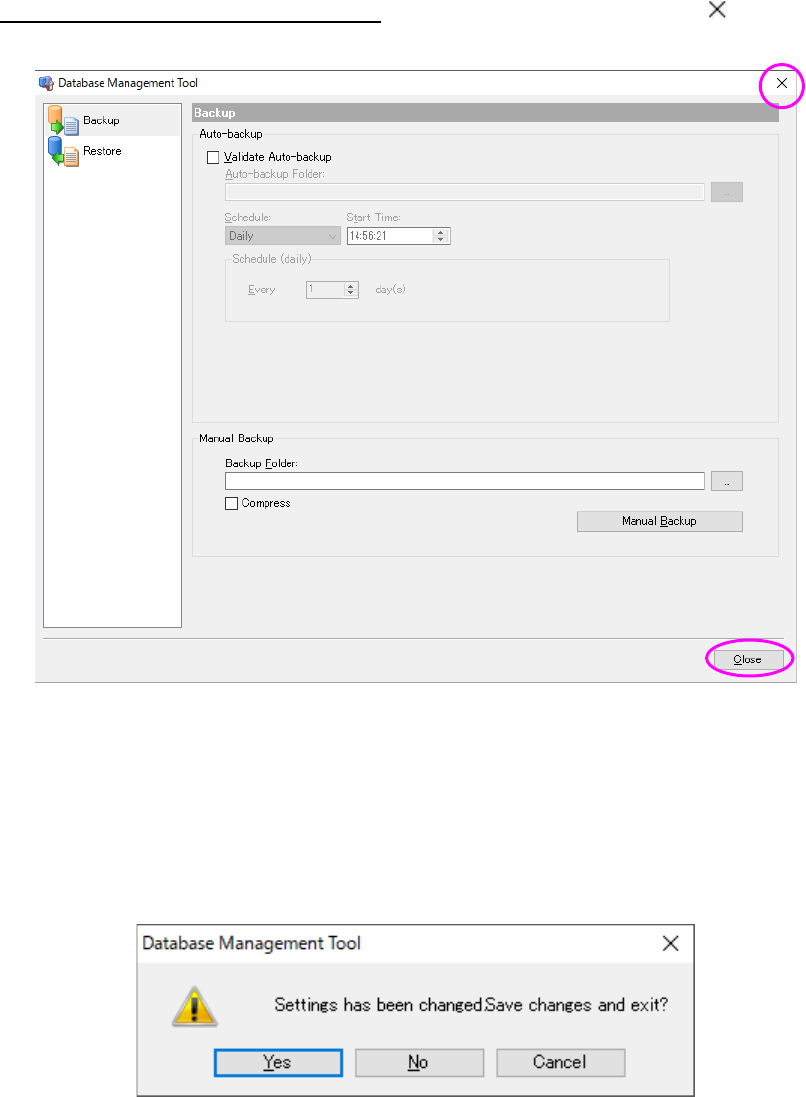
Quitting the Database Management Tool: Select the <Close> button or the
button. The
system quits this application software.
Figure C.1-3 Quitting the Database Management Tool
If any data is changed, the dialog box for confirmation of the save operation appears on the
screen. When you press the <Yes> button on this dialog box, your change is saved. When you
press the <No> button, the system quits the application software without saving any changes.
When you press the <Cancel> button, the system aborts the quit operation for this application
software.
Figure C.1-4 Dialog box for confirmation of the save operation