JANETS_INM.pdf - 第755页
MANUFACTURER INQUIRY 2- 11 - 1, T sur umak i, T ama - shi, T okyo 206 - 8551, JAP AN PHO NE: 81 - 42 - 357 -2 321 http s ://ww w .juki.c o.jp / Copyright © 20 17- 2020 JUKI CO RPO RAT IO N The specificati on and appearan…
JaNets Instruction Manual C. Database Management Tool
C-8
C.3.1.1 Selecting a restore option
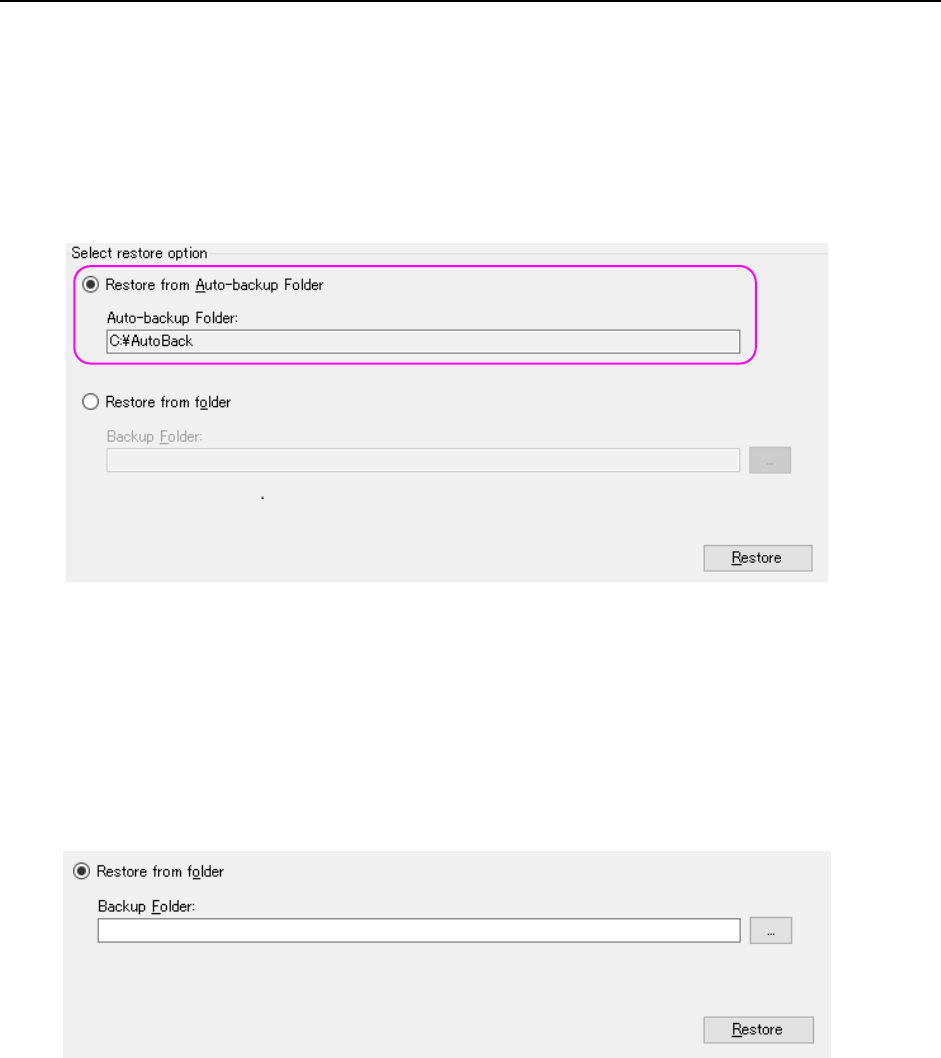
(1) Restoring data backed up automatically
To restore data backed up automatically, select the “Restore from Auto-backup Folder”
radio button in the “Select restore option” section of the “Restore” screen. When you press
the <Restore> button, the system restores data from the folder selected in the “Auto-backup
Folder” text box of the “Backup” screen.
When the system restores data, all of data in the database is restored to the backed-up one.
Note that the database cannot be used (it enters Offline mode) during restoring.
Figure C.3-2 Restoring data from the folder specified in the “Auto-backup Folder”
(2) Restoring data backed up manually
To restore data backed up manually, select the “Restore from folder” radio button on the
“Restore” screen. Enter the path in the “Backup Folder” text box ① directly or select the
button ② to open the dialog box for selecting a folder and select the desired path.
When you press the <Restore> button, the system restores data. Note that the database
cannot be used (it enters Offline mode) during restoring.
Figure C.3-3 Restoring data from the desired folder
When restoring the data that has been manually backed up, you do not need to include the Data
Manager version name folder created automatically in the path of a backup folder (specify the
path that is completely the same as that specified at the time of manual backup).
For example) When you restore the data from the backup folder as the example shown in the
section "C.2.1.2 Manual Backup," specify the "D:¥BackUp" as a backup folder.
You do not need to make it the "D:¥BackUp¥1.01.00A."
②
①

◆ Revision record
Rev. Date
Revised locations Revision contents
Remarks
00 Apr. 2017 First edition
01 Aug. 2017 The overall revision Supported Ver1.01 Revised
02 Jan. 2018 The overall revision Supported Ver1.05 Revised
03 Sep. 2018 The overall revision Supported Ver1.07 Revised
04 Oct. 2018 The overall revision Supported Ver1.08 Revised
05 Oct. 2018 The overall revision Supported Ver1.09 Revised
06 Jan. 2019 The overall revision Supported Ver1.10 Revised
07 Apr. 2019 The overall revision Supported Ver1.11 Revised
08 Jul.2019 The overall revision Supported Ver1.12 Revised
09 Oct. 2019 The overall revision Supported Ver1.13 Revised
10 Dec. 2019 The overall revision Supported Ver1.14 Revised
11 Mar. 2020 The overall revision Supported Ver1.15 Revised

MANUFACTURER
INQUIRY
2-11-1, Tsurumaki, Tama-shi, Tokyo 206-8551, JAPAN
PHONE: 81-42-357-2321
https://www.juki.co.jp/
Copyright © 2017-2020 JUKI CORPORATION The specification and appearance may be changed without notice.
All rights reserved throughout the world.
Original Instructions
2020.3 Printed in Japan