CP40 service manual.pdf - 第32页
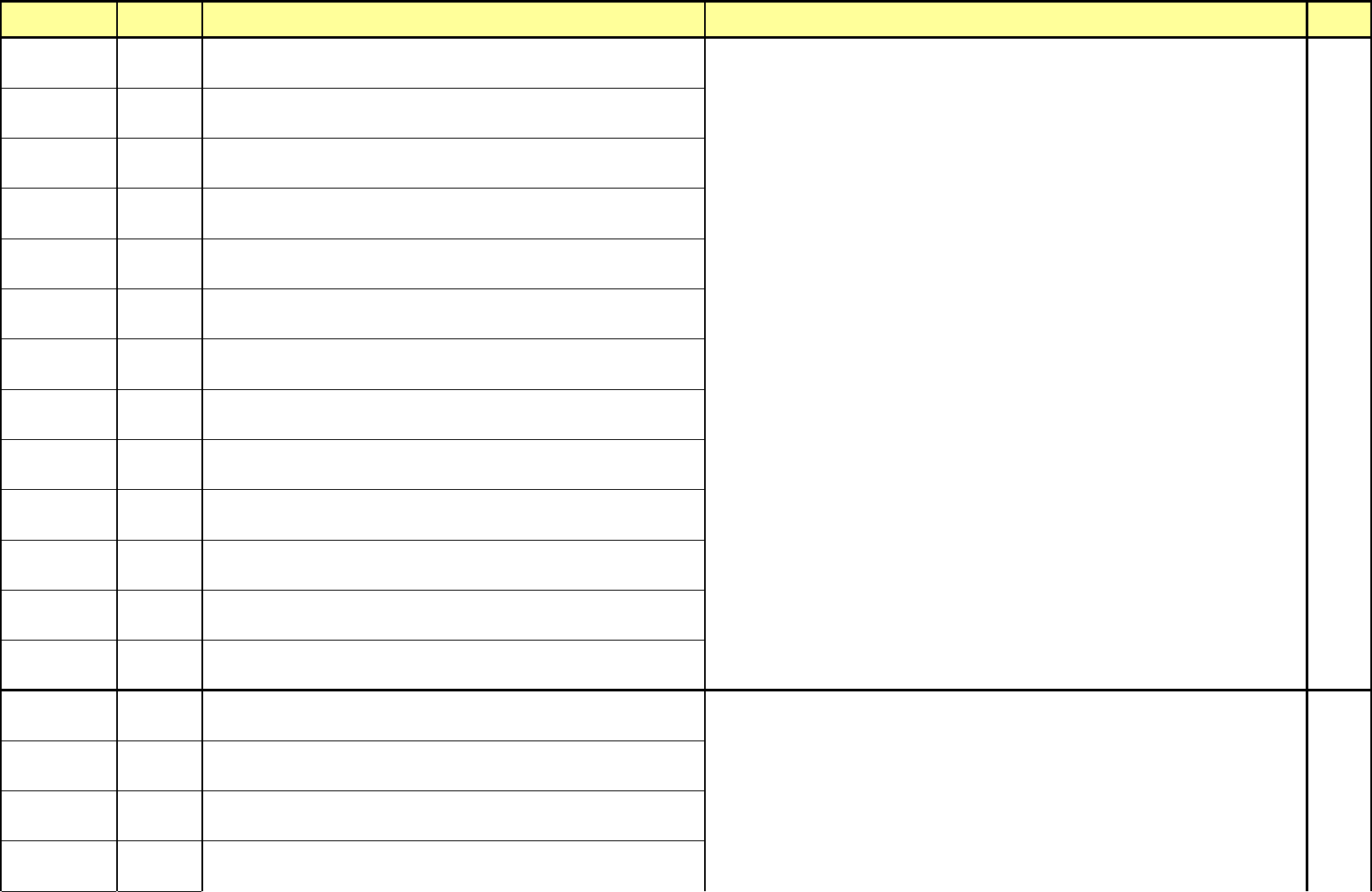
MODULE ERROR CODE Symptom and Cause ACTION Service Manual $88D3 Aligner unable to reset the theta position counter[13] (Head 3) Error occurred to position counter circuit of Aligner DSP Board. 7-3-1 $88E1 Aligner image a…
MODULE
ERROR
CODE
Symptom and Cause ACTION
Service
Manual
$8871
Aligner out of heap memory[07] (Head 1)
Error occurs to memory of Aligner DSP Board.
$8872
Aligner out of heap memory[07] (Head 2)
Error occurs to memory of Aligner DSP Board.
$8873
Aligner out of heap memory[07] (Head 3)
Error occurs to memory of Aligner DSP Board.
$8881
Aligner received invalid length of message[08] (Head 1)
Aligner DSP Board receives invalid data from Host(Component Placer).
$8882
Aligner received invalid length of message[08] (Head 2)
Aligner DSP Board receives invalid data from Host(Component Placer).
$8883
Aligner received invalid length of message[08] (Head 3)
Aligner DSP Board receives invalid data from Host(Component Placer).
$8891
Aligner Received Bad Reply Length[09] (Head 1)
Aligner DSP Board receives invalid data from Host(Component Placer).
$8892
Aligner Received Bad Reply Length[09] (Head 2)
Aligner DSP Board receives invalid data from Host(Component Placer).
$8893
Aligner Received Bad Reply Length[09] (Head 3)
Aligner DSP Board receives invalid data from Host(Component Placer).
$88A1
Aligner RAM Failed[10] (Head 1)
Error occurred to memory of Aligner DSP Board.
$88A2
Aligner RAM Failed[10] (Head 2)
Error occurred to memory of Aligner DSP Board.
$88A3
Aligner RAM Failed[10] (Head 3)
Error occurred to memory of Aligner DSP Board.
$88C1
Aligner Position Counter circuitry failed[12] (Head 1)
Error occurred to position counter circuit of Aligner DSP Board.
Woori Align
Part
$88C2
Aligner Position Counter circuitry failed[12] (Head 2)
Error occurred to position counter circuit of Aligner DSP Board.
$88C3
Aligner Position Counter circuitry failed[12] (Head 3)
Error occurred to position counter circuit of Aligner DSP Board.
$88D1
Aligner unable to reset the theta position counter[13] (Head 1)
Error occurred to position counter circuit of Aligner DSP Board.
$88D2
Aligner unable to reset the theta position counter[13] (Head 2)
Error occurred to position counter circuit of Aligner DSP Board.
1-3-1
Try again after finding out again Home position by turning on the Aligner DSP Board by pressing and
releasing the <Emergency> switch of operation panel or teaching box.
Check for cable linked conditions between Aligner DSP Board and VME RS-232C I/F Board.
- 18 -
MODULE
ERROR
CODE
Symptom and Cause ACTION
Service
Manual
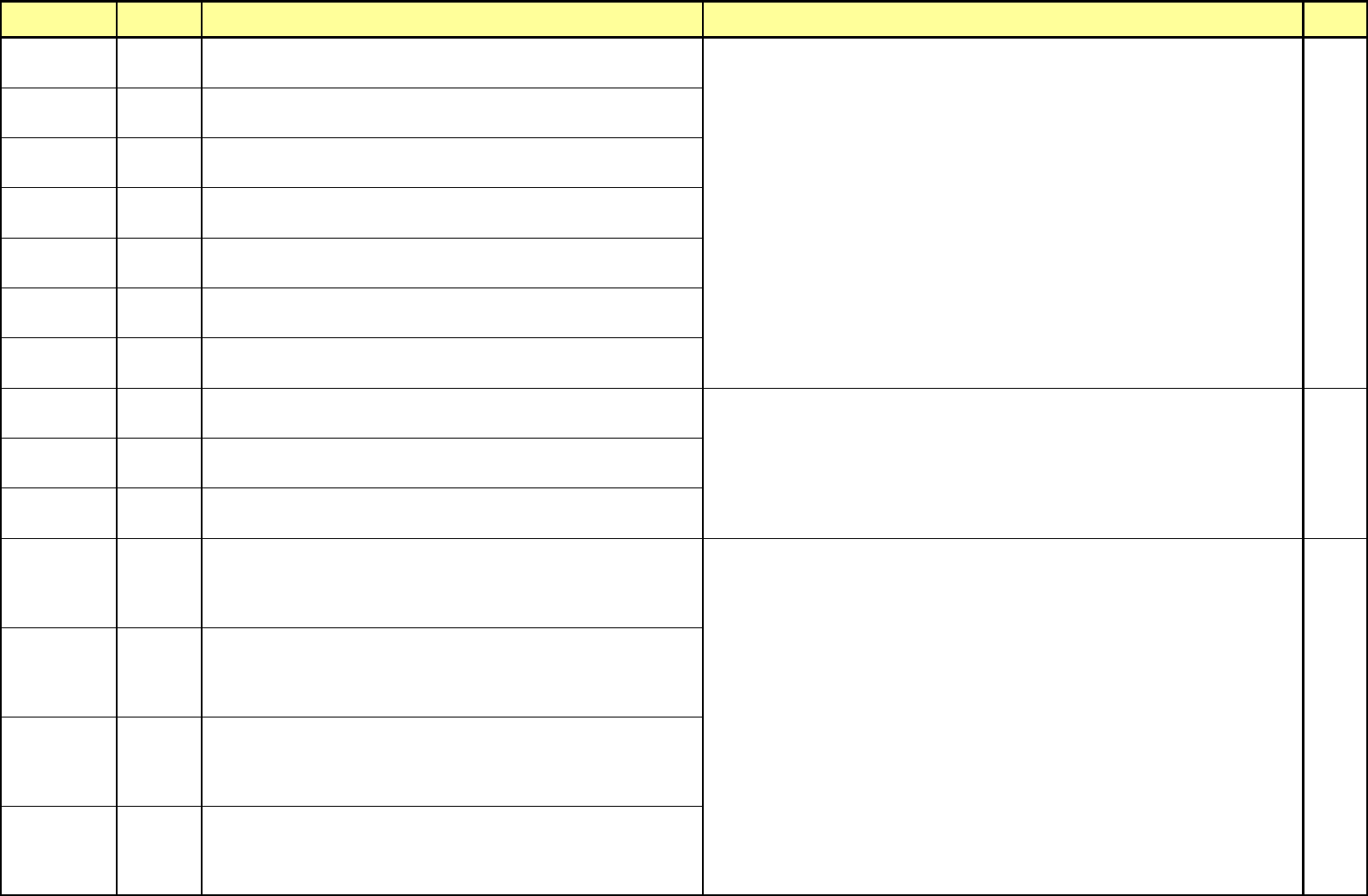
$88D3
Aligner unable to reset the theta position counter[13] (Head 3)
Error occurred to position counter circuit of Aligner DSP Board.
7-3-1
$88E1
Aligner image acquisition circuitry failed[14] (Head 1)
Error occurred to Aligner DSP Board.
$88E2
Aligner image acquisition circuitry failed[14] (Head 2)
Error occurred to Aligner DSP Board.
$88E3
Aligner image acquisition circuitry failed[14] (Head 3)
Error occurred to Aligner DSP Board.
$88F1
Aligner AD converter circuitry failed[15] (Head 1)
Error occurred to Aligner DSP Board.
$88F2
Aligner AD converter circuitry failed[15] (Head 2)
Error occurred to Aligner DSP Board.
$88F3
Aligner AD converter circuitry failed[15] (Head 3)
Error occurred to Aligner DSP Board.
$8921
Aligner failed nozzle find[18] (Head 1)
Aligner failed to set the align position of nozzle.
1-3-1
$8922
Aligner failed nozzle find[18] (Head 2)
Aligner failed to set the align position of nozzle.
7-3-1
$8923
Aligner failed nozzle find[18] (Head 3)
Aligner fails to set the align position of nozzle.
$89B1
Aligner inspected bad x dimension[27] (Head 1)
X size of part measured by Aligner exceeds the tolerance of size X registered. This
occurs caused by pickup(tombstome) with part upwards, failure of part pickup,
incorrectly inputted scan size of part, or incorrect align height of part.
$89B2
Aligner inspected bad x dimension[27] (Head 2)
X size of part measured by Aligner exceeds the tolerance of size X registered. This
occurs caused by pickup(tombstome) with part upwards, failure of part pickup,
incorrectly inputted scan size of part, or incorrect align height of part.
12-3-3
$89B3
Aligner inspected bad x dimension[27] (Head 3)
X size of part measured by Aligner exceeds the tolerance of size X registered. This
occurs caused by pickup(tombstome) with part upwards, failure of part pickup,
incorrectly inputted scan size of part, or incorrect align height of part.
12-3-7
$89C1
Aligner inspected bad y dimension[28] (Head 1)
Y size of part measured by Aligner exceeds the tolerance of size Y registered. This
occurs caused by pickup(tombstome) with part upwards, failure of part pickup,
incorrectly inputted scan size of part, or incorrect align height of part.
12-3-8
Try again after releasing the error by pressing <Reset> switch of operation panel.
Check for cable linked conditions between Aligner DSP Board and VME RS-232C I/F Board.
Check that scan size of part registered is identical to that of real part.
Check that Align height of part is proper.
Check that thickness of part registered is identical to that of real part.
Check that tolerance of part is suitable.
Check that picked up condition of part and value of Z-axis inputted are suitable.
Check for feeding condition of Feeder.
Try again after finding out again Home position by turning on the Aligner DSP Board by pressing and
releasing the <Emergency> switch of operation panel or teaching box.
Check for cable linked conditions between Aligner DSP Board and VME RS-232C I/F Board.
- 19 -
MODULE
ERROR
CODE
Symptom and Cause ACTION
Service
Manual
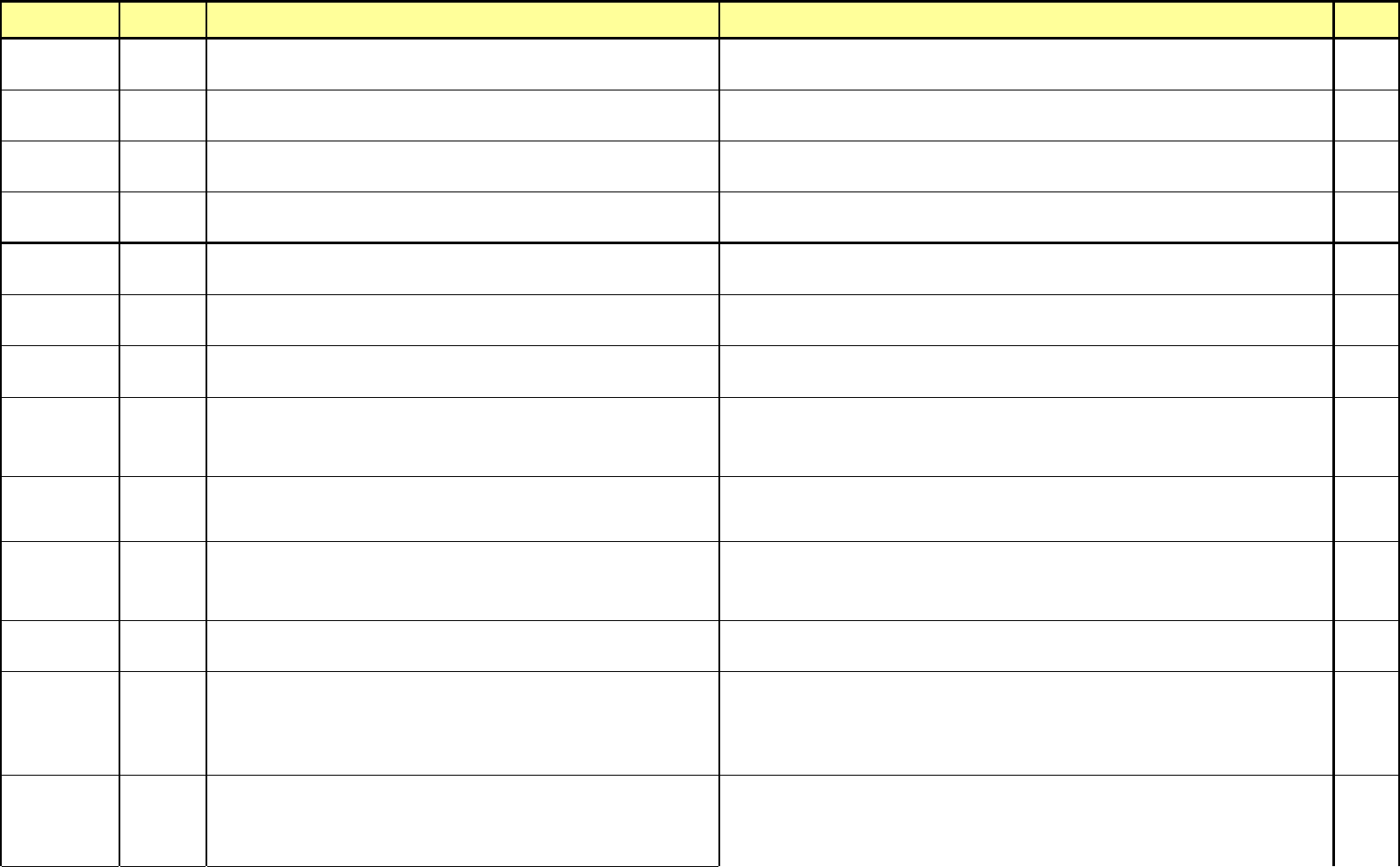
$AA10
Vision Component Data Ready Error
Occurs when data not inputted exists in Vision Component Data or error occurs.
Check that Component Data in use is inputted correctly, and if not inputted, input the data correctly. 12-3-3
$AA11
Vision Component Acquisition Error
Occurs when grab is not possible when grabbing the Vision Component image.
Check the Vision H/W Type. (Cognex, SSA)
Check the linked condition of Camera Cable.
7-3-1
$AA12
Vision Component Inspection Error
Occurs when it fails to recognize component concerned in Vision Component
Inspection.
Modify correctly the Vision Component Data concerned.
Check a Camera for calibrated conditions(inspection height, scale value, etc.).
$AA13
Vision Component Camera Data Error
Occurs when data not inputted or invalid data exists in Vision Camera Data.
Input data not inputted in Vision Component Camera Data, and modify the incorrect data. 12-3-3
Vision Part $AA21
Vision Camera Data Error
Occurs when data not inputted or invalid data exists in Vision Camera Data.
Input data not inputted in Vision Component Camera Data, and modify the incorrect data.
12-3-3
12-3-6
$AA22
Vision Camera Display Initialize Error
Occurs when abnormal conditions exist in Vision Camera initial Display.
Check the Vision H/W Type. (Cognex, SSA)
Check that a Camera of Vision Camera Data is correct.
$AA32
Vision Head Can not Use Special Nozzle
Occurs when trying to carry out Vision operation with Special Nozzle.
Check a nozzle concerned in Vision work Data.
If selected to Special Nozzle, modify the nozzle with suitable general nozzle.
4-3-4
$AA40
Vision Inspection Error, at retry over any times
Occurs when inspection error occurs caused by error of retry count in Vision
Component inspection.
Check that part exists in Tray or Feeder concerned, and if not existed, replace it.
Check that Vision Component Data is correct. If not correct, modify it correctly.
Check that Inspection Z height is identical to the upper side of Fixed Camera. If it is too high or too
low, modify it to meet the height.
$AB00
Vision Test Camera Data Error
Occurs when data not inputted or invalid data exists in Camera Data in Vision
manual Test.
Input data not inputted in Vision Test Data, and modify the incorrect data.
12-3-3
12-3-6
$AB01
This Head Setting Nozzle
Occurs when no nozzle exists in Vision Component manual inspection or executing
the TestMove under abnormal nozzle.
Check for a nozzle of head.
If nozzle not existed, select the nozzle concerned.
4-3-4
$AB02
Component Move Z Limit Error(Under 10mm)
Occurs when Component Thick of Vision Component Data exceeds 10mm.
Check the Component Thick of Vision Component Data.
If set to 10mm or more, modify it with correct data.
12-3-3
12-3-6
Motor & I/O
Part
$C012
XY axis jogging failed (jog102)
Occurs when Jog Speed is transferred incorrectly,
when it fails to define XY axis with software,
caused by unsuitable Motor ID, or when ID exceeds total numbers of motor,
or when action for Motor Jog fails to be defined.
Try again after Emergency stop.
If failed to recover with above corrective action, the error is caused by incorrect designation of Motor
ID or Speed in aspects of software error.
12-3-7
$C014
X/Y Speed or Distance Set Error (mot102)
This may occur when other errors occurred during XY operation.
Occurs when speed of X and Y axes, moving distance, Motor ID, action, etc. are
defined incorrectly.
12-3-9
Try again with operations of Stop and Reset, or Emergency and Reset.
Check that teaching for moving distance is correct
- 21 -