TS566R-UserGuide - 第11页
11 5.2.3 Spray Time setting Note : A complete cycle consists of Pre-Spray, Spray and Post-Sp ray. Pre-spray: Atomized air turned on before the valve is opened. Post- sp ray: Atomized air stayed on after the valve is clos…
10
5.2 SPRAYING
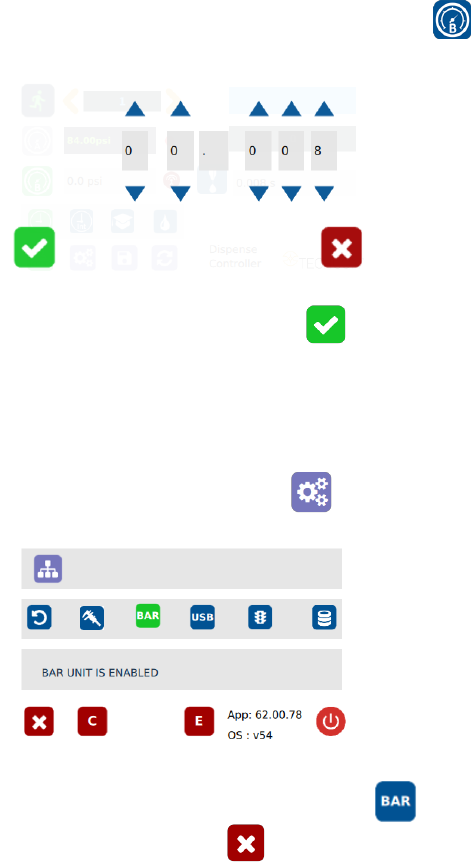
5.2.1 Pressure Adjustment
Note: Pressure in Port A (I) is not regulated. It delivers the same pressure
as the supplied inlet pressure. This pressure is to activate the valve. Make
sure the supplied pressure is at least 70 psi (4.8 bar)
Pressure in Port B is regulated. This pressure is to control the atomized air
spray. Adjust the pressure accordingly to achieve desired spray results.
1. Touch the “Pressure B” icon to enter the pressure setup screen
2. Touch the Up and Down arrows to set the desired atomized pressure
3. Touch the Check Mark icon to save and exit
5.2.2 To Change Pressure Unit Display
Note: The default pressure unit is PSI. To change pressure unit to BAR,
follow below instructions.
1. Touch the Setup icon to enter setup screen
2. Press the “BAR” icon to change pressure unit to BAR
3. Touch the X icon to save and exit
11
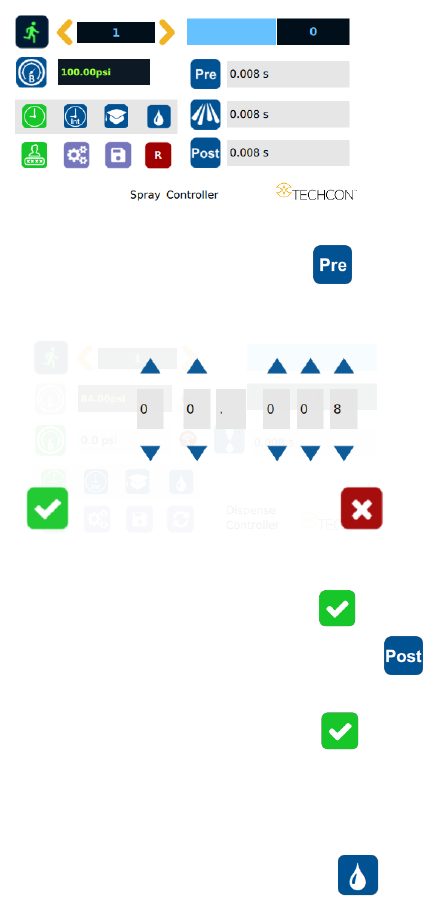
5.2.3 Spray Time setting
Note: A complete cycle consists of Pre-Spray, Spray and Post-Spray.
Pre-spray: Atomized air turned on before the valve is opened.
Post-spray: Atomized air stayed on after the valve is closed.
1. Touch the “Pre” icon to setup pre-spray time
2. Touch Up and Down arrows to set the desired pre-spray time
3. Touch the Check Mark icon to save and exit
4. Touch the “Post” icon to setup post-spray time
5. Touch Up and Down arrows to set the desired post-spray time
6. Touch the Check Mark icon to save and exit
5.2.4 Manual/Purge Cycle Setting
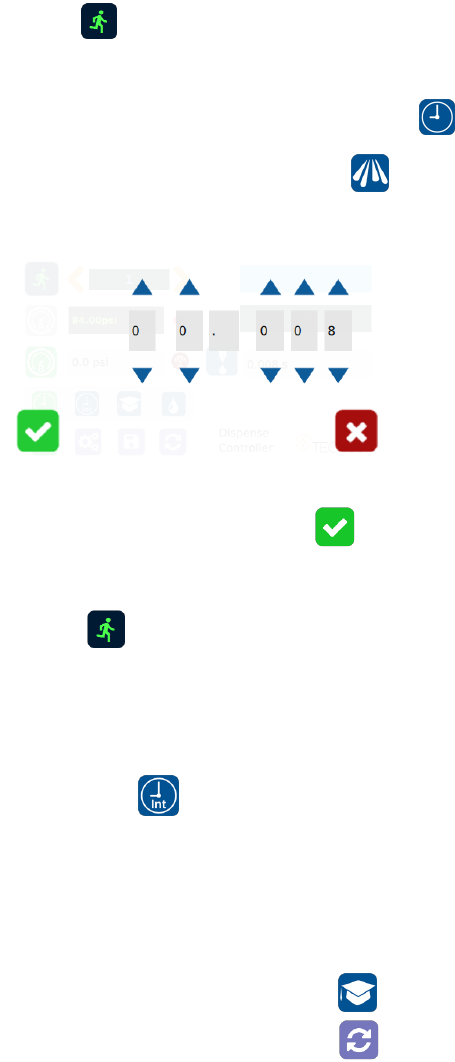
1. Touch the Purge icon to select the purge cycle.
The Purge icon will turn to green color.
2. Press and hold down the foot switch to activate the purge cycle.
12
Alternately, touch and hold the Run icon on the display to activate the
purge cycle.
5.2.5 Automatic Spray Cycle Setting
1. Touch the “Timed” mode icon to set the spray cycle time.
The icon will turn to green color.
2. Touch the “Spray” icon to enter the setup screen
3. Touch the Up and Down arrows to set the desired spray time
Note: The minimum activation is 0.008 second
4. Press the Check Mark icon to save and exit
5. Press the foot switch to activate the “Timed” spray cycle.
Alternately, touch the Run icon on the display to activate the “Timed”
spray cycle
Note: The unit has an “Interrupt” mode feature. In this mode, the
“Timed” spray cycle can be disrupted if the foot switch is released and
resumed when the foot switch is depressed again.
6. Touch the “Interrupt” icon to activate “Interrupt” mode. The icon will
turn to green color
5.2.6 Teach Mode Setting
In the teach mode, the spray time will be accumulated as long as the foot
switch is depressed. This is helpful in determining the required spray
time when the dispense output is known.
1. Touch the “Teach” icon to enter the teach mode