TS566R-UserGuide - 第16页
16 Notes : A. If there is no delay time enter ed in the setting, the operator has to press the foot switch or touch the Run icon after each memory cell is completed to activate the next memory cell. B. If delay time is e…
15
5.3.3 To run in Single Sequence Mode
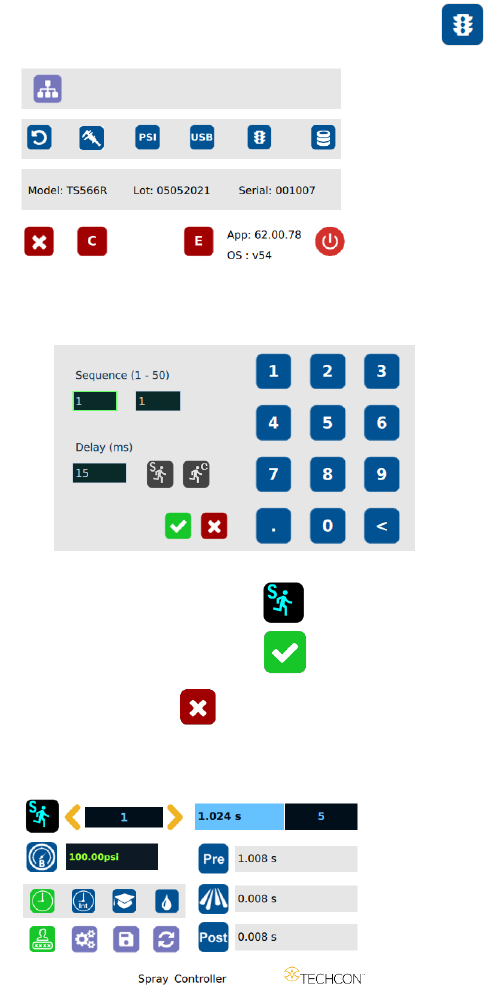
1. Touch the “Run Method” icon to enter sequence mode setup
2. Enter number of memories to be run in sequence (ex. 1 to 3)
3. Touch the “Sequence Mode” icon
4. Touch the Check Mark icon to save
5. Touch the X icon to exit
The screen will look similarly to the screen below:
16
Notes:
A. If there is no delay time entered in the setting, the operator has
to press the foot switch or touch the Run icon after each
memory cell is completed to activate the next memory cell.
B. If delay time is entered in the setting, the controller will activate
the next memory cell in sequence automatically. Delay time
must be at least 15 ms.
5.3.4 To run in Continuous Sequence Mode
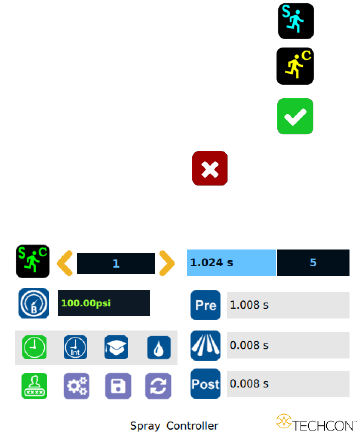
1. Follow steps 1 to 2 above and enter the waiting time “delay time” between
each activation.
2. Touch the “Sequence Mode” icon
3. Touch the “Continuous Mode” icon
4. Touch the Check Mark icon to save
5. Touch the X icon to exit
The screen will look similarly to the screen below:
Note: If the sequence mode is set to activate memory cells 1 – 3, and the
delay time is set at 5000 ms, the controller will activate memory 1 to 3
continuously with 5000 ms delay between each activation. The delay time
must be at least 15 ms.
17
5.4 Cycle Counter
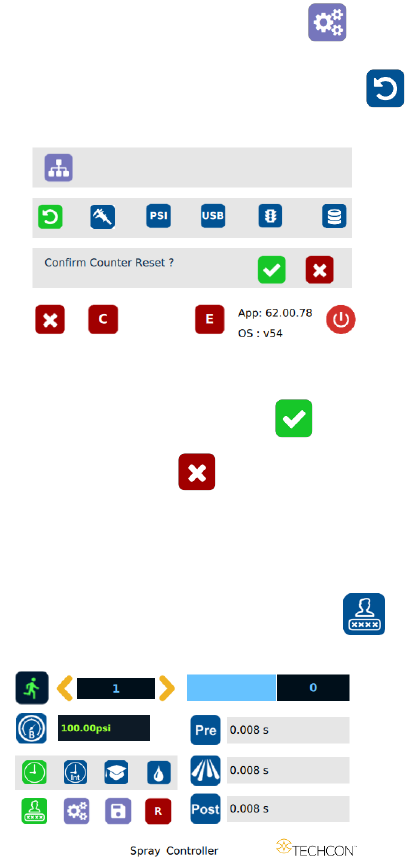
The cycle counter records the numbers of spray cycle being activated. Up to
999,999 cycles can be recorded. To reset the counter, follow steps below:
1. Touch the Setup icon to enter setup screen
2. Touch the Counter Reset icon to reset the counter
3. Press the check mark icon to confirm
4. Touch the X icon to exit
5.5 To Change Password
Note: The default password is “0000”. To change password, follow the
instructions below.
1. Touch the Login icon to enter the login screen