00198377-01_SM_JTF-ML2_en.pdf - 第34页
2 General Tasks 2.2 Software Tasks 34 Service Manual SIPLACE JTF-ML2 08/2017 2.2.2 Teach Refill Position Reteach the refill position if a cassette does not slide easily in and out of the tower. Fig.25: Teach refill posi…
2 General Tasks
2.2 Software Tasks
Service Manual SIPLACE JTF-ML2 08/2017 33
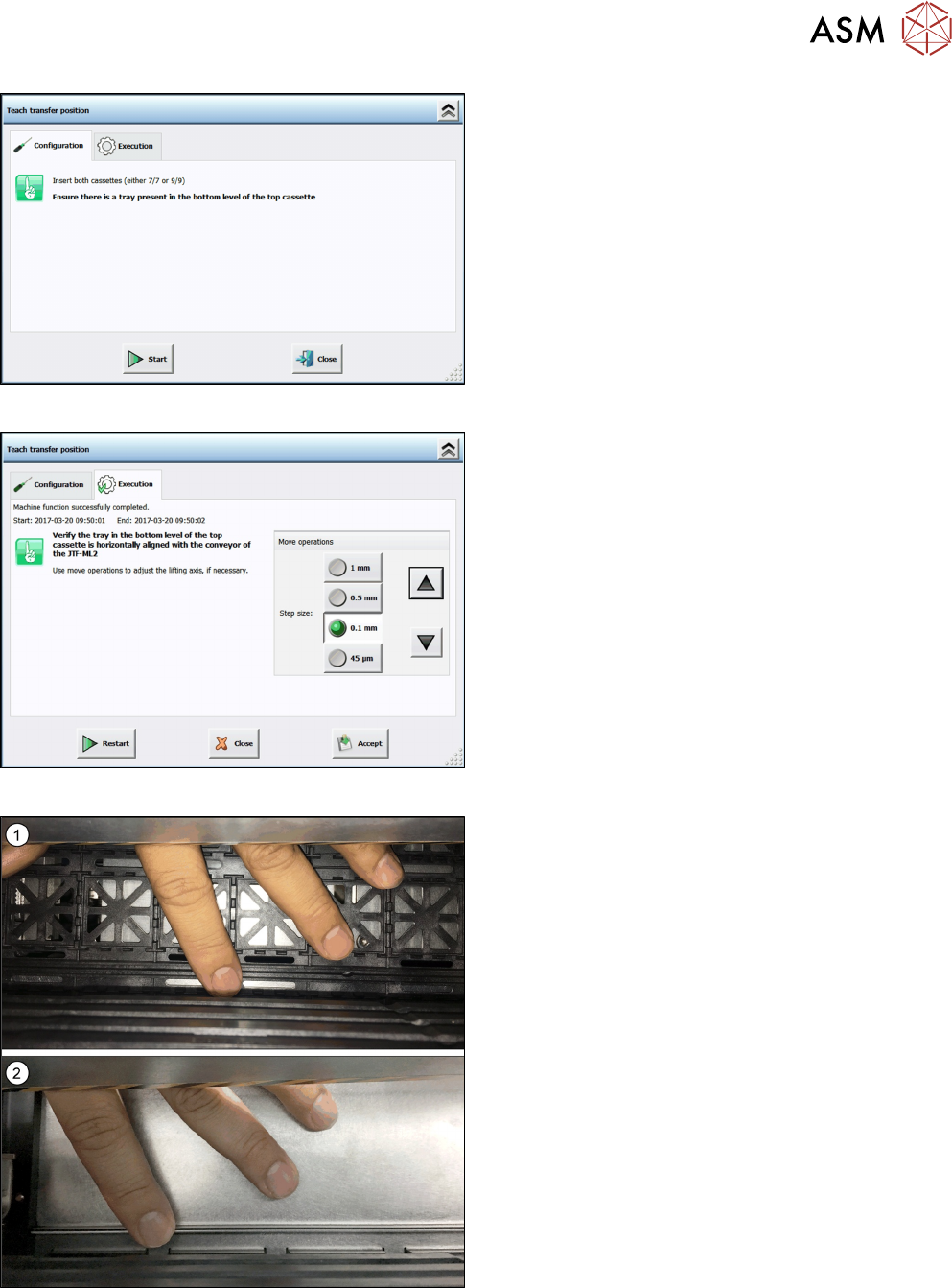
Fig.22: Teach transfer position 2
► Insert two cassettes into the SIPLACE JTF‑ML2.
Ensure there is a Jedec tray or a cookie tray
present in the bottom level of the top cassette.
Fig.23: Teach transfer position 3
► Verify the tray in the bottom level of the top cas-
sette is horizontally aligned with the conveyor of
the SIPLACE JTF‑ML2.
Use the arrow buttons to adjust transport and
tower to each other.
Fig.24: Adjusting transfer position
► Use your finger to feel the levelling and adjust ac-
cordingly.
You may use a JEDEC(1) or a cookie tray(2).
► Click the button Accept to save the new transfer
position.
2 General Tasks
2.2 Software Tasks
34 Service Manual SIPLACE JTF-ML2 08/2017
2.2.2 Teach Refill Position
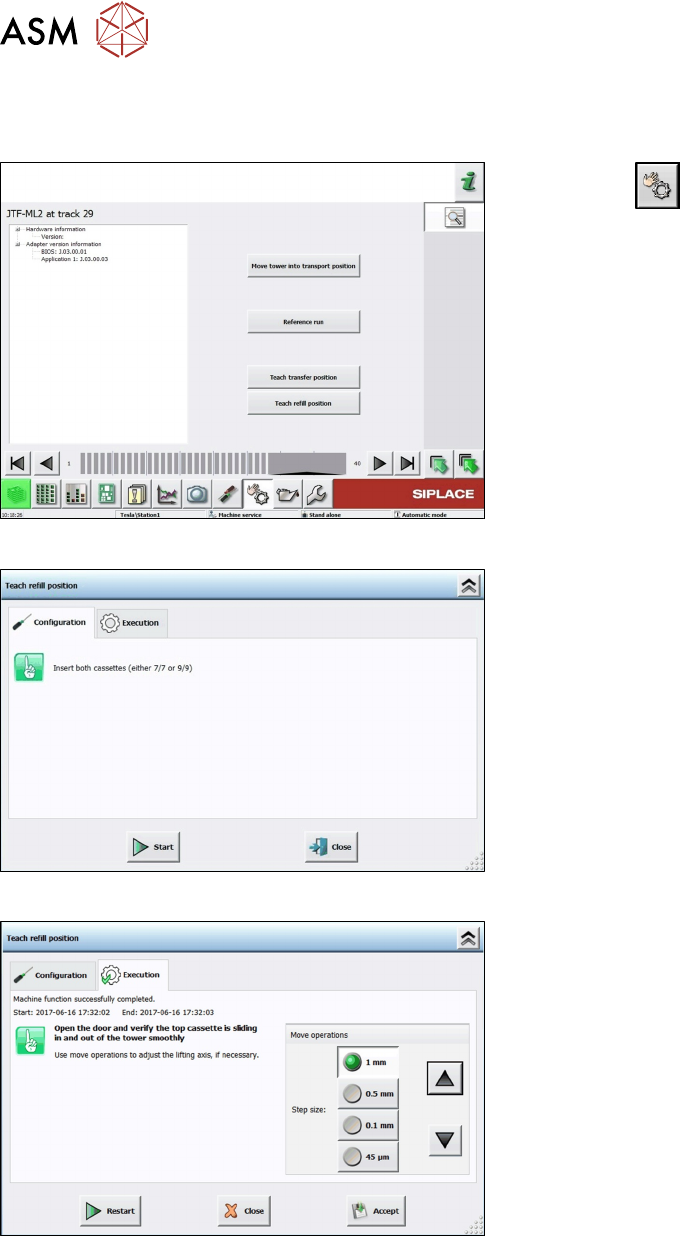
Reteach the refill position if a cassette does not slide easily in and out of the tower.
Fig.25: Teach refill position 1
► Click the button.
► Select the button Location 1.
► Select Track 29.
► Select the button Details….
► Click the button Teach refill position.
Fig.26: Teach refill position 2
► Insert two cassettes into the SIPLACE JTF‑ML2.
The cassettes have to be of the same type (7or
9levels).
Fig.27: Teach refill position 3
► Open the door and verify the top cassette is slid-
ing in and out of the tower smoothly.
Use the arrow buttons to adjust the refill position.
► Click the button Accept to save the new refill
position.
3 Tower Mechanics
3.1 Replacing the Synchronized Pulley
Service Manual SIPLACE JTF-ML2 08/2017 35
3 Tower Mechanics
3.1 Replacing the Synchronized Pulley
Parts, Equipment and Tools
●
Standard tools
●
Synchronized pulley [03129152-xx]
Removal
► Switch off the machine, disconnect it from the power supply and secure it to prevent
unauthorized reactivation. Observe the instructions in section 1.2 "Preparatory Work..." [}11].
► Remove the tower from the machine (See 2.1.2 "Removing Tower from Machine" [}21])
► Remove the top cover (see 2.1.3 "Removing Tower Top Cover" [}25]).
► Remove the side cover (see 2.1.4 "Removing Side Cover" [}27]).
► Place the JFT-ML2 on a stable surface like a work bench while working on it.
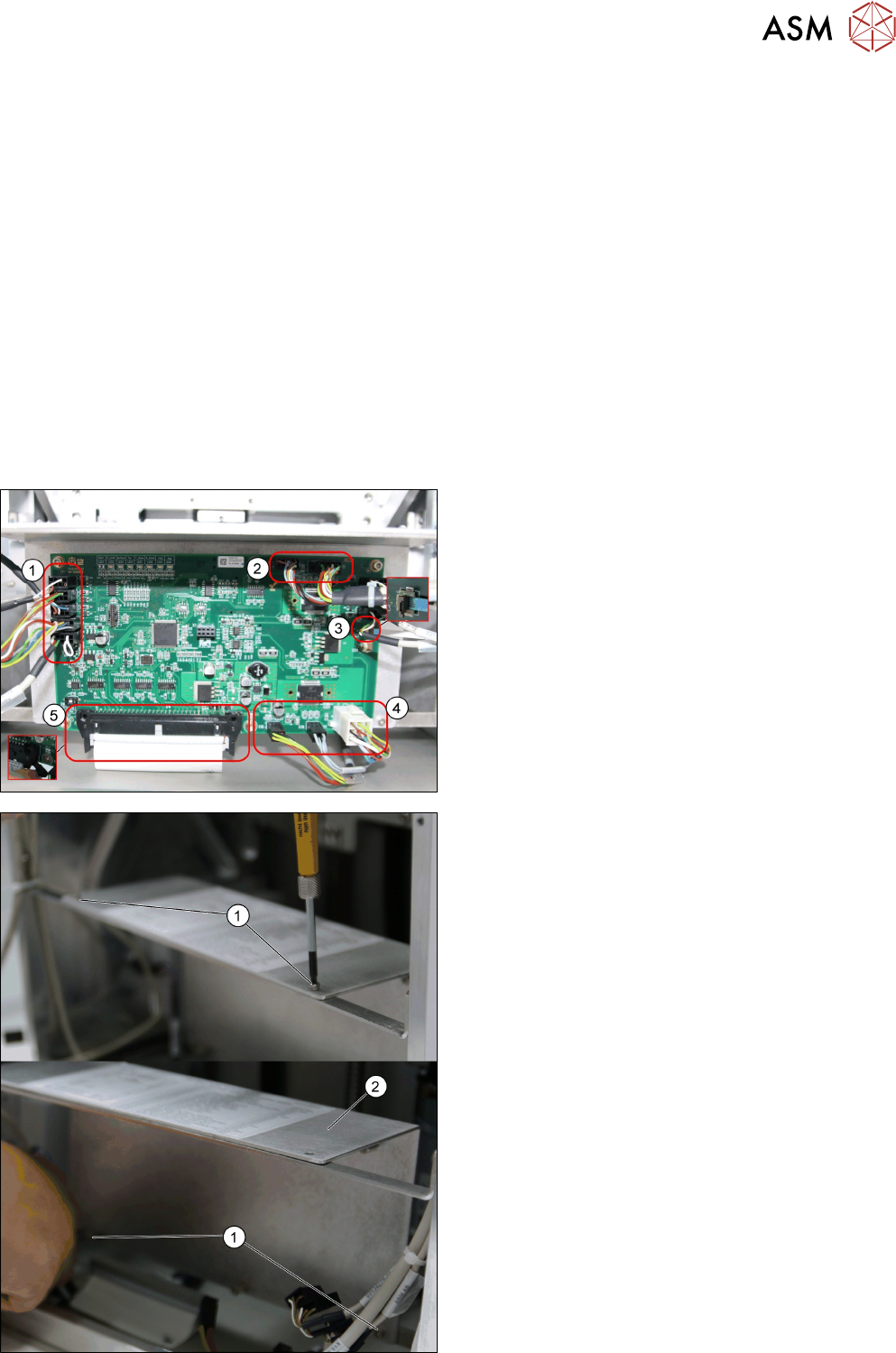
► Remove all cables from the PCBA, JFT-ML2 con-
trol board [03125534-xx].
1. X22; X8; X7; X6; X5
2. X16; X15
3. X23
4. X18; X19; X17
5. X4
► Remove the four screws ISO 4762 - M 3 x 6-
A2-70 [03042541-xx] (1).
► Remove the Plate f. PCBA Support [03129139-
xx] (2).