IPC 7711A.pdf - 第330页
Component Modification Examples (continued) Figure 7 Chip component bridging leads of surface mount component. Figure 8 Chip component stacked onto another chip component. Figure 9 Acceptable Surface mount component moun…
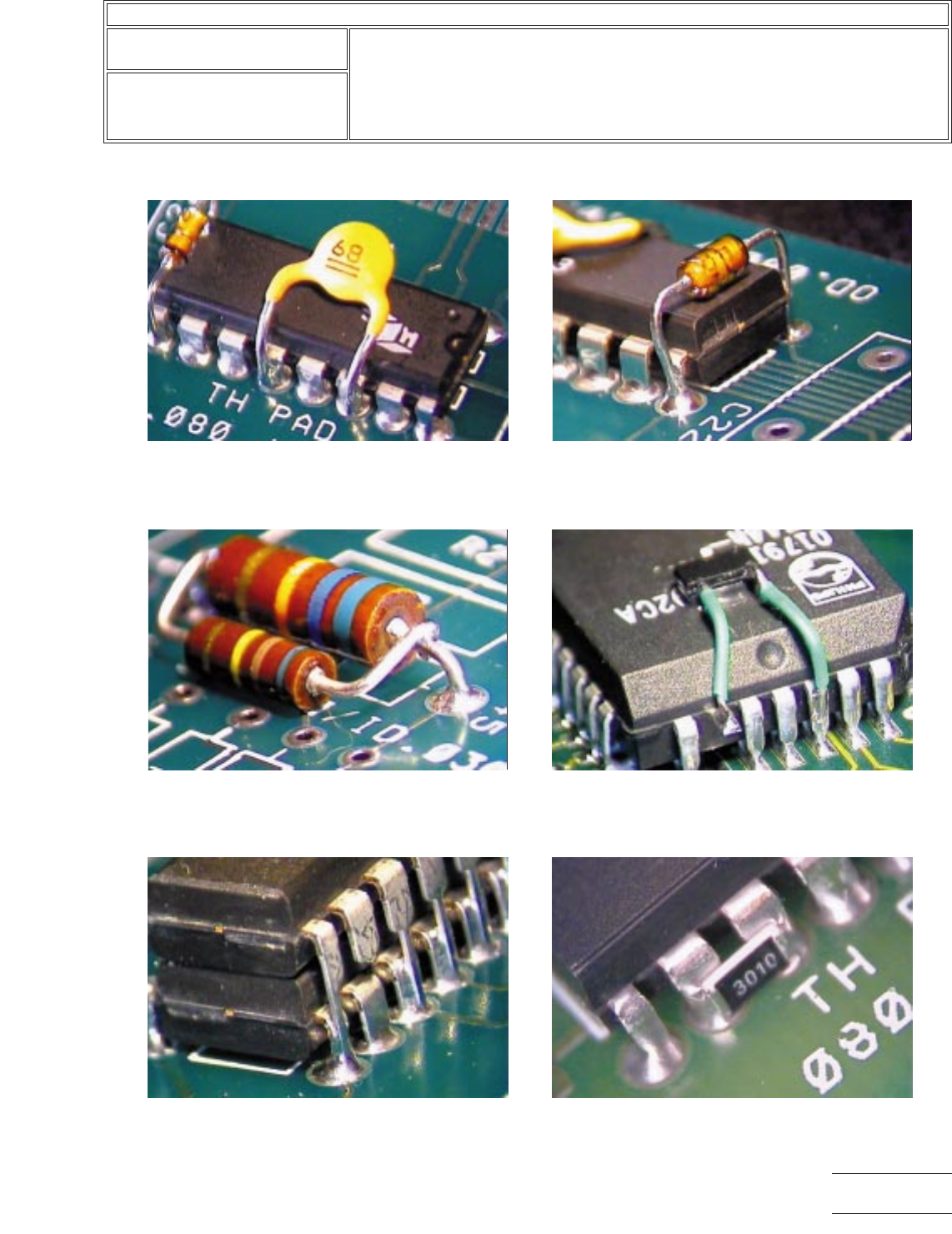
Component Modification Examples
Figure 1 Radial lead component soldered to
through hole component leads. Note: Leads of the
radial component should not need to be inserted
into the plated holes.
Figure 2 Axial lead component soldered to through
hole component leads. Note: Leads of axial
component should not be inserted into the plated
holes.
Figure 3 Axial lead component soldered to
adjacent axial lead component. Note: Added
component may be stacked vertically or
horizontally.
Figure 4 Chip component soldered to surface
mount component using jumper wires. Note: One
lead of surface mount component is shown lifted.
Figure 5 DIP component stacked and soldered
onto another DIP component. One lead shown
clipped. Note: Leads of added component should
not be inserted into the plated holes.
Figure 6 Chip cap bridging adjacent leads.
IPC-7721A
Number: 6.3
Revision:
Date: 03/01
Subject: Component Modifications and Additions
Page3of4
Copyright Association Connecting Electronics Industries
Provided by IHS under license with IPC
Not for Resale
No reproduction or networking permitted without license from IHS
--``,``,-`-`,,`,,`,`,,`---
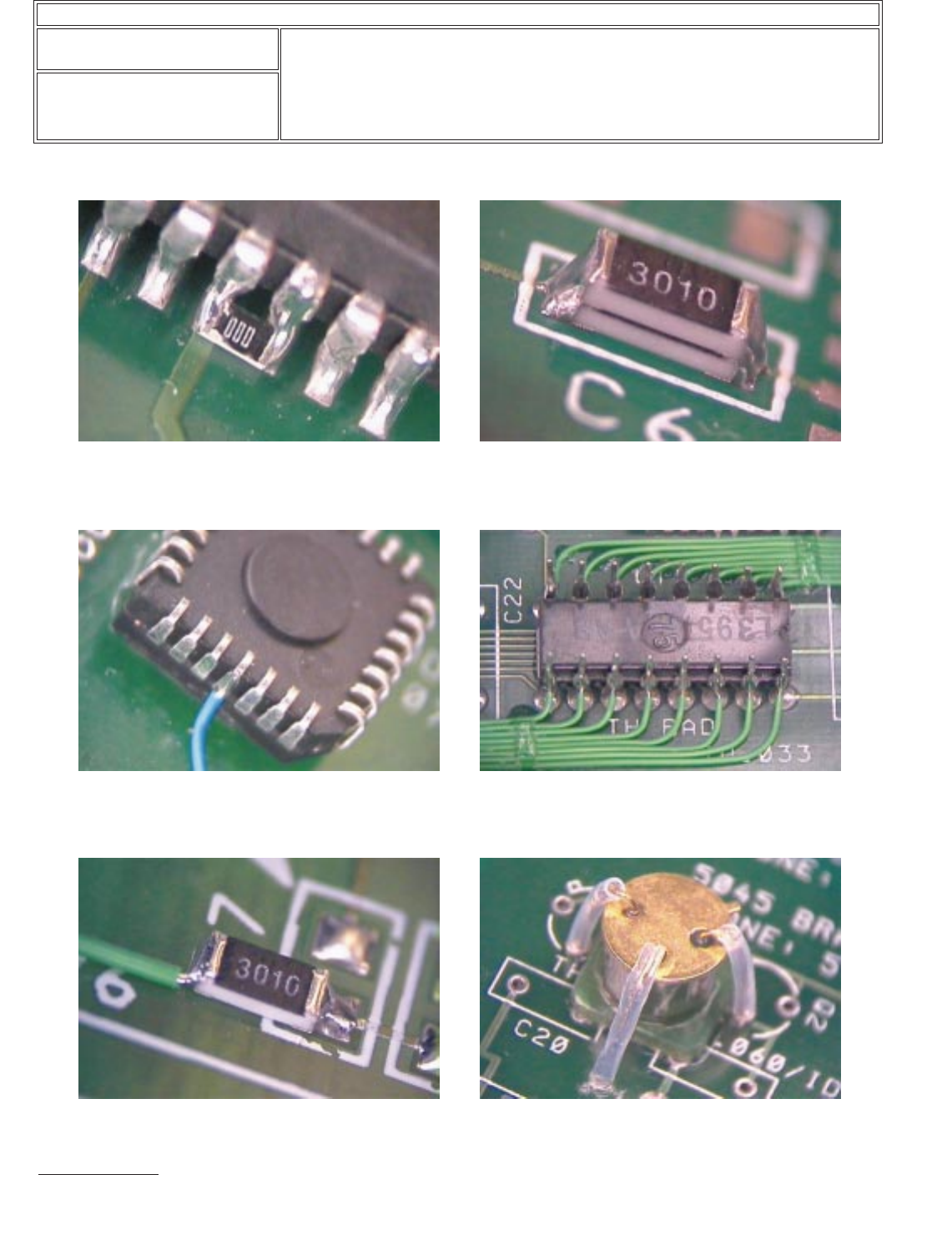
Component Modification Examples (continued)
Figure 7 Chip component bridging leads of surface
mount component.
Figure 8 Chip component stacked onto another chip
component.
Figure 9
Acceptable
Surface mount component
mounted upside down with jumper wires attached.
Note: One lead is bent outward.
Figure 10 DIP component mounted upside down with
jumper wires attached.
Figure 11 Chip component mounted to one pad only. Figure 12 Radial lead component mounted upside
down. Note: Insulate leads to avoid contact with
component body.
IPC-7721A
Number: 6.3
Revision:
Date: 03/01
Subject: Component Modifications and Additions
Page4of4
Copyright Association Connecting Electronics Industries
Provided by IHS under license with IPC
Not for Resale
No reproduction or networking permitted without license from IHS
--``,``,-`-`,,`,,`,`,,`---
OUTLINE
This method is used to replace damaged or missing conductors on the flexible
printed wiring surface.
CAUTION
Flexible laminates come in a variety of materials, e.g., Mylar®, Teflon®, and Kap-
ton®. These laminates are easily damaged during repair, if correct procedures are
not used.
REFERENCES
2.1 Handling Electronic Assemblies
2.2 Cleaning
TOOLS & MATERIALS
Dental Mixing Slab
Scalpel Blade
Pumice Impregnated Wheel
Dental Tool (Carver)
Dental Tool (Chisel)
Soldering Iron
Isopropyl Alcohol
Acid Brush
Oven
Scalpel
Microscope
Rotary Bristle Brush
Tweezers
Orangewood Stick
Soldering Iron Tip
Lint-Free Tissue
Silicone Resin
Amber Colored Polyimide Film
PROCEDURE
1. After the damaged area has been isolated, mark the area of the laminate that is
to be removed.
NOTE
Only enough laminate should be removed to expose the needed work area.
2. Support the flexible laminate with a flat, smooth surface such as a dental mixing
slab or a piece of stainless steel. A firm base will keep the assembly from mov-
ing while repairing the damaged area.
WARNING
Do not apply lateral pressure to the scalpel. The blade could snap and cause
personal injury.
To ensure personnel safety and prevent workpiece damage, spot tools under the
microscope in the work area before looking through the microscope.
CAUTION
Excessive pressure with a removal tool can cause additional damage to the lami-
nate.
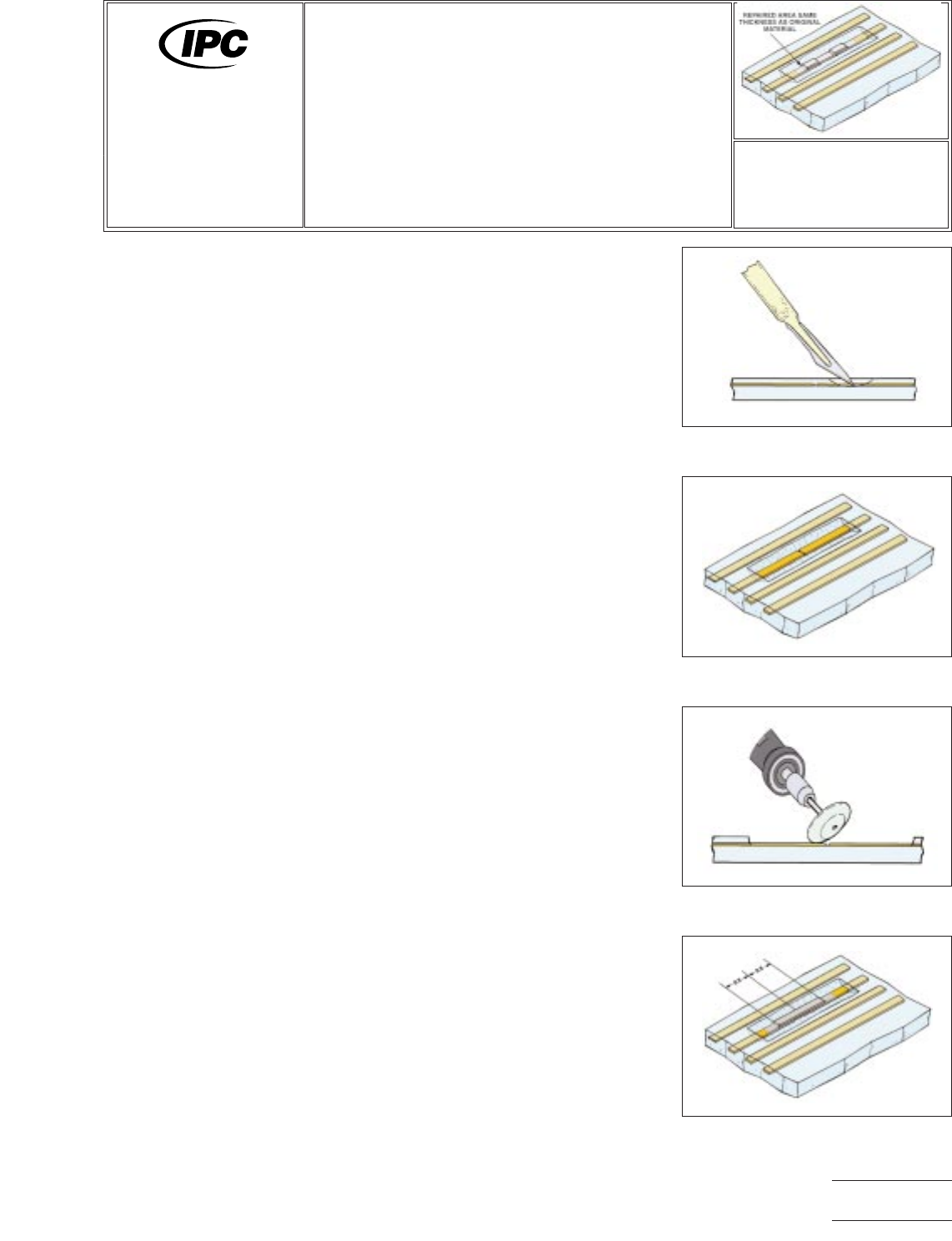
Figure 1 Laminate removal.
Figure 2 Laminate removed.
Figure 3 Adhesive removal.
Figure 4 Conductor hairline crack
repair.
7721A
Repair and
Modification of
Printed Boards and
Electronic Assemblies
Revision:
Date: 10/03
Flexible Conductor Repair
Number: 7.1.1
Product Class: F
Skill Level: Expert
Level of Conformance: Medium
Material in this manual was voluntarily established by Technical Committees of IPC. This material is advisory only and its use
or adaptation is entirely voluntary. IPC disclaims all liability of any kind as to the use, application, or adaptation of this material.
Users are also wholly responsible for protecting themselves against all claims or liabilities for patent infringement. Equipment
referenced is for the convenience of the user and does not imply endorsement by IPC.
Page1of4
Copyright Association Connecting Electronics Industries
Provided by IHS under license with IPC
Not for Resale
No reproduction or networking permitted without license from IHS
--``,``,-`-`,,`,,`,`,,`---