00198354-01_AI_Loc2_Fixed_Table_en.pdf - 第5页
Assembly Instructions E by SIPLACE Location 2 Fixed Table 04/2017 1 Introduction 1.1 Safety Instructions 5 1 Introduction This manual describes the "Loc2 Fixed Table (Single Side -> Double Side) " for E by S…
4
Table of Contents Assembly Instructions E by SIPLACE
Location 2 Fixed Table 04/2017

Assembly Instructions E by SIPLACE
Location 2 Fixed Table 04/2017
1 Introduction
1.1 Safety Instructions
5
1 Introduction
This manual describes the "Loc2 Fixed Table (Single Side -> Double Side) " for E by SIPLACE®
machines.
1.1 Safety Instructions
DANGER
Nonobservance of these safety instructions may cause injury to personnel and dam-
age to the machine!
► Please observe the safety instructions in the user manual of the relevant machine
for all work!
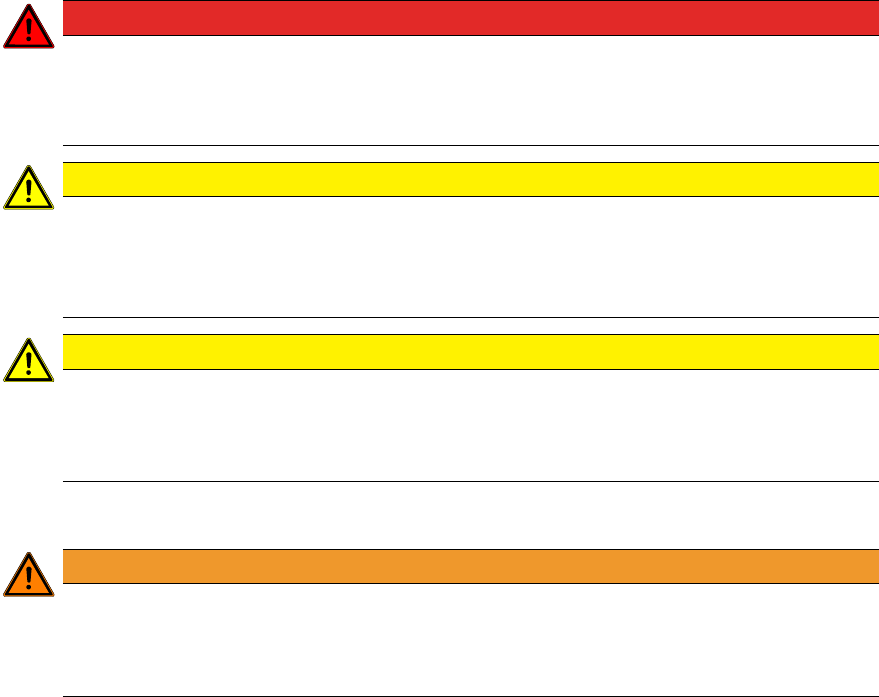
1.1.1 Conventions for the use of safety instructions
This manual contains notes that must be observed to guarantee your personal safety and to avoid
damage to equipment. These notes are highlighted by warning triangles and are indicated as fol-
lows according to the level of risk:
DANGER
Definition
For the purposes of this manual, this indicates that fatal or severe injuries or considerable
damage to property will occur if this hazard warning is not observed.
WARNING
Definition
For the purposes of this manual, this indicates that fatal or severe injuries or considerable
damage to equipment may occur if these warning instructions are not followed.
CAUTION
Definition
For the purposes of this manual, this indicates that minor injuries or damage to property
may occur if this caution is not observed.
NOTICE
Definition
For the purposes of this manual, this note provides information about the product or indic-
ates a part of the manual that requires particular attention.
1 Introduction
1.1 Safety Instructions
Assembly Instructions E by SIPLACE
Location 2 Fixed Table 04/2017
6
1.1.2 Safety Instructions for Working with Strong Magnetic Fields
DANGER
Strong permanent magnet fields
Fatal hazard: persons with active implants (e.g. pacemakers, defibrillators, insulin pumps
etc.) are at risk from strong permanent magnetic fields inside the machine.
Persons at risk should avoid the immediate vicinity of the machine.
CAUTION
Danger of crushing
Danger of crushing for persons with passive metal implants (e.g. plates, screws).
► Do not reach or lean over into the machine when the protective covers are open.
► Do not bring any metal objects into the hazard area.
CAUTION
Strong permanent magnet fields
There is a risk that the strong magnetic fields could corrupt data on data media or check
cards.
► Keep sensitive data supports away from the permanent magnets.
1.1.3 Safety Instructions for the Power Supply
WARNING
Hazardous Voltages!
The machine is supplied with 3x400V~ (or. 3x204V~ / 3 x 220V~ / 3 x 230V~ / 3 x
380V~ / 3x415V~) ± 5%, 50/60Hz mains voltages.
► Observe the safety instructions in the user manual during all service work!
●
This means that some parts of the system carry potentially lethal voltages - even when
switched off at the main power switch.
●
Incorrect handling of the placement system can therefore result in fatal injuries, severe injuries
or considerable damage to equipment.
●
Measurements and maintenance work must always be carried out by appropriately qualified
personnel.
●
Always follow the applicable accident prevention and DIN regulations (particularly DIN EN 60
204, part 1) or the regulations specific to your country.
●
Before starting any maintenance work, switch the machine off at the main switch and discon-
nect it from the main power supply.
●
Always secure the machine against unauthorized reactivation. If these instructions are not fol-
lowed, you may be able to touch live parts, which could result in fatal or severe injuries.
Maintaining, Installing or Removing Assemblies
► End all placement operations on the machine.
► Shut down the Windows operating system correctly, otherwise problems may occur when re-
starting or data may be lost.
► Switch the machine off at the main switch.
► Disconnect the machine from the main power supply.
► Switch off the machine and attach warnings signs to indicate that service work is in progress.