00197733-01_VD_605_04_DE_EN.pdf - 第14页
Station Software 60 5.04 / Version D escription Ausgabe 04/ 2015 Edition 14 6.2 "ROC" for Readi ng Out the Confi guration Data of the Station The "ROC" tool (Readout Stat ion Configuration) is u sed t…

Station Software 605.04 / Version Description Ausgabe 04/2015 Edition
13
6 Service Tools
6.1 Automatic Error Report (Bug Report)
The "BugReporter" tool is used to automatically save all the data required for debugging in an error
report (bug report) each time the station is shut down. The "BugReporter" tool must be activated to
do this.
Activating the "BugReporter" tool:
► Double-click the BugReporter_Autrun_ON.reg file in the folder C:\WinBO folder.
► Then confirm the two dialog boxes which appear by clicking OK.
Deactivating the "BugReporter" tool:
► Double-click the BugReporter_Autrun_OFF.reg filed in the folder C:\WinBO folder.
► Then confirm the two dialog boxes which appear by clicking OK.
After the "BugReporter" tool has been activated, the "BugReporter" tool dialog box appears
automatically each time that the station is shut down. It is not possible to make any entries. The
fields are completed automatically.
The current error report is stored under C:\BugReport\Latest. Previous error reports are stored
under C:\BugReport\Archive. Since the Latest and Archive folders also contain the error reports
created manually by pressing ALT + CTRL + F10, the automatically generated error reports are
indicated by AutoLog_xxxxxxxxxx_x.zip in the file name. An error report can comprise several
files. If this is the case, the number in the file name is incremented automatically (e.g.
AutoLog_xxxxxxxxxx_2.zip).
6.1.1 Restrictions
When the "BugReporter" is activated, it may take up to 3 minutes longer to shut down the station.
Station Software 605.04 / Version Description Ausgabe 04/2015 Edition
14
6.2 "ROC" for Reading Out the Configuration Data of the Station
The "ROC" tool (Readout Station Configuration) is used to optimize the remote service (e.g. for
trouble shooting and compatibility checks).
The following information can be read out by the tool:
– Operation system (version, build, service pack)
– Language Pack
– Station software (version, release, build, patch, service pack, hotfix)
– Version of the firmware of the components which are able to download from SITEST (e.g. axis
cards, vision, pcb transport, cameras, WPC, feeder table)
– Machine identification
– Machine typ (e.g. D1 machine)
– IP addresses
– Head configuration
– SIPLACE options (e.g. nozzle changer, vacuum pump, high components, whispering)
Start the tool as described:
► Stop the machine.
► Change to the desktop.
► Start the ROC.exe application from the desktop.
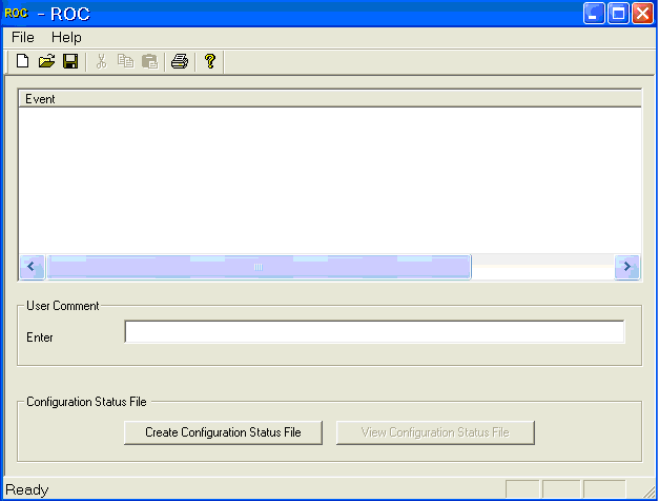
The following dialog is displayed:
Figure 6-1: "ROC" dialog
► Click on the Create Configuration Status File button.
The configuration data is written to the ConfigStatus.xml file.
Station Software 605.04 / Version Description Ausgabe 04/2015 Edition
15
6.2.1 Restrictions
► The application is only installed on the station computer.
► The application is a stand-alone application and is not integrated into the station software.
► The machine must be stopped when reading out the configuration data.
► The line engineer needs the service password to change to the desktop.