00197733-01_VD_605_04_DE_EN.pdf - 第18页
Station Software 60 5.04 / Version D escription Ausgabe 04/ 2015 Edition 18 6.3.2.2 Stopping EVA ► Close the measurem ent by stopping E VA. Stop EVA as follows: ► Copy the ConfigInStop.xml fil e from the C: \ EVA \ Data …
Station Software 605.04 / Version Description Ausgabe 04/2015 Edition
17
6.3.2 EVA Running under Station Software 605
6.3.2.1 Activating EVA
► Change to the operating system and start Explorer.
Activate EVA as follows:
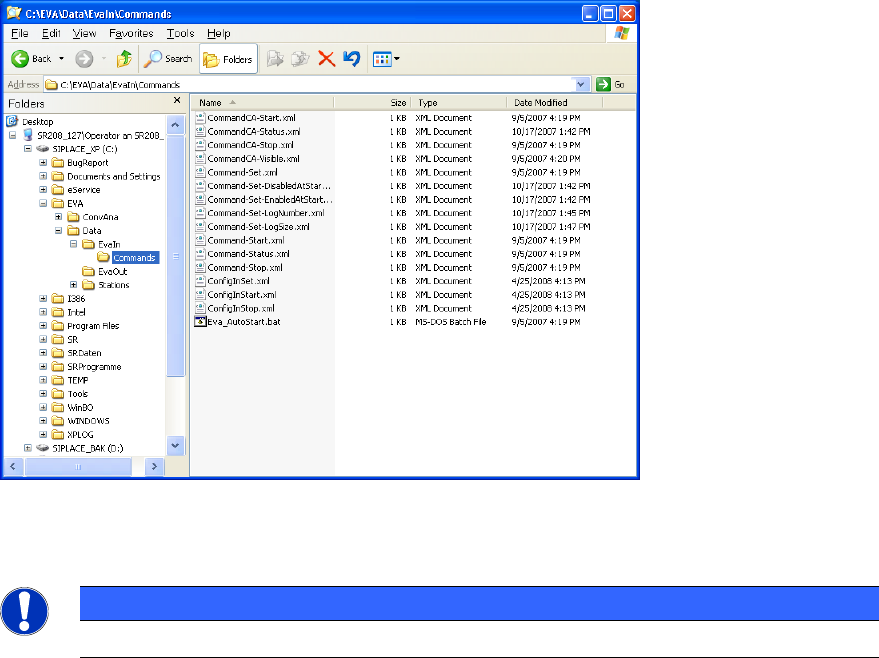
► Copy the ConfigInSet.xml file from the C:\EVA\Data\EvaIn\Commands directory into the
C:\EVA\Data\EvaIn directory.
Rename the file to ConfigIn.xml. One second later the file is recognized by the system and
disappears.
► Always stop EVA before you start a new measurement (several boards).
► Copy the ConfigInStop.xml file from the C:\EVA\Data\EvaIn\Commands directory into the
C:\EVA\Data\EvaIn directory.
Rename the file to ConfigIn.xml. One second later the file is recognized by the system and
disappears.
► Copy the ConfigInStart.xml file from the C:\EVA\Data\EvaIn\Commands directory into the
C:\EVA\Data\EvaIn directory.
Rename the file to ConfigIn.xml. One second later the file is recognized by the system and
disappears.
EVA is now activated.
Figure 6-2: Directory for XML files
Now you can start the production of 1 to n boards for a measurement in the main view.
NOTICE
If you reboot the station EVA is deactivated and needs to be reactivated.

Station Software 605.04 / Version Description Ausgabe 04/2015 Edition
18
6.3.2.2 Stopping EVA
► Close the measurement by stopping EVA.
Stop EVA as follows:
► Copy the ConfigInStop.xml file from the C:\EVA\Data\EvaIn\Commands directory into the
C:\EVA\Data\EvaIn directory.
Rename the file to ConfigIn.xml. One second later the file is recognized by the system and
disappears.
6.3.2.3 Saving Log Files
The log files (EventAnalyzer_*.log, BB-*.log) are automatically saved under
C:\EVA\Data\Stations\Local\Log\BB-*.log.
You can save the EventAnalyzer file(s) directly or via a bug report on a removable medium and
send it (them) to SIPLACE service.
For troubleshooting we recommend saving the EventAnalyzer file via bug report.
You can save the log file via bug report as follows:
► Start bug report (Crtl + Alt + F10).
► Mark the checkbox EVA.
► Activate the Generate Bug Report button.
► Finally, copy the bug report onto a removable medium.
Station Software 605.04 / Version Description Ausgabe 04/2015 Edition
19
7 Hardware Specifications
7.1 Supported Feeder Types
The following feeders are supported by the 605.04 software version:
Linear feeders
– LINEAR 10
– LINEAR 15
– LINEAR 30
– LINEAR 95
Tape feeders
– 8 mm S
– 3 x 8 mm S
– 3 x 8 mm S 0201
– 3 x 8 mm S 01005
– 12 mm S
– 16 mm S
– 24 mm S
– 32 mm S
– 44 mm S
– 56 mm S
– 72 mm S
– 88 mm S
– 3 x 8mm SL (Shutterless feeder)
Paper tape feeders
– 32 mm Paper
Bulkcase feeders
– BC AIR
Surf tape-feeders
– 8 mm ST
– 12 mm ST
– 16 mm ST
– 24 mm ST