00197042-04_SM_X-Serie-S_Customer_EN.pdf - 第125页
4 Electrics and control system 4.8 Replacing the CAN switch Service Manual SIPLACE X-Serie S 06/2019 125 4.8.2 CAN switch Fig.151: 03083844-02 LED [03083844-02] LED Color Status Signal name Description V6 GN/RD ON P20.1…
4 Electrics and control system
4.8 Replacing the CAN switch
124 Service Manual SIPLACE X-Serie S 06/2019
4.8.1 Setting the DIP Switch on the CAN Switch
► Disconnect the CAN switch from the voltage supply.
► Loosen the two screws fastening the upper section (side with label) and remove this upper section.
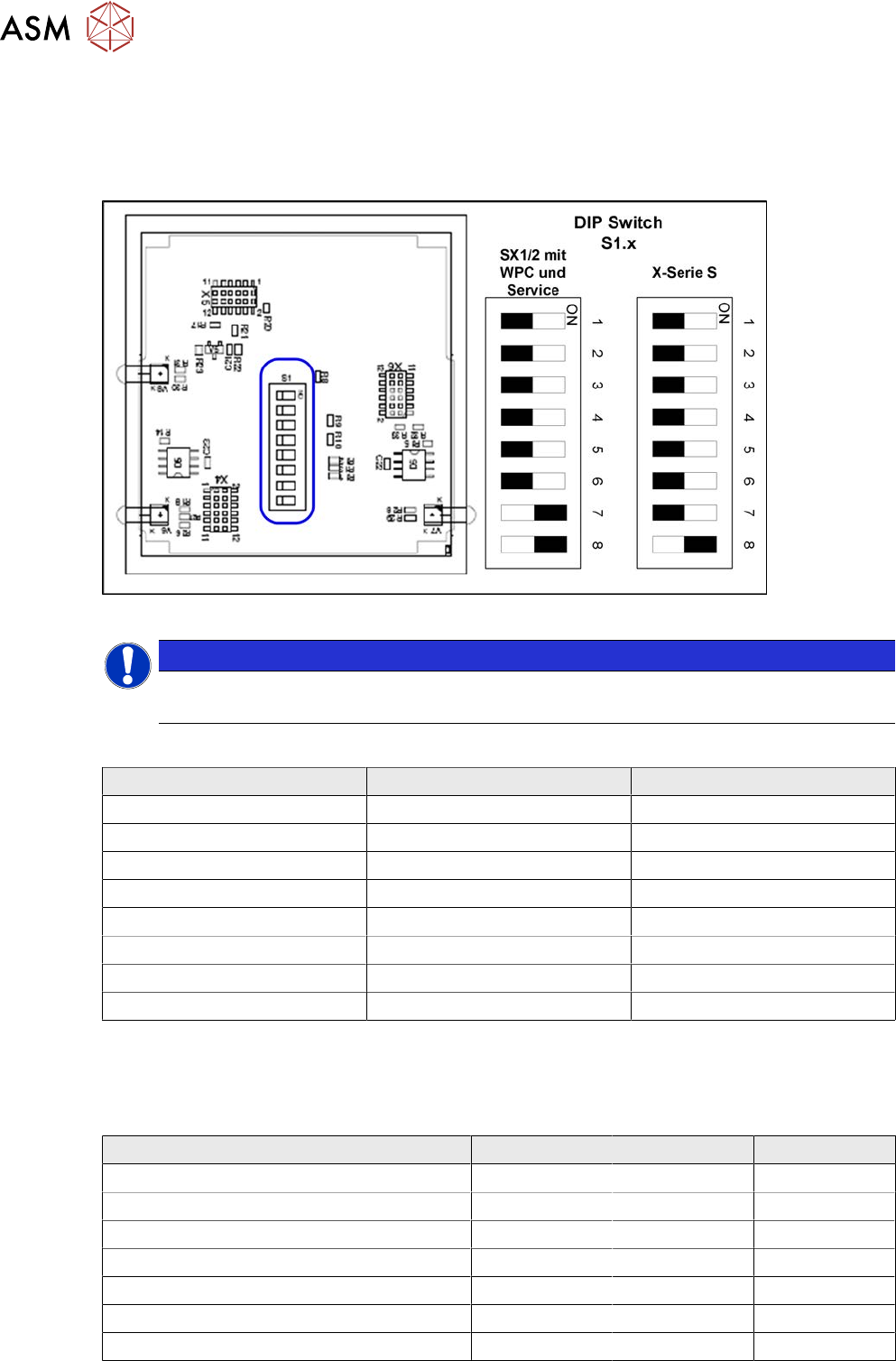
► Set the DIP switches:
Fig.150: Board in CAN switch [03083844-xx]
NOTICE
Default setting
The CAN switch is preset as a default for the SIPLACE X-Series S.
DIP switch S1 in CAN switch [03083844-xx]
DIP switch S1 ON OFF
S1.1 Test mode Normal mode
S1.2 500 kBaud 1 MBaud
S1.3 See table below See table below
S1.4 See table below See table below
S1.5 See table below See table below
S1.6 ASC Test ON ASC Test OFF
S1.7 120 Ohm CAN 1 No terminal resistor
S1.8 120 Ohm CAN 2 No terminal resistor
The DIP switch setting S1.3 to S1.5 is used to configure the display (LED) i.e the number of error
frames needed for the LED to change its status from green to red. The default setting is that the
LED turns red for each error frame received.
LED status error frames
LED status S1.3 S1.4 S1.5
1 error frame OFF OFF OFF
5 error frames/minute ON OFF OFF
10 error frames/minute OFF ON OFF
10 error frames/hour ON ON OFF
50 error frames/hour OFF OFF ON
100 error frames/hour ON OFF ON
500 error frames/hour OFF ON ON
4 Electrics and control system
4.8 Replacing the CAN switch
Service Manual SIPLACE X-Serie S 06/2019 125
4.8.2 CAN switch
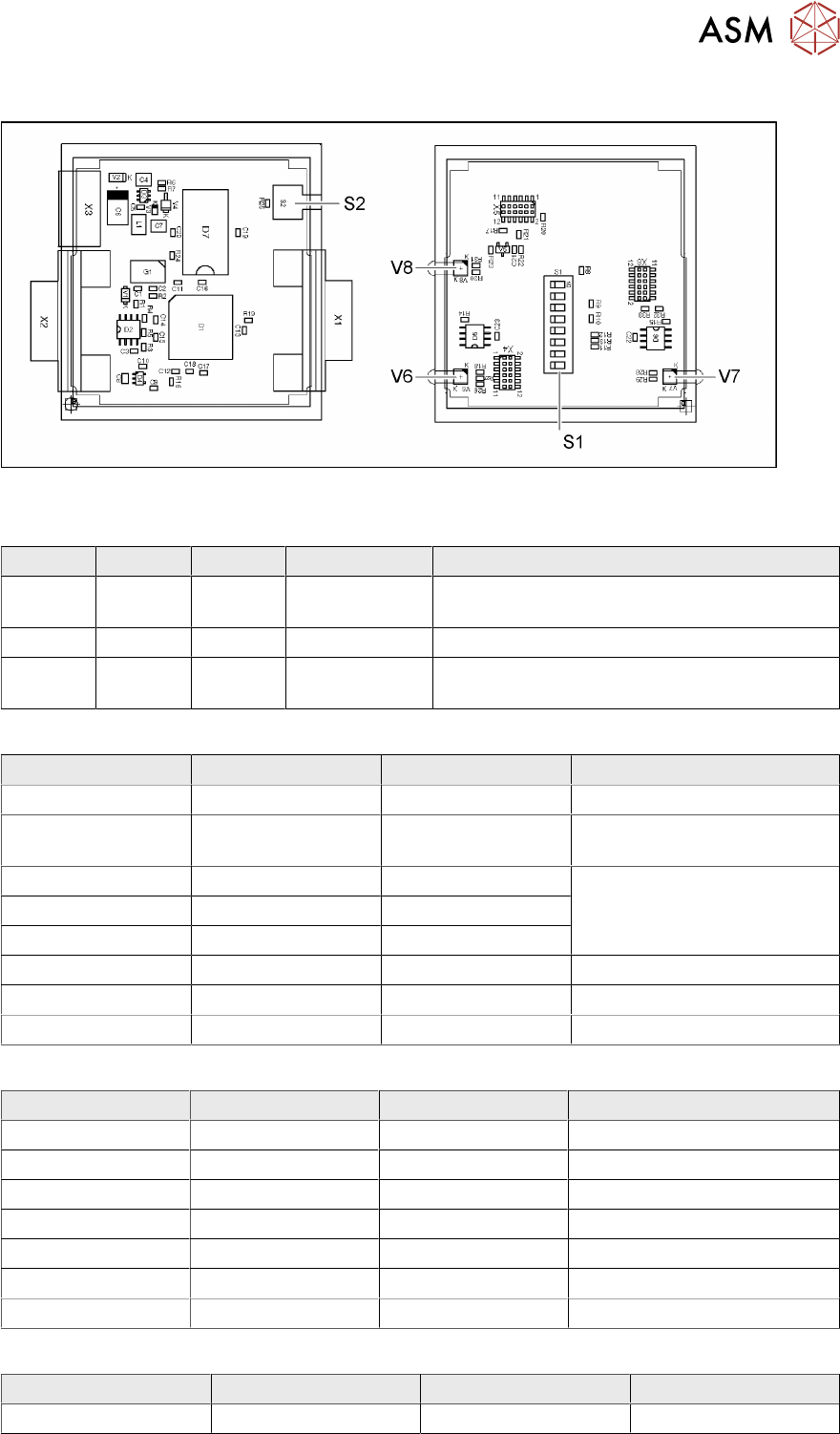
Fig.151: 03083844-02
LED [03083844-02]
LED Color Status Signal name Description
V6 GN/RD ON P20.12/
RST001_N
1 Mbit transmission rate:
GN OK, RD: error
V7 GN/RD ON P20.4/ALE 500 kbit transmission rate: GN OK, RD: error
V8 GN/RD ON P9./CC16IO Transmission rate:
GN 1Mbit, RD 500kbit
Dip switch S1 [03083844-02]
Switch Status Signal name Description
S1.1 OFF P5.0/AN0 ON: DIP test
S1.2 ON/OFF P5.1/AN1 ON: 500 kbit
OFF: 1 Mbit
S1.3 ON/OFF P5.2/AN2 See table Error Frame Limits
S1.4 ON/OFF P5.3/AN3
S1.5 ON/OFF P5.4/AN4
S1.6 OFF P5.5/AN5 OFF: no test, ON: testing
S1.7 ON CAN1RB 120ohms, CAN1
S1.8 ON CAN2RB 120ohms, CAN2
DIP switch S1.3 - S1.5 error frame limits [03083844-02]
S1.3 S1.4 S1.5 Function
OFF OFF OFF 1 error frame
ON OFF OFF 5 error frames/min
OFF ON OFF 10 error frames/min
ON ON OFF 10 error frames/h
OFF OFF ON 50 error frames/h
ON OFF ON 100 error frames/h
OFF ON ON 500 error frames/h
Button S2 [03083844-02]
Buttons Status Signal name Description
S2 When pressed SWITCH_TACT Reset error frame
4 Electrics and control system
4.9 Replacing the CAN interface CINX (from serial no. Hxxxx)
126 Service Manual SIPLACE X-Serie S 06/2019
4.9 Replacing the CAN interface CINX (from serial no. Hxxxx)
Parts, equipment and tools
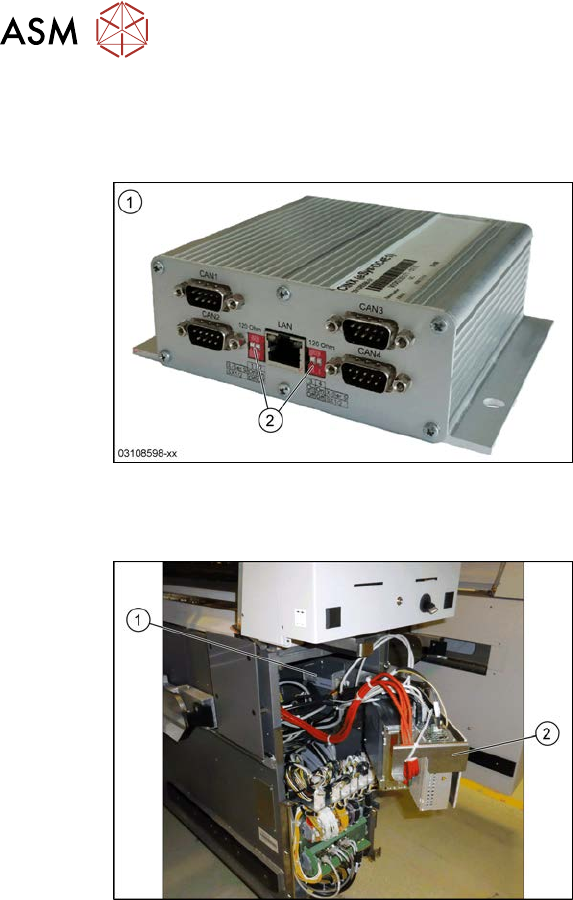
Fig.152: CAN interface CINX
1. CAN Interface CINX [03108598-xx]
2. DIP switches
Overview
Fig.153: CAN interface in the machine
The CAN interface(1) is located between
location 1 and 2, behind the BoxPC(2).
The CAN interface is fixed with Velcro to the
machine base.
The CAN interface also features four con-
nections for diagnostics.
Removal
► Switch off the machine, disconnect it from the power supply and secure it to prevent
unauthorized reactivation. Observe the instructions in section 1.2 "Preparatory work..." [}16].
► Lift off the keyboard.
► Dismantle the lower cover between locations 1 and 2.
► Lift the BoxPC slightly and swing it forwards.
► Unplug all electrical connections to the CAN interface. Mark their positions, to make clear as-
signment easier later on.
► Take the CAN interface out of the machine.
Installation
► Set the DIP switches. (see below).
► Further installation is performed by following the above instructions in the reverse order.