00197042-04_SM_X-Serie-S_Customer_EN.pdf - 第224页
7 Conveyor 7.4 Conveyor Drive 224 Service Manual SIPLACE X-Serie S 06/2019 Fig.287: Drive shaft and bracket 1. Drive shaft with drive bracket, washers, circlip and toothed belt 2. Motor fastening screws and shield con- …
7 Conveyor
7.4 Conveyor Drive
Service Manual SIPLACE X-Serie S 06/2019 223
Installation
► Follow the removal instructions in reverse order for installation. Also observe the following
instructions:
– Check the setting for the transmitter/receiver and correct if necessary
Setting and Correcting the Laser Light Barrier
– If you have loosened them:
Secure the four screws fastening the conveyor drive to the drive bracket with Loctite 241
and tighten these with a torque of 0.7 Nm.
– Replace any open cable ties.
Make sure that the cable ties and the heads of the cable ties do not rub against any parts
when you do this.
– Observe the installation instructions for the conveyor drive where necessary.
7.4.3 Replacing the drive shaft (conveyor drive)
Parts, equipment and tools
Fig.285: Drive shaft assembly
●
Drive shaft assembly SXa [03092349-
xx]
●
Bearing for hexagonal shaft SXa
(plastic bearing) – pack of 10
[03092024-xx]
●
Sealing varnish Loctite 241 [02101037-
xx]
Removal and installation
► Replacement of the drive shaft is follows the same procedure as replacement of the toothed
belt on the conveyor drive.
7.4.4 "Replacing the toothed belt (conveyor drive)" [}223]
7.4.4 Replacing the toothed belt (conveyor drive)
Parts, equipment and tools
●
Synchroflex toothed belt 6 AT3/150 [00355553-xx]
●
Bearing for hexagonal shaft SXa (plastic bearing) – pack of 10 [03092024-xx]
●
Sealing varnish Loctite 241 [02101037-xx]
Overview
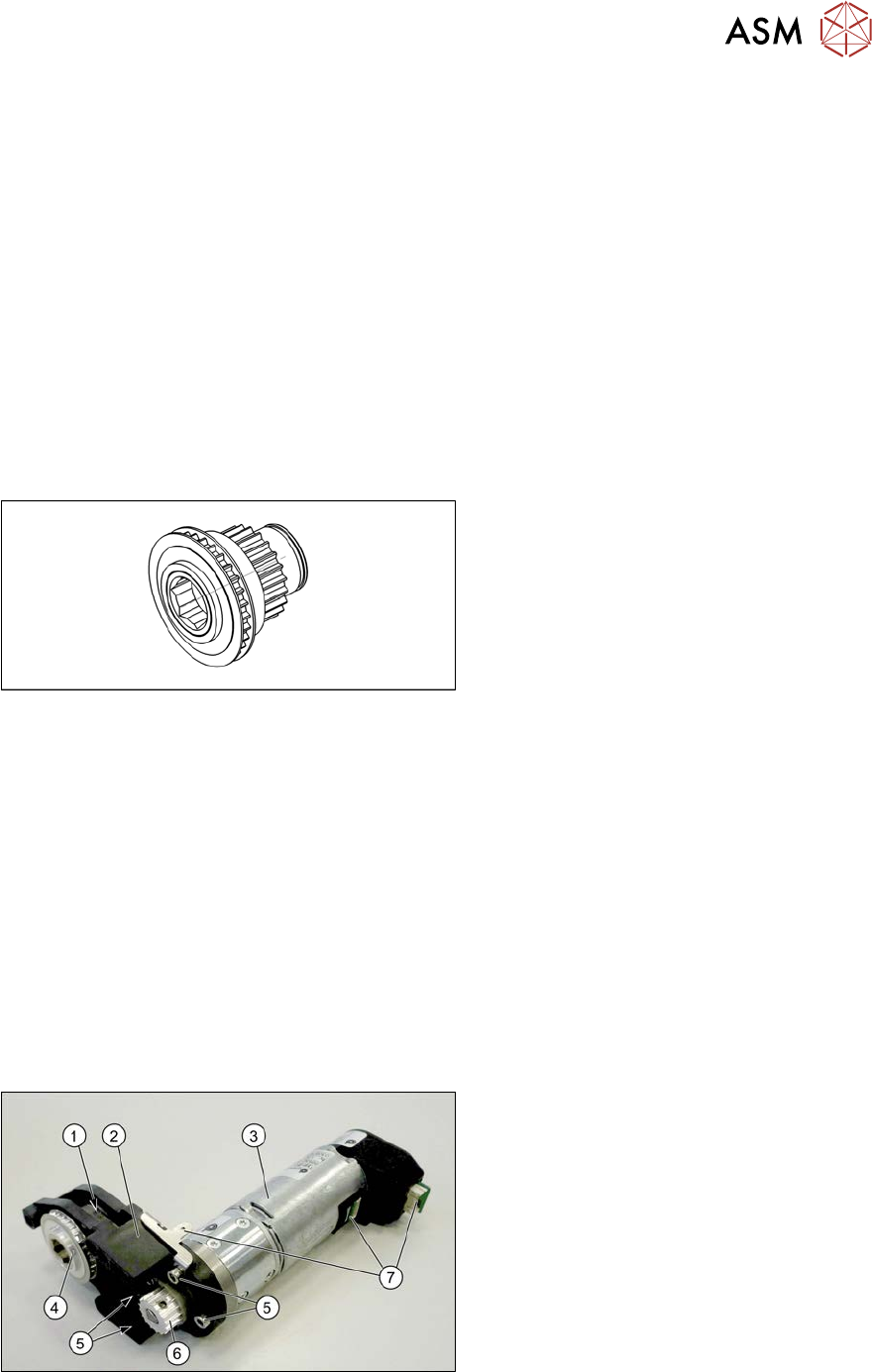
Fig.286: Conveyor drive
1. Toothed belt on conveyor drive
2. Drive bracket
3. Motor
4. Drive shaft
5. Four motor fastening screws in the
drive bracket
6. Motor shaft
7. Electrical connections (incl. shield con-
nection)
7 Conveyor
7.4 Conveyor Drive
224 Service Manual SIPLACE X-Serie S 06/2019
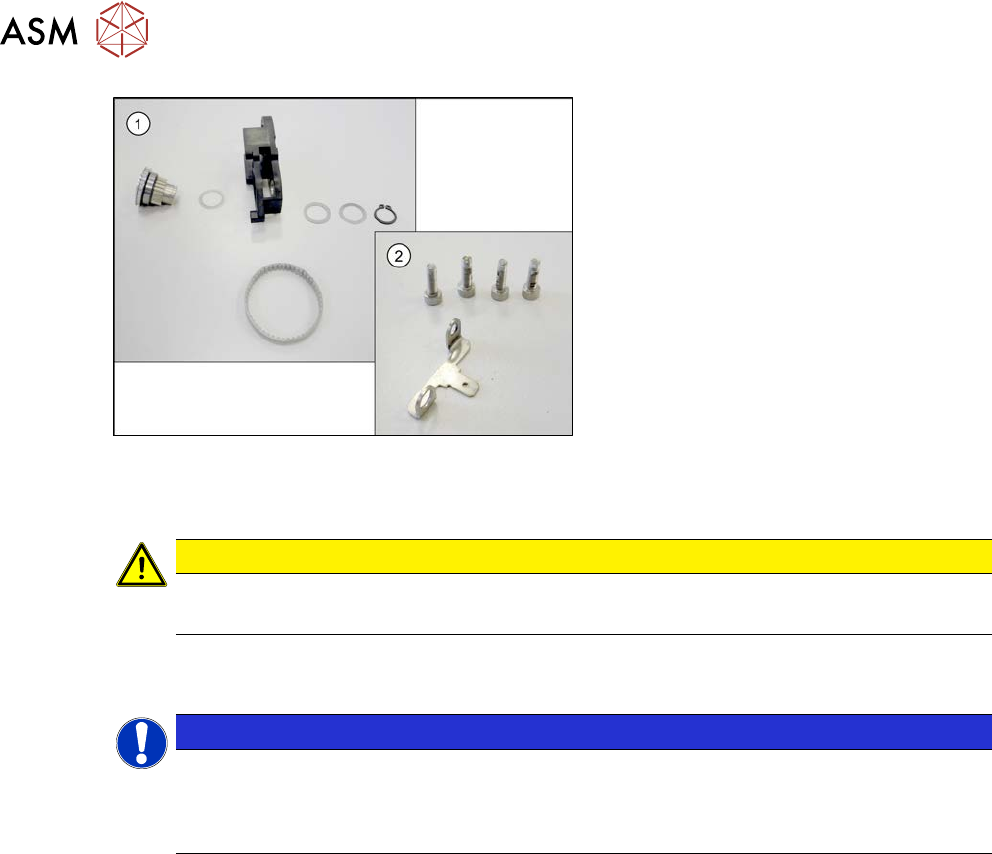
Fig.287: Drive shaft and bracket
1. Drive shaft with drive bracket, washers,
circlip and toothed belt
2. Motor fastening screws and shield con-
nection
Removal
CAUTION
Toothed belt
► Make sure that the toothed belt is not folded!
► Dismantle the conveyor drive. For more information, read section 7.4.1 "Replacing the con-
veyor drive" [}218].
NOTICE
Make a note of the order
You may want to make a note of the order in which the following parts are, to make it easier
to refit them later on. The number of washers may vary. Make sure that you fit the exact
number of these in the exact places.
► Open the circlip.
► Take off the washers.
► Pull the drive shaft out of the housing. You may need to apply slightly more force than usual to
remove the drive shaft.
► Remove the toothed belt.
Installation
► Follow the removal instructions in reverse order for installation. Also observe the following
instructions:
– Make sure that the toothed belt is not folded or otherwise damaged!
– Make sure that the toothed belt is not rubbed against anything.
– Tension the toothed belt with 10 to 15 Hz.
– Secure the four screws fastening the conveyor drive to the drive bracket with Loctite 241
and tighten these with a torque of 0.7 Nm.
– Replace any opened cable ties.
– Observe the installation instructions for the conveyor drive.
7 Conveyor
7.5 Width Adjustment, Clamps and Cylinder Unit
Service Manual SIPLACE X-Serie S 06/2019 225
7.5 Width Adjustment, Clamps and Cylinder Unit
7.5.1 Replacing the drive (width adjustment)
Parts, equipment and tools
●
Drive unit of width adjustment assembly SXa [03092543-xx]
●
If needed, bearing for hexagonal shaft SXa (plastic bearing) – pack of 10 [03092024-xx]
Overview
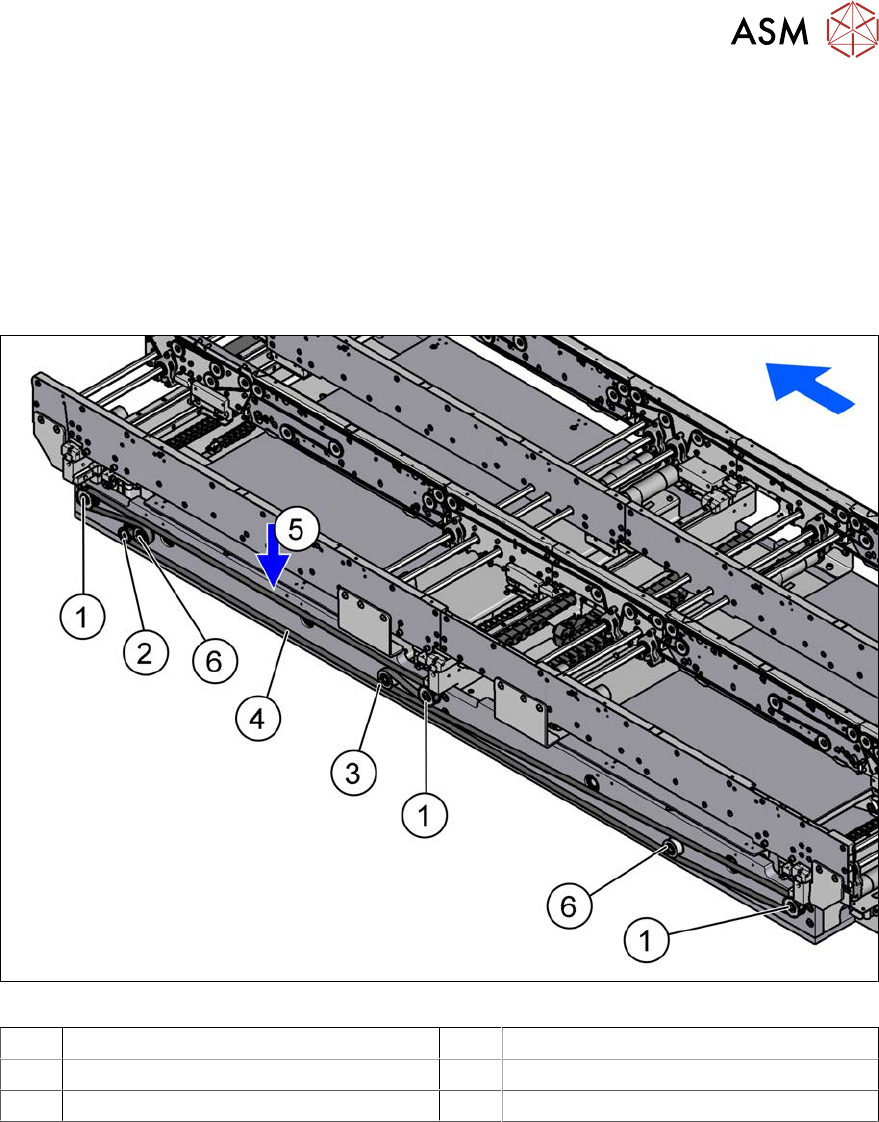
Fig.288: Overview of width adjustment
1 Cylinder units 2 Width adjustment drive
3 Movable idler pulley 4 Toothed belt of width adjustment
5 Measurement point for belt tension 6 Idler pulley
Removal
► Use the software to move the conveyor sides into a position which allows you best access. As
an alternative, you can loosen the clamps for the relevant sides in dual conveyors.
7.2 "Loosening the Conveyor Side Clamps" [}207]
► Switch off the machine, disconnect it from the power supply and secure it to prevent
unauthorized reactivation.
1.2 "Preparatory work..." [}16]
► Move the cylinder units as far as the end stop on one side of the conveyor. To do this, move
the toothed belt of the width adjustment.
► Dismantle the lifting table plate over the width adjustment drive.
7.3.1 "Replacing the lifting table plate" [}212]
► Dismantle the cover over the conveyor control at the movable idler pulley.
► Loosen the movable idler pulleyfor the width adjustment toothed belt (SW10).