00197042-04_SM_X-Serie-S_Customer_EN.pdf - 第241页
7 Conveyor 7.5 Width Adjustment, Clamps and Cylinder Unit Service Manual SIPLACE X-Serie S 06/2019 241 Troubleshooting NOTICE Insufficient clamping power If the conveyor side clamps are no longer clamping enough, this co…
7 Conveyor
7.5 Width Adjustment, Clamps and Cylinder Unit
240 Service Manual SIPLACE X-Serie S 06/2019
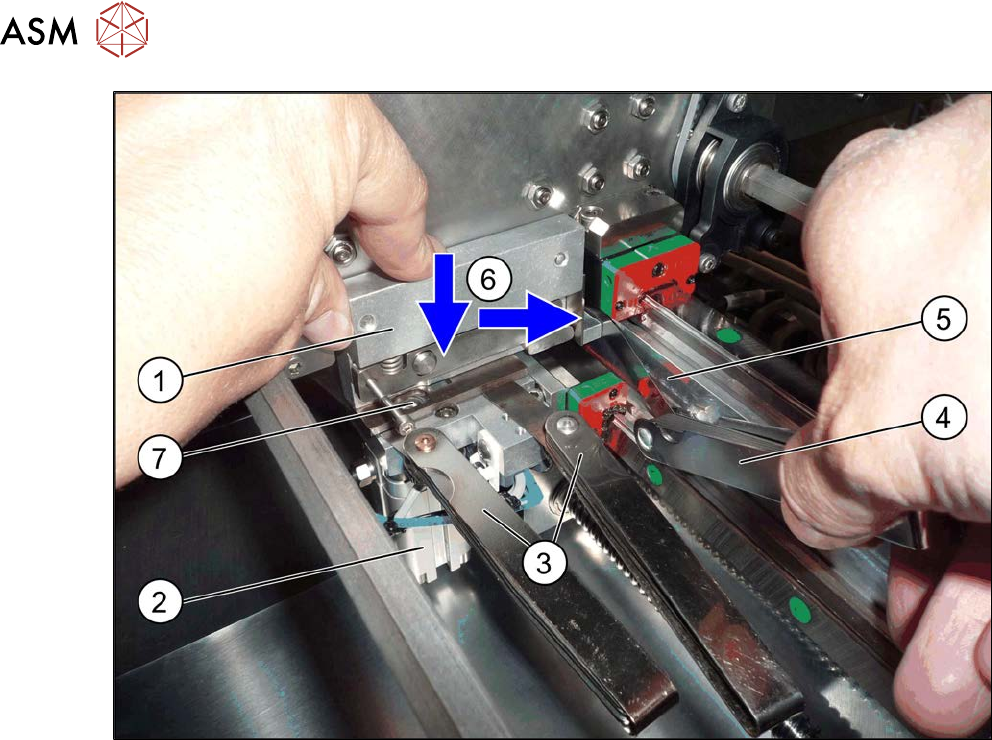
Fig.307: Fitting the clamp
► Place a 0.3 mm feeler gauge (3) between the clamp (1) and cylinder unit (2).
Two feeler gauges are used in the diagram for more clarity.
The feeler gauge should not lie over the parallel pin(7).
► Place a 0.15 mm(4) feeler gauge between the clamps and the clamping surface(5).
► (6) Press the clamps at the same time towards the cylinder unit and towards the clamping sur-
face and then tighten the clamps with a torque of 8Nm.
► Check the distance under the clamps with a 0.25 and 0.3mm feeler gauge. The 0.25 mm
feeler gauge should just have enough room while the 0.3 mm one should not have room to
move.
► Check the distance between the clamps and the clamping surface with a 0.1 and 0.15mm
feeler gauge. The 0.1 mm feeler gauge should just have enough room while the 0.15 mm one
should not have room to move.
► Follow the removal instructions in reverse order for further installation. Also observe the fol-
lowing instructions:
– Check the input/output functions in the software to make sure that the adjustment units
with all sensors are recognized for all conveyor sides.
– Perform calibration of the fixed conveyor sides on the left and right. If you do not, not all
conveyor sides will be calibrated (see7.10.3 "Calibrating the Conveyor Rails" [}301]).
This calibration is needed to ensure that the conveyor sides are positioned correctly.
7 Conveyor
7.5 Width Adjustment, Clamps and Cylinder Unit
Service Manual SIPLACE X-Serie S 06/2019 241
Troubleshooting
NOTICE
Insufficient clamping power
If the conveyor side clamps are no longer clamping enough, this could be because the con-
veyor side has been moved without the brakes (clamps) being released. In this case, pro-
ceed as follows:
► Remove the clamping unit and check its friction surface. If this is no longer rough,
clean the surface with "universal sanding cleaner". Carefully remove any aluminum
shavings on the friction surface.
► Readjust the clamps as described above and then tighten the screws with a torque of
8 Nm.
► If you are unable to set the parallelism of the conveyor sides with the width adjust-
ment, inform your SIPLACE service team.
7 Conveyor
7.5 Width Adjustment, Clamps and Cylinder Unit
242 Service Manual SIPLACE X-Serie S 06/2019
7.5.11 Replacing the Clamping Unit (Version 2) (DC Only)
NOTICE
Old/new clamping unit
A combination of old and new clamping units is possible.
Before installing a new clamping unit (version 2), make sure that your machine has
SW706.1 SP1 with Hotfix 4 or higher.
Parts, equipment and tools
Select the clamping unit needed:
Side (DC) Input area and center Output area
A Clamping unit A1 SXa [03092996Sxx] Clamping unit A2 SXa [03092973Sxx]
B Clamping unit B1 SXa [03092453Sxx] Clamping unit B2 SXa [03092891Sxx]
C Clamping unit C1 SXa [03092901Sxx] Clamping unit C2 SXa [03092712Sxx]
D Clamping unit D1 SXa [03092989Sxx] Clamping unit D2 SXa [03092997Sxx]
●
1 feeler gauge [00094020-xx]
●
1 feeler gauge 0.3mm
●
Torque wrench (2–25Nm) [00376625‑xx]
Overview
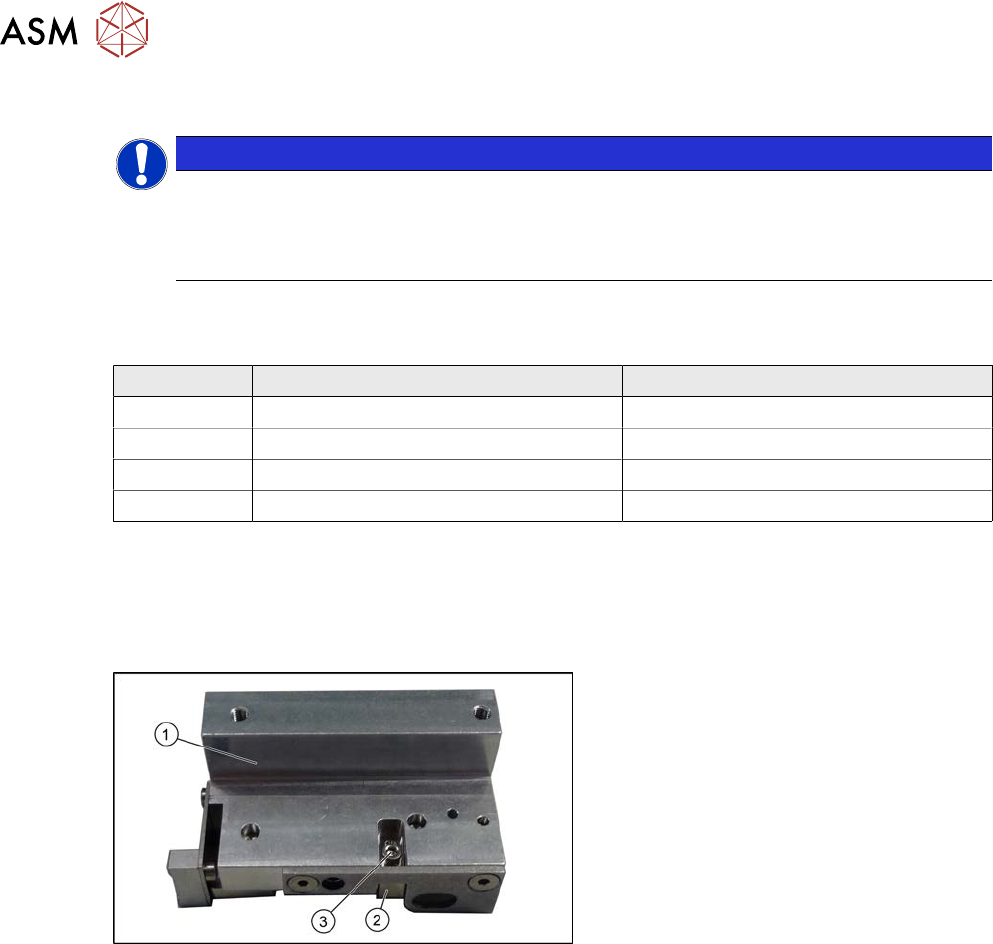
Fig.308: Clamp version 2
Version 2
1. Clamp
2. Sensor switch
3. Fastening screw for sensor switch
Removal
► Use the software to move the conveyor sides into a position which allows you best access.
The sides must move freely. Fix all three clamping units into place with one screw each, so
that the clamp is not able to exert any force onto the conveyor side.
7.2 "Loosening the Conveyor Side Clamps" [}207]
► Switch off the machine, disconnect it from the power supply and secure it to prevent
unauthorized reactivation.
1.2 "Preparatory work..." [}16]