00197042-04_SM_X-Serie-S_Customer_EN.pdf - 第404页
9 Component feeding 9.6 Smart Pin Support 404 Service Manual SIPLACE X-Serie S 06/2019 9.6.5 Replacing the control board Parts, equipment and tools ● Control board SPS [03089614Sxx] ● Assembly instructions "Smart Pi…
9 Component feeding
9.6 Smart Pin Support
Service Manual SIPLACE X-Serie S 06/2019 403
9.6.4 Replacing the linear guide
Parts, equipment and tools
●
SPS linear guide [03084323Sxx]
●
Assembly instructions "Smart Pin Support" for SIPLACE X‑SeriesS [DEEN:00197394‑xx]
Overview
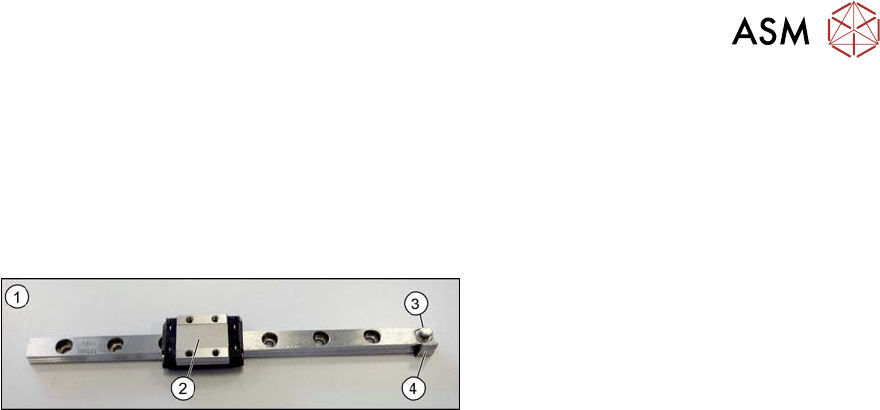
Fig.553: Linear guide
1. Linear guide
2. Trolley
3. Eyelet for hooking up the tension spring
4. Switch tag
Removal
► Switch off the machine, disconnect it from the power supply and secure it to prevent
unauthorized reactivation.
1.2 "Preparatory work..." [}16]
► Remove the pin picker. For more information, read section 9.6.1 "Replacing the Pin Picker
Assembly" [}399].
► Remove the front section of the cylinder. For more information, read section 9.6.2 "Replacing
the front section of the cylinder" [}400].
► Remove the back section of the cylinder. For more information, read section 9.6.3 "Replacing
the back section of the cylinder" [}402].
► Remove the linear guide.
Installation
► Follow the removal instructions in reverse order for installation. Also observe the following
instructions:
– When you screw in the linear guide carriage, press it to the left, against the stop edge, so
that it lies flush against the base plate.
– Check the linear guide travel path. The linear guide must be easy to move along the whole
length.
– Check that the sensors switch properly. The switch tag of the linear guide must have ap-
prox. 1 mm space to the trolley.
9 Component feeding
9.6 Smart Pin Support
404 Service Manual SIPLACE X-Serie S 06/2019
9.6.5 Replacing the control board
Parts, equipment and tools
●
Control board SPS [03089614Sxx]
●
Assembly instructions "Smart Pin Support" for SIPLACE X‑SeriesS [DEEN:00197394‑xx]
Overview
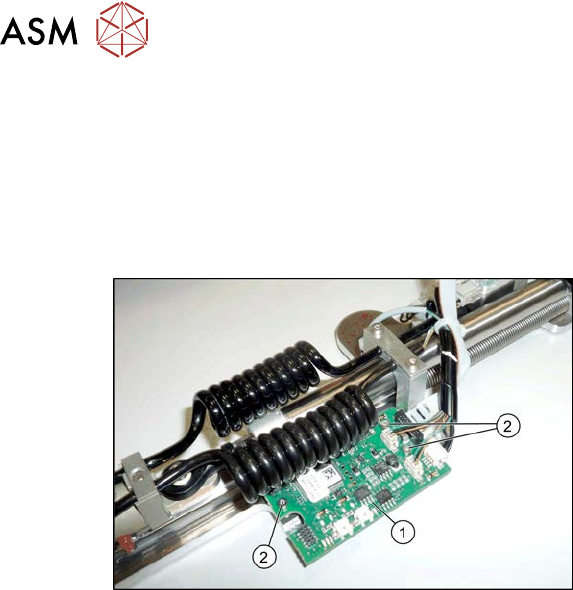
Fig.554: Control board
1. Control board
2. Three fastening screws for the control
board
Removal
► Switch off the machine, disconnect it from the power supply and secure it to prevent
unauthorized reactivation.
1.2 "Preparatory work..." [}16]
► Remove the pin picker. For more information, read section 9.6.1 "Replacing the Pin Picker
Assembly" [}399].
► Disconnect all electrical connections. Mark their positions, to make clear assignment easier
later on.
► Remove the three screws fastening the control board. Make sure that you do not lose the cor-
responding bushings on the back.
Installation
► Follow the removal instructions in reverse order for installation. Also observe the following
instructions:
– Perform a function check. Check whether the pin picker is recognized by the software and
also check the LEDs.
– See also 9.6.5.1 "Control board SPS" [}405]
9 Component feeding
9.6 Smart Pin Support
Service Manual SIPLACE X-Serie S 06/2019 405
9.6.5.1 Control board SPS
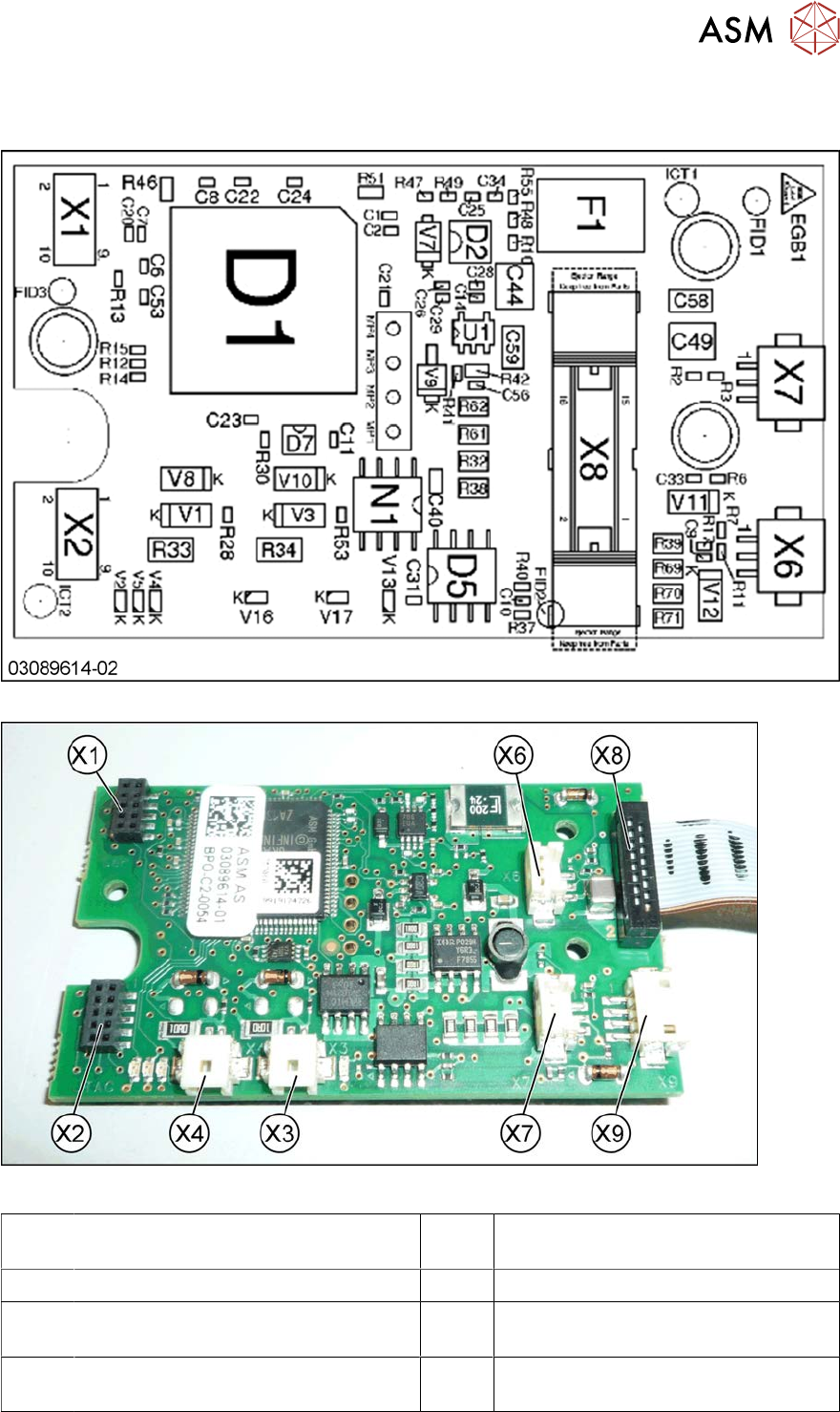
The control board SPS is fitted to the pin picker of the Smart Pin Support option.
Fig.555: Control board – board overview
Fig.556: Control board – connections [03089614-01]
X1,X2 Diagnosis / Test connector X3,X4 Diagnosis / Test connector (not used
in FS02)
X5 Magnet (rear side) X6 Proximity switch down
X7 Proximity switch up X8 Connection to head interface
(FS01: ribbon cable on the rear side)
X9 Valves lifting cylinder and cleaning
pulse
On the back of the board:
Power electromagnet connection