00197042-04_SM_X-Serie-S_Customer_EN.pdf - 第414页
9 Component feeding 9.6 Smart Pin Support 414 Service Manual SIPLACE X-Serie S 06/2019 9.6.13 Replacing the bottom sensor Parts, equipment and tools ● Inductive sensor assembly, bottom SPS [03090192Sxx] ● Assembly instru…
9 Component feeding
9.6 Smart Pin Support
Service Manual SIPLACE X-Serie S 06/2019 413
9.6.12 Replacing the top sensor
Parts, equipment and tools
●
Top sensor [03093273Sxx]
●
Assembly instructions "Smart Pin Support" for SIPLACE X‑SeriesS [DEEN:00197394‑xx]
Overview
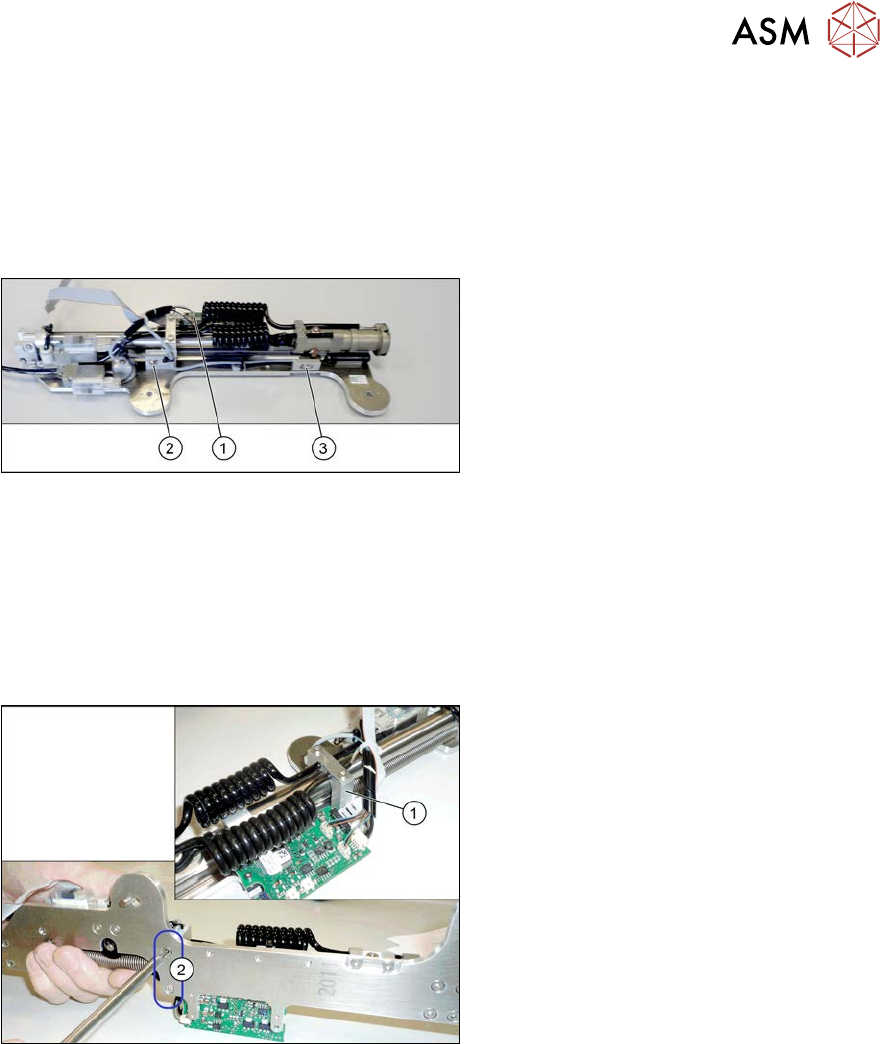
Fig.566: Sensors
1. Control board
2. Fastening screw for top sensor
3. Fastening screw for bottom sensor
Removal
► Switch off the machine, disconnect it from the power supply and secure it to prevent
unauthorized reactivation.
1.2 "Preparatory work..." [}16]
► Remove the pin picker. For more information, read section 9.6.1 "Replacing the Pin Picker
Assembly" [}399].
Fig.567: Screws fastening the guide
► Remove the two screws(2) fastening
the pneumatic cylinder guidance(1).
► Remove the screws holding the sensor.
► Unthread the sensor cable as far as the
board. Open the corresponding cable
ties to help you, if needed.
► Unplug the sensor cable from the
board. You may want to mark the posi-
tion to make clear assignment easier
later on.
Installation
► Follow the removal instructions in reverse order for installation. Also observe the following
instructions:
– Fasten the sensor in the center of the slot.
– Replace any opened cable ties.
9 Component feeding
9.6 Smart Pin Support
414 Service Manual SIPLACE X-Serie S 06/2019
9.6.13 Replacing the bottom sensor
Parts, equipment and tools
●
Inductive sensor assembly, bottom SPS [03090192Sxx]
●
Assembly instructions "Smart Pin Support" for SIPLACE X‑SeriesS [DEEN:00197394‑xx]
Overview
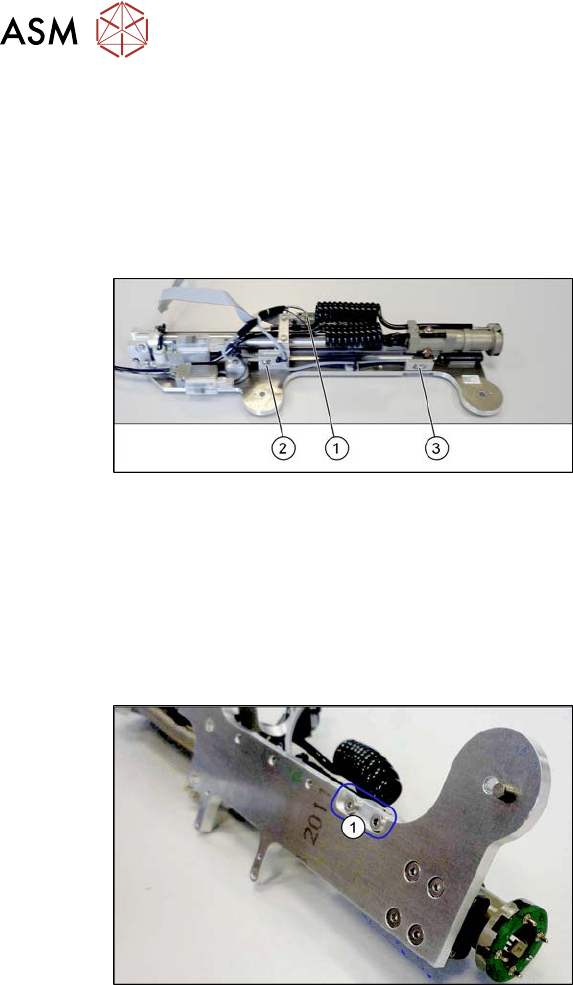
Fig.568: Sensors
1. Control board
2. Fastening screw for top sensor
3. Fastening screw for bottom sensor
Removal
► Switch off the machine, disconnect it from the power supply and secure it to prevent
unauthorized reactivation.
1.2 "Preparatory work..." [}16]
► Remove the pin picker. For more information, read section 9.6.1 "Replacing the Pin Picker
Assembly" [}399].
Fig.569: Screws fastening the sensor mount
► Remove the two screws(1) fastening
the sensor mount.
► Remove the screws holding the sensor.
► Unthread the sensor cable as far as the board. Open the corresponding cable ties to help you,
if needed.
► Unplug the sensor cable from the board. You may want to mark the position to make clear as-
signment easier later on.
Installation
► Follow the removal instructions in reverse order for installation. Also observe the following
instructions:
– Fasten the sensor in the center of the slot.
– Replace any opened cable ties.
9 Component feeding
9.6 Smart Pin Support
Service Manual SIPLACE X-Serie S 06/2019 415
9.6.14 Replacing the one-way restrictor
Parts, equipment and tools
●
One-way restrictor AS1201F-M3-04 [03088646-xx]
●
Assembly instructions "Smart Pin Support" for SIPLACE X‑SeriesS [DEEN:00197394‑xx]
Overview
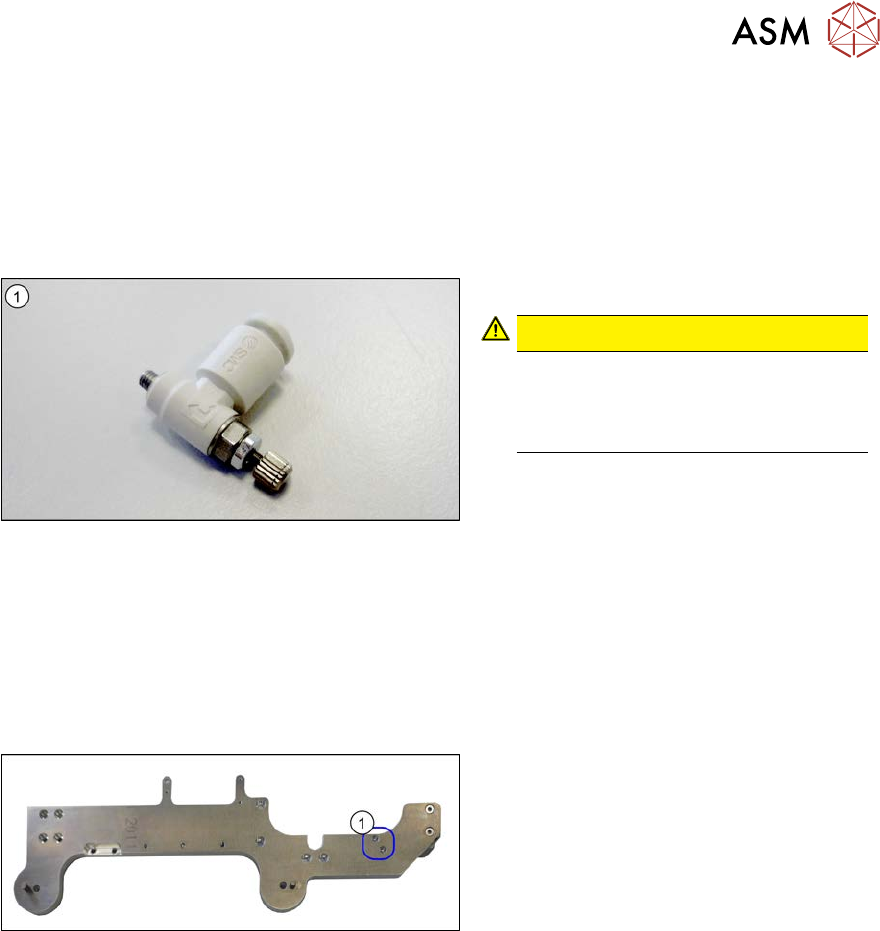
Fig.570: One-way restrictor
1. One-way restrictor
CAUTION!
The one-way restrictor is preset. Do
not change this setting!
If the setting is changed, you will need
to replace the one-way restrictor.
.
Removal
► Switch off the machine, disconnect it from the power supply and secure it to prevent
unauthorized reactivation.
1.2 "Preparatory work..." [}16]
► Remove the pin picker. For more information, read section 9.6.1 "Replacing the Pin Picker
Assembly" [}399].
Fig.571: Screws fastening the valve terminal
► Remove the two screws(1) fastening
the valve terminal. These are on the
back of the pin picker.
► Pull the pneumatic hose off the one-way restrictor.
► Unscrew and remove the one-way restrictor from the valve terminal.
Installation
► Follow the removal instructions in reverse order for installation.