00197042-04_SM_X-Serie-S_Customer_EN.pdf - 第64页
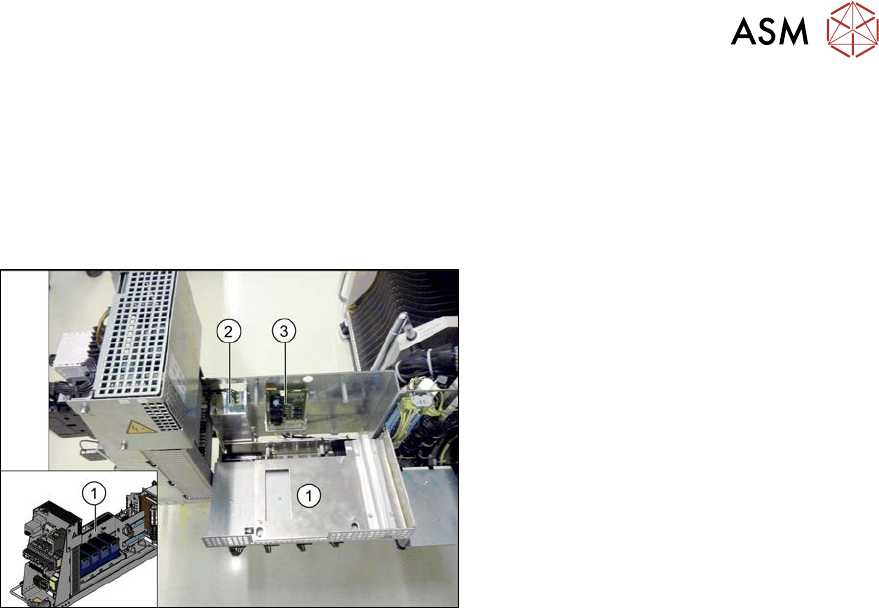
3 Power supply 3.4 Power supply and transformer module (up to serial number Gxxx) 64 Service Manual SIPLACE X-Serie S 06/2019 3.4.11 Replacing the line filter (Z1) Parts, equipment and tools ● Line filter for 3-phase sys…
3 Power supply
3.4 Power supply and transformer module (up to serial number Gxxx)
Service Manual SIPLACE X-Serie S 06/2019 63
3.4.10 Replacing the load add circuit (A4)
Parts, equipment and tools
●
FBG dyn. load add circuit intermediate cycle [03094585Sxx]
(replaces: LZS260/1000 [03061114-xx])
Overview
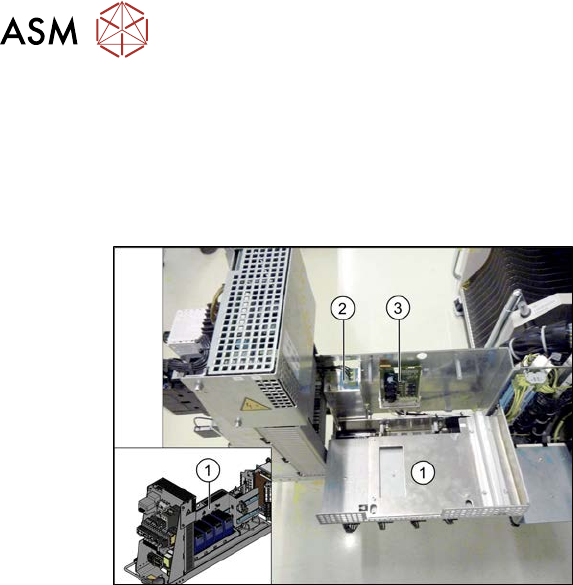
Fig.63: Overview of line filter and load add circuit
1. Cover
2. Line filter (Z1)
3. Load add circuit (A4)
Removal
► Switch off the machine, disconnect it from the power supply and secure it to prevent
unauthorized reactivation.
1.2 "Preparatory work..." [}16]
► Before you start working, check the power supply for absence of voltage and observe the
waiting times!
► Remove the screws fastening the cover and swing the cover towards the front. The AC/DC
converters are also fitted on the cover. These are swung away with the cover.
► Unplug all connections to the load add circuit. You might like to mark their positions to make
clear assignment easier later on.
► Remove the screws fastening the load add circuit and remove the load add circuit.
Installation
► Follow the removal instructions in reverse order for installation.
3 Power supply
3.4 Power supply and transformer module (up to serial number Gxxx)
64 Service Manual SIPLACE X-Serie S 06/2019
3.4.11 Replacing the line filter (Z1)
Parts, equipment and tools
●
Line filter for 3-phase systems 36A (Z1) [03078386-xx]
Overview
Fig.64: Overview of line filter and load add circuit
1. Cover
2. Line filter (Z1)
3. Load add circuit (A4)
Removal
► Switch off the machine, disconnect it from the power supply and secure it to prevent
unauthorized reactivation.
1.2 "Preparatory work..." [}16]
► Before you start working, check the power supply for absence of voltage and observe the
waiting times!
► Remove the screws fastening the cover and swing the cover towards the front. The AC/DC
converters are also fitted on the cover. These are swung away with the cover.
► Unplug all connections to the line filter. You might like to mark their positions to make clear
assignment easier later on.
► Remove the three screws fastening the line filter and then take the line filter off.
Installation
► Follow the removal instructions in reverse order for installation.
3 Power supply
3.4 Power supply and transformer module (up to serial number Gxxx)
Service Manual SIPLACE X-Serie S 06/2019 65
3.4.12 Replacing the protective contactor combination
Parts, equipment and tools
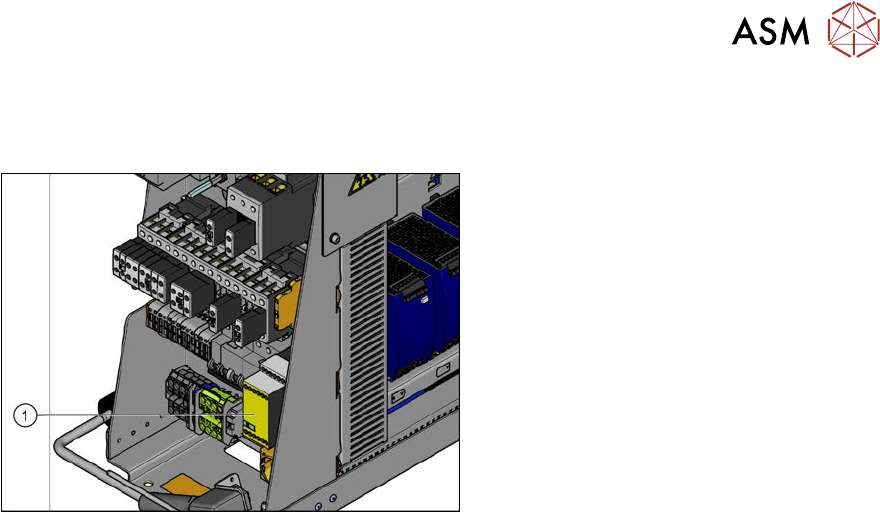
Fig.65: Protective contactor combination
1. Protective contactor combination
3TK28 25 [00358268-xx]
Removal
► Switch off the machine, disconnect it from the power supply and secure it to prevent
unauthorized reactivation.
1.2 "Preparatory work..." [}16]
► Before you start working, check the power supply for absence of voltage and observe the
waiting times!
► Unplug all connections to the protective contactor combination. You might like to mark their
positions to make clear assignment easier later on.
► Take the protective contactor combination off the rail. To do this, press the protective con-
tactor combination upwards slightly and tilt it.
Installation
► Follow the removal instructions in reverse order for installation.