00197042-04_SM_X-Serie-S_Customer_EN.pdf - 第90页
3 Power supply 3.5 Power supply and transformer module (from serial number Hxxxx) 90 Service Manual SIPLACE X-Serie S 06/2019 Fig.102: LED status Monitoring the voltage absence after switch-off The voltage at the measur…
3 Power supply
3.5 Power supply and transformer module (from serial number Hxxxx)
Service Manual SIPLACE X-Serie S 06/2019 89
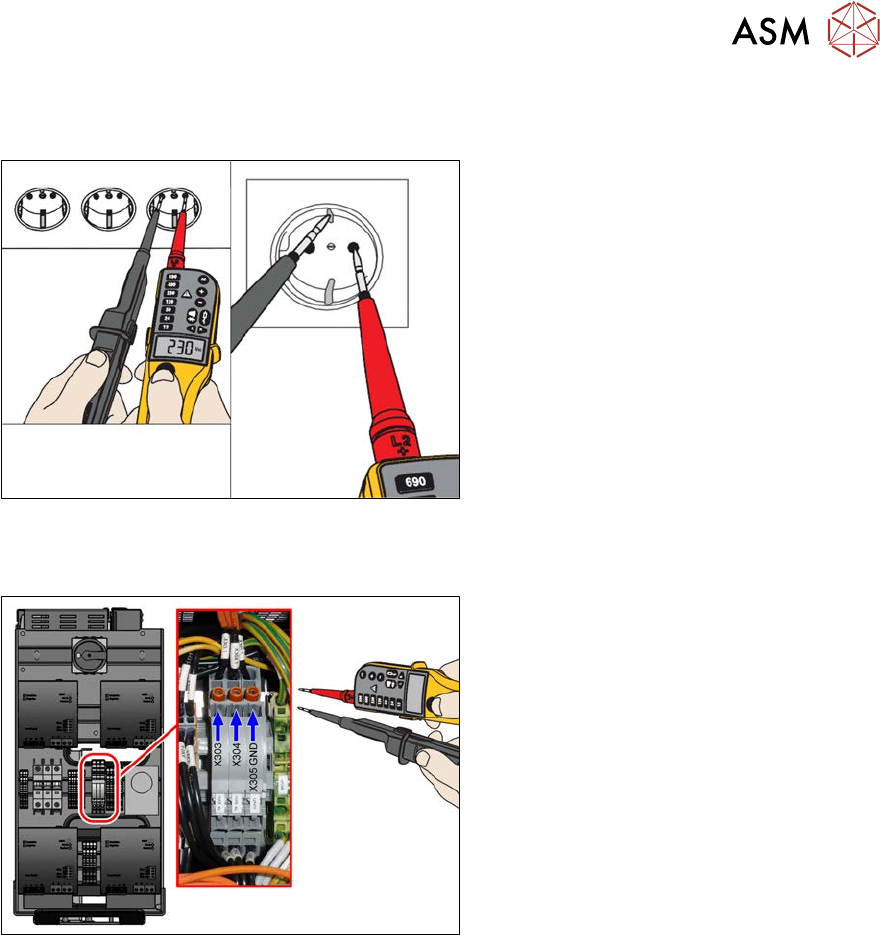
Measurement with known reference voltage
To conclude the self-test, check the voltage tester with a known reference voltage.
Fig.100: Test with reference voltage
You can use the service socket (if present)
on the power supply (disabled with "110V
option") or any other electrical socket.
Measure the voltage present between the
pins and at PE (ground).
Measuring the voltage absence directly after switching machine off
Fig.101: Check voltages
When the machine has been switched off,
the full voltage is still present at the meas-
urement points X303 and X304.
Measurement is always performed at the ref-
erence point (GND)!
●
X303 – X305 GND: 300+/‑10V OUT
●
X304 –X305 GND: 300+/‑10V
Test 300V IN_X303-X305:
Currently present voltage
Test 300V OUT_X304-X305:
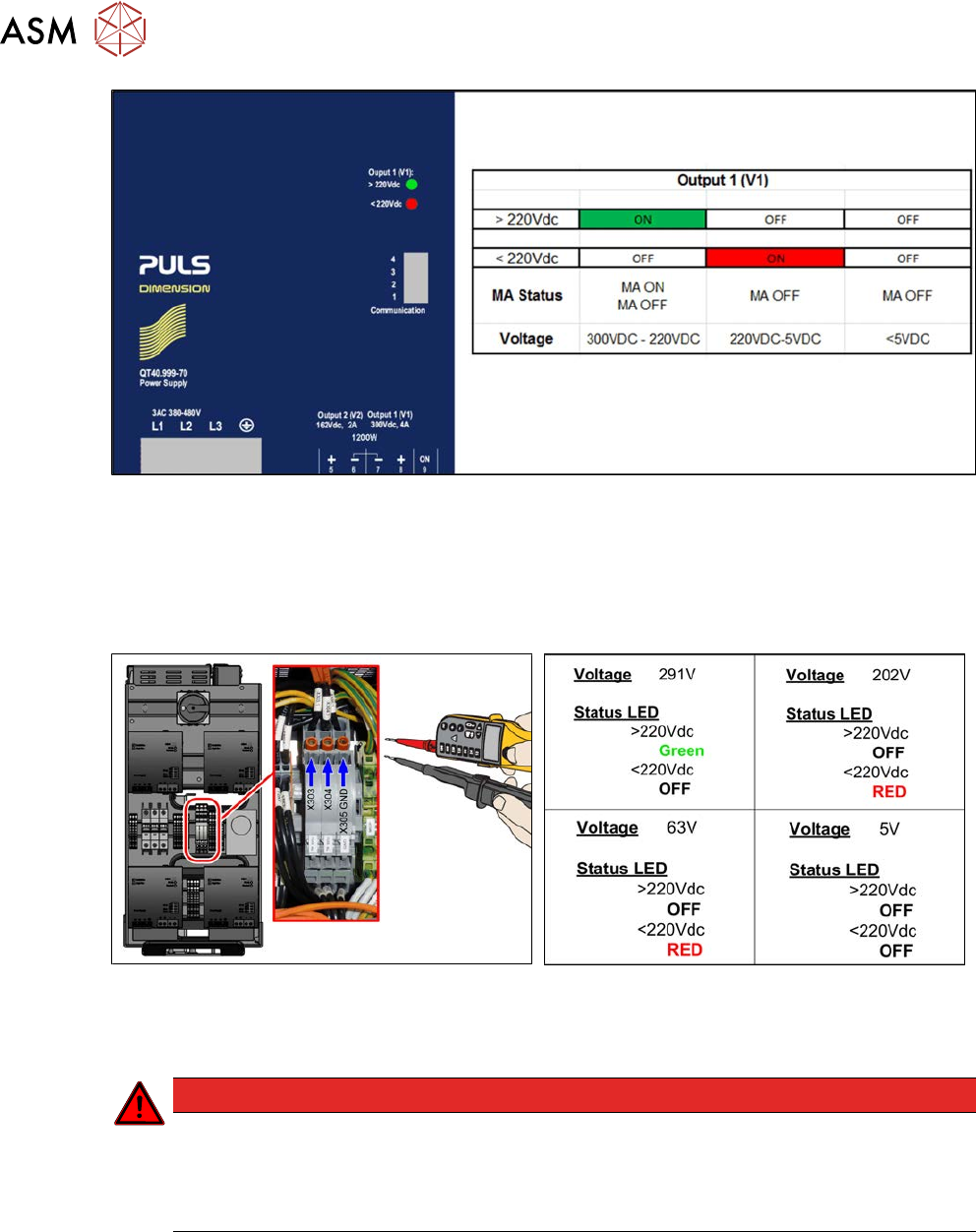
LED display Output 1 at AC/DC converter
Green: Voltage over 220V
The power pack shows an LED display for output 1 > 220 V in green, which means that the voltage
is still over 220 V!
The following figure explains the LED status of power packs PS1 and PS2 (300VDC):
3 Power supply
3.5 Power supply and transformer module (from serial number Hxxxx)
90 Service Manual SIPLACE X-Serie S 06/2019
Fig.102: LED status
Monitoring the voltage absence after switch-off
The voltage at the measurement points only discharges slowly.
After switch-off, the voltage drops from 300VDC to under 5VDC in approx. five minutes.
It is only then possible to pull the SMPS out of the machine without hazard and work on it.
Fig.103: Checking voltages (X-Series S from Hxxxx)
Fig.104: Measurement values
As soon as the voltage has undershot a value of 220VDC, the LED display on the power pack
changes!
DANGER
Measurement values below 5VDC
Measure between the following points:
► X303 (IN) – X305 (GND) < 5VDC
► X304 (OUT) – X305 (GND) < 5VDC
3 Power supply
3.5 Power supply and transformer module (from serial number Hxxxx)
Service Manual SIPLACE X-Serie S 06/2019 91
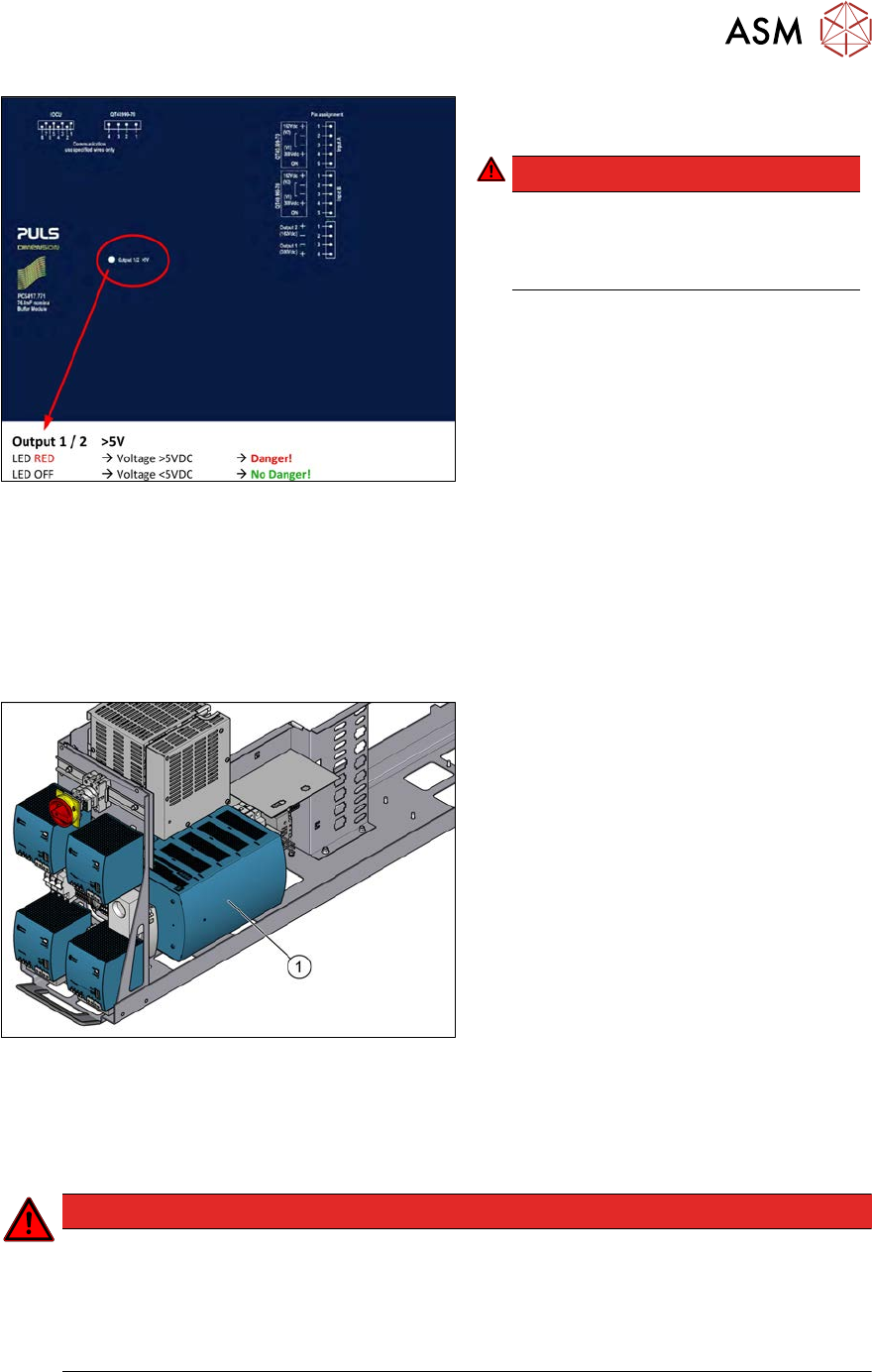
Fig.105: LED on the capacitor battery(CAP)
► Check the LED on the capacitor battery
(CAP).
DANGER!
Once the LED on the capacitor battery
(CAP) does not light any longer, it is
possible to work on the power supply
without hazard!
.
3.5.5 Replacing the buffer module
Parts, equipment and tools
●
Buffer module PCS417.771 [03106016-xx]
Overview
Fig.106: Buffer module
1. Buffer module
Removal
► Switch off the machine, disconnect it from the power supply and secure it to prevent
unauthorized reactivation. Observe the instructions in section 1.2 "Preparatory work..." [}16].
DANGER
High voltages
High DC voltages can be present in the buffer module.
► Observe the waiting period after power supply switch-off (5 minutes).
► Observe the LED display on the buffer module. This will show any residual voltages
still present.