Setup Center Patch and Extensions.pdf - 第12页
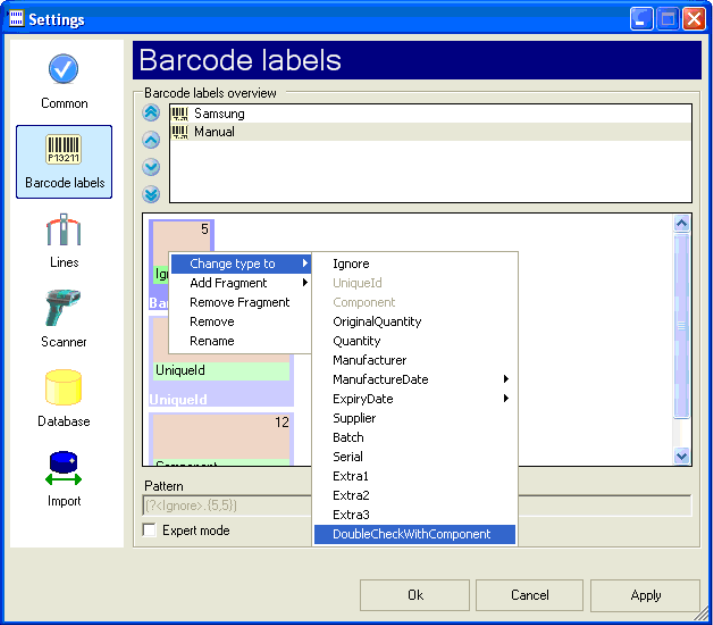
1 Installation manual SetupCenter Patch and Extensions (00169117) SIPLACE 05/2006 Edition 12 Y ou have to define th e new Barcode as shown below in order to have Prefix which will be ignored. The “DoubleCheckWithComp one…
SIPLACE 1 Installation manual SetupCenter Patch and Extensions (00169117)
05/2006 Edition
11
: You can now add a new Barcode as usual and change the type to “DoubleCheckWithCompo-
nent”.
1
1
1
1 Installation manual SetupCenter Patch and Extensions (00169117) SIPLACE
05/2006 Edition
12
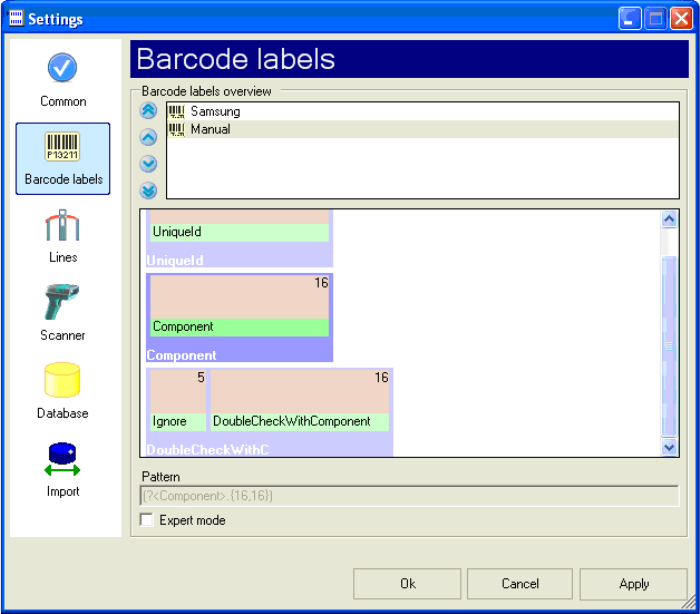
You have to define the new Barcode as shown below in order to have Prefix which will be ignored.
The “DoubleCheckWithComponent” expects exactly the component name. 1
If you now accept the changes, you would have to scan the component name with a prefix after
scanning the component name. 1
1
1
1
1
1
1
1
1
1
1
1
1
SIPLACE 1 Installation manual SetupCenter Patch and Extensions (00169117)
05/2006 Edition
13
1.5.3 CSV File with “,” instead of “;” as separator
After installing the Setup Center you will have to make modifications to the configuration file of the
Setup Center which is the ApplicationsSettings.xml. This file is located in the directory in which
Setup Center was installed, usually “c:\Program Files\Siemens SIPLACE\SIPLACE Setup Cen-
ter\” 1
: Open the file with a editor, e.g. Notepad.
You will have to search for the following lines and exchange the “;” against a “,”, then add a value
Action for scanactiontype in Header and Linedefinition and optional change “Logfilelevel” from De-
tail to Debug and “Cli.LogfileIO” from False to True. 1
1
Original Version: 1
<Setting key="Export.1.Header" value="date time;operator name;device name;verification re-
sult;setup name;station name;station location nr;track;division;component name;raw bar-
codes;product barcode;batch barcode;originalquantity barcode;quantity barcode;supplier
barcode;supplier" /> 1
<Setting key="Export.1.LineDefinition"
value="${Date}${Time};${OperatorName};${BarcodeDeviceName};${VerificationResult};${Setup
Name};${StationName};${StationLocationNumber};${Track};${Division};${ComponentName};${R
awBarcodes};${Component};${Batch};${OriginalQuantity};${Quantity};${RawComponentBar-
code};${Supplier}" /> 1
<Setting key="Export.2.Header" value="date time;operator name;device name;verification re-
sult;setup name;station name;station location number;track;division;component name;raw bar-
codes;product barcode;batch barcode;quantity barcode;supplier barcode" /> 1
<Setting key="Export.2.LineDefinition"
value="${Date}${Time};${OperatorName};${BarcodeDeviceName};${VerificationResult};${Setup
Name};${StationName};${StationLocationNumber};${Track};${Division};${ComponentName};${R
awBarcodes};${Component};${Batch};${OriginalQuantity};${Quantity};${RawComponentBar-
code};${Supplier}" /> 1
<Setting key="Logfile.Level" value="Detail" /> 1
<Setting key="Cli.LogFileIO" value="False" /> 1
1
New Version: 1
<Setting key="Export.2.Header" value="date time,operator name,device name,verification re-
sult,setup name,station name,station location number,track,division,component name,raw bar-
codes,product barcode,batch barcode,quantity barcode,supplier barcode,action" /> 1
1