YRM20_Mainte_E.pdf - 第108页
4. 6-month maintenance 3-41 Chapter 3 Periodic maintenance items 4.2 Base section 4.2.1 Cleaning the fan filter of control box T he control box section, whic h controls the machine, is equipped the air intake fan and fil…
4. 6-month maintenance
3-40
Chapter 3 Periodic maintenance items
4.1.4 Side view camera [RM head]
The RM head unit is equipped the lighting diffuser plate of side view camera and the mirror. The lighting or
the aperture of mirror may be soiled by dust or dirt during the long time operation. The periodic cleaning is
recommended.
c
CAUTION
Do not apply strong force to the camera unit and lighting unit during cleaning. As the glass parts are equipped inside of
camera, they may be damaged.
1
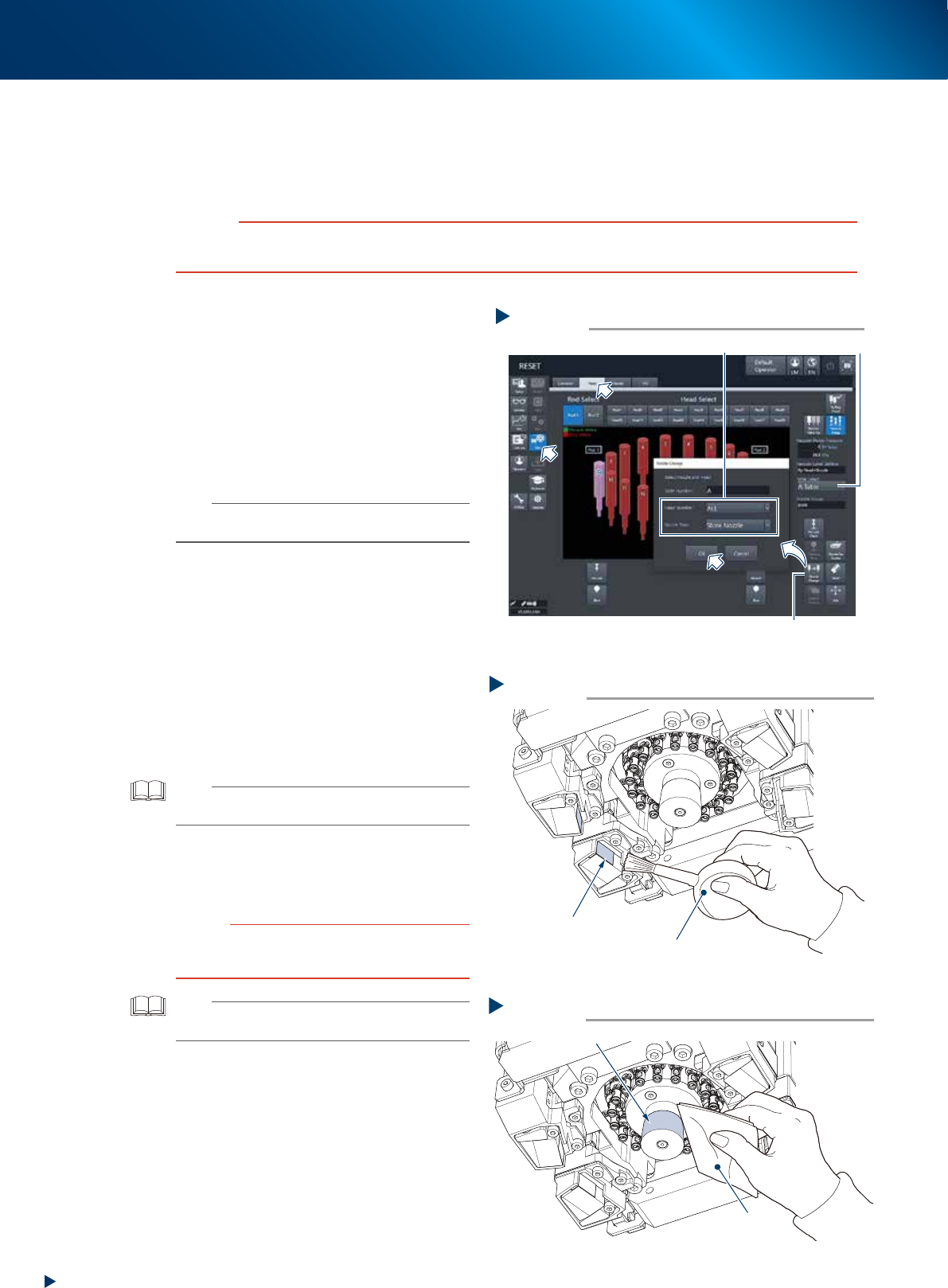
Store all the nozzles.
1. Open [Unit] - [Head] screen.
2. Select any head unit from "Table Select".
3. Press the [Nozzle Change] button.
4. Select "ALL" for "Head Number" and select
"Store Nozzle" for "Nozzle Type" on the
"Nozzle Change" screen.
5. Press the [OK] button to return all nozzles to
the nozzle station.
n
NOTE
When the nozzle station is not installed, press the
emergency stop button and remove nozzles by hand.e
2
Move the head unit.
e
1. Remove all items sensitive to magnetic fields
such as wristwatches and magnetic ID cards.
2. Press the emergency stop button and detach
the feeder exchange carriage.
3. Open the machine safety cover and move
the head unit by hand to the position
convenient to work.
3
Remove the dust around prism using a
blower brush.
TIP
Accessing from the reverse side of head unit facilitates
your work.
4
Clean the lighting unit by dry-wiping
with a lint-free cloth or a cleaning
paper.
c
CAUTION
Do not use a solvent (including lens cleaner). Using a
solvent may cause the surface coat of lighting or prism to
damage, or to discolor.
TIP
The blower brush and the cleaning paper are available as
an option.
5
Return the nozzles to their removed
positions if they are removed by hand
from heads.
Step 1
[Nozzle Change] button
Table Select
Select “ALL” for Head Number, “Store Nozzle”for Nozzle Type
Storing nozzle
54326-KMX-00
Step 3
Cleaning the prism
4 prisms
Blower brush
53352-KMX-10
Step 4
Cleaning the lighting unit
Light
Lint-free cloth
53353-KMX-10
4. 6-month maintenance
3-41
Chapter 3 Periodic maintenance items
4.2 Base section
4.2.1 Cleaning the fan filter of control box
The control box section, which controls the machine, is equipped the air intake fan and filter. This filter
should be cleaned once 6-month, though it depends on the machine operating condition.
1
e
Prepare for work.
1. Press the emergency stop button and detach
the feeder exchange carriage of machine
front side.
2. Close applications and turn OFF the machine
power.
2
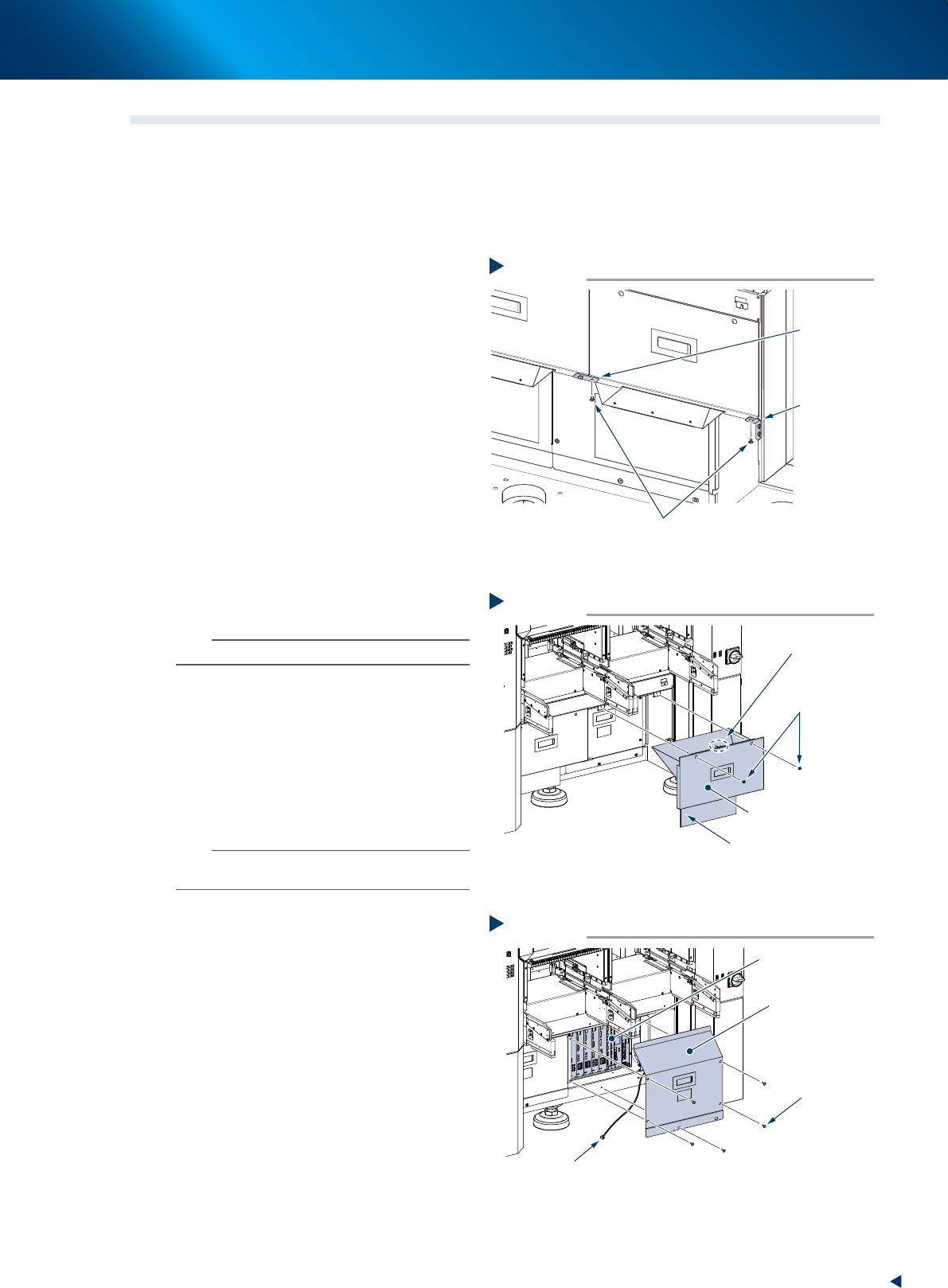
Remove the mounting screws installed
at left-right connecting point and
connecting point to machine body of
the safety cover (hereinafter referred to
as cutter cover) of tape cutter using
Phillips screwdriver.
3
Detach the cutter cover.
1. Remove the mounting screw (at front right of
machine front) using Phillips screwdriver.
2. Detach the cutter cover by pulling it out to
front.
n
NOTE
The cutter cover is installed an interlock key.
4
Detach the inner cover.
1. Remove 5 mounting screws of the inner
cover (front right) using Phillips screwdriver.
2. Detach the inner cover.
3. The ground wire is connected at the center
of the inner cover reverse side. Remove the
wire mounting screw using Phillips
screwdriver.
n
NOTE
The mounting screw of ground wire is used with a tooth
lock washer. Be careful not to lose it upon detaching.
5
Clean around the control box before
detaching the filter upon finding the
dust and dirt around the control box.
Removing the mounting screw
Step 2
Mounting screw
Left-right
connecting
point
Connecting
point to
machine body
53386-KMX-00
Step 3
Detach the cutter cover
Cutter cover (front right)
Mounting screw
Interlock key
Preventing cut debris splattering sheet
53380-KMX-00
Step 4
Detaching the inner cover
Inner cover
(front right)
Mounting screw
Control box
Ground wire mounting screw
53381-KMX-10
4. 6-month maintenance
3-42
Chapter 3 Periodic maintenance items
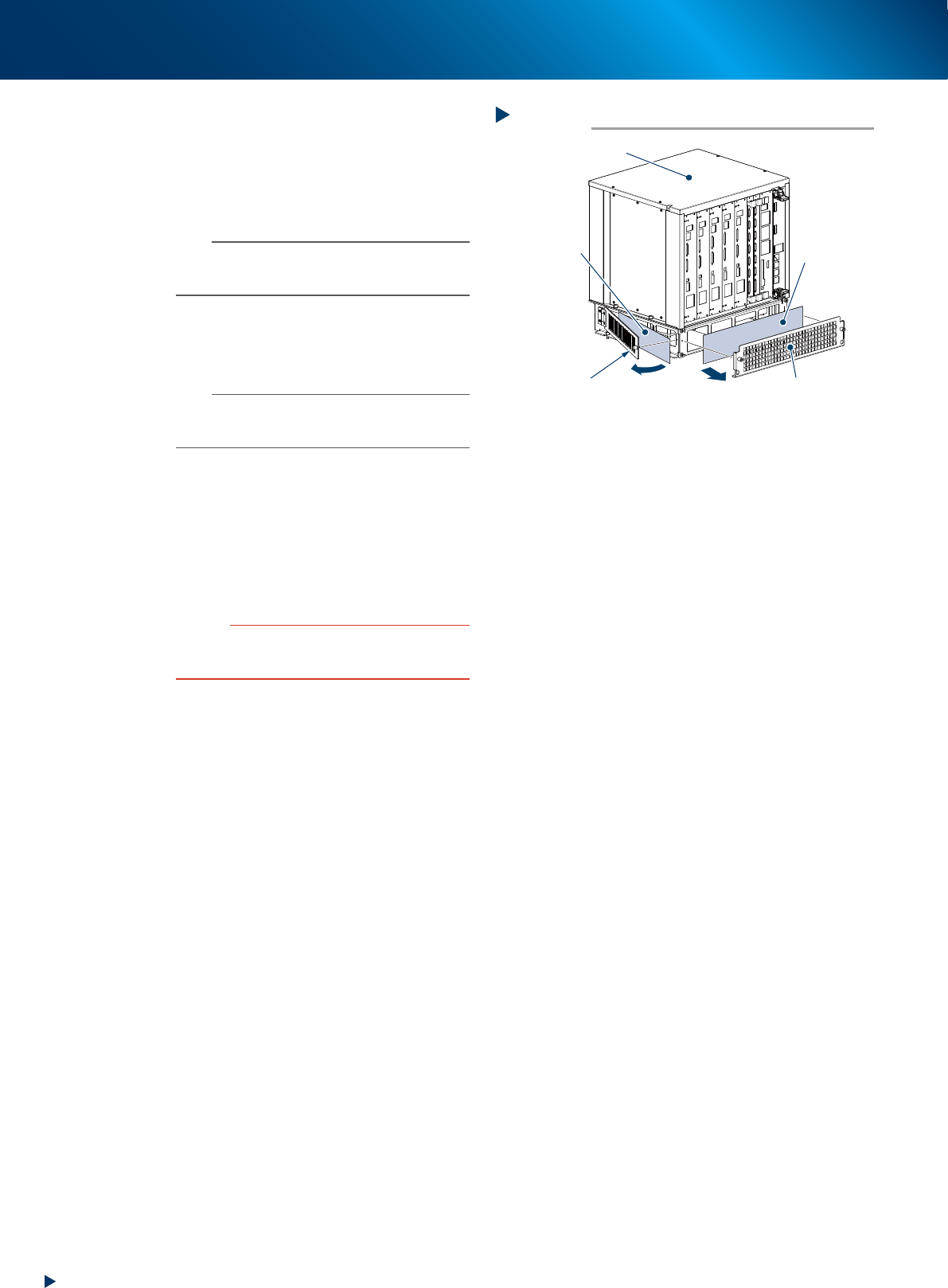
6
Detach the filter of control box.
The filters are located at front and lateral side.
Detach the machine front filter with filter cover
by loosening 2 mounting screw by hand.
Detach the machine lateral side filter by
loosening a mounting screw by hand.
n
NOTE
The multiple cables are connected to the control box.
Disconnect some cables as necessary when the access to
filter is interfered.
7
Clean the filter with a vacuum cleaner
or a vacuum assembly removing the
dust adhering to the filter.
n
NOTE
When the dust or dirt cannot be removed, or the filter
itself is deteriorated, it requires the filter replacement
detaching the cover.
8
Return the filter to its original position
by the reverse procedure of detaching
it.
9
Return the covers.
1. Attach the inner cover.
2. Attach the tape cutter cover.
c
CAUTION
• Be careful not to forget the reconnecting of ground wire
to the inner cover.
• Be careful not to tuck the cable upon attaching covers.
Detaching the filter of control box
Step 6
Control box
Front filter
Lateral side filter
Filter cover
Filter mounting screw
53382-KMX-00