YRM20_Mainte_E.pdf - 第134页
7. 3-year maintenance 3-67 Chapter 3 Periodic maintenance items 6 Detach t he vacuum pump. 1. Slide the whole vacuum pump assembly t o right and remov e from the mounting bolts loosened. 2. Pull out the vacuu m pump asse…
7. 3-year maintenance
3-66
Chapter 3 Periodic maintenance items
7. 3-year maintenance
This section describes 3-year maintenance items.
7.1 Replacement of the vacuum pumps
Though it may vary with the machine operating status, the vacuum pump should normally be replaced every
3 years.
1
Prepare for work.
1. Press the emergency stop button and detach
the feeder exchange carriage on the front
side of machine.
2. Close the applications and power off the
machine.
2
Detach all the cover referring the
"5.5.2 Replacing the filter element of
vacuum pump" above.
3
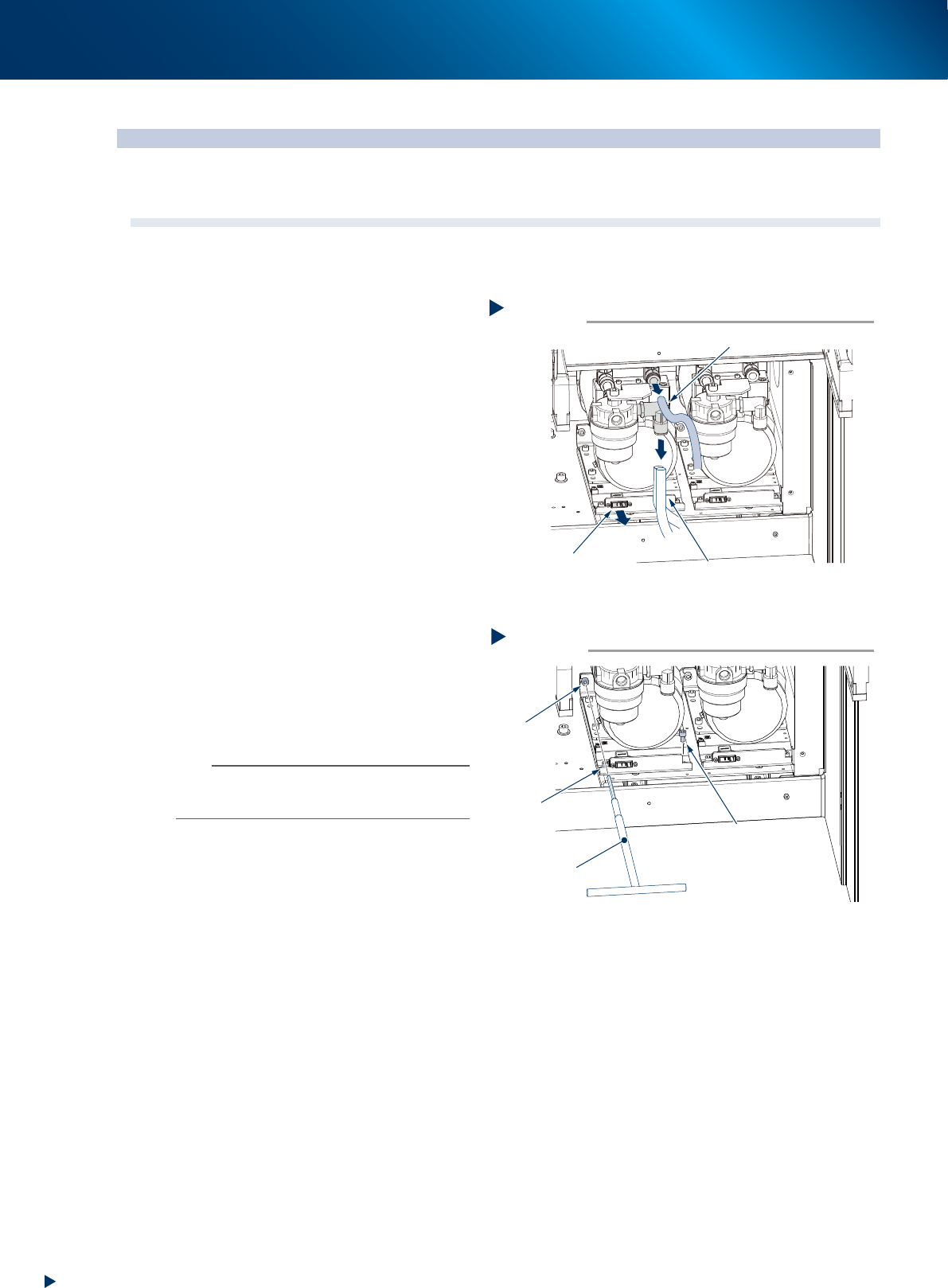
Detach the air hoses and connector.
1. Detach the 1 blue air hose and 2 white, 3 in
all air hoses.
2. Detach the connector illustrated at right.
4
Loosen the mounting bolts at rear side
and left front.
1. Using a T-type wrench (5mm), loosen the
mounting bolt at rear side illustrated at right
to an extent as not coming off.
2. Also, using a hexagon wrench (5mm),
loosen the mounting bolt at left front of
machine to an extent as not coming off.
n
NOTE
The mounting bolts described above are not required to
detach. The vacuum pump can be removed by only
loosening them.
5
Remove the mounting bolt at right front
using a hexagon wrench (5mm).
Removing the connector and air hoses
Step 3
1 blue air hose
2 white air hoses
Connector connection
5339G-KMX-00
Removing the mounting bolts
Step 4, 5
Rear
mounting bolt
Front left
mounting bolt
Loosen
Loosen
Remove
Front right mounting bolt
T-type wrench
5339H-KMX-00
7. 3-year maintenance
3-67
Chapter 3 Periodic maintenance items
6
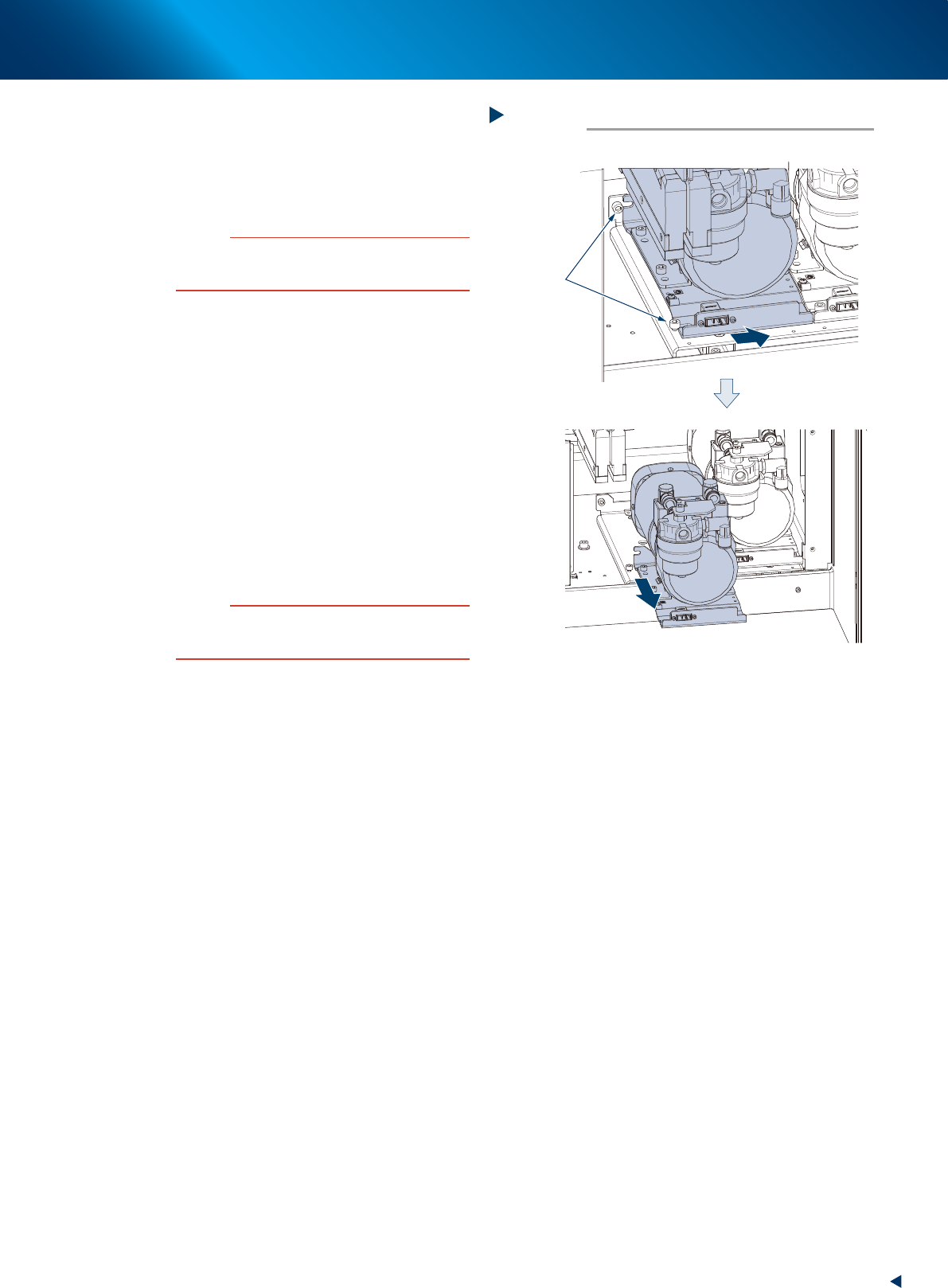
Detach the vacuum pump.
1. Slide the whole vacuum pump assembly to
right and remove from the mounting bolts
loosened.
2. Pull out the vacuum pump assembly
frontward and remove it.
c
CAUTION
As the pump is heavy, do not drop the pump to avoid
injury to your feet and handle it carefully not to hurt your
back.
7
Attach the vacuum pump.
1. Slide and attach the vacuum pump assembly
to its mounting position in reverse procedure
of detaching.
2. Tighten the mounting bolts, using a T-type
wrench (5mm) for rear side and a hexagon
wrench (5mm) for left front.
3. Attach and tighten the mounting bolt at right
front using a hexagon wrench (5mm).
8
Connect the connector and air hoses to
their original position.
9
Return the inner cover and the cutter
cover to their original position.
c
CAUTION
• Be careful not to forget the reconnecting of ground wire
to the inner cover.
• Be careful not to tuck the cable upon attaching covers.
Detaching the vacuum pump
Step 6
Loosened
mounting bolts
Slide to right
Lift up and detach frontward
5339J-KMX-00
8. Others
3-68
Chapter 3 Periodic maintenance items
8. Others
8.1 Cleaning inside of nozzle shaft on RM head unit
When the vacuum level does not go down to 140 or less while nozzle is detached from RM head unit,
replace with new filter as a general. If vacuum level does not go down to the standard value even after
replacing filter, The air path in spline shaft may be dirty.
In this case, it is required to clean the inside of nozzle shaft.
Note that clean 18 shafts of all heads as a rule even the vacuum level of one head does not go down to the
standard value as shaft inside of other heads may be dirty.
1
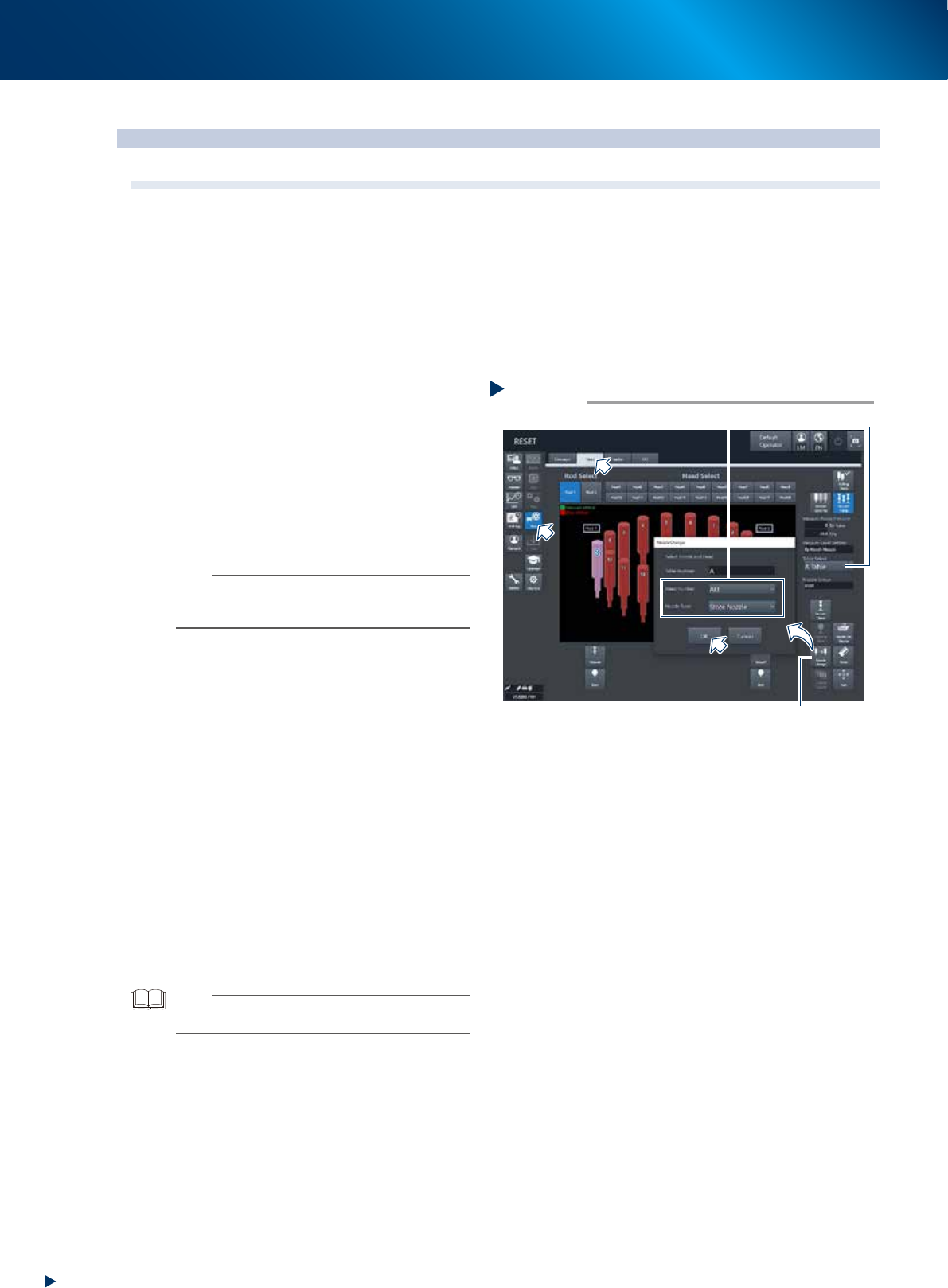
Store all nozzles to nozzle station.
1. Open the [Unit] - [Head] screen.
2. Select desired head unit from "Table Select".
3. Press the [Nozzle Change] button.
4. Select "ALL" for "Head Number" and select
"Store Nozzle" for "Nozzle Type" on the
"Nozzle Change" screen.
5. Press the [OK] button to return all nozzles to
the nozzle station.
n
NOTE
If the machine is not equipped with a nozzle station, press
the emergency stop button and then detach the nozzles
manually.
2
Prepare for work.
e
1. Remove all items sensitive to magnetic fields
such as wristwatches and magnetic ID cards.
2. Press the emergency stop button and detach
the feeder exchange carriage. Then open
the machine safety cover.
3. Move the head unit to convenient position to
work and place a square cloth beneath the
head unit.
3
Detach all filters.
See Step 3 of "2.4.1 Inspecting and replacing
the air filters" to detach all filters.
4
Clean and lubricate all spools.
See "6.2.3 Cleaning/lubricating the vacuum
selector (spool)" above to clean and lubricate
all spools.
TIP
It is not necessary to return detached spools to the original
positions.
Step 1
[Nozzle Change] button
Table Select
Select “ALL” for Head Number, “Store Nozzle”for Nozzle Type
Storing nozzle
54326-KMX-00