YRM20_Mainte_E.pdf - 第156页
4. Conveyor unit 5-7 Chapter 5 How to replace consumable parts 4 L oosen the conve yor belt. 1. Mark the current position of pul ley bracket (CV2 and CV3) and pull ey mounti ng bolt (CV1 an d CV4) using a permanent marke…
4. Conveyor unit
5-6
Chapter 5 How to replace consumable parts
4. Conveyor unit
4.1 Replacing the conveyor belt
The conveyor belt should be replaced if excessive slack, grime or fraying is found after checking it as
described in Chapter 3, "5.2 Inspecting conveyor belt and cleaning guide".
Use the following procedure to replace the belt. Moreover, as the replacement procedure varies for CV1, 2,
4, and CV3 by Step 5 and later, they are described separately.
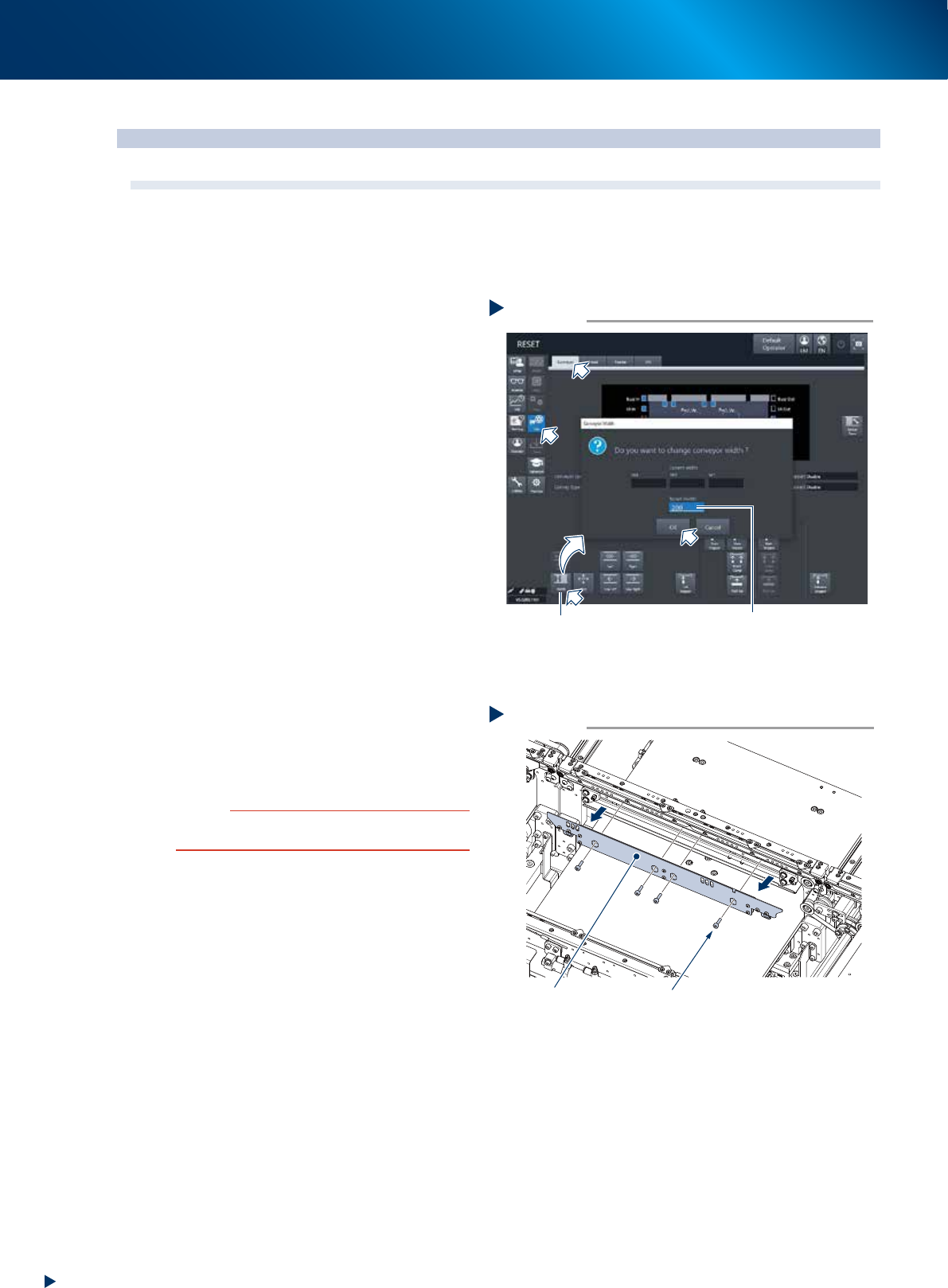
1
Change the conveyor width to
convenient for maintenance work.
1. Press the [Conveyor width] button on the
[Unit] - [Conveyor] scree and open the
conveyor width changing screen.
2. Input the value (approx. 200mm) which a
hexagon wrench can be inserted into the
"Changed conveyor width" and press the
[OK] button. Then the conveyor width is
changed to specified width.
2
Prepare for work.
e
1. Remove all items sensitive to magnetic fields
such as wristwatches and magnetic ID cards.
2. Press the emergency stop button and detach
the feeder exchange carriage.
3. Open the machine safety cover and detach
the upper cover.
4. Place a square cloth on the push-up plate.
3
Remove the board clamp board by
loosening the mounting bolts for PCB
clamp board (4 bolts, shown in the
figure at right) with a hexagon wrench
(3).
c
CAUTION
Do not remove any bolts other than 4 bolts shown in the
figure at right.
Changing the conveyor width
Step 1
[Width] button
Enter the value
which allows to insert a tool
(Approx. 200mm)
54501-KMX-00
Removing the board clamp board
Step 3
Board clamp board 4 mounting bolts
53517-KMX-00
4. Conveyor unit
5-7
Chapter 5 How to replace consumable parts
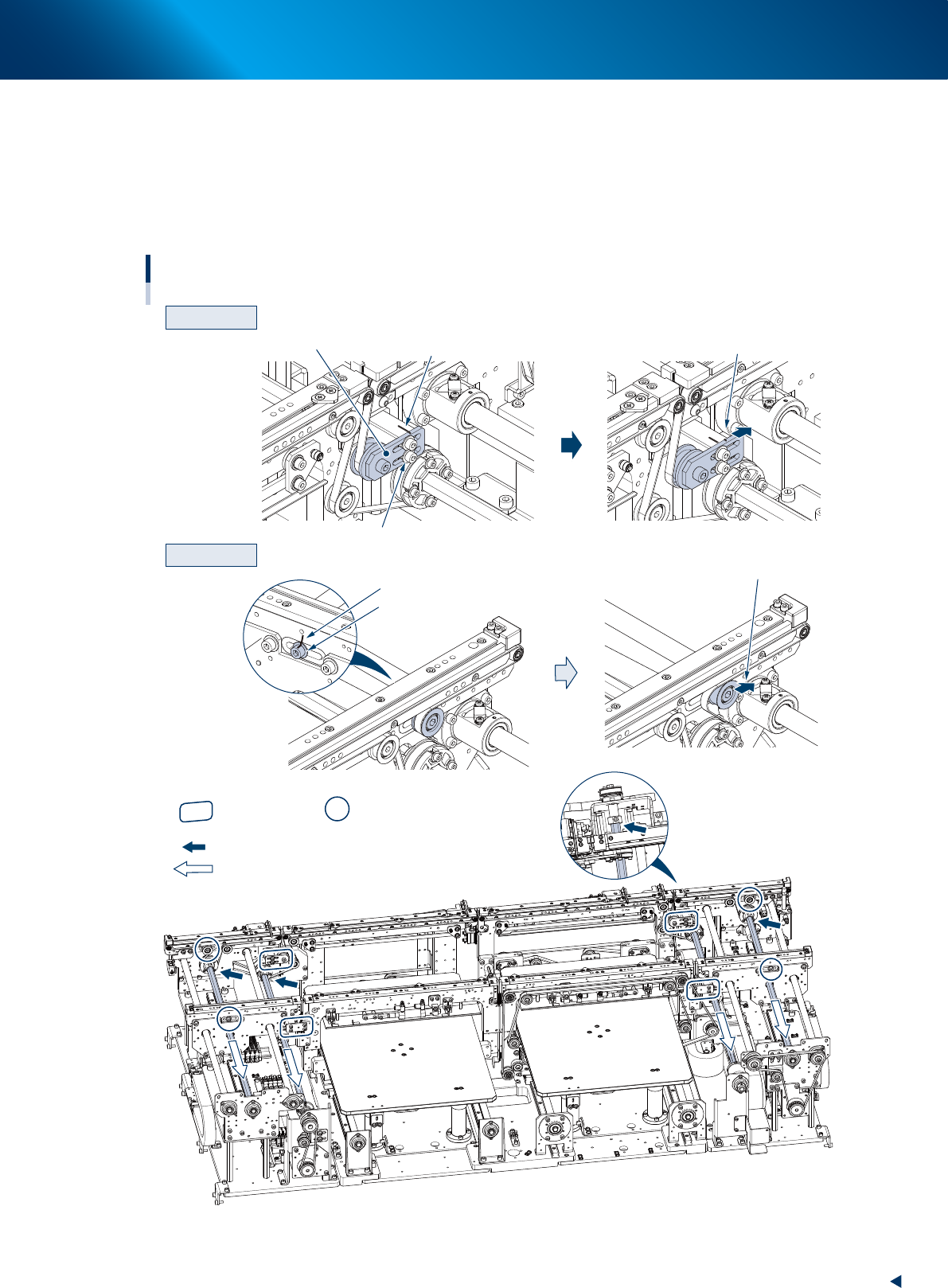
4
Loosen the conveyor belt.
1. Mark the current position of pulley bracket (CV2 and CV3) and pulley mounting bolt (CV1 and CV4) using a
permanent marker before loosening the conveyor belt.
2. Loosen the mounting bolt of pulley bracket (hereinafter referred to as bracket) using a hexagon wrench (3),
referring the figure below, then move the bracket to the end of its long hole (loosening direction).
For CV1 and CV4, loosen the mounting bolts of pulley using a hexagon wrench (5) and (4), then move the
pulley.
Machine rear
CV2 and CV3
CV1 and CV4
CV4
CV1
CV3
CV2
: Place where the shaft is separated from the pulley.
: Shaft pull-out direction
Loosening the conveyor belt
Slide the bracket
Loosen the mounting bolt
Mark with a permanent marker
Bracket
Loosen the mounting bolt
Mark with a permanent marker
Slide the pulley
Entrance
Exit
: Bracket position : Pulley position
53518-KMK-10
4. Conveyor unit
5-8
Chapter 5 How to replace consumable parts
█
Replacing the CV3 conveyor belt
The replacement procedure of CV3 conveyor belt differs to other conveyor belts. Here describes the
procedure from Step 5 and later. When the conveyor belt other than CV3 is to be replaced, see
"Replacing the CV1/CV2/CV4 conveyor belt" described below.
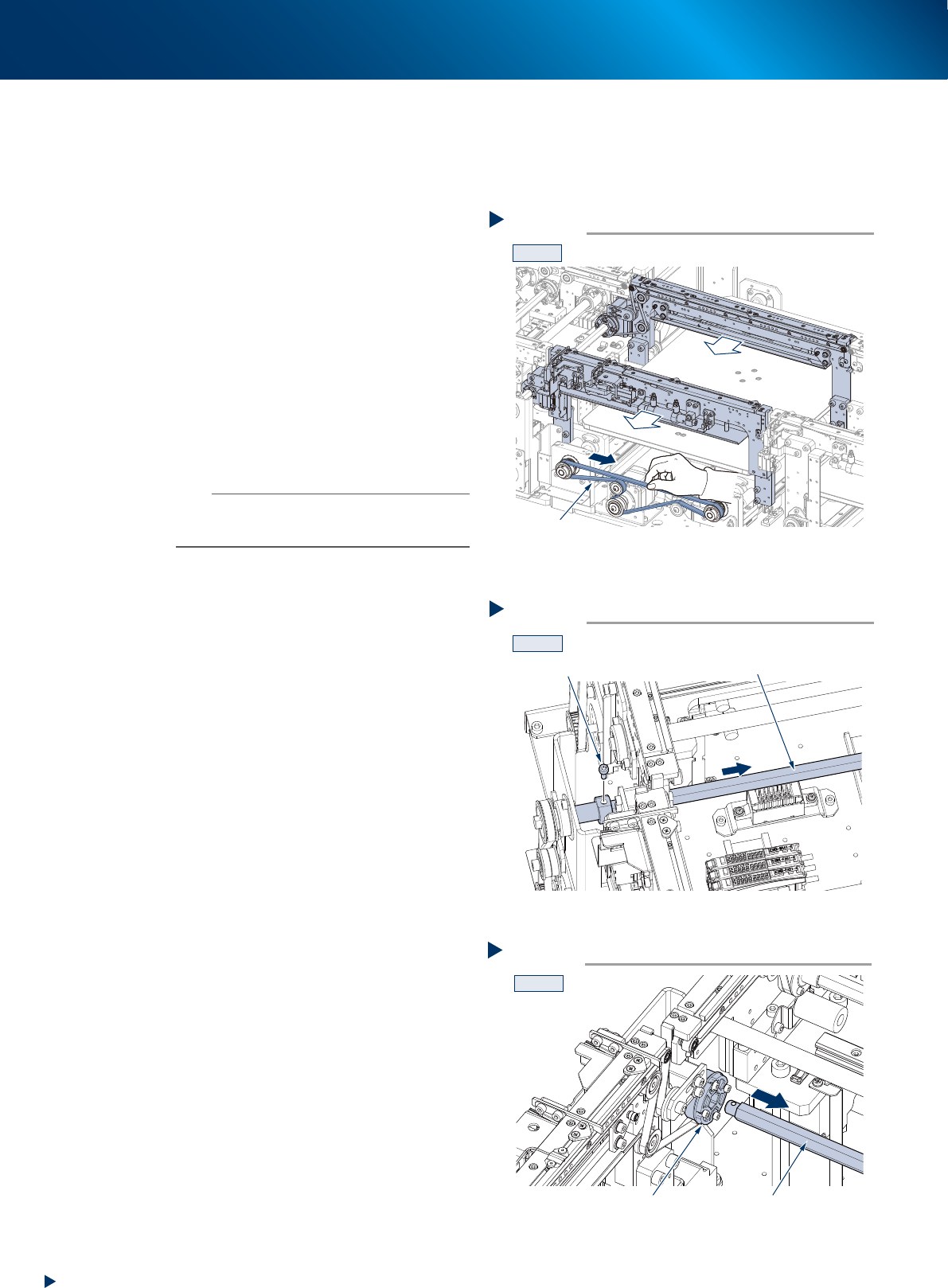
5
Move the conveyor U-axis.
Whole the CV3 conveyor can be moved by
running the U-axis belt manually. Run the U-axis
belt to the arrow direction shown at right to
move the CV3 conveyor to frontmost.
6
Detach the shaft by removing the shaft
mounting bolt (see the figure of Step 4
for its position) using a hexagon wrench
(3).
7
Pull out the shaft from the belt drive
pulley until they are completely pulled
out.
n
NOTE
The belt drive pulley may come off upon pulling out the
shaft, so that hold the pulley by hand while pulling out the
shaft.
Step 5
U-axis
CV3
Moving the coneyor U-axis
53520-KMX-10
Step 6
CV3
Detaching the shaft
Shaft
Bolt
53521-KMX-10
Step 7
CV3
Belt drive pulley Shaft
Pulling out the shaft from the belt drive pulley
53522-KMX-10