YRM20_Mainte_E.pdf - 第61页
1. Checking the nozzle 2-10 Chapter 2 Daily maintenance items 1.2 Checking the nozzles visually T o visually c heck nozzles, remove eac h nozzle from the head or from the nozzle station. █ Points to check detached nozzle…
1. Checking the nozzle
2-9
Chapter 2 Daily maintenance items
1.1.1 Vacuum level when nozzle is open
The table below shows the vacuum level measured when each nozzle is open.
The values might differ slightly depending on the air source and operating conditions. Use these values for
reference during maintenance.
►
Standard vacuum level when nozzle is open
Head type
Nozzle
Standard value when nozzle is open
RM head HM head
Type 8104A 200 to 240 150 to 190
Type 8105A 180 to 220 130 to 170
Type 8106A 120 to 160 60 to 100
Type 8107A 110 to 150 40 to 80
Type 8108A 110 to 150 40 to 80
Type 8004H – 150 to 190
Type 8006H – 60 to 110
Without nozzle 140 or less 30 to 60
1. Checking the nozzle
2-10
Chapter 2 Daily maintenance items
1.2 Checking the nozzles visually
To visually check nozzles, remove each nozzle from the head or from the nozzle station.
█
Points to check detached nozzles
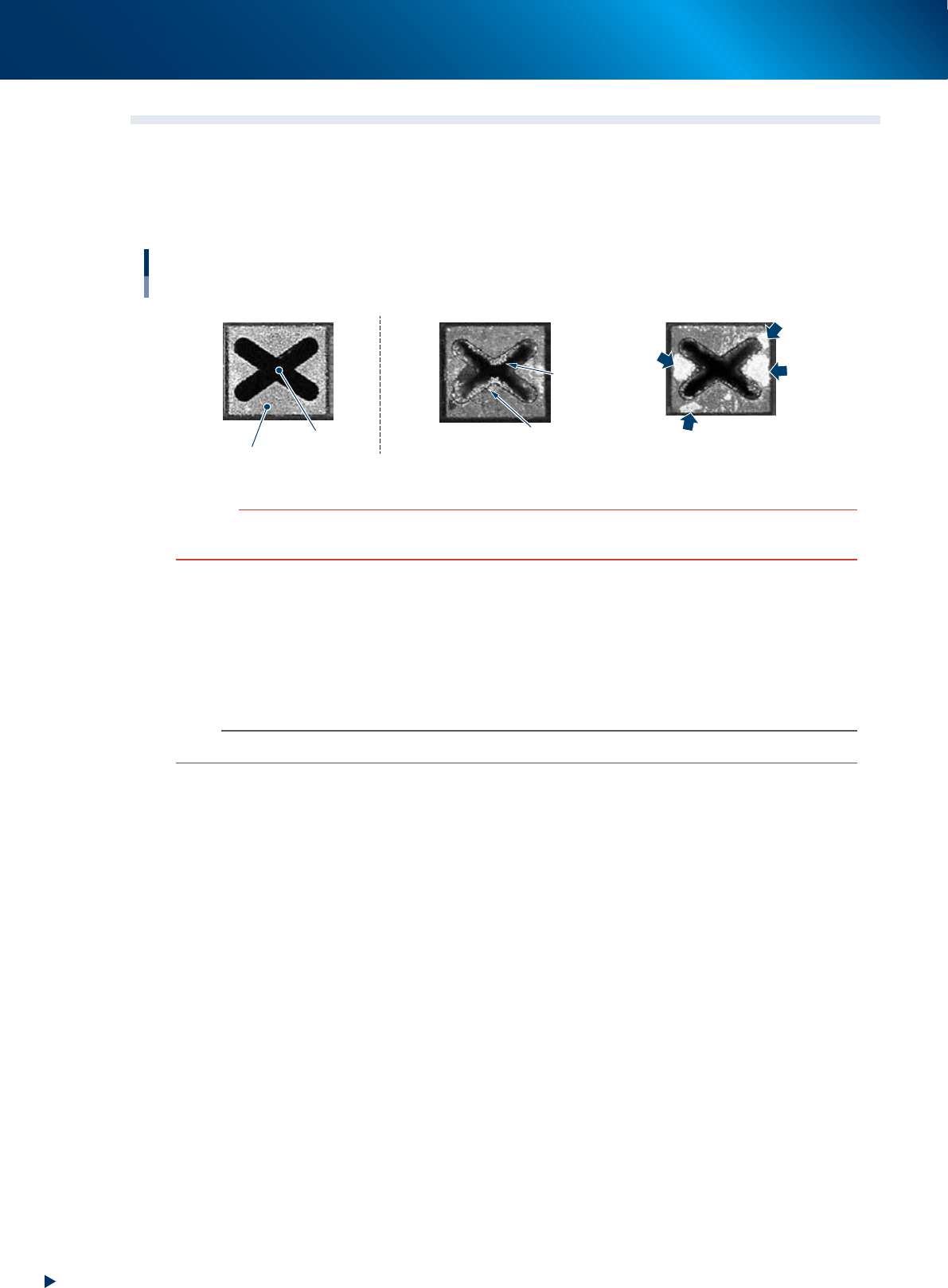
Check the removed nozzles with a magnifying glass or similar tool.
Checking the nozzle condition
Nozzle tip
Solder is adhering to nozzle hole.
Solder
Solder
Solder is adhering to
flat surface of nozzle tip.
Nozzle hole
◆ Normal condition ◆ Fault: Nozzle is clogged
◆ Fault: Shiny material on tip
53200-KMX-00
c
CAUTION
When the fault nozzle is found, clean the nozzle hole and nozzle tip.
See the "1.2 Nozzle cleaning" of Chapter 3 for cleaning method.
►
Checking nozzles by detaching them from the head individually
1. Move the head to a position where the nozzles can be easily detached, then detach each nozzle
manually.
2. After checking and cleaning the nozzle, reattach the nozzle to the head while making sure the head
position and the nozzle's direction are correct.
n
NOTE
As for a simple method, check the nozzle attached to the head with a mirror or similar tool.
1. Checking the nozzle
2-11
Chapter 2 Daily maintenance items
►
Checking nozzles by detaching the whole nozzle holder
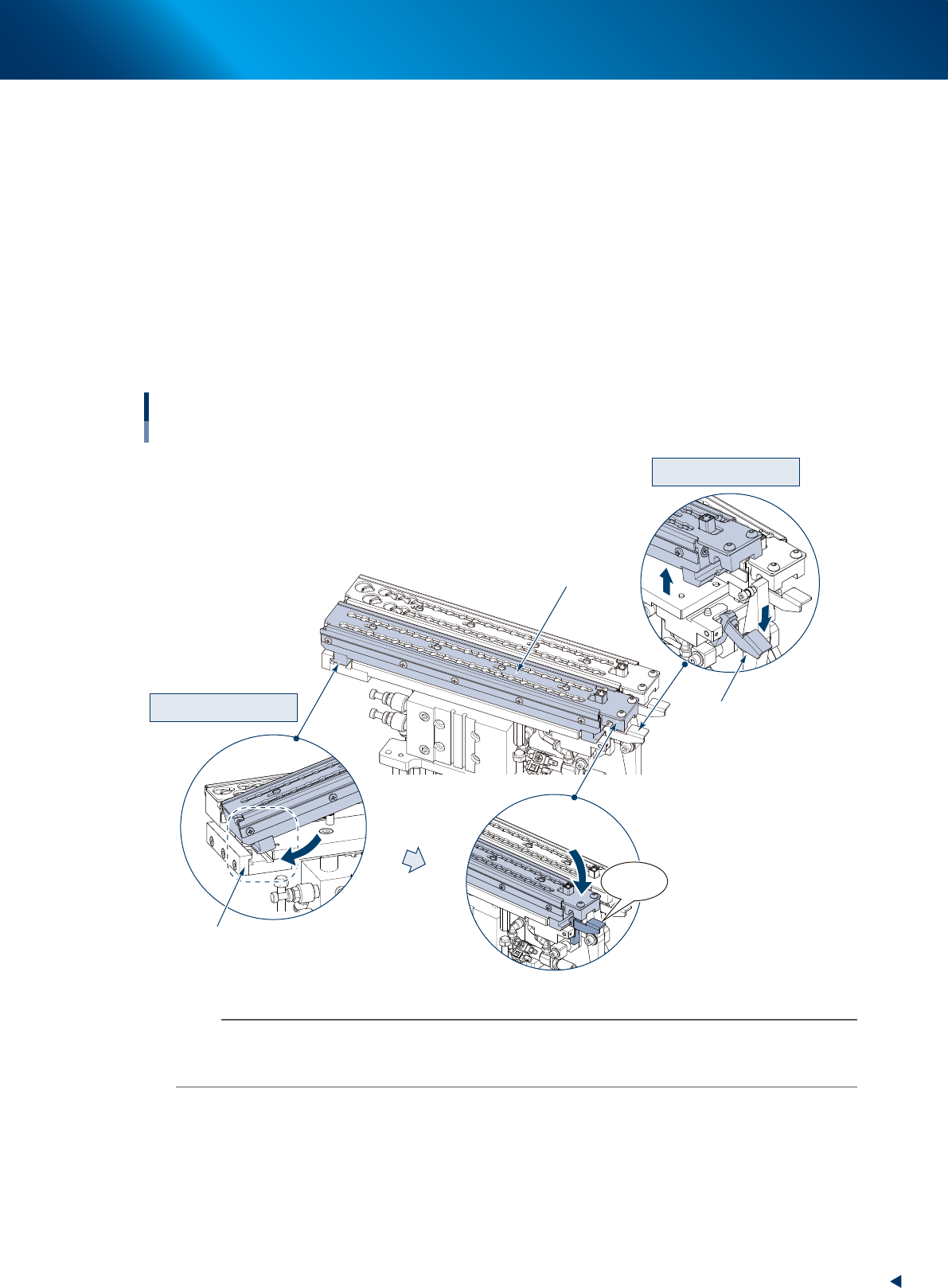
When the nozzle station (option) is installed, another procedure can be performed by detaching the
whole nozzle holder storing nozzles from the nozzle station base section.
e
1. Return all nozzles in the nozzle holder and close shutter, then press the emergency stop button and
open the machine safety cover.
2. Lay the holder retaining lever frontward and detach the nozzle holder upward.
3. Check and clean the nozzles, then return nozzles.
4. Check if there is no foreign matter on the nozzle station, and insert the nozzle holder likely to hook
it into the attaching block section of base unit. Then push down the holder retaining lever while
pressing the nozzle holder until it clicks.
5. Check that the nozzle holder is fixed securely.
Detaching nozzle holder
Attaching nozzle holder
Click!
Detaching nozzles
Detaching the whole nozzle holder
Holder retaining lever
Mounting block
Nozzle holder
53206-KMX-10
n
NOTE
The nozzle holder shutter is equipped with magnet and it is closed after detaching the nozzle holder.
The nozzle can be detached while shifting the shutter by hand.
Moreover, do not make upside down the nozzle holder with opening the shutter as the nozzles may drop off.