YRM20_Mainte_E.pdf - 第92页
3. 3-month maintenance items 3-25 Chapter 3 Periodic maintenance items 3.1.3 Checking the operation of each valve of head T his section describes the procedure of chec king the operation of the blow v alve and the cleani…
3. 3-month maintenance items
3-24
Chapter 3 Periodic maintenance items
3.1.2 Check the ejector vacuum level
This section checks the ejector vacuum level of each head.
When it cannot reach the specified vacuum level, replacement of the ejector bit or the valve may be
required. Perform the replacement referring to "6.1.1 Replacement of ejector bit" in Chapter 3, or to "3.1
HM head: Replacing the valves" in Chapter 5.
1
Move the head unit to machine front
side.
1. Remove all items sensitive to magnetic fields
such as wristwatches and magnetic ID cards.
e
2. Press the emergency button and detach the
feeder exchange carriage on the side to
which an engineer puts his/her body to
perform maintenance work. Then open the
machine safety cover.
3. Move the head unit to convenient position to
wrok.
4. Place a square cloth under the head unit.
2
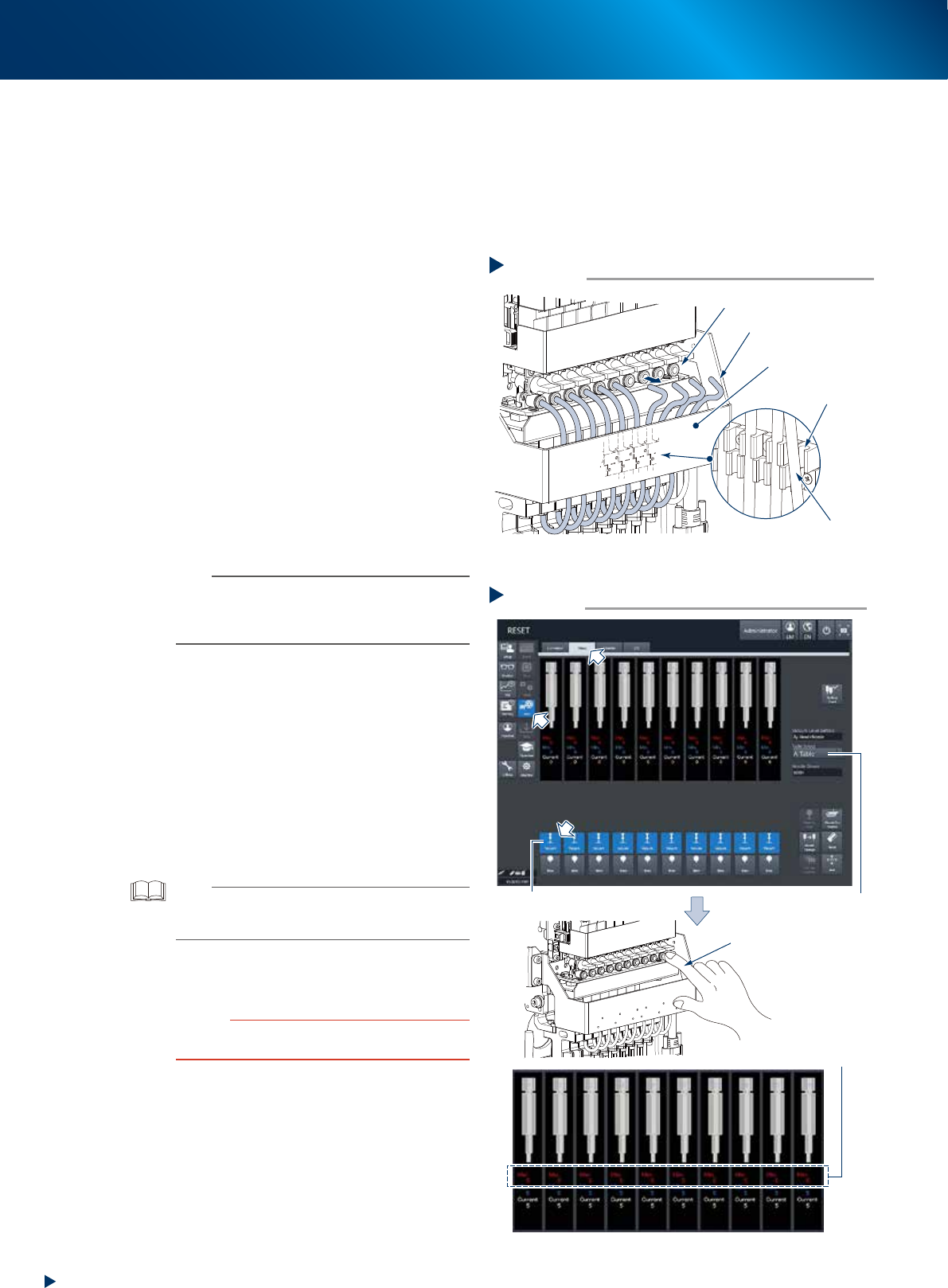
Disconnect all the air hoses from the
upper joints. Keep the lower joints being
connected.
n
NOTE
The air hoses are attached to the holder located at the
reverse side of head unit fromt cover. Upon disconnecting
the air hoses, be careful not to drop off the hoses from
holder.
3
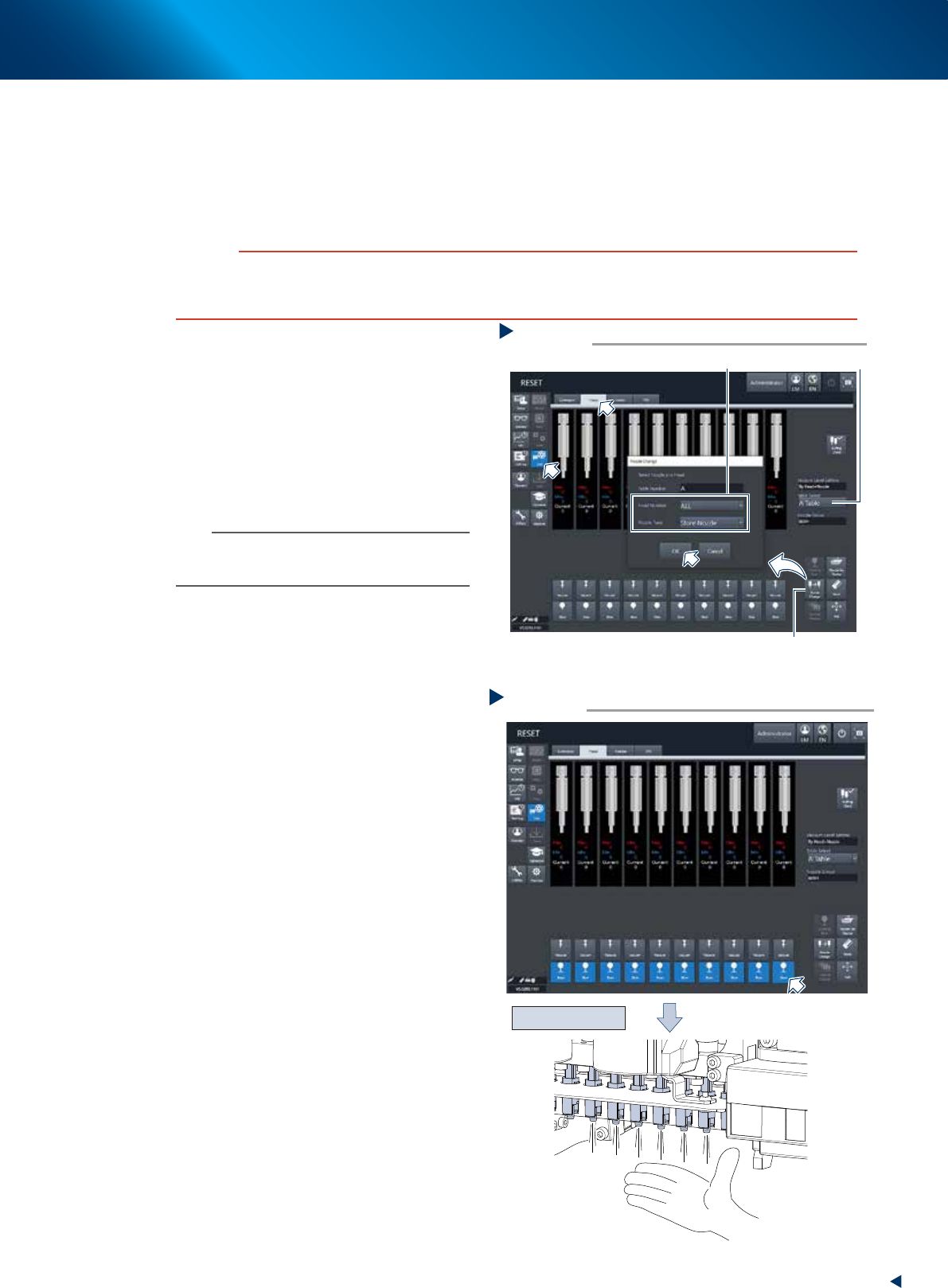
Check the vacuum level of each head.
1. Open the [Unit] - [Head] screen.
2. Select any head unit at the "Select Table"
field.
3. Press the [Vacuum] button of all heads.
4. Close the air joint part with finger.
5. The vacuum level of sealed head appears at
the "Maximum value" field located at the
center of screen. Check if the value is "190"
or more, which is the measuring reference
value for sealed condition.
TIP
When the measured value cannot reach the measuring
reference value, recheck the air path (ejector/valve) of the
head and clean or replace it as necessary.
4
Attach the air hoses to their original
position.
c
CAUTION
Insert the air hoses all the way seated and confirm that
they do not drop off.
Disconnecting air hoses
Step 2
Air hose
Removed air hose
Holder
Air joint
Head unit
front cover
53397-KMX-00
Checking the vacuum level
Step 3
[Vacuum] button
Check the maximum
value of vacuum level
Close the air joint section
with finger
Table Select
54312-KMX-00
3. 3-month maintenance items
3-25
Chapter 3 Periodic maintenance items
3.1.3 Checking the operation of each valve of head
This section describes the procedure of checking the operation of the blow valve and the cleaning blow
valve of head unit. The head unit is installed 2 types of valves, one is the blow valve blowing by each
shingle head, and the other is the cleaning blow valve blowing powerfully to clean up inside of shaft.
When the valve motion error occurs, it needs to be replaced. See Chapter 5, "3.1 HM head: Replacing the
valves"
c
CAUTION
The cleaning blow exhausts powerful air. The nozzle attached to the head should be detached upon performing the
cleaning blow. If the cleaning blow is performed with the nozzle attached, the nozzle may drop off from head and may be
damaged or lost.
1
Detach all the nozzles from the heads.
When the nozzle station is equipped.
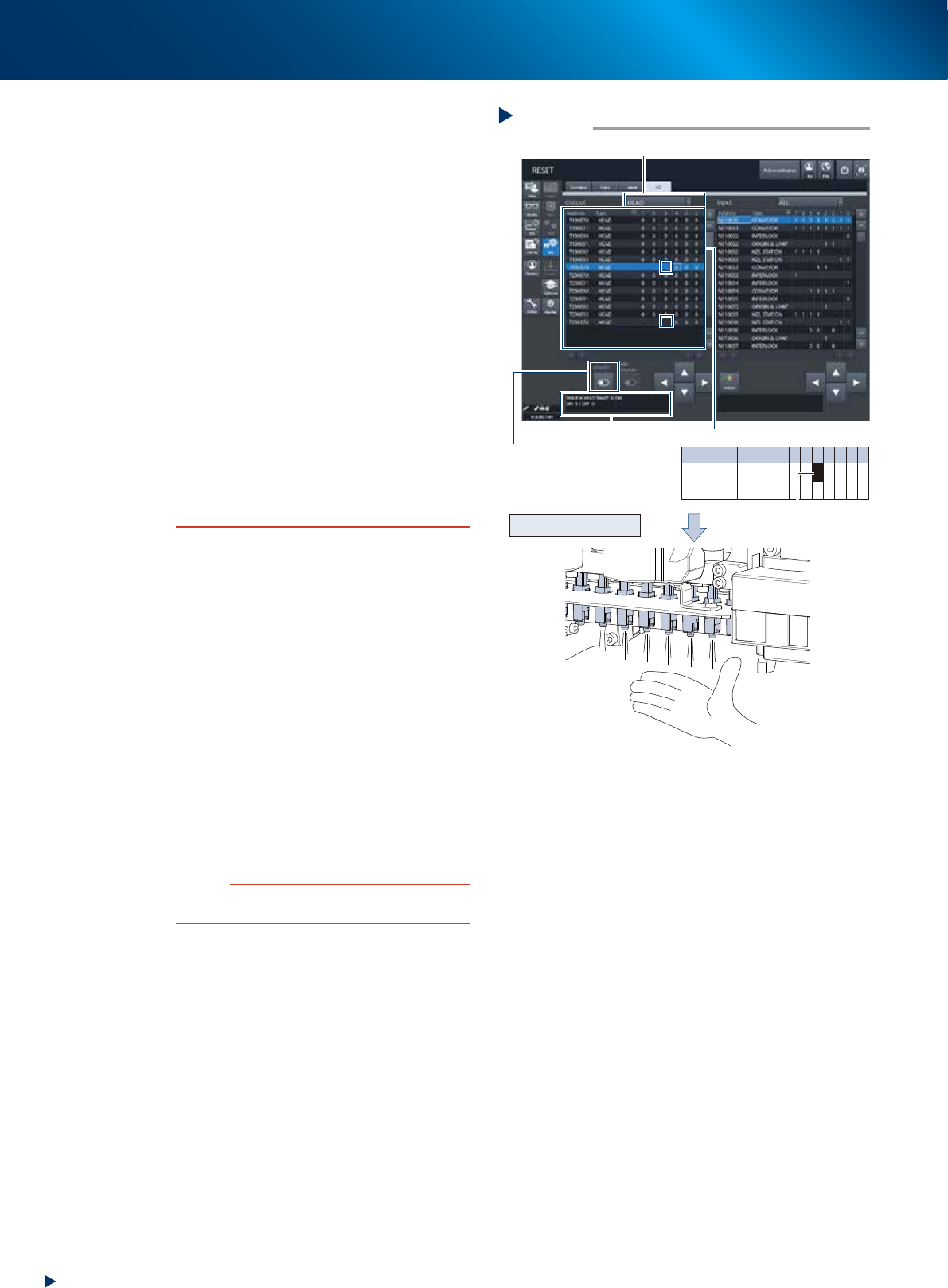
1. Open the [Unit] - [Head] screen.
2. Select any head unit from "Table Select".
3. Press the [Nozzle Change] button. Select
"ALL" for "Head Number" and select "Store
Nozzle" for "Nozzle Type" on the "Nozzle
Change" screen.
4. Press the [OK] button to return all nozzles to
the nozzle station.
n
NOTE
When the machine does not equip the nozzle station,
open the machine safety cover and detach the nozzles by
hand.
e
2
Move the head unit to machine front
side.
1. Press the emergency stop button and detach
the feeder exchange carriage.
2. Open the machine safety cover and move
the head unit to convenient position to work.
3
Blow each head by opening the [Unit]
- [Head] screen and pressing the [Blow]
buttons of all the heads.
4
Check the condition of blowing by
placing your hand beneath the each
head to check that all the heads exhaust
air evenly. When a head exhausts less air
than the others or does not, the valve
replacement is required. See "3.1
HM head: Replacing the valves" in
Chapter 5 to replace the valve.
Storing nozzle
Step 1
Select “ALL” for Head Number, “Store Nozzle”for Nozzle Type
[Nozzle Change] button
Table Select
54313-KMX-00
Checking the blow operation
Step 3,4
Press the [Blow] button of each head
Check the air blow
54314-KMX-00
3. 3-month maintenance items
3-26
Chapter 3 Periodic maintenance items
5
Operate the cleaning blow valve.
1. Open the [Unit] - [I/O] screen.
2. Select "Head" from the pull-down list of the
"Output" side.
3. Select the address of cleaning blow valve.
Address for the cleaning valve
Table A: T1301704
Table B: T1305704
When the address is selected, the contents
of selected address appears at lower left of
screen to be confirmed.
4. Recheck that all the nozzles of target head
unit are detached.
5. Press the [ON/OFF] button once and the
cleaning blow valve operates. (address
changes 0 to 1)
c
CAUTION
Recheck that all the nozzles attached to the target head
unit are detached before operating the cleaning blow
valve.
If the cleaning blow is performed with the nozzle attached,
the nozzle may drop off from head and may be damaged
or lost.
6
Check the condition of cleaning blow
valve.
1. Check that the more powerful air is
exhausted from all the head than that
checked before by placing your hand
beneath the each head.
2. Press the [ON/OFF] button at the [Unit] - [I/
O] screen again. The appeared address
changes 1 to 0 and the cleaning blow
valves close.
3. Check that the air exhausted from head
decreases.
When the air exhausted from the head does not
change even the cleaning blow valves are
operated, the replacement of cleaning blow
valve is required.
See "3.1 HM head: Replacing the valves" in
Chapter 5 to replace the valve.
c
CAUTION
Be sure to wear the protective goggles as the cleaning
blow air may blow on your face.
7
Stop the blowing operation by pressing
the [blow] buttons of all the head at the
[Unit] - [Head] screen.
8
Return the nozzles to their original
position.
When the nozzles are detached by hand,
return each nozzle to the head from which it
was detached.
Step 5,6
[ON/OFF] button
Example : T1301704
Address
T130170
T230170
Type
Head
Head
7 6 5 4
0
0
3
0
0
2
0
0
1
0
0
0
0
0
Checking the blow operation
Select “Head” of Output field
Select Address
Displays address contents
Checking cleaning blow
54315-KMX-00