YSM40R_Mainte_E.pdf - 第108页
3-38 3 Periodic maintenance items 3.2 RS head 3.2.1 Inspecting/cleaning nozzle shaft tip T he dirt on nozzle tip may cause shaft operation error or nozzle c hange error . T herefore, perform visual inspection and cleanin…
3-37
3
Periodic maintenance items
3.1.4 MU head: Applying grease to spline shaft (when required)
n
NOTE
Basically, it is not necessary to apply grease to spline shaft (Z-axis) of MU head unit. However, if touching the shaft
surface or solvent sprayed on it, the grease is removed and rust may appear. Slightly apply specified grease (NSL) for
anti-rust as needed.
e
1
Move the head unit.
1. Press the emergency stop button and
then open the machine safety cover.
2. Use the CLAMP ON/OFF switch to lower
the feeder exchange carriage and
detach it.
3. Move the head unit forward.
2
Clean the spline shaft.
Clean the spline shaft with lint-free cloth or
cotton swab.
3
Apply grease to the spline shaft.
Apply and spread thinly specified grease
(NSL) with finger uniformly over the shaft
surface.
533G2-N9-00
4
Wipe off the excess grease.
1. Move up/down the spline shaft several
times manually.
2. Wipe off excess grease on top and
bottom of the spline shaft with lint-free
cloth or cotton swab.
c
CAUTION
Make sure not to wipe off grease on spline shaft surface
completely.
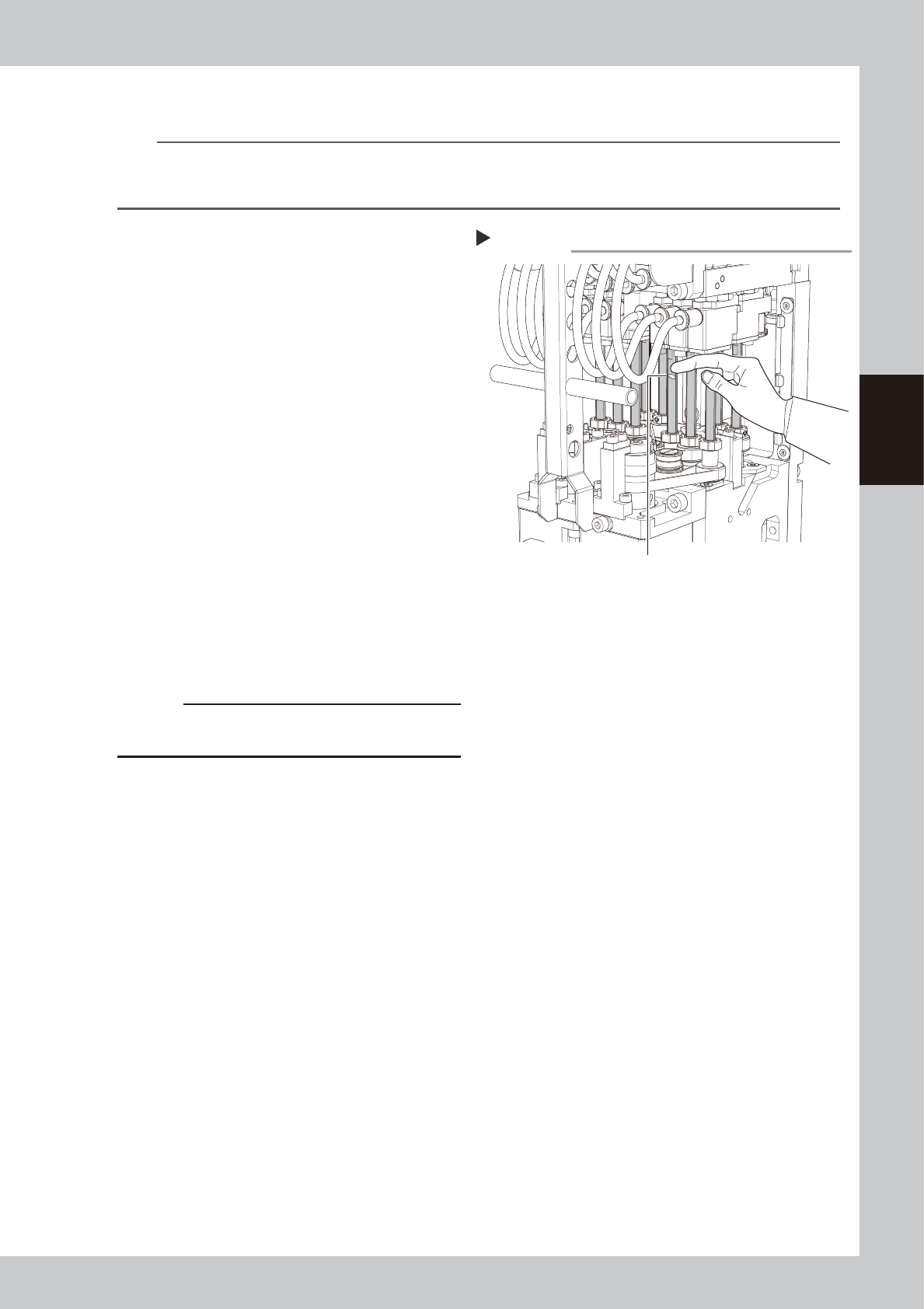
Applying grease to spline shaft
Step 3
Grease (Apply uniformly.)
3-38
3
Periodic maintenance items
3.2 RS head
3.2.1 Inspecting/cleaning nozzle shaft tip
The dirt on nozzle tip may cause shaft operation error or nozzle change error. Therefore, perform visual
inspection and cleaning of shaft tip once every 3 months.
1
Prepare for work.
e
1. Take off all accessories susceptible to magnetic fields, such as a wristwatch and magnetic ID card.
2. If the machine is equipped with nozzle station, store all nozzles to the nozzle station.
3. Press the emergency stop button and then open the machine safety cover.
4. Use the CLAMP ON/OFF switch to lower the feeder exchange carriage and detach it.
5. Move the head unit to convenient position to work and place a square cloth under the head unit.
TIP
See "How to lower RS head/nozzle shafts" for details.
2
Inspect shaft tip.
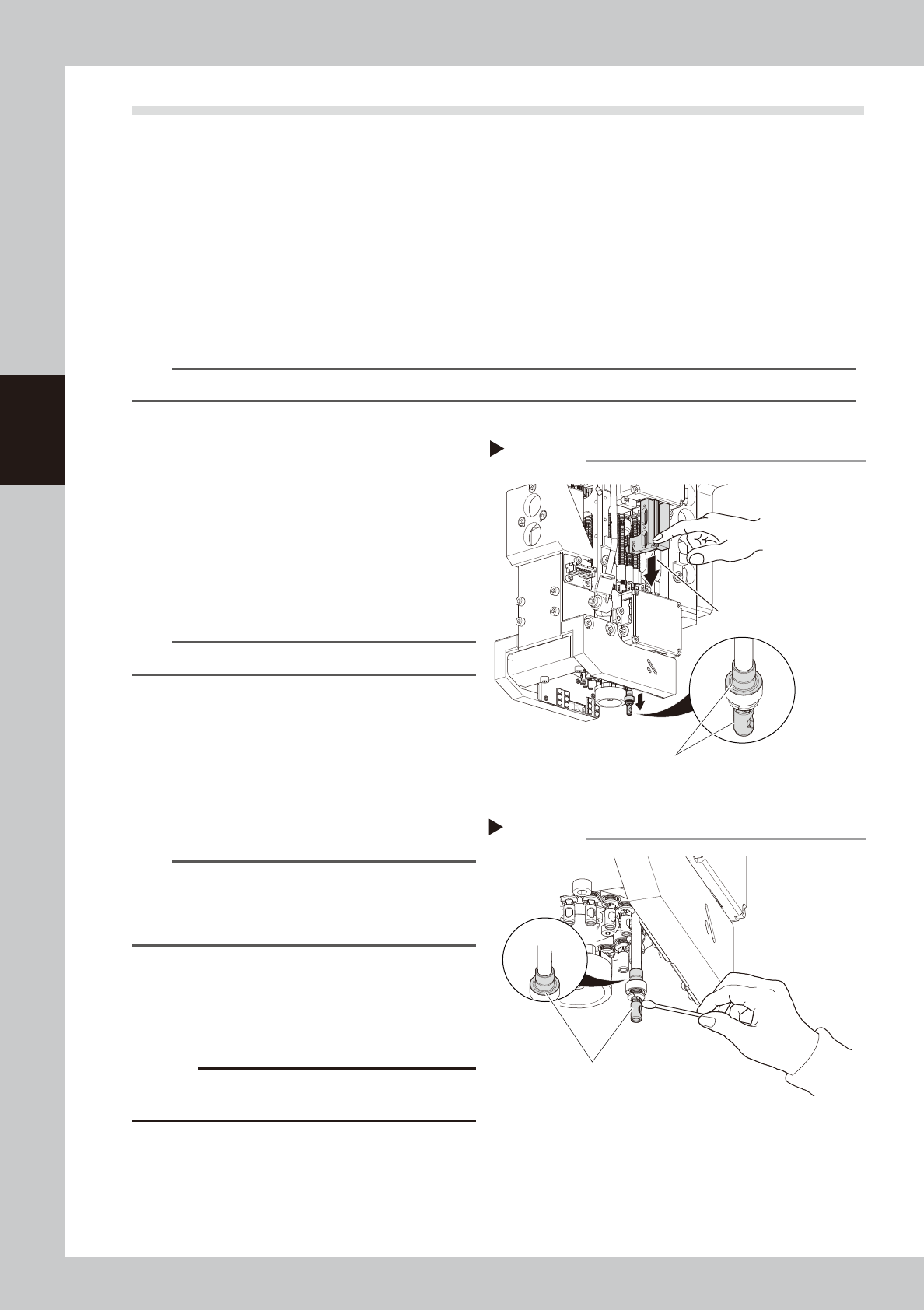
1. Turn the rotary so that the relevant nozzle
shaft locates under the Z-axis.
2. Press the Z-axis with finger to lower the
nozzle shaft.
3. (Without nozzle station) Detach nozzle
manually.
4. Check that no dirt is found on the
position shown at right.
53340-N9-20
TIP
Check the inside of shaft with hand mirror or similar tool.
3
Clean nozzle shaft tip.
1. Lower the nozzle shaft with the same
procedure as Step 2.
2. Wipe off dirt on nozzle shaft tip with
cotton swab. If the dirt still remains, apply
IPA to cotton swab and remove it.
533F5-N9-10
n
NOTE
If oil on shaft tip is removed due to cleaning, apply
specified oil to cotton swab and spread it uniformly.
See "3.2.2 Lubricating nozzle shaft tip" for lubricating all
nozzle shaft tips.
4
Inspect/clean rest of nozzle tips.
1. Inspect/clean rest of nozzle tips with the
same procedures as Step 2 to 3.
2. Remove square cloth after working.
c
CAUTION
Make sure that all nozzle shafts are raised up if lowered
them manually.
Inspecting shaft tip
Step2
Inspect visually here.
Press Z-axis with finger to
lower nozzle shaft.
Cleaning nozzle shaft tip
Step3
Clean here.
3-39
3
Periodic maintenance items
3.2.2 Lubricating nozzle shaft tip
The nozzle shaft tip for RS head may be worn out due to lack of greasing.
Apply grease to the nozzle shaft tip once every 3 months.
n
Required tools
Special grease: KMB-M3859-00X (GREASE PACK (L500))
Jig for greasing RS head: KMB-M3820-00X (LUBRICATION SET)
Others: Petri dish (Contains grease for RS head shaft), Cleaning wiper or Cloth
1
Store all nozzles to nozzle station.
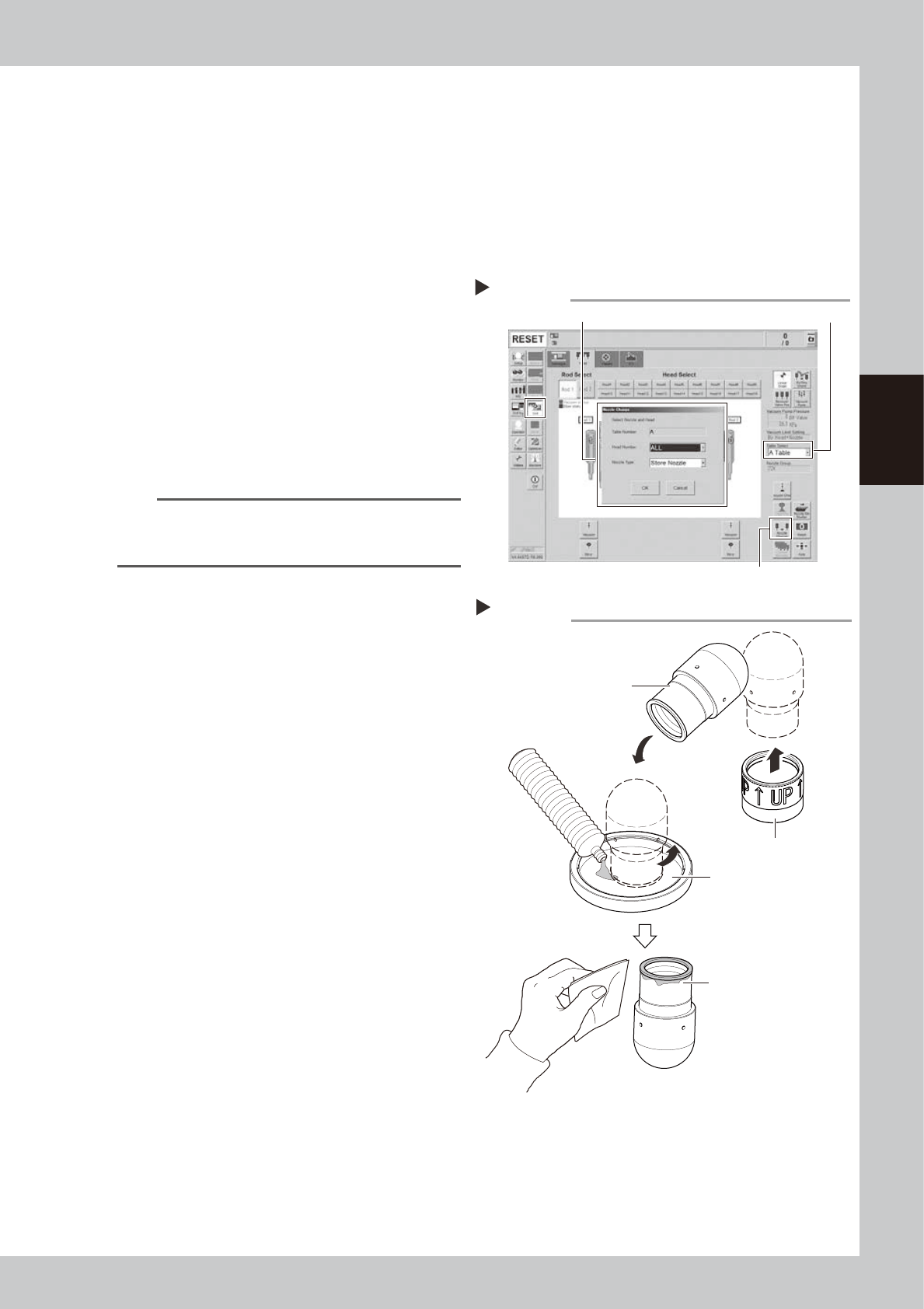
1. Open the [Unit] - [Head] screen.
2. Select desired head unit from "Table
Select".
3. Press the [Nozzle Change] button.
4. Select "ALL" for "Head Number" and
select "Store Nozzle" for "Nozzle Type" on
the "Nozzle Change" screen.
5. Press the [OK] button to return all nozzles
to the nozzle station.
n
NOTE
If the machine is not equipped with a nozzle station,
press the emergency stop button and then remove the
nozzles manually.
e
2
Move the head unit.
1. Press the emergency stop button and
then open the machine safety cover.
2. Turn off the carriage clamp switch to
detach carriage from mounter.
3. Move the head unit to a convenient
position for maintenance work.
3
Apply grease to jig.
1. Pour grease for shaft into petri dish.
2. Remove cap from jig. Turn the jig to
apply grease thoroughly to the sponge.
4
Remove excess grease.
Place the jig on cleaning wiper or cloth to
remove excess grease.
533F1-N9-00
Step 1
Storing nozzles
Head Number: “ALL” / Nozzle type: “Store Nozzle”
[Nozzle Change] button
Table Select
Preparing jig and grease
Step 3, 4
Turn jig to apply grease
thoroughly.
Remove excess grease.
Cap
Jig