YSM40R_Mainte_E.pdf - 第159页
3-89 3 Periodic maintenance items 9 T urn blow switch off . T ur n off the "Rod 1 (or 2)" valve and "Blow switch" of cleaned head unit in reverse order of Step 6. 0 Check vacuum le vel. Check vacuum l…
3-88
3
Periodic maintenance items
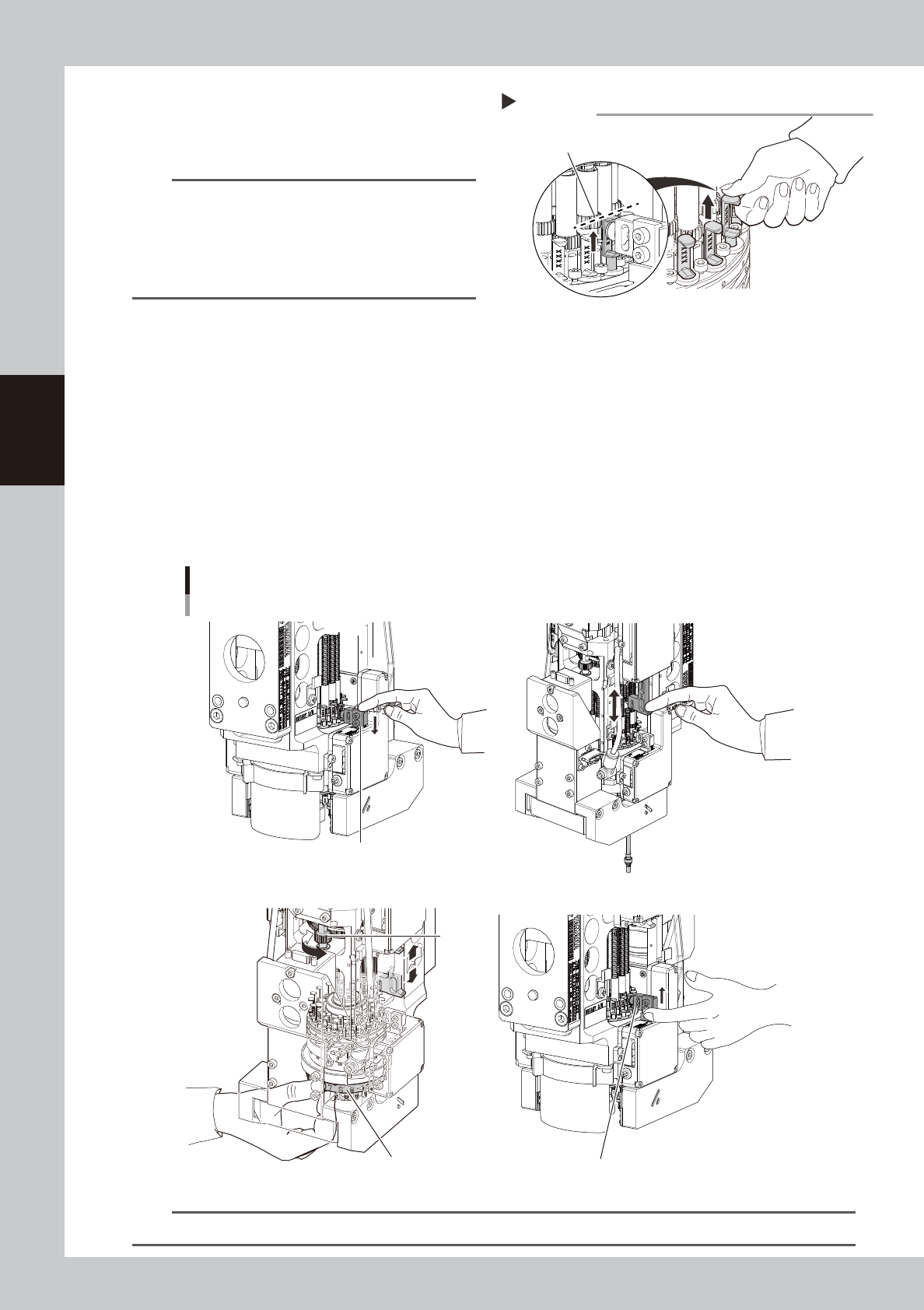
7
Set all spools to "Vacuum position".
Move all spools on relevant head unit to
upper end (vacuum position).
533G4-N9-00
TIP
The spool upper end locates where it can be moved
up without resistance. The spool can be moved up to
the middle of gear on shaft (upper gear). The stroke of
top/bottom of spool is approx. 3 mm. The spool is
detached by moving it up more than 3 mm. Make sure
not to move it up excessively.
8
Blow the inside of shaft.
1. Pressing down V-axis of relevant rod side manually lowers the relevant spool and blows the inside of
nozzle shaft.
2. Move up/down Z-axis knob on relevant rod side several times to move up/down shaft under the
knob.
3. R (mount angle) of all heads can be turned not by turning rotary but by turning R-axis gear holding
the label where head numbers are indicated with hand. Turn them 120 degrees.
4. Move up/down Z-axis knob of relevant rod several times to move up/down shaft under Z-axis.
5. Perform the works from 3 to 4 again.
6. Move up V-axis manually to move the relevant spool to the upper end (vacuum position).
7. Turn the rotary to perform the works from 1 to 6 for all heads.
Blowing the inside of shaft
Moving down V-axis: Blow
Moving up V-axis: Vacuum (stop blowing)
R-axis gear
Hold here with hand. Moving up V-axis: Vacuum (stop blowing)
1
8- 28-
3
8- 68-
533G5-N9-00
n
NOTE
It requires approx. 30 seconds to blow per head. If dirt cannot be removed, blow a little longer.
Moving up spool
Step 7
Spool upper end: meddle of shaft gear (upper side)
3-89
3
Periodic maintenance items
9
Turn blow switch off.
Turn off the "Rod 1 (or 2)" valve and "Blow
switch" of cleaned head unit in reverse order
of Step 6.
0
Check vacuum level.
Check vacuum level without nozzles/filters.
See "How to check for clogged nozzles (on
the [Unit]-[Head] tab screen)" in Chapter 2.
• Reference value of vacuum level: 90 or less
If the vacuum level is out of the value,
perform Step 5 to 9 again for relevant nozzle
shaft.
q
Attach the filters.
1. See "2.6.1 Inspecting and replacing the
air filters" to attach new filters to all heads.
2. Remove square cloth after working.
w
Return spools to original position.
1. Close the machine cover and set
carriage.
2. Cancel the emergency stop.
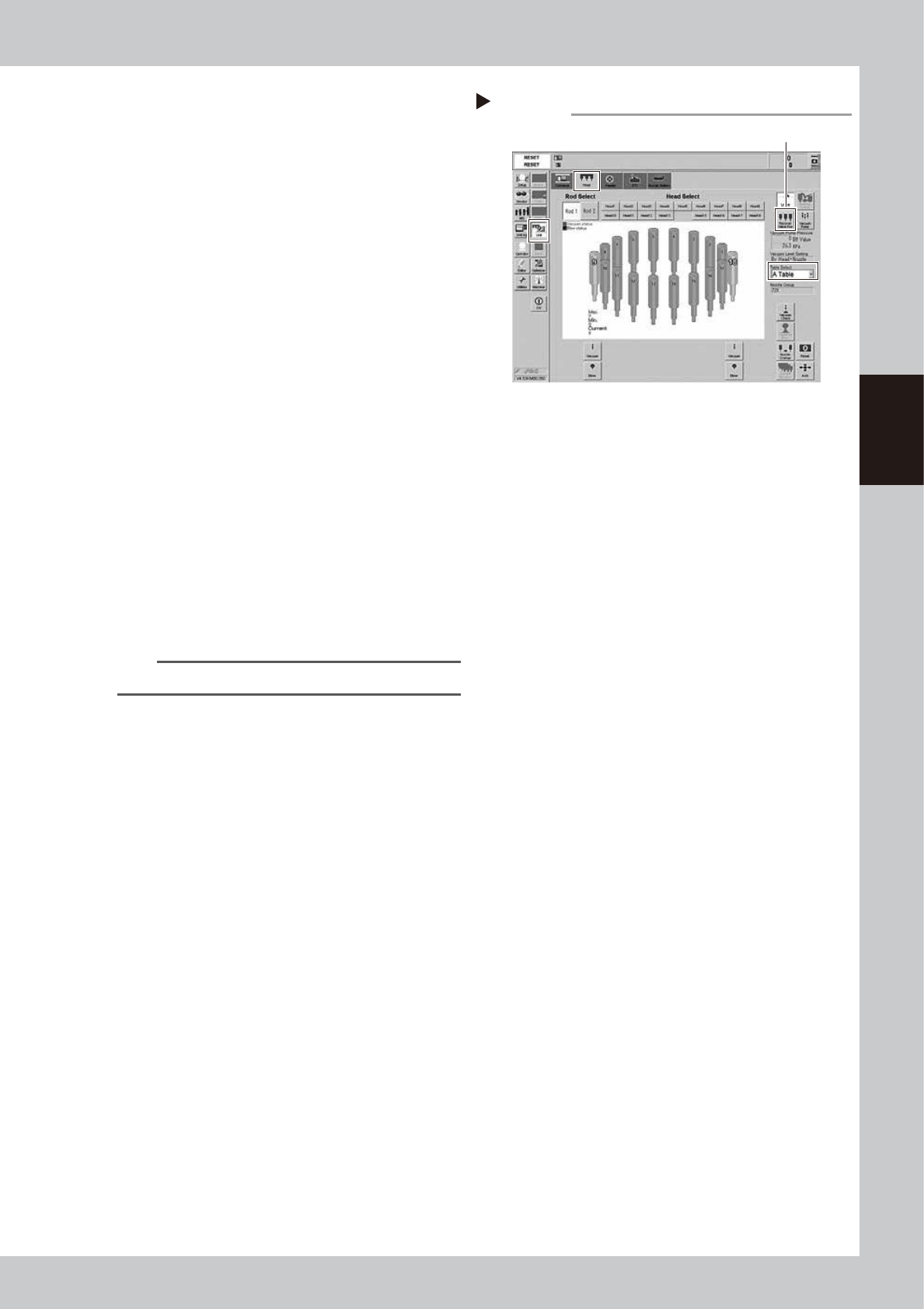
3. Open [Unit] - [Head] screen.
4. Select the table to perform the work.
5. Pressing [Recover Valve Pos] returns
spools to the reset positions.
54307-N9-00
TIP
The [Recover Valve Pos] is a vacuum position.
Recovering valve position
Step 12
[Recover Valve Pos] button

Chapter 4 Maintenance of options
Contents
1. Ionizer 4-1
1.1 Cleaning ionizer discharge needle (Monthly) 4-2
1.2 Replacing ionizer discharge needle (2-year) 4-3
2. UPS (Uninterruptible Power Supply) 4-4
2.1 Replacing the UPS battery (3 year) 4-4
3. Inspecting, cleaning and lubricating cATS 4-5
3.1 Daily inspection 4-6
3.1.1 Inspecting magazines and pallets 4-6
3.2 Monthly inspection 4-7
3.2.1 AZ-axis 4-7
3.2.2 Both sides of cATS 4-7
3.3 6-month inspection 4-8
3.3.1 AH-axis 4-8
3.3.2 Magazine shaft 4-8
3.3.3 Pickup station (pallet clamp) 4-9
3.3.4 Pickup station (vertical guide) 4-9
4. Nozzle station 4-10
4.1 Checking nozzle station sensor (1-year) 4-10
4.2 Cleaning nozzle station 4-12