00194081-01.pdf - 第169页
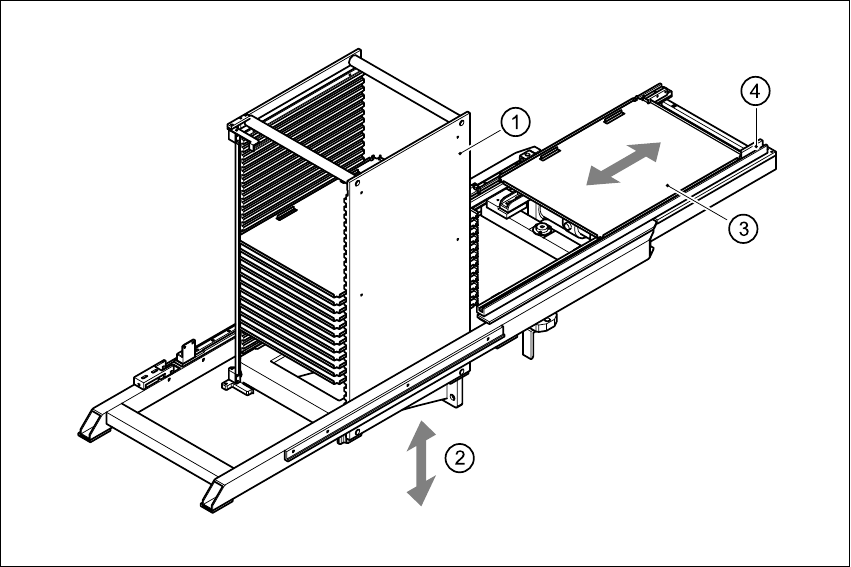
User Manual SIPLAC E CF 6 Component han dling Software Vers ion SR.408.xx 03/2006 US Ed ition 6.5 Waffle-pack c hanger 169 6 Fig. 6.5 - 2 Principle of the w affle-pack changer 6 (1) Magazin e storag e unit (2) Lift (3) M…

6 Component handling User Manual SIPLACE CF
6.5 Waffle-pack changer Software Version SR.408.xx 03/2006 US Edition
168
6.5.2 General
The space required by waffle trays is relatively large in comparison to the component density.
The low component capacity also requires the waffle trays to be changed frequently, which
means that the placement sequence has to be interrupted if the trays are changed manually.
The use of a waffle-pack changer eliminates this unnecessary time loss since the waffle trays are
stored and automatically changed. Programmable, random access to up to 28 waffle trays also
increases the range of components that can be made available.
PLEASE NOTE 6
The waffle-pack changer does not fill the entire width of the component feeder table. It leaves 10
locations on the right-hand side of the table that could be used for ten 8 mm feeders, for example.6
6.5.3 Principle of the waffle-pack changer
The waffle-pack changer can be used to store and change up to 28 waffle trays fully automati-
cally. The magazine carriers (levels) for the waffle-pack trays are numbered consecutively in
ascending order from bottom to top (1 - 28).
The magazine storage unit moves vertically to the selected level within the traveling range of the
horizontal axis. The horizontal axis then grabs the magazine carrier from the level, and carries it
to within the access range of the placement head.
Fig. 6.5 - 2
below illustrates the principle of the waffle-pack changer.
User Manual SIPLACE CF 6 Component handling
Software Version SR.408.xx 03/2006 US Edition 6.5 Waffle-pack changer
169
6
Fig. 6.5 - 2 Principle of the waffle-pack changer
6
(1) Magazine storage unit
(2) Lift
(3) Magazine
(4) Horizontal axis
6.5.3.1 Sequence of functions
Waffle-pack trays with the associated components are defined in the set-up. Once the set-up has
been converted, the magazine storage unit performs a reference run.
6 Component handling User Manual SIPLACE CF
6.5 Waffle-pack changer Software Version SR.408.xx 03/2006 US Edition
170
6
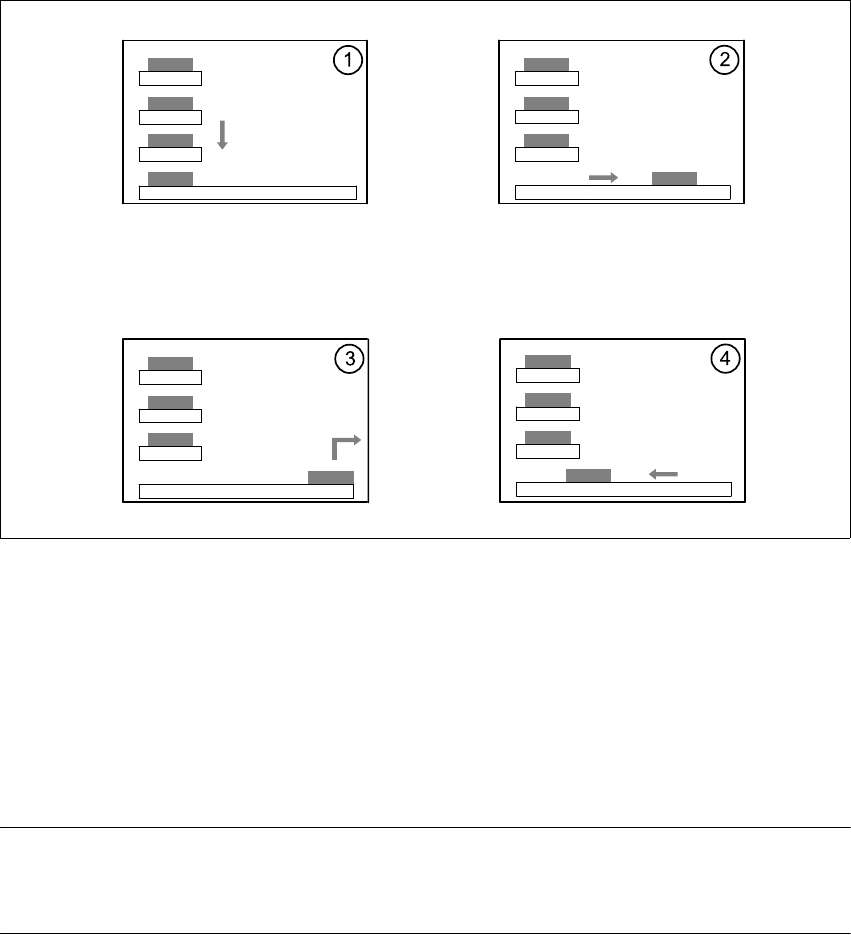
Fig. 6.5 - 3 Sequence of functions
6
(1) The Lift of the magazine storage unit positions the selected magazine carriers level with the
horizontal feed axis.
(2) The magazine carrier is carried to the placement head's pick-up area.
(3) The components are removed.
(4) The magazine carrier is moved back into the magazine storage unit.
6
PLEASE NOTE 6
If the placement sequence is interrupted thus switching off the waffle-pack changer, the set-up and
the current fill level are stored. 6
The position of the waffle-pack tray carrier in the waffle-pack tray storage unit and the components
to be placed in the waffle-pack tray carrier are entered in the set-up.
The waffle-pack changer is defined as location 1.