P-TOOL说明书.pdf - 第227页
S-1 INDEX Index A About this manual i B Backup f older s 2-70 Creating the backup f older s 2-70 Board data Copying Board data 2-43 Deleting Board data 2-47 Duplicating Board data 2-46 Editing Board data 2-43 Managing th…
4-51
4
Feeder Viewer
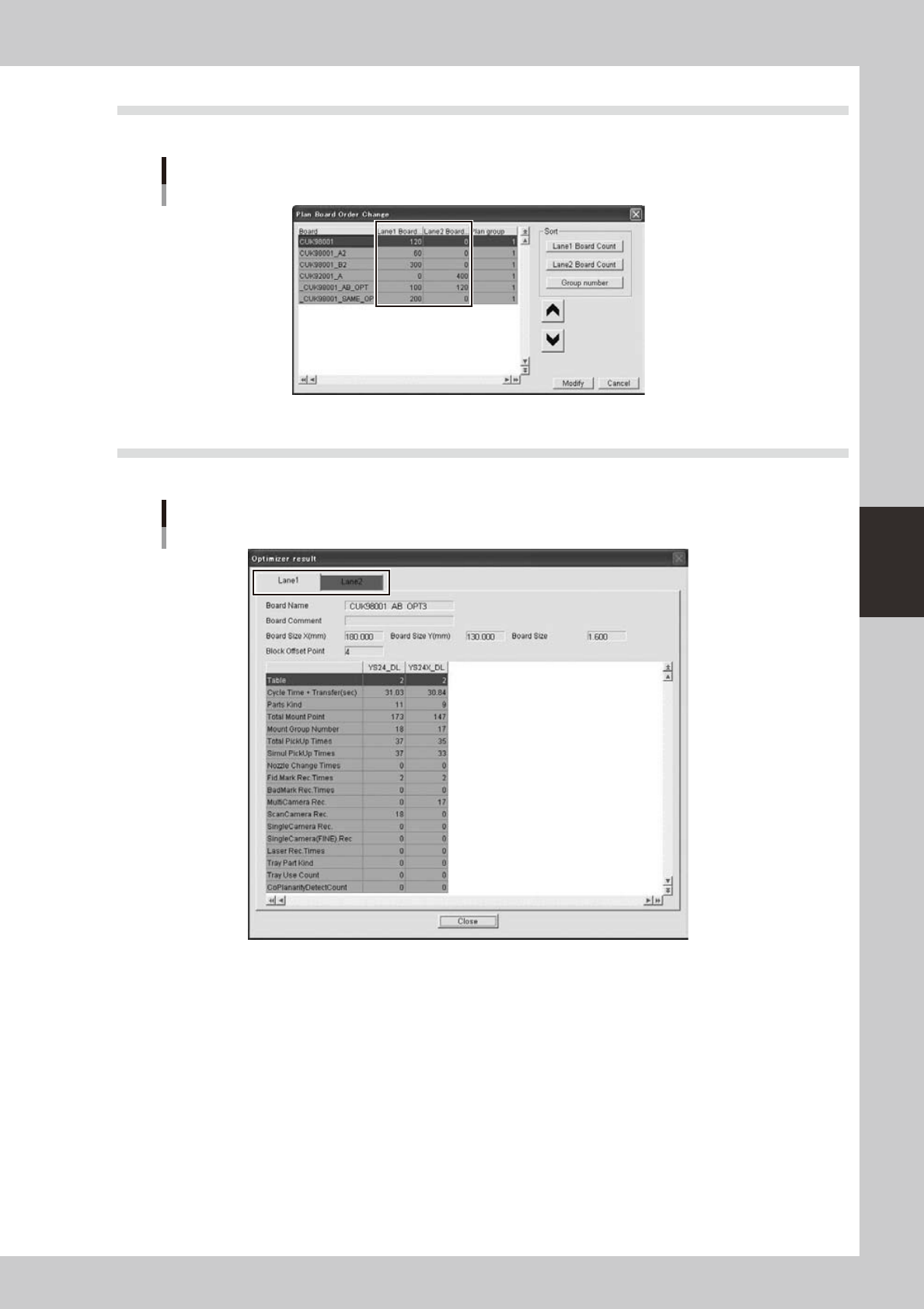
5.3 [Production Plan]-[Plan Board Order Change] dialog is extended
It is extended for board count of each lane and sorting by board count.
[Plan Board Order Change] dialog
64483-S0-00
5.4 [Optimizer]-[Optimizer Result] is extended
It is extended for each lane. It is same with Optimizer application.
[Optimizer Result] dialog
64484-S0-00

S-1
INDEX
Index
A
About this manual i
B
Backup folders 2-70
Creating the backup folders 2-70
Board data
Copying Board data 2-43
Deleting Board data 2-47
Duplicating Board data 2-46
Editing Board data 2-43
Managing the Board data 2-43
Renaming Board data 2-45
Board data disk 2-12
Board data format v
Board data type icons 2-10
Board data window, Board Editor 3-11
Board Editor 3-1
Arranging the Board Editor windows 3-22
Arranging the windows 3-21
Basic operation 3-4
Canceling the filter 3-30
Copying and pasting 3-27
Data sorting 3-38
Displaying the detail view 3-18
Filtering the data 3-29
Graphic View 3-41
Hiding the detail view 3-19
Moving the cursor 3-25
Quitting the Board Editor 3-3
Search and replace 3-31
Starting the Board Editor 3-1
Switching the window 3-20
Working with multiple Board data 3-22
Board Editor main window 3-4
Board Explorer 2-1
Basic operation 2-3
Changing the language 2-19
Comparison between folders 2-50
Converting the data type 2-48
Copying Board data 2-43
Deleting Board data 2-47
Duplicating Board data 2-46
Editing Board data 2-43
Managing the Board data 2-43
Option setting 2-19
Quitting the Board Explorer 2-2
Renaming Board data 2-45
Starting the Board Explorer 2-1
Board Explorer window 2-5
C
Communication
Restrictions on communication function iii
Comparison between folders 2-50
Converting the data type 2-48
Copy and paste, Board Editor 3-27
Copying Board data 2-43
Creation of Board data disk 2-17
D
Database option setting 2-20
Data sorting, Board Editor 3-38
Data type
Converting the data type 2-48
Default data type 2-17
Deleting Board data 2-47
Detail view, Board Editor 3-13,3-14
Duplicating Board data 2-46
E
Editing Board data 2-43
F
Factoly Tools
Applicable models iv
Factoly Tools application configuration i
Factory folder, Board Explorer 2-3
Factory Tools option settings 2-19
Feeder interference check 4-13
Feeder Viewer 4-1
Adding Board data 4-23
Basic operation 4-4
Changing the feeder position 4-30
Changing the order of Board data 4-25
Changing the tray position 4-30
Combining the parts 4-36
Creating new plan information 4-18
Deleting Board data 4-24
Dividing the parts 4-34
Editing the Board data 4-27
Moving a feeder between machines 4-32
Moving a feeder within the same machine
4-30
Opening a plan file 4-21
Plan information screen 4-22
Production board list 4-17
Quitting the Feeder Viewer 4-3
Saving the Board data 4-28
Starting the Feeder Viewer 4-1
Switching the production lines 4-22
Filtering, Board Editor 3-29
G
Graphic View, Board Editor
Changing the mount positions 3-45
Closing the graphic view 3-41
Crating new mount information 3-45
Displaying the graphic view 3-41
Editing the graphic view 3-45
Graphic toolbar 3-42
Graphic View 3-41
Manipulating the graphic view 3-42
Graphic view icon, Board Editor 3-10
H
Hardware key option setting 2-21
J
Jump, Board Editor 3-25
L
Language
Changing the language 2-19
Line Data view tree icon, Board Editor
3-10
Line folder, Board Explorer 2-3
Lines
Deleting lines 2-18
Registering lines 2-12
M
Machine icon, Board Editor 3-10
Machine icon, Board Explorer 2-4
Machines
Deleting machines 2-18
Registering machines 2-12
Main view, Board Editor 3-13,3-14
Main view, Board Explorer 2-4
Managing the Board data 2-43
Menu bar, Board Explorer 2-5
N
Necessary hardware ii
Network configuration iii
O
Option setting 2-19
P
Plan file, board Explorer 2-66
Plan information screen, Feeder Viewer
4-4
Editing the data 4-22
Production board list 4-23
Production plan, Board Explorer 2-66
Creating a new production plan 2-68
Production Plan window, Board Explorer
2-66
R
Registration of all machines 2-17
Renaming Board data 2-45
Replace, Board Editor 3-33
S
Search, Board Editor 3-31
Setup error prevention system iii
Status bar, Board Editor 3-10
Status bar, Board Explorer 2-11
System configuration ii
T
Toolbar, Board Editor 3-6
Toolbar, Board Explorer 2-7
Toolbar, Feeder Viewer 4-5
Tree view, Board Editor 3-13
Tree view, Board Explorer 2-3

Programming PC Software
Factory Tools
Jul. 2010
Version 2.00
© YAMAHA MOTOR CO., LTD. IM Operations
All rights reserved. No part of this publication may be
reproduced in any form without the permission of
YAMAHA MOTOR CO., LTD.
Information furnished by YAMAHA in this manual is believed to
be reliable. However, no responsibility is assumed for possible
inaccuracies or omissions. If you find any part unclear in this manual,
please contact YAMAHA or YAMAHA sales representatives.
USER’S MANUAL
Standard Function