manual-dth-heating-element-0033502_ID-244970_EN.pdf
INSTRUCTION MANUAL DTH Heating Element for DT530
INSTRUCTION MANUAL
DTH
Heating Element for DT530
1
2
2
40 mm
50 mm
60 mm
80 mm
100 mm
130 mm
130 mm
para manuales - color gris
200 mm
300 mm
Replacing the Heating Element
The following items are included:
Heating Element ......... 1 unit Manual ........................... 1 unit
Ref. 0033502
Packing List
This manual corresponds to the following reference:
DTH-A
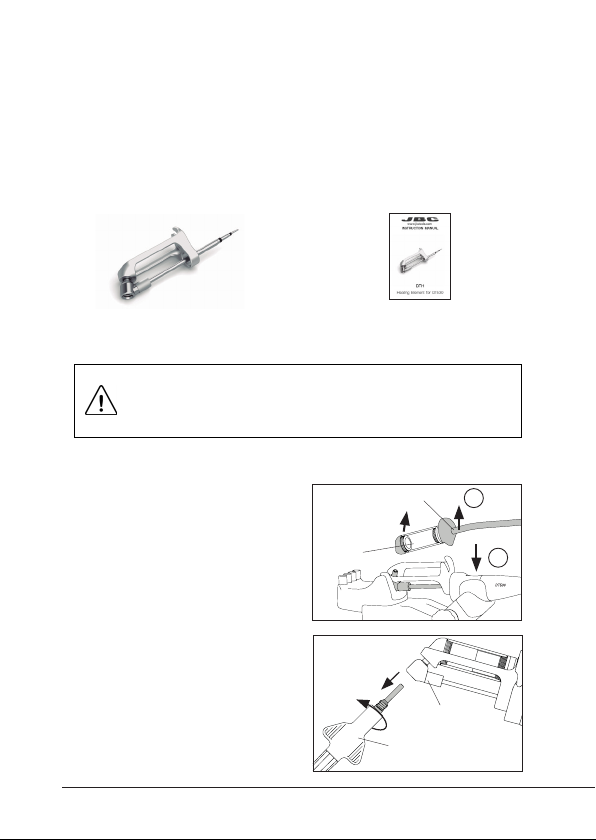
To detach the solder-collector
group from the desoldering
iron, hold with one hand the
tool down onto the tool holder
(1) and grasp the area of the
suction tube connector with
the other hand to remove the
collector group upwards (2).
If the heating element has a tip
on, remove it with the spanner
provided with the tool.
Turn off the station or disconnect the tool and
wait until the equipment has cooled down to room
temperature before doing the replacement.
Solder-
Collector
Group
Suction Tube
Spanner
Heating
Element
3
40 mm
50 mm
60 mm
80 mm
100 mm
130 mm
130 mm
para manuales - color gris
200 mm
300 mm
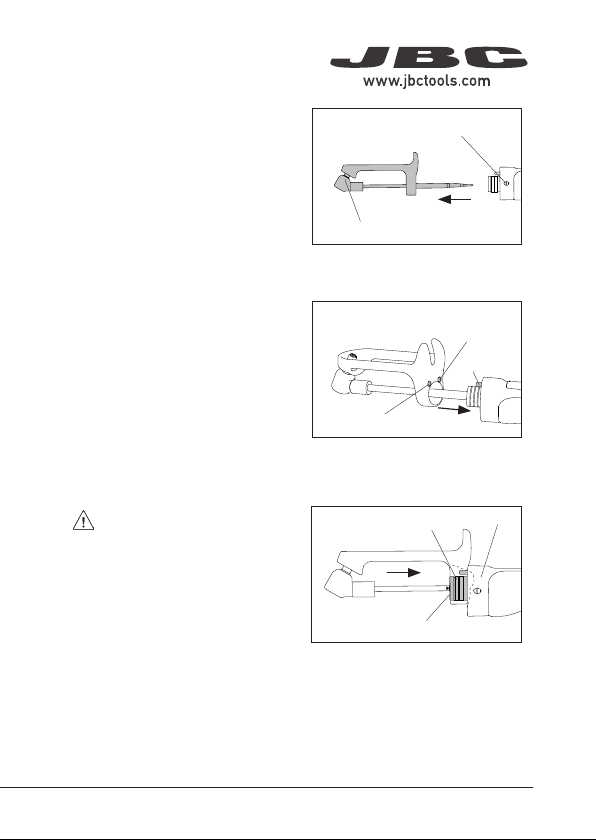
Take the tool and loosen
the fixing screw, pull out the
heating element from the
tool and replace it with the
new one.
Note: The heating element
has two assembling positions:
For right-hand use, insert
the pin into the hole “a” and
for left-hand use, into the
hole “b”.
Assemble the heating element
to the desoldering iron in the
desired position.
Make sure that the heating
element is pushed all the
way in. The metal bushing
of the handle should be
aligned with the edge of the
heating element for a proper
connection.
With the new heating element in place, tighten the fixing screw,
assemble the solder collector group and screw the tip in.
Heating Element
Metal Bushing
“a” for right-
hand use
“b” for
left-hand use
Pin
Heat. Element Edge
Handle
Fixing Screw