00194398-01.pdf - 第63页
Retrofit instructions SIPLACE HS-60 12/2004 Edition 2.10 Activating the option 63 2.10.2 Activating and configuring th e ceramic substrate centering option : S tart the SITEST program. DANGER Read and follow the DANGER t…
Retrofit instructions SIPLACE HS-60
2.10 Activating the option 12/2004 Edition
62
2.10 Activating the option
2.10.1 Overview
All though the fully installed "mechanical ceramic substrate centering" option hardware is auto-
matically detected by the software due by the presence of the coding plug (plug-in connection
between the option and the conveyor control), it still has to be activated in the SITEST program.
The mechanical ceramic substrate centering is always combined with fiducial position detection
on the substrate.
The position detection is carried out with the PCB vision camera with normal lighting or the
optional oblique lighting. If the optional multi-color PCB camera is used on the machine, rather
than the above PCB vision camera, then the fiducials are always centered with this camera by
default. The oblique lighting option is not used in this case.
Please note: 2
– If the mechanical ceramic substrate centering hardware has been installed, it must also be ac-
tivated in the "Machine Configuration" menu.
– When the mechanical ceramic substrate centering is deactivated in the Machine Configuration
menu, then it must first be fully removed from both processing areas of the affected conveyor,
i.e. the plug-in connections on the option must also be detached from the conveyor control.
The conveyor modules must also be converted on the PCB conveyor in parallel.
2
2
2
2
2
2
2
2
2
2
2
2
Retrofit instructions SIPLACE HS-60
12/2004 Edition 2.10 Activating the option
63
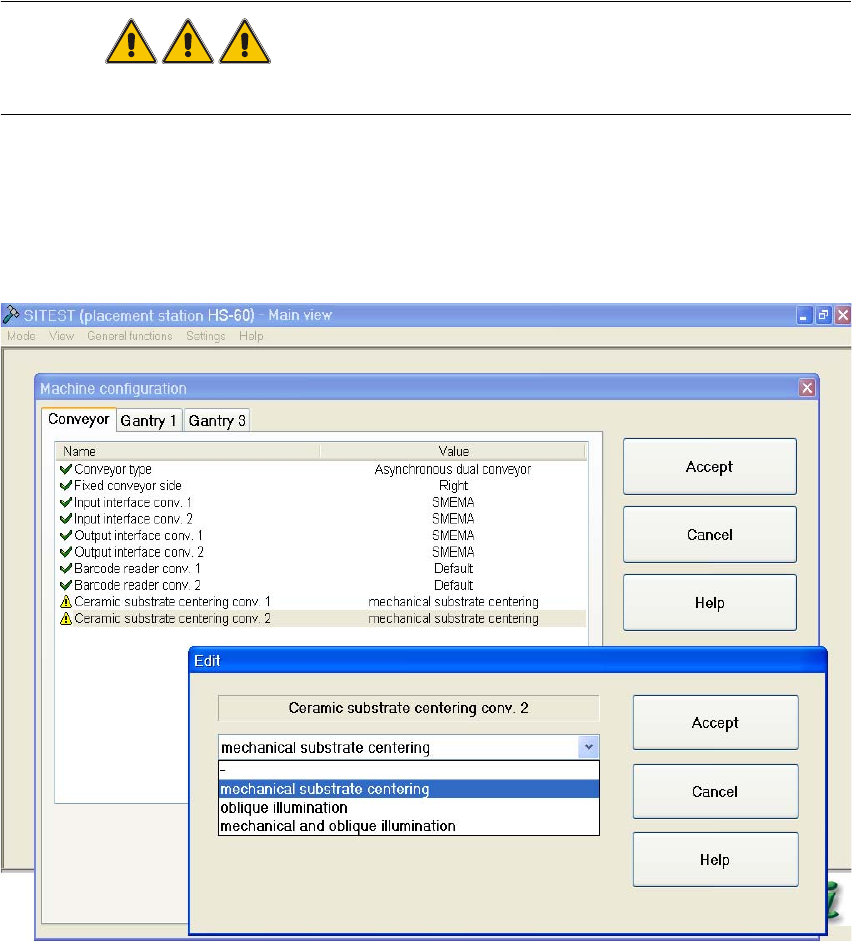
2.10.2 Activating and configuring the ceramic substrate centering option
: Start the SITEST program.
DANGER
Read and follow the DANGER text on working with the SITEST program. 2
: Select "Settings" from the menu bar.
: From the "Machine Configuration" menu, select the "Ceramic substrate centering conveyor 1"
(= processing area 1 and 2) -> "Edit" option. The Edit window appears:
2
Fig. 2.10 - 1 "Machine Configuration" menu, activating the ceramic substrate centering
2
2
2

Retrofit instructions SIPLACE HS-60
2.10 Activating the option 12/2004 Edition
64
The "Edit" window " contains the following selection options: 2
2
Tab. 2.10 - 1 Explanation of the selection options in the "Edit" menu"
CAUTION
The "Oblique lighting" and "None" options are of no relevance for the ceramic substrate centering.
However, if you do select one of these menu options, the mechanical ceramic substrate centering
unit must first be fully removed and the corresponding conveyor set up for PCB clamping once
more, as described in the Service Manual.
If this is not done, the next PCB or the mechanical ceramic substrate centering unit may be dam-
aged. 2
: If you want to use the mechanical ceramic substrate centering option in combination with sub-
strate position detection using PCB vision camera (normal lighting) or optional multi-color PCB
camera, then select:
"Mechanical substrate centering" -> "Accept".
: If you want to use the mechanical ceramic substrate centering option in combination with sub-
strate position detection using the optional oblique lighting, then select:
"Mechanical and oblique lighting" -> "Accept".
: If the machine only has a single conveyor, click on "Accept" to exit the "Machine Configuration"
Selection option in the "Edit"
menu"
Explanation
None Normal PCB conveyor with PCB clamp and PCB position
detection using PCB vision camera with normal lighting or
optional multi-color PCB camera.
The mechanical ceramic substrate centering unit must be
removed and the conveyor for clamping PCBs set up.
Mechanical substrate centering Mechanical ceramic substrate centering and
substrate position detection using PCB vision camera (nor-
mal lighting)
or optional multi-color PCB camera.
Oblique lighting No mechanical centering
Only position detection for PCBs using optional oblique
lighting (ring light)
-> Oblique lighting is only possible for both conveyors.
ATTENTION:
The mechanical ceramic substrate centering unit must be
removed and the conveyor for clamping PCBs set up.
Mechanical and oblique lighting Mechanical ceramic substrate centering and substrate
position detection using optional oblique lighting for PCB
vision camera.
-> Oblique lighting is only possible for both conveyors