DuraBlue II Customer Product Manual.pdf - 第46页
Installation 3-18 Part 1126931_01 2018 Nordson Corporation To read or edit a parameter (contd) Parameter Name Range of Values Default Value Input Setup 35 Optional Input 6 0–8 and 10-14 0 (disabled) 36 Optional Input 7…
Installation
3-17
Part 1126931_01
2018 Nordson Corporation
If the numeric set‐point or control option is not accepted, the right
display will indicate dashes (‐‐‐‐) for three seconds and then it will
change back to the original value.
8. Repeat step 5 through step 7 to read or change the next sequential
parameter number or press the Setup key to exit the setup mode.
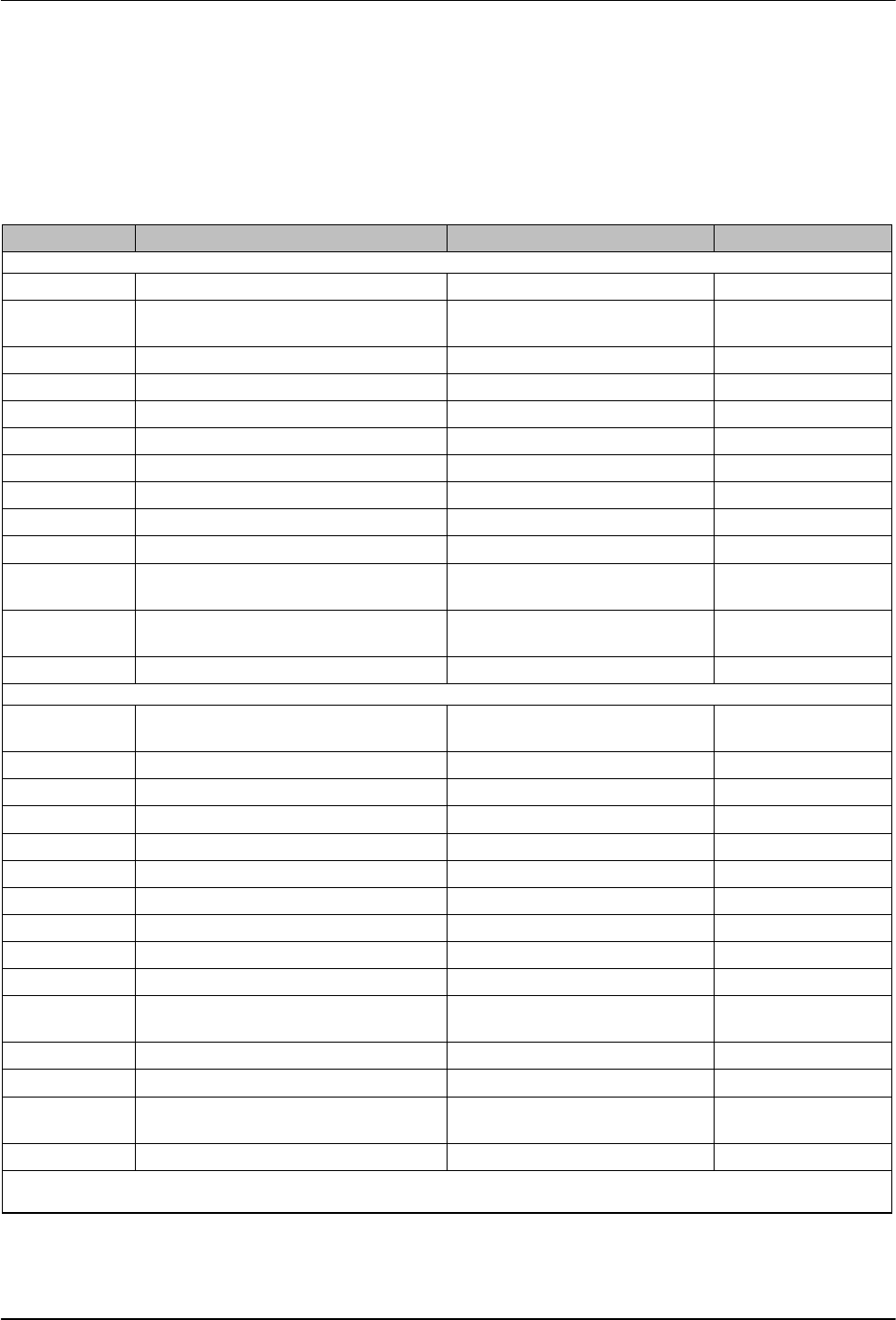
Table 3‐4 Operating Parameters
Parameter Name Range of Values Default Value
Standard
0 Enter Password 0 to 9999 4000
1 Total Hours with Heaters On
(noneditable)
0 to 9999 0
2 Fault Log (noneditable) — _‐F0 (empty)
3 Change History Log (noneditable) — P‐_ (empty)
4 Ready Delay Time 0 to 60 minutes 0 minutes
5 Service Interval Time 0 to 8736 hours 500 hours
6 Service LED Heater Hours 0 to 9999hours 0
8
1
Automatic Pump On 0 (disabled) or 1(enabled) 1 (enabled)
10 Enable or Disable Password 0 (disabled) or 1(enabled) 0 (disabled)
11 Create Password 0 to 9999 5000
12
1
Change Hose 1 Output to Electric
Applicator Activation
0 (disabled) or 1 (enabled) 0 (disabled)
13
1
Change Hose 2 Output to Electric
Applicator Activation
0 (disabled) or 1 (enabled) 0 (disabled)
14 External Communications Lock‐out 0 or 1 0 (disabled)
Temperature Control
20 Temperature Units (degrees C or F) C (degrees Celsius) or F
(degrees Fahrenheit)
C (degrees Celsius)
21 Over Temperature Delta 5 C (10 F) to 60C(110 F) 15 C (25 F)
22 Under Temperature Delta 5 C (10 F) to 60C(110 F) 25 C (50 F)
23 Standby Delta 25 C (50 F) to 190C (350 F) 50 C (100 F)
24 Automatic Standby Timeout 0 to 1440minutes 0 (disabled)
25 Automatic Heaters Off Time 0 to 1440minutes 0 (disabled)
26 Manual Standby Time 0 to 180 minutes 0 (disabled)
27 Hose Standby Delta 1 C (1 F) to 190C (350 F) 0 (disabled)
28 Applicator Standby Delta 1 C (1 F) to 190C (350 F) 0 (disabled)
29 Internal Zone Temperate Offset 0 C (0 F) to ‐15C (‐30 F) 0 (disabled)
30 Standard Input 1
0–8 and 10-14
10 (Automatic
Standby)
31 Standard Input 2 0–8 and 10-14 1 (Standby on/off)
32 Standard Input 3 0–8 and 10-14 2 (Heaters on/off)
33 Standard Input 4
0–8 and 10-14
4 (Hose/applicator 1
enable/disable)
34 Optional Input 5 0–8 and 10-14 0 (disabled)
1
Not used with DuraBlue II melters.
Installation
3-18
Part 1126931_01
2018 Nordson Corporation
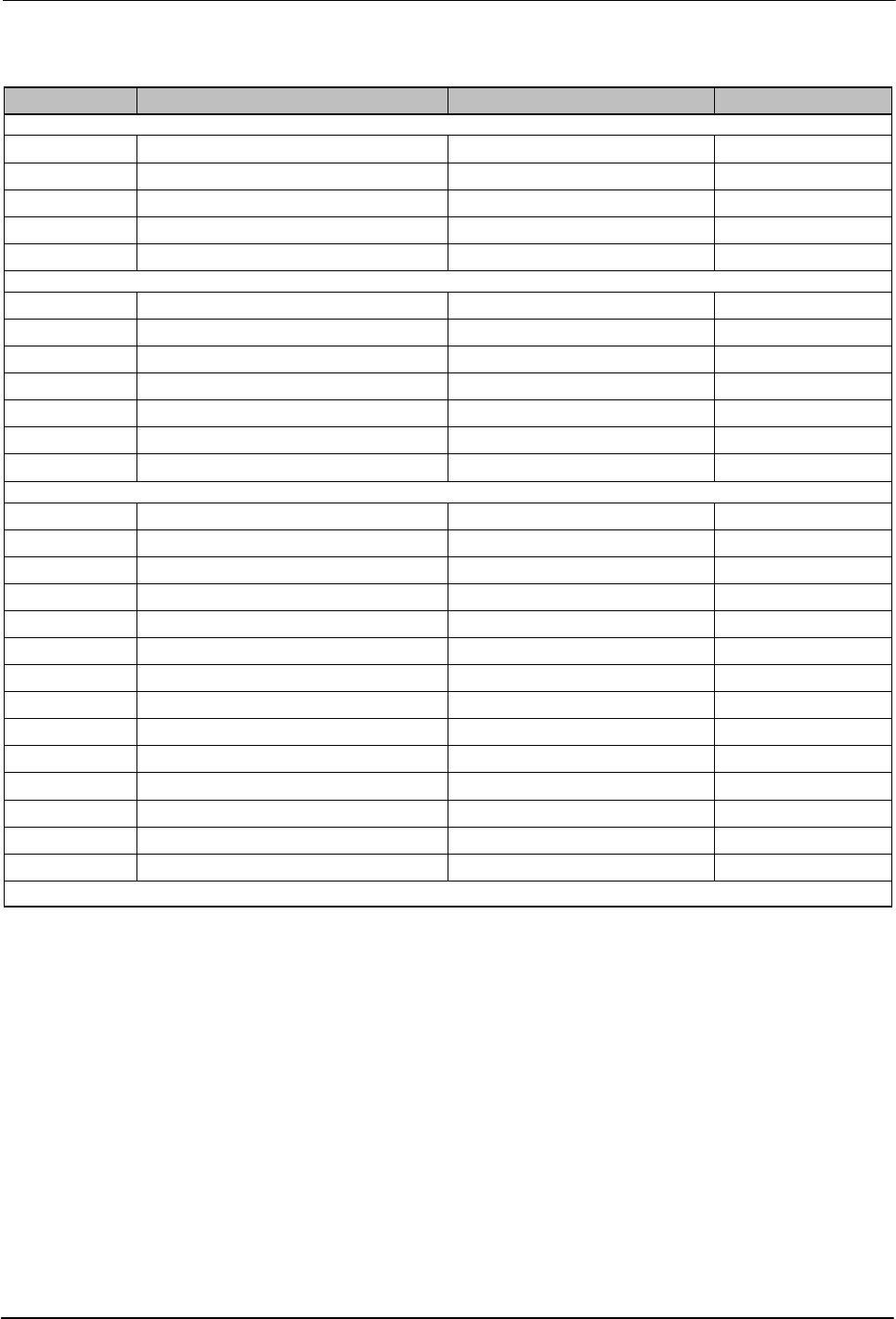
To read or edit a parameter (contd)
Parameter Name Range of Values Default Value
Input Setup
35 Optional Input 6 0–8 and 10-14 0 (disabled)
36 Optional Input 7 0–8 and 10-14 0 (disabled)
37 Optional Input 8 0–8 and 10-14 0 (disabled)
38 Optional Input 9 0–8 and 10-14 0 (disabled)
39 Optional Input 10 0–8 and 10-14 0 (disabled)
Output Setup
40 Standard Output 1 0–6 1 (Ready)
41 Standard Output 2 0–6 3 (Fault)
42 Standard Output 3 0–6 4 (Not used)
43 Optional Output 4 0–6 0 (disabled)
44 Optional Output 5 0–6 0 (disabled)
45 Optional Output 6 0–6 0 (disabled)
46 Optional Output 7 0–6 0 (disabled)
Seven‐day Clock
50 Current Day 1 to 7 (1 = Monday) —
51 Current Hour 0000 to 2359 —
55 Schedule 1 Heaters On 0000 to 2359 06:00
56 Schedule 1 Heaters Off 0000 to 2359 17:00
57 Schedule 1 Enter Standby 0000 to 2359 —:—
58 Schedule 1 Exit Standby 0000 to 2359 —:—
60 Schedule 2 Heaters On 0000 to 2359 —:—
61 Schedule 2 Heaters Off 0000 to 2359 —:—
62 Schedule 2 Enter Standby 0000 to 2359 —:—
63 Schedule 2 Exit Standby 0000 to 2359 —:—
65 Schedule 3 Heaters On 0000 to 2359 —:—
66 Schedule 3 Heaters Off 0000 to 2359 —:—
67 Schedule 3 Enter Standby 0000 to 2359 —:—
68 Schedule 3 Exit Standby 0000 to 2359 —:—
Continued…
Installation
3-19
Part 1126931_01
2018 Nordson Corporation
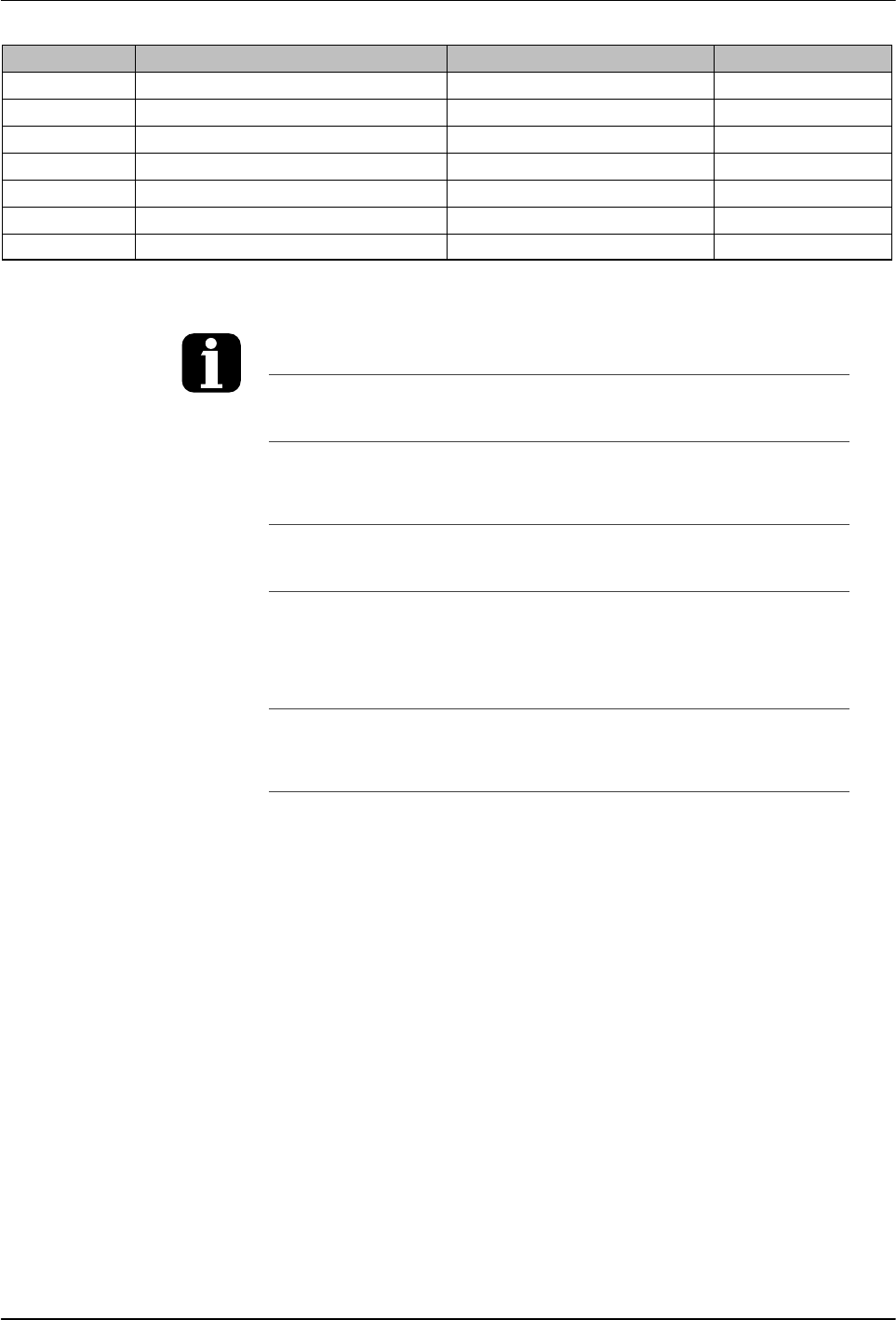
Parameter Name Range of Values Default Value
71 Schedule for Monday 0-7 0
72 Schedule for Tuesday 0-7 0
73 Schedule for Wednesday 0-7 0
74 Schedule for Thursday 0-7 0
75 Schedule for Friday 0-7 0
76 Schedule for Saturday 0-7 0
77 Schedule for Sunday 0-7 0
You can exit the setup mode at any time by
pressing the Setup key.
Parameter numbers that are not applicable are
skipped when you scroll through the operating
parameter list in the left display.
When the right display is flashing, you can
quickly set the value of the current parameter
to its lowest possible value by simultaneously
pressing both of the right‐display scroll keys.
While in the setup mode, if no key is pressed
for two minutes, the melter will return to the
automatic scan mode.
You can also use the right‐display scroll keys
to enter or change a parameter's value or
control option. After entering the parameter's
number in the left display, press either of the
right‐display scroll keys to change the value or
control option.
Using a personal computer that is connected
to the melter through the serial port, you can
view and change all of the operating
parameters from a single computer screen.
Refer to Appendix C, Melter
Communications
If password protection is enabled, the melter
will return to the password protected mode
whenever you exit the setup mode.
Appendix B, Parameter 10