DuraBlue II Customer Product Manual.pdf - 第59页
Installation 3-31 Part 1126931_01 2018 Nordson Corporation Setting Up Gear‐to‐Line Operation If you want to use the gear‐to‐line capability, install a (customer‐supplied) line‐speed signal generator to measure the spee…

Installation
3-30
Part 1126931_01
2018 Nordson Corporation
Set Up Inputs/Outputs (contd)
Table 3‐6 Input/Output Data
(contd)
Item Description
Operating
Parameter
Control Options Terminals Notes
13 Motor 3
remote start
(See Note J)
— XI:29, XI:30 Connect a
momentary,
normally open
contact to the
terminals.
14 Motor 3
remote stop
(See Note J)
— XI:31, XI:32 Connect a
momentary,
normally open
contact to the
terminals.
15 Motor 4
remote start
(See Note J)
— XI:33, XI:34 Connect a
momentary,
normally open
contact to the
terminals.
16 Motor 4
remote stop
(See Note J)
— XI:35, XI:36 Connect a
momentary,
normally open
contact to the
terminals.
17 Motor drive 1
running (optional)
— XI:25, XI:26 Refer to Setting
Up Motor Run
Status Monitoring.
18 Motor drive 2
running (optional)
— XI:27, XI:28
19 Motor drive 3
running (optional)
(See Note J)
— XI:37, XI:38 Refer to Setting
Up Motor Run
Status Monitoring.
20 Motor drive 4
running (optional)
(See Note J)
— XI:39, XI:40
J: Motors 3 and 4 are present only on three/four pump or 100L melters.

Installation
3-31
Part 1126931_01
2018 Nordson Corporation
Setting Up Gear‐to‐Line Operation
If you want to use the gear‐to‐line capability, install a (customer‐supplied)
line‐speed signal generator to measure the speed of the production line. The
AltaBlue motor control accepts a 0-10 VDC analog input signal.
NOTE: Nordson offers a 0-10 VDC line‐speed signal generator. Refer to
Optional Accessories in Section7, Parts, for the part number.
To use the gear‐to‐line capability, connect a 0-10 VDC signal from a
customer‐supplied line‐speed signal generator to the appropriate terminals
on terminal block XI inside the electrical enclosure. See Figure 3‐6 for the
location of terminal block XI. Refer to Table 3‐6 for the terminal numbers that
correspond to each input/output.
Installation
3-32
Part 1126931_01
2018 Nordson Corporation
Setting Up Motor Run Status Monitoring
If desired, you can set up the melter to allow remote monitoring of the run
status (running or not running) of the pump motors.
Wiring
To use the motor run status monitoring capability, connect wiring from the
parent machine to the appropriate terminals on terminal block XI inside the
electrical enclosure. See Figure 3‐6 for the location of terminal block XI.
Refer to Table 3‐6 for the terminal numbers that correspond to each
input/output.
NOTE: The relay contact between terminals XI:25/XI:26 and XI:27/XI:28 is
normally open. When the motor is running, these contacts should close.
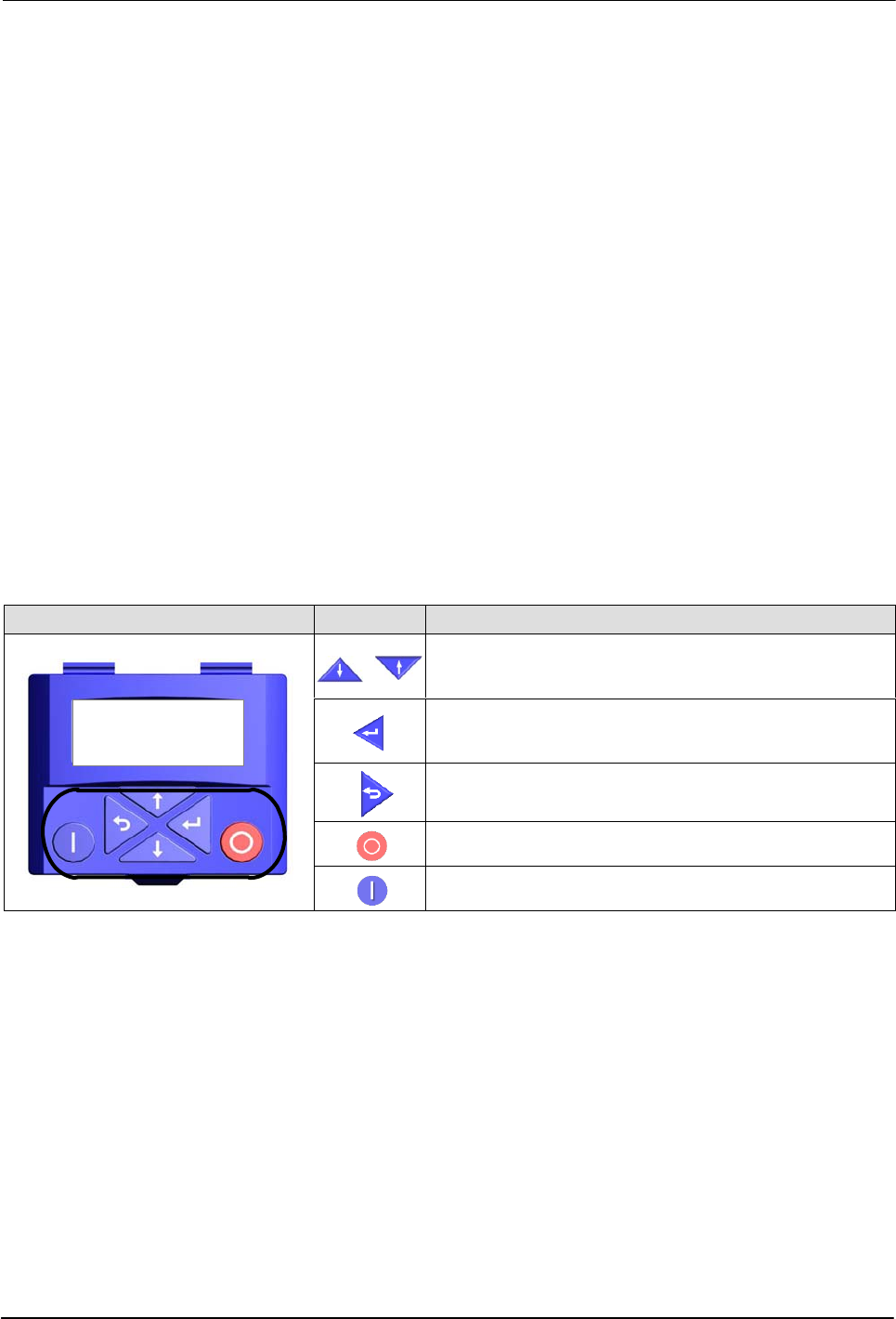
Keypad Buttons
The motor driver keypad is not shipped with the melter, in order to use the
keypad you will need to order the keypad service kit (P/N 7411739)
separately.
An explanation of the keypad button functions is given in the following table.
Keypad Buttons Description
PAR 430
Analog Input 1
REM AUTO SET
8
Menu navigation (UP/Down).
Adjust parameter values.
Enter (sub-) menu/parameter.
Confirm parameter.
Exit (sub-) menu/parameter.
Stop inverter
Release inverter