OM-1833-001w_SL.pdf - 第68页
4.3 Error Code, Component Shortage Notication If any error occurs during tape feeder operation, an error code is displayed on the digital display. Also, the component shortage notication is displayed. • Error codes are…
Note
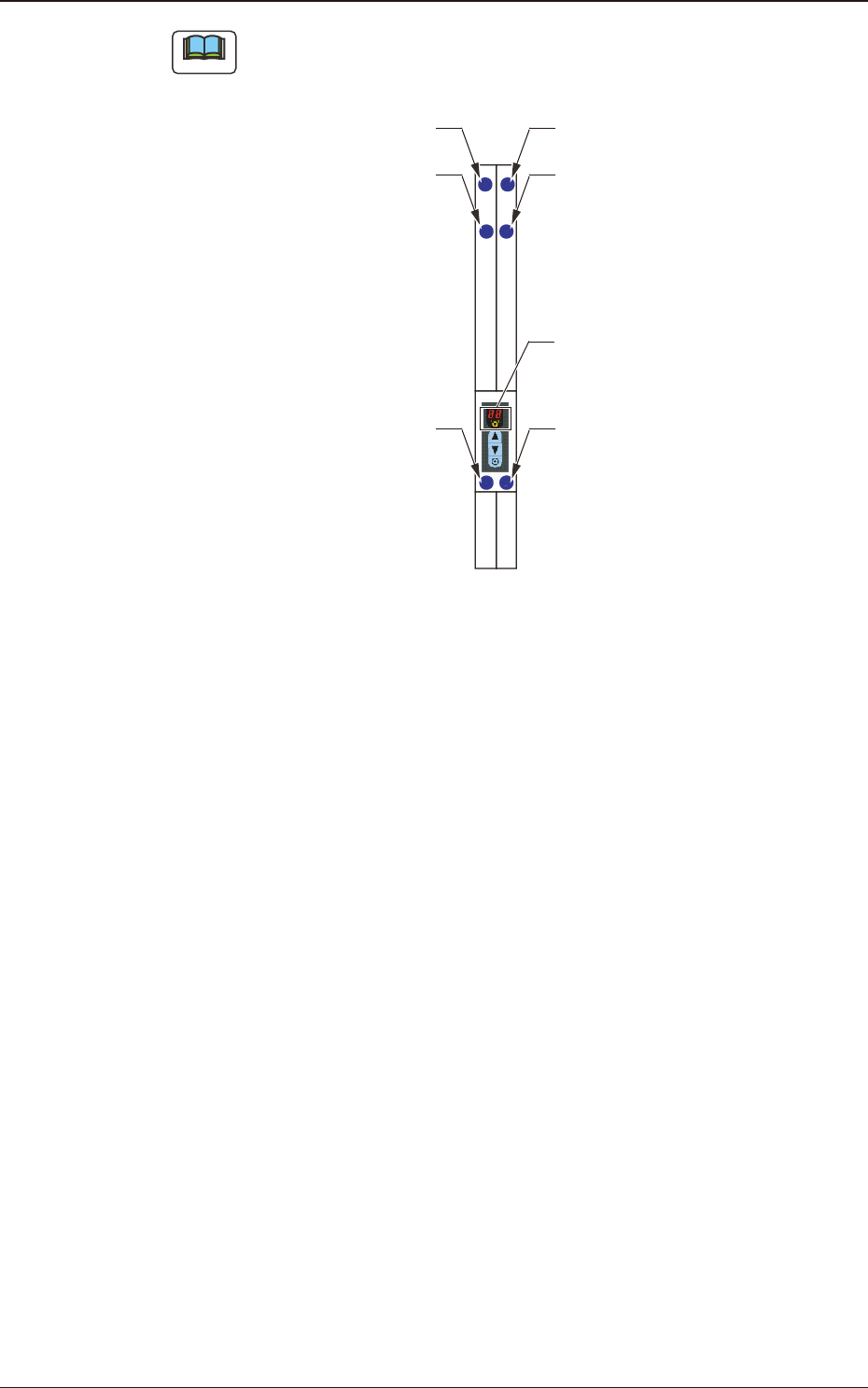
The layout of the seven segments in the display section is arranged as the order
of the sensor arrangement on the feeder.
Lane 1 Sprocket Home Position
Detection Sensor
Lane #1 Tape Detection Sensor (2)
Lane #1 Tape
Detection Sensor (1)
Lane 2 Sprocket Home Position
Detection Sensor
Lane #2 Tape Detection Sensor (2)
Lane #2 Tape
Detection Sensor (1)
Seven Segments
Fig. D3
1504-001
4.2 Operation of Operation Panel
OM-1833
4-11

4.3 Error Code, Component Shortage Notication
If any error occurs during tape feeder operation, an error code is displayed on the
digital display.
Also, the component shortage notication is displayed.
•
Error codes are divided into two classications: one is
feeder operation error
with prex of "E", and the other is
servo alarm system error
with prex of
"A".
•
For the lane where an error has occurred, the dot display
is turned ON.
4.3.1 Feeder Operation Error Codes
[Detection Description] After the loading operation starts, even when the tape has been fed
with the specied amount, the tape end cannot be detected with the
tape detection sensor (2).
[Remedy] Press the loading button on the operation panel to clear the error
indication (EO).
[Cause and Remedy]
•
The loading suppressor in the tape guide section has not been
setup correctly.
⇒
Set it correctly.
•
A tape travel error occurs due to a catch, etc., during the loading
operation.
⇒
Check that there is no alien substance on the tape traveling surface
(chute).
•
The tape has not been set in the correct position.
⇒
Set the tape in the correct position.)
[Check Items]
•
Is the tape detection sensor (2) operating normally?
•
Is the loading motor (DC motor) rotating normally?
⇒
Motor malfunction (wire breakage, worn bush or commutator or damaged
shaft)
•
Broken Control PCB
E0 Loading Time-out
1504-001
4.3 Error Code, Component Shortage Notication
OM-1833
4-12
[Detection Description] The succeeding component reload tape has been inserted into a
position where the tape is detected using the tape detection sensor
(1), under the condition that the end of the preceding tape is in the
feeder.
[Remedy] Pull out the succeeding component reload tape and press the
loading button on the operation panel to clear the error display (E3).
[Cause and Remedy]
•
Set the succeeding component reload tape to the correct position.
E3 Succeeding Tape Setup Position Error
4.3 Error Code, Component Shortage Notication
[Detection Description] After the moving order of the tape feed motor is output and the
locating completion check time (for 3 seconds), the locating is still
not completed.
[Cause and Remedy]
•
A foreign substance is engaged with the sprocket.
⇒
If any foreign substance is engaged, remove it.
•
The tape is twisted on, or only one side comes in contact with,
the chute.
⇒
Set the tape correctly and see the result.
•
A heavy load has been given on the tape travel route.
⇒
Remove the cause of the given load.
E4 Locating Completion Time Out
[Detection Description] While one shaft of the dual tape feeder is moving for the tape feeder,
the moving order is input for the other shaft.
E5 Order Duplication Error
[Detection Description] In the case of the dual tape feeder, when the lane is changed, the
servo-motor shaft does not change after 2 seconds.
E6 Lane Change Time Out Error
[Detection Description] The servo-motor is not turned ON after 2 seconds.
E7 Servo ON Time Out
1504-001
OM-1833
4-13