YAMAHA errer code-a.pdf
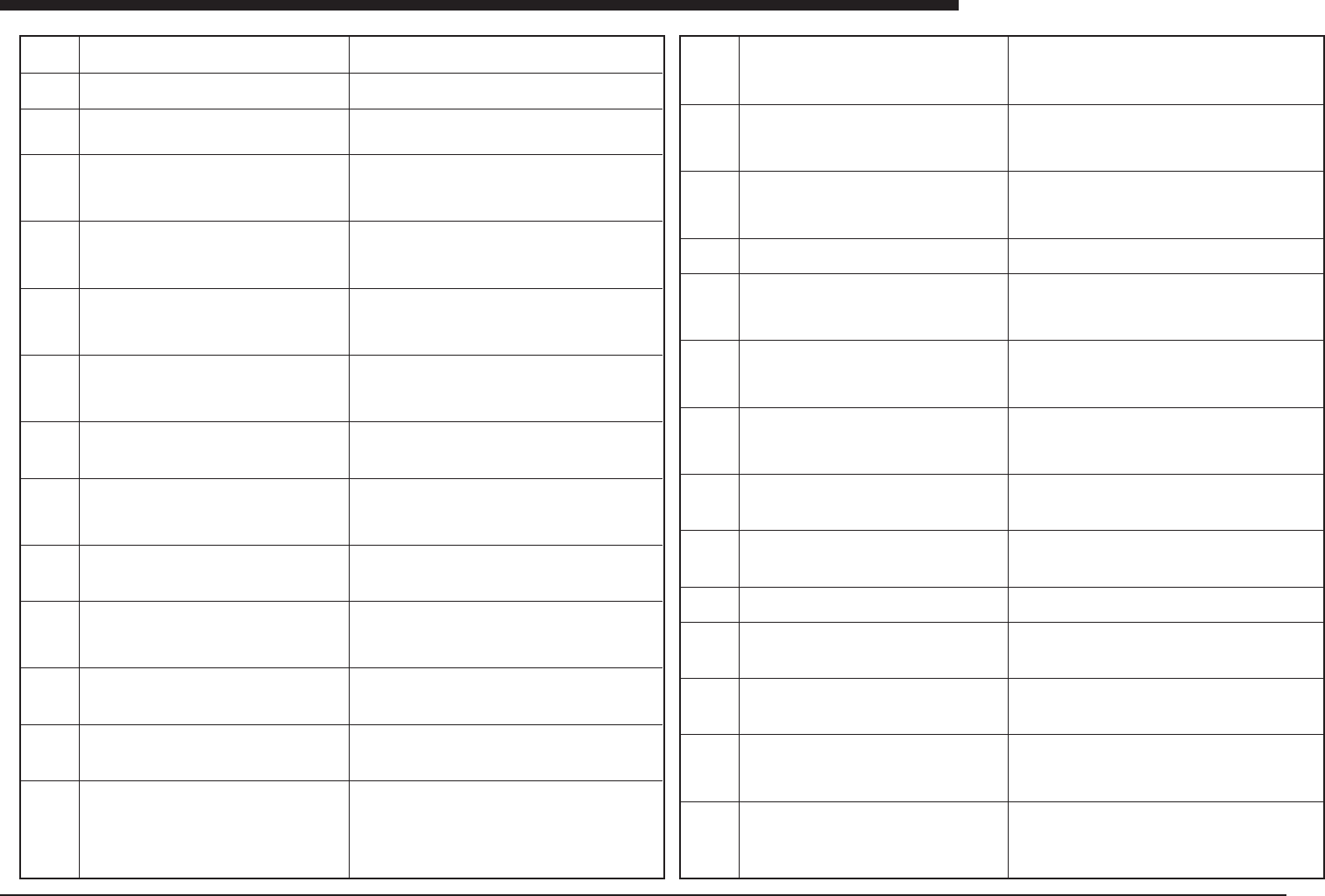
Ea - 1 ERROR MESSAGES LIST Ea Ea00000 Ea00001 Ea00002 Ea00003 Ea00004 Ea00005 Ea00006 Ea00007 Ea00008 Ea00009 Ea00010 Ea00011 Ea00012 Ea00013 Detection succeeded. The corrected data is now effective. CORRECTION DA T A ER…
Ea -1
ERROR MESSAGES LIST
Ea
Ea00000
Ea00001
Ea00002
Ea00003
Ea00004
Ea00005
Ea00006
Ea00007
Ea00008
Ea00009
Ea00010
Ea00011
Ea00012
Ea00013
Detection succeeded.
The corrected data is now effective.
CORRECTION DATA ERROR
Only 1 Lead detected.
CORRECTION DATA ERROR
Correction data is not loaded. Or it diversifies.
COMPONENT DETECTION ERROR
Failed to find first lead. Failed to find the first Lead Edge
Mount data 765
Component data 150
Feeder set position 20
COMPONENT DETECTION ERROR
Failed to find second lead.
Mount data 765
Component data 150
Feeder set position 20
LEAD NUMBER ERROR
The number of detected leads is different than specified.
Mount data 765
Component data 150
Feeder set position 20
LEAD EDGES NUMBER ERROR
The number of detected lead edges is different than speci-
fied.
Mount data 765
Component data 150
Feeder set position 20
LEAD DETECTION ERROR
Failed to find the lead top.
Mount data 765
Component data 150
Feeder set position 20
LEAD PITCH ERROR
The detected Lead Pitch is out of tolerance
Mount data 765
Component data 150
Feeder set position 20
COMPONENT DATA ERROR
The Component data was not loaded
Mount data 765
Component data 150
Feeder set position 20
COMPONENT DATA ERROR
Failed to download the component data. Memory for com-
ponent data is full.
Mount data 765
Component data 150
Feeder set position 20
COMPONENT DATA ERROR
This component data already existed
Mount data 765
Component data 150
Feeder set position 20
COMPONENT DATA ERROR
The component shape is illegal
Mount data 765
Component data 150
Feeder set position 20
VISION BUSY ERROR
Vision system is now recognizing.
Mount data 765
Component data 150
Feeder set position 20
(meaning)Recognition has been made successfully.
(cause)None
(remedy)Not needed
(meaning)The size of one side of the detected component is 0.
(cause)The component is standing on end.
(remedy)Adjust the reader head to improve pickup.
(meaning)Convergence of multi-stage recognition was not possible.
(cause)The axis positioning capability is inadequate.
(remedy)Check to see if the component is slipping on t henozzle or
is otherwise insecurely attached.
(meaning)Recognition of the component was not possible.
(cause)The component has not been picked up, or the component
is too dark to be seen by the camera.
(remedy)Adjust so that the component can be picked up. Use
supplementary adjustment to change the recognition parameters.
(meaning)One of the components leads could not be detected.
(cause)The recognition parameter is for a different component, or
a different component is being recognized.
(remedy)Use supplementary adjustment to re-adjust.
(meaning)The number of detected leads is different.
(remedy)The data is for a different component or the offset value
for the detected line is inappropriate.
(cause)Use supplementary adjustment to correct the component,
or check the data.
(meaning)The number of leads detected is different from the set-
ting.
(remedy)Recognition is not stable.
(cause)Change the recognition position or the flash intensity.
(meaning)There was trouble recognizing the tip of the lead.
(remedy)The image of the component produced for recognition was
not clearly detailed.
(cause)Use supplementary adjustment to set stable parameters.
(meaning)The lead pitch is different from the specified pitch.
(cause)The feet are bent, or the wrong lead pitch has been speci-
fied.
(remedy)Correct the contents of the setting, and if the feet on the
component are bent, don't use that component, or use supplemen-
tary adjustment to correct it.
(meaning)Data has not been registered for the part being recog-
nized.
(cause)There is a problem with the vision board.
(remedy)Check to see how often the problem occurs, and contact
the manufacturer if it occurs frequently.
(meaning)Too much data has been sent to the vision board, and
will not fit in the memory.
(cause)Too much data has been created for a complex compo-
nent.
(remedy)Use less data for irregularly-shaped connectors and other
MSEW parts.
(meaning)This is not an error.
(cause)None
(remedy)Not needed
(meaning)The component recognition mode is not supported.
(cause)The versions of the vision software and the VIOS software
do not match.
(remedy)Contact the manufacturer and check the combination of
versions being used.
(meaning)Image processing is in progress.
(cause)None
(remedy)Wait until processing has been completed.
Ea00014
Ea00015
Ea00016
Ea00017
Ea00018
Ea00019
Ea00020
Ea00021
Ea00022
Ea00023
Ea00024
Ea00025
Ea00026
Ea00027
VISION TIME_OUT ERROR
Time-out occurred: Vision recognition is aborted. The start
trigger did not come in.
Mount data 765
Component data 150
Feeder set position 20
VISION TIME_OUT ERROR
Time-out occurred: Vision recognition aborted. Sync. sig-
nal from the camera did not come in.
Mount data 765
Component data 150
Feeder set position 20
DATA ERROR
Failed to find this component data on HDD. Check HDD
(Hard Disk Drive).
Mount data 765
Component data 150
Feeder set position 20
NOZZLE DETECTION ERROR
Failed to find the nozzle center
REFERENCE MARKER DETECTION ERROR
Failed to detect reference marker edge of moving direc-
tion.
Mount data 765
Component data 150
Feeder set position 20
REFERENCE MARKER DETECTION ERROR
Failed to detect reference marker position of moving di-
rection
Mount data 765
Component data 150
Feeder set position 20
REFERENCE MARKER DETECTION ERROR
Failed to detect reference marker position of fixed direc-
tion
Mount data 765
Component data 150
Feeder set position 20
LEAD WIDTH ERROR
The detected Lead Width is out of tolerance
Mount data 765
Component data 150
Feeder set position 20
COMPONENT DATA DOWNLOAD ERROR
Unable to update the component data.
Mount data 765
Component data 150
Feeder set position 20
COMPONENT DATA UPDATED.
The component data is updated. (This is not an Error)
LEAD SKEW ERROR
Component lead skew detected.
Mount data 765
Component data 150
Feeder set position 20
LEAD LENGTH ERROR
The lead lengths are not equal to each other
Mount data 765
Component data 150
Feeder set position 20
COMPONENT SIZE ERROR
The measured size of the [Std.Chip] component type is
out of tolerance.
Mount data 765
Component data 150
Feeder set position 20
COMPONENT SIZE ERROR
The measured size of component is out of tolerance.
Mount data 765
Component data 150
Feeder set position 20
(meaning)The vision system has not responded within the given
time period.
(cause)There is a problem with the vision board.
(remedy)Check to see how often the problem occurs, and contact
the manufacturer if it occurs frequently.
(meaning)The vision system terminated the processing because it
exceeded the time limit.
(cause)The servo axis does not move smoothly
(remedy)Check to see how often the problem occurs, and contact
the manufacturer if it occurs frequently.
(meaning)The specified data does not exist.
(cause)There may be a problem with the hard disk.
(remedy)Contact the manufacturer.
(meaning)Nozzle detection error
(cause)There is no object on the screen to be recognized.
(remedy)Pick up a component before initiating recognition.
(meaning)No reference markers could be detected.
(cause)The timing of the synchronization has not been adjusted
properly, or the marker information needs re-adjusting
(remedy)Adjust as necessary.
(meaning)No reference markers could be detected.
(cause)The timing of the synchronization has not been adjusted
properly, or the marker information needs re-adjusting
(remedy)Adjust as necessary.
(meaning)No reference markers could be detected.
(cause)The timing of the synchronization has not been adjusted
properly, or the marker information needs re-adjusting
(remedy)Adjust as necessary.
(meaning)The lead width is wrong.
(cause)The setting for the lead width is wrong, or the recognition
parameter is not appropriate.
(remedy)Use supplementary adjustment to re-adjust.
(meaning)Component data is not being sent to the vision board.
(cause)Too much data has been created for a complex component.
(remedy)Use less data for irregularly-shaped parts in MSEW mode.
(meaning)This is not an error.
(cause)None
(remedy)Not needed
(meaning)The lead is skewed in general.
(cause)There is overall skewing of the lead.
(remedy)Do not use components with this problem.
(meaning)Lead lengths are not uniform.
(cause)The component leads are bent.
(remedy)Do not use components with this problem, or adjust the
setting so that the component lead length is not checked.
(meaning)The component size is different from the specified size.
(cause)The wrong data has been specified, or the recognition is
not stable.
(remedy)Use supplementary adjustment to re-confirm.
(meaning)The component size is different from the specified size.
(cause)The wrong data has been specified, or the recognition is
not stable.
(remedy)Use supplementary adjustment to re-confirm.
Ea -2
ERROR MESSAGES LIST
Ea
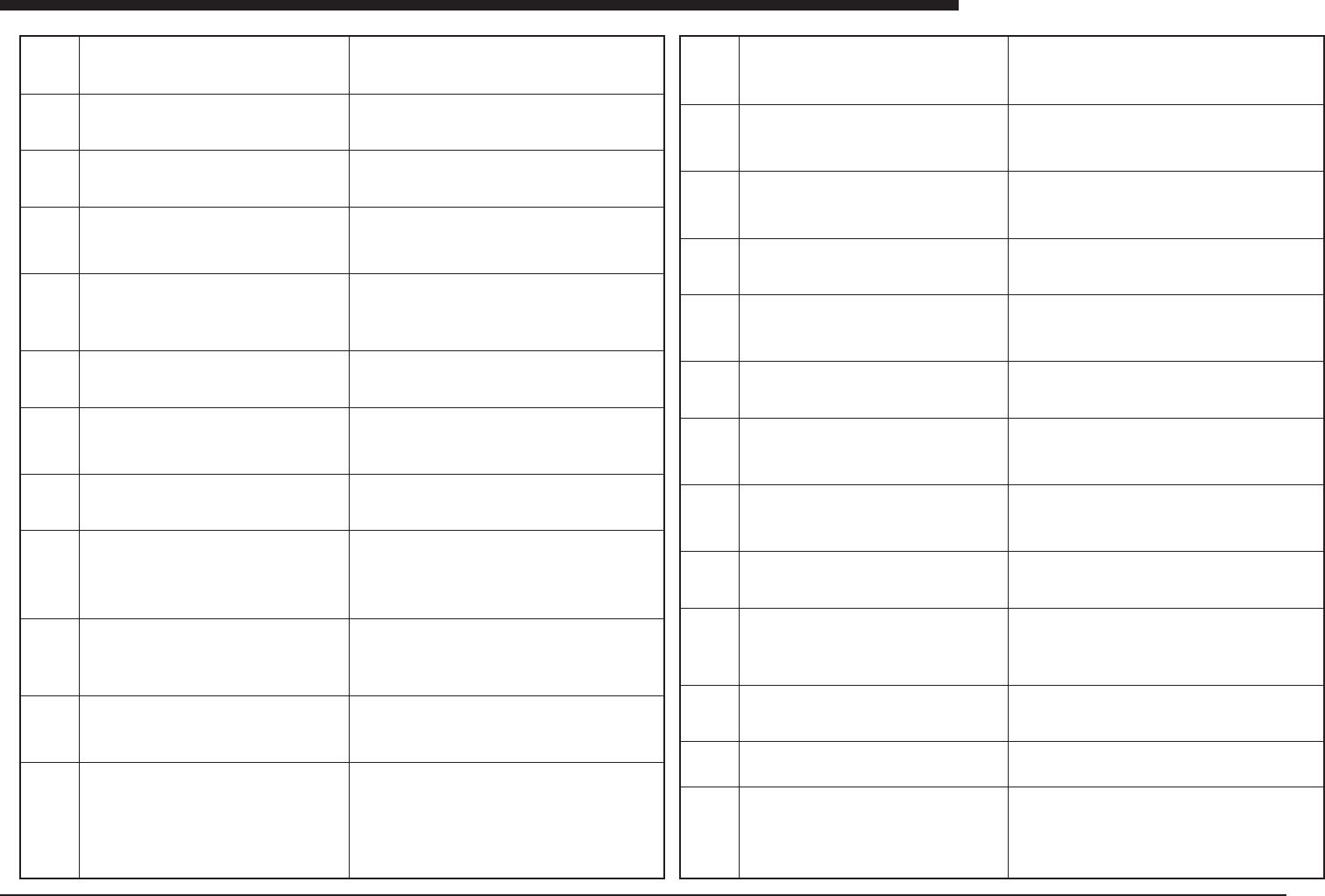
Ea00028
Ea00029
Ea00030
Ea00031
Ea00032
Ea00033
Ea00034
Ea00035
Ea00036
Ea00037
Ea00038
Ea00039
COMPONENT DETECTION ERROR
Failed to detect the [Std.Chip] type component.
Mount data 765
Component data 150
Feeder set position 20
PICK UP POSITION ERROR
Failed to pick up the component at the center of the nozzle
Mount data 765
Component data 150
Feeder set position 20
ILLEGAL RESULT ERROR
The detected center position is illegal.
Mount data 765
Component data 150
Feeder set position 20
PICK UP ERROR
Failed to pick up the component. Vision system could not
find the component.
Mount data 765
Component data 150
Feeder set position 20
RETRY LIMIT OVER
Vision error: Maximum number of retries for this compo-
nent is exceeded.
Mount data 765
Component data 150
Feeder set position 20
/0000/0004/0005/0006/E
COMPONENT DETECTION ERROR
Failed to detect the component.
Mount data 765
Component data 150
Feeder set position 20
MOUNT ERROR
Failed to mount component by vacuum check
Mount data 765
Component data 150
Feeder set position 20
DUMP ERROR
Vacuum check error: Failed to dump the component.
Mount data 765
Component data 150
Feeder set position 20
VACUUM LEVEL ERROR
Vacuum level does not reach the specified level.
The component might have dropped after recognition.
Mount data 765
Component data 150
Name
Feeder set position 20
LASER SYSTEM ERROR(code 00, 03, 04, 05, 07, 08,
09, 72, 73, 74, etc)
A software or hardware error of the Laser
Alignment Unit is detected.
Mount data 765
Component data 150
Feeder set position 20
COMPONENT DETECTION ERROR(code 64, 75)
The laser sensor could not detect the component.
Please check the laser height.
Mount data 765
Component data 150
Feeder set position 20
SPEED DETECTION ERROR (code 65, 90, 91, 92, 93)
Laser system cannot read a clear image of the compo-
nent. The rotation speed is too fast.
Mount data 765
Component data 150
Feeder set position 20
(meaning)Recognition of the component was not possible.
(cause)The component has not been picked up, or the component
is too dark to be seen by the camera.
(remedy)Adjust so that the component can be picked up. Use supple-
mentary adjustment to change the recognition parameters.
(meaning)The component could not be picked up in the center of
the nozzle.
(cause)The pickup precision is poor.
(remedy)Stabilize the component pickup, or reduce the effective
diameter size of the nozzle.
(meaning)The center coordinates of the recognized component are
wrong.
(cause)The component recognition is not stable.
(remedy)Use supplementary adjustment to re-adjust.
(meaning)The vacuum sensor confirmed that a component pickup
error was made.
(cause)The component cannot be picked up, the setting for the
vacuum pressure is wrong, or the pickup conditions are not stable.
(remedy)Use supplementary adjustment to re-specify the pickup
vacuum level, or other measures to stabilize the vacuum pressure.
(meaning)The component could not be picked up successfully with
the specified number of retries.
(cause)
(remedy)Stabilize the component pickup, or the recognition param-
eters.
(meaning)An error occurred in detecting the component.
(cause)The pickup conditions are not stable, or the recognition con-
ditions are not stable.
(remedy)Use supplementary adjustment to re-adjust.
(meaning)During the vacuum check of component mounting, it was
confirmed that the component is still on the nozzle.
(cause)The volume of air discharged from the nozzle has not been
adjusted properly, or the setting for the mounting level is incorrect.
(remedy)Re-adjust the pickup level, and check the dispensing air
pressure by hand.
(meaning)The component cannot be discarded.
(cause)The dispensing air pressure is too low, or the wrong setting
has been entered for the mounting vacuum pressure.
(remedy)Adjust the data and re-adjust the dispensing pressure.
(meaning) Although there were no problems immediately prior to
image processing, it was confirmed that the vacuum pressure level
had not reached the set value.
(cause) Incorrect pickup vacuum setting, or component cannot be
picked up correctly. Component pickup position coordinates or
pickup precision may not be correct.
(remedy) Stabilize component pickup state, or readjust pickup
vacuum pressure using auxiliary adjustment.
(meaning)A problem has occurred with the laser recognition unit
hardware or software
(cause)The laser recognition unit hardware has broken down, or a
problem has occurred with the software.
(remedy)Contact the manufacturer.
(meaning) The laser beam is not reaching the component.
(cause)There is no component on the nozzle, or the setting for the
laser recognition height is inappropriate.
(remedy)Use supplementary adjustment to re-adjust the compo-
nent.
(meaning)During laser recognition, the component rotates too
quickly, causing a recognition error.
(cause)The scanning speed is too fast.
(remedy)Reduce the speed at which components are being
mounted.
Ea00040
Ea00041
Ea00042
Ea00043
Ea00044
Ea00045
Ea00046
Ea00047
Ea00048
Ea00049
Ea00050
Ea00051
Ea00052
COMPONENT DETECTION ERROR (code 66)
Minimum width of component cannot be found. The com-
ponent is round or misaligned on the nozzle.
Mount data 765
Component data 150
Feeder set position 20
COMPONENT SIZE ERROR (code 22)
Laser detection error: The measured size of the compo-
nent is out of tolerance.
Mount data 765
Component data 150
Feeder set position 20
COMPONENT POSITION ERROR(code 23)
Laser detection error: The measured position of the com-
ponent is illegal.
Mount data 765
Component data 150
Feeder set position 20
DETECTION ABORTED(code 67)
Measurement is aborted by a STOP or EMG operation.
Mount data 765
Component data 150
Feeder set position 20
LASER WINDOW ERROR(code 68, 78, 79, 80, 81, 82)
The component is too large for the window or the window
is blocked by other objects.
Mount data 765
Component data 150
Feeder set position 20
LASER COMMUNICATION ERROR(code 69)
Communication error occurred in the Laser system.
Mount data 765
Component data 150
Feeder set position 20
MEASUREMENT FAILED(code 70, 76, 77)
Too less slope detected during rotation. The image of the
component is not clear.
Mount data 765
Component data 150
Feeder set position 20
EDGE DETECTION ERROR(code 71)
Laser detection error: Too many edges detected. Part may
be incorrectly positioned.
Mount data 765
Component data 150
Feeder set position 20
CO-PLANARITY CHECK ERROR
Co-Planarity check found the lead out of Max Tweeze.
Mount data 3
Component data 11
Feeder set position 32
NOZZLE PLUGGED ERROR
Possible cause :
1. In [3/MAINTE/M]-[2/MCH_DATA]-[Vacuum Level], the
value of [Low level] of current head is too small.
2. There is component under current nozzle.
3. Current nozzle is plugged.
Please remove cause.
DETECT THE PICK ERROR BY LAM
Detected the component that was picked side of body.
Mount data 3
Component data 21
Feeder set position 11
MARK DETECTION ERROR
Failed to detect defined mark.
MARK AREA OR PERIMETER ERROR
The detected fiducial mark area or perimeter is out of
tolerance.
(meaning)The minimum width of the component cannot be detected.
(cause)An attempt has been made to use recognition on compo-
nents which are not appropriate, or the component has not been
picked up properly.
(remedy)Do not use laser recognition, or use supplementary ad-
justment to correct the component.
(meaning)The size of the component is not with in the specified
tolerance range.
(cause)The molded size of the component is inappropriate, or the
component has not been picked up correctly.
(remedy)Stabilize the pickup conditions, and check the size of the
component.
(meaning)The laser recognition results are not within the detection
range of the laser.
(cause)The component used is too big for laser recognition.
(remedy)Try using another method of recognition.
(meaning)Component recognition was interrupted before being com-
pleted.
(cause)The recognition speed is too fast, and the component on
the nozzle may have moved during recognition.
(remedy)Reduce the mounting speed.
(meaning)The component protrudes from the laser recognition win-
dow.
(cause)An attempt was made to use laser recognition with a com-
ponent for which it is not possible.
(remedy)Do not use laser recognition.
(meaning)An error occurred inside the laser recognition unit.
(cause)There may be a problem with the hardware.
(remedy)Contact the manufacturer.
(meaning)Noise has occurred in the silhouette of the component.
(cause)The light-receiving element of the laser is dirty.
(remedy)Clean the light-receiving element of the laser with alcohol.
(meaning)The edge of the component could not be detected.
(cause)The component used is not appropriate for laser recogni-
tion.
(remedy)Do not use laser recognition with this component.
Set "Co-Planarity" value larger.
Please remove cause which is shown in "Error Message".
Check the pick up position of component.
(meaning)An error occurred with fiducial mark detection.
(cause)The surface of the mark is dirty, or the data setting is wrong.
(remedy)Clean the surface of the mark with an eraser and cloth, or
use supplementary adjustment to check the data for the mark.
(meaning)The shape of the detected mark does not match the speci-
fied setting.
(cause)The shape of the mark has not been registered correctly, or
adjustment has not been done properly.
(remedy)Check the data for the mark and use supplementary ad-
justment to correct it.
Ea -3
ERROR MESSAGES LIST
Ea
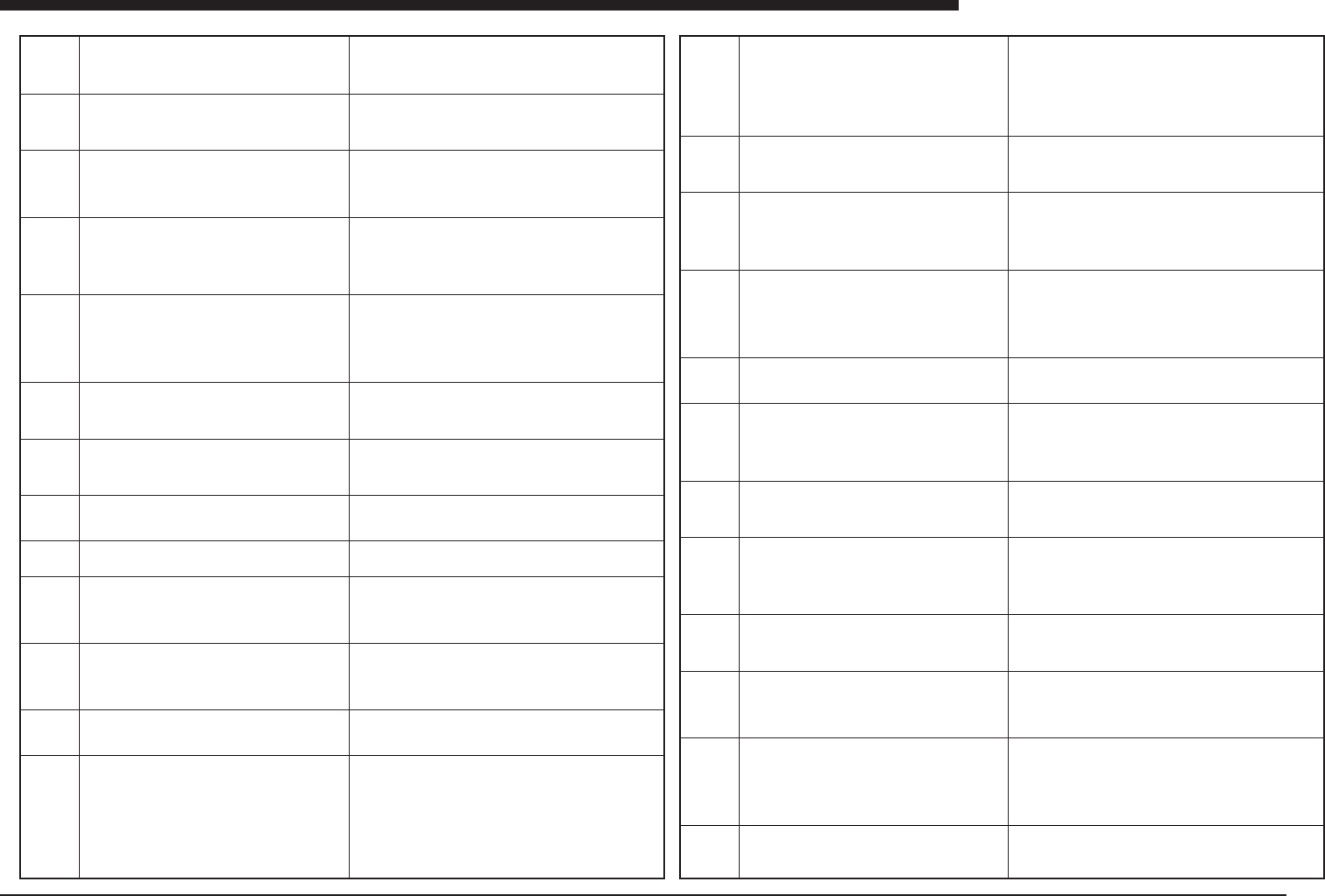
Ea00053
Ea00054
Ea00055
Ea00056
Ea00057
Ea00060
Ea00061
Ea00062
Ea00063
Ea00064
Ea00065
Ea00066
Ea00070
MARK DETECTION ERROR
A part of fiducial mark is located out of the specified search
area or the fiducial correction angle is too large.
MARK SHAPE ERROR
Failed to detect a fiducial mark of the specified shape
MARK AREA OR PERIMETER ERROR
The detected fiducial mark area or perimeter is out of
tolerance (Special)
MARK DETECTION ERROR
Failed to detect defined mark.
(MarkNO. )
Do you execute VISION-CURSOR-TEACHING by
manual?
[F10] key to execute
Any other key to abort
VISION-CURSOR-TEACHING
Please teach fiducial mark while looking VISION-MONI-
TOR by manual.
[ESC] : Abort
[ENTER] : Teaching
[Arrows] : Moving at TEACH-WINDOW
[SHIFT]+[Arrows] : Moving at TEACH-WINDOW
[TAB] : Changing at TEACH-WINDOW
Failed to RESET pick routine.
Pick routine did not stop correctly.
Retrying now.
Failed to RESET component vision routine.
Component vision routine did not stop correctly. Retrying
now.
Failed to RESET fiducial routine.
Fiducial routine did not stop correctly. Retrying now.
Failed to RESET mount routine.
Mount routine did not stop correctly.
Retrying now.
Failed to RESET LASER recognition routine.
LASER recognition routine didn't finish correctly.
Ready to Retry.
LASER TIMEOUT ERROR
Laser recognition rutine was interrupted by time out er-
ror. The rutine will be reset.Please run again.
Machines has been already reset condition now.
If you want to move machine's head to DUMP POSITION,
push the [TAB] key to execute.
If not, push the other key to cancel.
PCB TRANSFER ERROR
Unexpected PCB is on the conveyor.
(meaning)The mark is not located properly within the search area.
(cause)The PCB has not been positioned correctly, or a search
area has been specified which is too small.
(remedy)Make sure the PCB is securely fastened in place, and that
the search area is appropriate.
(meaning)A fiducial mark of the specified shape cannot be detected.
(cause)The shape has not been specified correctly, or the image
which has been read is not clear.
(remedy)Check the shape information and clean the surface of the
mark.
(meaning)The shape of the detected mark does not match the speci-
fied setting.
(cause)The shape of the mark has not been registered correctly, or
adjustment has not been done properly.
(remedy)Check the data for the mark and use supplementary ad-
justment to correct it.
(meaning) Error occurred in fiducial mark detection.
(cause) Mark surface is dirty, or data setting is incorrect.
(remedy) Clean mark surface with eraser or cloth, or use auxiliary
adjustment to check mark data. Alternatively, press [F10] key and
specify mark position directly.
(Meaning) This screen is displayed while vision cursor teaching is
in progress.
(meaning)An error occurred during the pickup operation.
(cause)The sensor is defective, or the solenoid valve is not operat-
ing correctly.
(remedy)Check the operation of the head and the value set for the
sensor reaction.
(meaning)An error occurred during recognition of the component.
(cause)Communication with the vision board could not be com-
pleted normally.
(remedy)Check to see how often the problem occurs, and contact
the manufacturer.
(meaning)Recognition of the fiducial mark could not be completed.
(cause)There is a problem with communication with the vision board.
(remedy)Check to see how often the problem occurs, and contact
the manufacturer.
(meaning)Mounting could not be completed.
(cause)The sensor is defective, or the solenoid valve is defective.
(remedy)Check the operation of the solenoid valve and sensor.
(meaning)Laser recognition could not be completed.
(cause)Communication with the laser recognition unit is not being
carried out properly.
(remedy)Replace the laser recognition unit, the laser recognition
board, or the I/O board. If the problem occurs frequently, contact
the manufacturer.
(meaning)Laser recognition could not be completed.
(cause)Communication with the laser recognition unit is not being
carried out properly.
(remedy)Replace the laser recognition unit, the laser recognition
board, or the I/O board. If the problem occurs frequently, contact
the manufacturer.
Machine is already reset condition. In case head is on the feeder or
manual tray feeder, so you want to move dumping position. Press
[TAB] key.
(meaning)The number of PCBs transported on the conveyor ex-
ceeds the rated number.
(cause)PCBs are being loaded although no PCB request signal
has been issued, or an irregular PCB has been detected.
(remedy)Adjust the position of the sensor at the exit end of the
loading conveyor, or the loading sensor on this machine or re-ad-
just the PCB detection sensor and the entrance stopper sensor.
Ea00071
Ea00072
Ea00073
Ea00074
Ea00075
Ea00076
Ea00077
Ea00078
Ea00079
Ea00080
Ea00081
Ea00082
PCB TRANSFER ERROR
The PCB detected before transfer is not detected after
transfer. Maybe there is the PCB on the edge of the mov-
ing conveyor. Set the PCB to its normal position manu-
ally.
Machine is unable to start running because the conveyor
width is not ready, The conveyor width will be changed
first. Misalignment of PUSH_UP PINS or PCB on con-
veyor may damage machine.
Assure safety and push the [ENTER] key.
PCB TRANSFER ERROR
PCB is detected on the edge of the moving conveyor. Set
the PCB to its normal position manually.
PCB FIXING ERROR
PCB trans-unit, locate-pin or push-up-unit does not re-
sponse to command.
DUMP STATION FULL
Dump station is filled with components. Please remove
the components manually from the dump station, then
start again.
COMPONENT COUNT STOP
Component counter reached to specified number. Fill the
components and run again.Component data
151
Feeder set position 21
Component data 152
Feeder set position 22
COMPONENT COUNT STOP
Component counter reached to specified number. Fill the
components and run again.
Component data 150
PCB TRANSFER ERROR
When the PCB was transferred to fixed conveyer of PCB
exit side, error happened for time over. Maybe the PCB
stopped between fixed conveyor and moving conveyor.
Or the PCB stopped in fixed conveyor of PCB exit side.
Set the PCB to its normal position manually.
PCB TRANSFER ERROR
The PCB was not able to exit from fixed conveyer of PCB
exit side. Maybe the PCB stopped on edge of fixed con-
veyer of PCB exit side. Set the PCB to its normal position
manually.
PCB TRANSFER ERROR
Moving conveyor can not move, because there is the PCB
on the edge of the moving conveyor. Set the PCB to its
normal position manually.
PCB TRANSFER ERROR
Fixed conveyor of PCB entrance side stopped for time
over. Check whether the PCB stops in fixed conveyor of
PCB entrance side.
PCB TRANSFER ERROR
PCBs are found both on entrance and entrance stopper.
Check whether more than 1 pcbs are conveyed to the
working position.
(meaning)The PCB which was detected prior to the beginning of
loading could not b confirmed after being loaded; a PCB which was
confirmed before unloading cannot be detected at the exit; or a PCB
which could not be confirmed before loading or unloading was con-
firmed after being loaded or unloaded.
(cause)
(remedy)Re-adjust the PCB detection sensor. If PCBs are not be-
ing transported correctly, adjust the conveyor unit and other related
parts, or adjust the PCB width data.
(meaning)This is a warning message which appears when the con-
veyor width is changed.
(cause)None
(remedy)Press any key.
(meaning)A PCB was detected by the danger alert sensor at the
connecting section of the moving conveyor.
(cause)This is to alert the operator that a PCB may be left on the
conveyor at the connecting section.
(remedy)If there is a PCB at the connecting section, remove it. If
there is none, the sensor may be malfunctioning. Use an I/O moni-
tor to check the sensor operation.
(meaning)The locating pin sensor or the pushup sensor on the PCB
transport unit does not respond correctly to the status of the sole-
noid.
(cause)The sensor position has not been adjusted correctly, or op-
eration is unstable because the speed controller has been tight-
ened too far.
(remedy)Check the operation of height-related sensors on the PCB
transport unit.
(meaning)The dump station is filled with discarded components.
(cause)The overflow sensor at the dump station has been activated.
(remedy)Remove all of the components discarded at the dump sta-
tion.
(meaning)During a test run, errors are still occurring after the speci-
fied number of test runs.
(cause)Pickup confirmation or another operation is unstable.
(remedy)Check the pickup operation, and use supplementary ad-
justment to check the status of recognition.
(meaning)During a test run, errors are still occurring after the speci-
fied number of test runs.
(cause)Pickup confirmation or another operation is unstable.
(remedy)Check the pickup operation, and use supplementary ad-
justment to check the status of recognition.
(meaning)When a PCB is being unloaded from the conveyor, the
PCB does not arrive at the exit sensor.
(cause) There are still PCBs left on the conveyor, or the conveyor
exit sensor was unable to detect the PCB.
(remedy)Adjust the conveyor and check that PCBs are being car-
ried smoothly to the exit. Also check the operation of the conveyor
exit sensor.
(meaning)A PCB could not be unloaded to the next process.
(cause)The conveyor exit sensor is continuing to detect a PCB.
(remedy)Adjust the conveyor exit sensor, or adjust the conveyor so
that PCBs arriving at the exit can be transported smoothly to the
next process.
(meaning)A PCB exists between Table A and Table B, preventing
the tables from being moved.
(cause)There is a PCB between Table A and Table B.
(remedy)Remove the PCB and adjust the conveyor so it moves
smoothly from Table A to Table B; or adjust the sensor at the con-
necting section of the conveyor.
(meaning)A PCB has been loaded with no problem but is not car-
ried as far as the standby position sensor.
(cause)The standby position sensor or the conveyor entrance sen-
sor is defective or the PCB has stopped somewhere along the en-
trance conveyor.
(remedy)Adjust the conveyor so that PCBs are carried smoothly.
Check the operation of the entrance sensor and the PCB standby
position sensor.
(meaning)PCBs are found both on entrance and entrance stopper.
(cause)More than 1 pcbs may be conveyed to the working position.
(remedy)Remove the PCB which is detected by entrance sensor.