YAMAHA errer code-a.pdf - 第10页
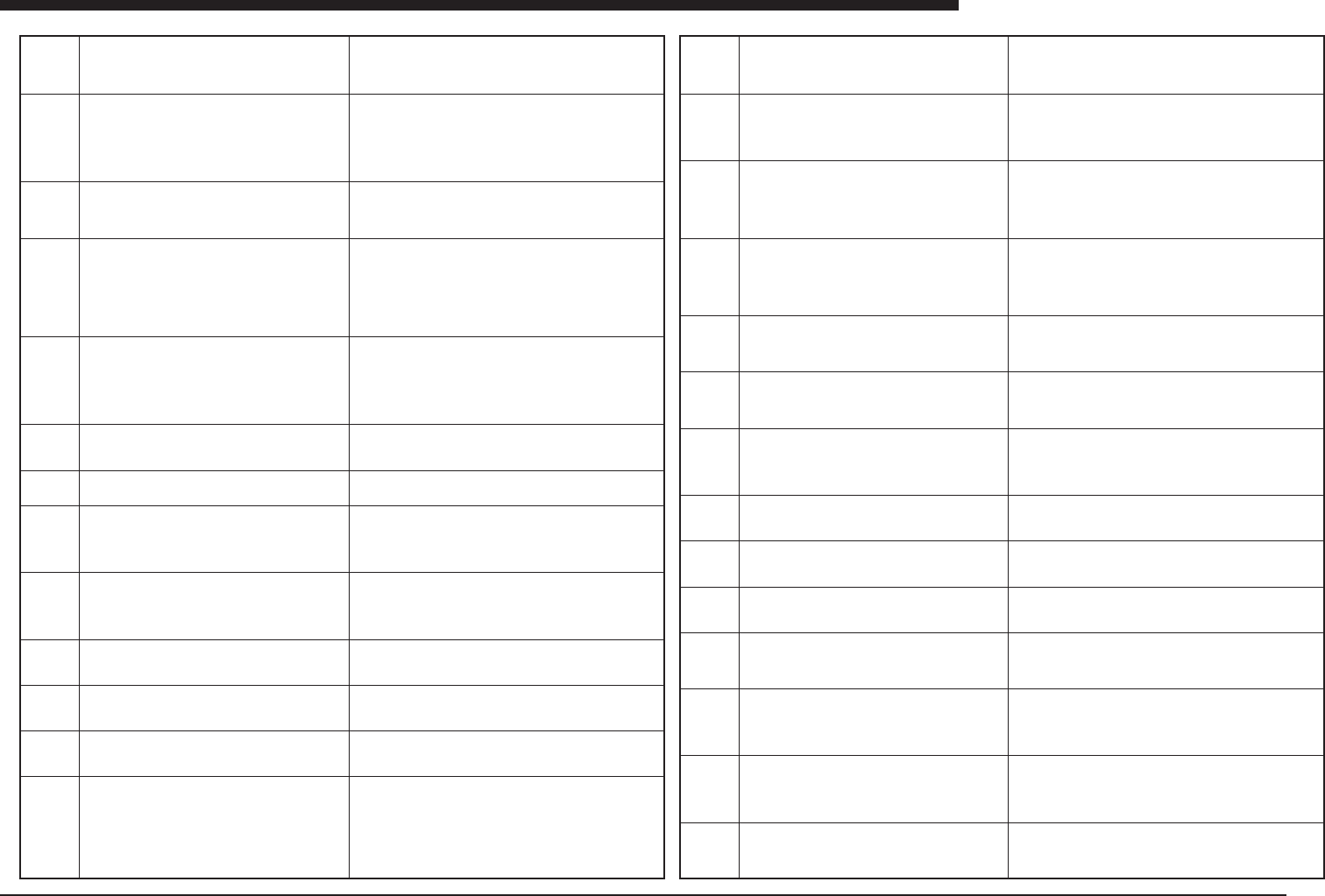
Ea - 10 ERROR MESSAGES LIST Ea Ea00288 Ea00289 Ea00290 Ea00300 Ea00301 Ea00302 Ea00303 Ea00304 Ea00305 Ea00306 DOT ST A TION MAX MA TRIX NUMBER ERR Please set max matrix number to more than 1. Please check the max matrix…
Ea -9
ERROR MESSAGES LIST
Ea
Ea00246
Ea00247
Ea00248
Ea00249
Ea00250
Ea00251
Ea00260
Ea00261
Ea00262
Ea00270
Ea00271
Ea00272
Ea00273
PCB DATA ERROR
This component body size is too big.gh. So this compo-
nent is cannot recognize by equipped camera.
Mount Data 10
Component Data 5
PCB DATA ERROR
"Mount Action" reserved component number is "Fine
Type", but fine mode reserved head is "Impossible".
Mount data 10
Head number 5
Please reserve component number not "Fine Type", etc.
COMPONENT DATA ERROR
Feeder Type for this component was not defined. Specify
the feeder type data in Component Info.
Mount Data 12
Component Data 3
COMPONENT DATA ERROR
Feeder Position must be "Teaching" or "Relative" for stick
feeder component. Input Feeder Pos_X,Y:
In case "Teaching", from the datum of machine origin.
In case "Relative", from the datum of 8mm tape feeder
pickup position.
Component data 3
COMMUNICATION ERROR
Failure of communicating with LOADER. One of the fol-
lowing could cause this error:
q LOADER or UNROADER is turned off power.
w LOADER or UNROADER is in emergency stop.
e LOADER or UNROADER is in auto-running.
r LOADER or UNROADER has already received PCB
width data after power-on.
If you don't want to repeat communicating with LOADER
Please push [TAB] keys.
If you want to repeat communicating with LOADER Please
push other keys.
DUMP STATION DATA ERROR
The feeder number used for dump station is not defined.
It must not be 0. Please confirm it.
DUMP STATION DATA ERROR
The feeder number used for dump station is not suitable.
In case of SM112, if this number for A-table is defined
more than 101, then this error will happen. Please con-
firm it.
DUMP STATION DATA ERROR
The X,Y position of dump station is not suitable. All heads
must be reach on this position, but the current coordi-
nate is out of it. In case of SM112, dump station may be
set about from 16 to 40 feeder location number. Please
correct X,Y coordinate of dump station.
PCB DATA ERROR
There is no dispense head for dot dispensing. Check the
head type and nozzle type in 3-2-A1-[Head Offset].
Dot Dispense data 11
PCB DATA ERROR
Dot dispensing position is outside moving area.
Dot Dispense data 3
Axes X
Checking dot dispensing data. Please wait a moment.......
Dot Dispense data 4
Block number 3
PCB DATA ERROR
Local badmark position of dispense data is outside mov-
ing area.
Dispense data 4
Local Badmark data 3
Axes X
(meaning) This component is too big for its height.
(remedy) Check camera coordinate data.
(meaning) The head "FineMode" is "Impossible " cannot act by
"FineType".
(cause) Reserved head is FineMode Impossible, but reserved com-
ponent is "FineType".(remedy) Please do one of following ways.
• Change headnum Finemode Possible.
• Change component not Finetype.
• Change component data other type
• Change "FineMode" "Possible".
(meaning) Feeder Type was not defined yet.
(cause) It seems that component package parameter was changed
after feeder type was defined. So, feeder type was changed to "Not
Defined"
(remedy) Select right feeder type.
(meaning) Feeder position is set to "Automatic" but this is a stick
feeder component.
(cause) Stick feeder must set its feeder set position to "Teaching"
or "Relative".
(remedy) Set right setting for Feeder Position (Teaching or Rela-
tive). And input Feeder Pos_X,Y parameter.
In case "Teaching", input from the datum of machine origin
In case "Relative", input from the datum of 8mm tape feeder pick
up position
(meaning) Failure of communicating with LOADER.
(cause) Cause is shown in "Error Message".
(remedy)Please remove cause.
This message is not "Error Message".
(meaning)
(cause)None
(remedy)None
(meaning)Feeder number for dump station is 0.
(cause)Feeder number for dump station must be more than 1.
(remedy)Please set number again.
(meaning)Feeder number for dump station is 0.
(cause)There is no dump station on the table which feeder for a
component is attached.
(remedy)If no dump station, please abort to use. Please change
feeder location on same table to dump station. Please set more
than 1 in feeder number for dump station.
(meaning)Feeder number for dump station is 0.
(cause)Because all heads must be reached on this coordinate, but
current pos. is out of it.
(remedy)Please change the position of dump station, and change
the coordinate again.
(meaning)Illegal dispense head was defined in dot dispense data.
(cause)The head does not exist, or the head number is not dis-
pense head.
(remedy)Please input right head number.
(meaning)X,Y position of Dot Dispense data is out of moving area.
(cause)The position is out of software limit.
(remedy)Please set right X, Y position or set right head number.
(meaning)Data check about dot dispensing data is being now car-
ried on.
(cause)This is not error message.
(remedy)Please wait until data check finish.
(meaning)Local badmark position defined in Dot dispense data is
out of moving Area.
(cause)Local badmark position is out of software limit.
(remedy)Please input right local badmark position.
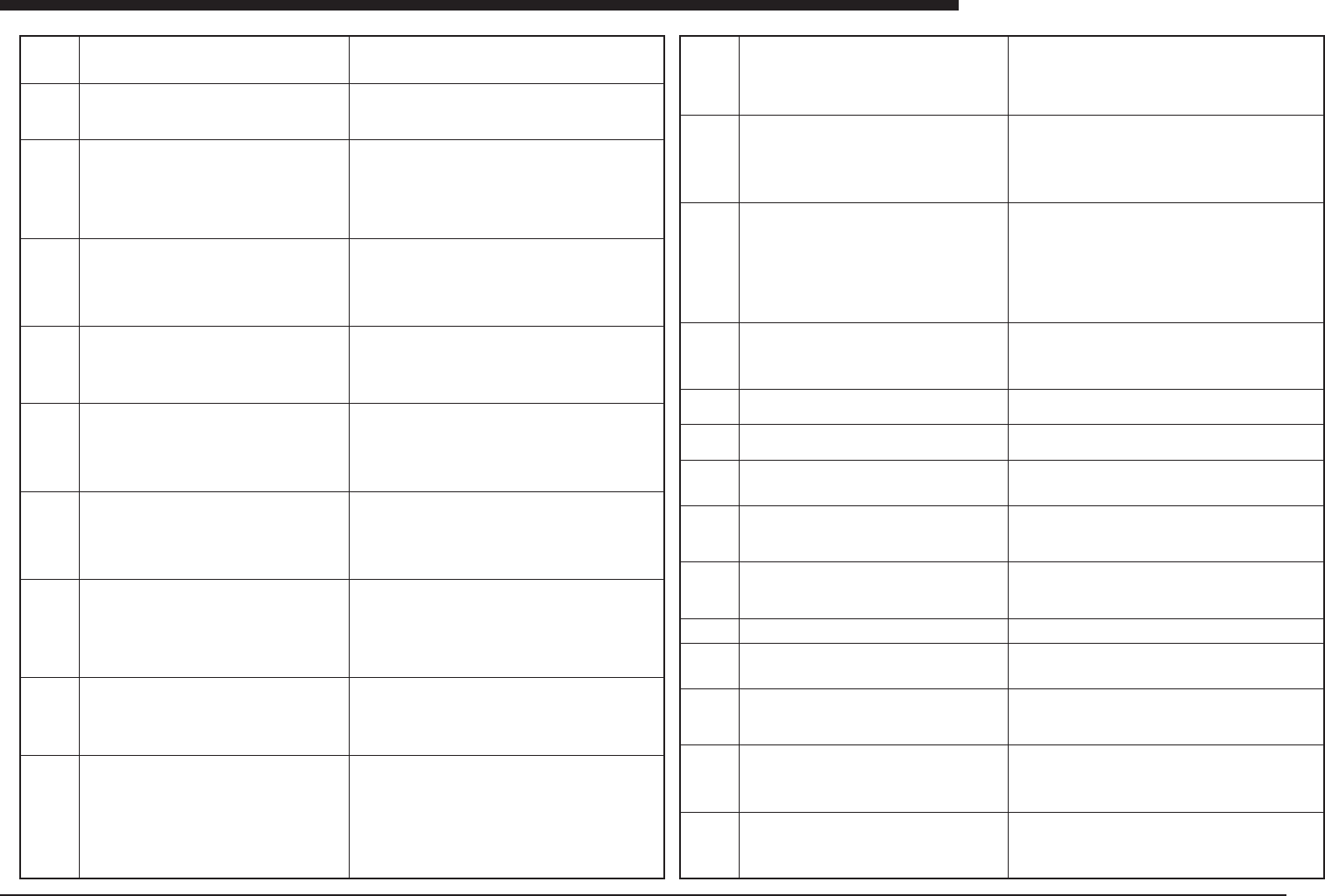
Ea00274
Ea00275
Ea00276
Ea00277
Ea00278
Ea00279
Ea00280
Ea00281
Ea00282
Ea00283
Ea00284
Ea00285
Ea00286
Ea00287
PCB DATA ERROR
There is no local badmark data for the dot dispense.
Dispense Data 4
Local Badmark Data 3
PCB DATA ERROR
There is no mark data of local badmark available for the
dot dispense data.
Dot Dispense Data 4
Local Badmark data 3
Mark data 5
PCB DATA ERROR
No local badmark data is set to "Note" for executable dot
dispense data. During production, "Note" data is ignored.
So if you want to use local badmark function, set this "
Exec". If not, set "0" for BadMk in dot dispensing data.
Dot Dispense Data 4
Local Badmark Data 3
4-Point Fiducial Data Error
Dot Dispense Data No 4
Fiducial Data No. 3
It is impossible to use this Fiducial number which is se-
lected in this Dot Dispense Data, because this data is
[4Local-S]. Please use [4Local-M] Fiducial number of 4-
point fiducial.
PCB DATA ERROR
Dot Dispense Data No. 4
Fiducial data No. 3
It is impossible to use this fiducial data, because this data
is [Note]. Please change from [Note] to [Exec].
PCB DATA ERROR
No fiducial data available for the dot dispense local fidu-
cial.
Dot Dispense data 4
Fiducial data 3
PCB DATA ERROR
No mark data available for the dot dispense local fidu-
cial.
Dot Dispense data 10
Fiducial data 5
Mark data 2
Checking pre dispensing data.
Please wait a moment.......
Pre Dispense data 4
Block number 3
PCB DATA ERROR
Pre dispensing position is outside moving area.
Pre Dispense data 3
Axes X
PCB DATA ERROR
There is no dispense head for pre dispensing.
Pre Dispense data 11
Head number 4
PCB DATA ERR
It is impossible to use "Point Fiducial" for Dispense. Please
check the mount data or fiducial data.
Dot Dispense data 5
Fiducial data 3
PCB DATA ERR
Illegal unit for pre dispensing. Defined unit for that head
is out of range for adequate unit.
Pre Dispense data 5
Head number 3
Unit 30
PCB DATA ERR
Illegal unit for dot dispensing. Defined unit for that head
is out of range for adequate unit.
Dot Dispense data 4
Head number 2
Unit 70
DOT STATION PITCH ERR
Dot station pitch either X direction or Y direction must be
set "0". Please check the dot station pitch X,Y.
(meaning)Local badmark data for dot dispense data does not ex-
ist.
(cause)Local badmark data have not defined in local badmark in-
formation yet.
(remedy)Please define local badmark data, if you use this function.
(meaning)There is not mark data for local badmark.
(cause)The mark data of Local badmark data for dot dispense have
not defined.
(remedy)Please define mark data in mark information for local
badmark of dot dispense data.
(meaning)The local badmark data of the dot dispense data is "Note"
data.
(cause)Local badmark that is "Note" is ignored during in running
condition.
(remedy)Please input "Exec" data of local badmark for dot dispense
data.
(meaning)The fiducial number of dot dispense data is "4Local-S"
data.
(cause)"4Local-S" data is not for setted in fiducial number of dot
dispense data.
(remedy)Please set "4Local-M" number.
(meaning)The fiducial number of dot dispense
(cause)"Note" data is ignored in running.
(remedy)Set "Exec" from "Note".
(meaning)There is no fiducial data for dot dispense data.
(cause)The fiducial number of dot dispense has not defined yet.
(remedy)Please make fiducial data
(meaning)There is no mark data for fiducial data of dot dispense
data.
(cause)The mark data was not made yet.
(remedy)Please make mark data of fiducial of dot dispense, or if
you have already prepared mark data, set that mark number.
(meaning)Data check about pre dispensing data is being now
carryed on.
(cause)This is not error message.
(remedy)Please wait until data check finish.
(meaning)X,Y position of Pre Dispense data is out of moving area.
(cause)The position is out of software limit.
(remedy)Please set right X, Y position or set right head number.
(meaning)Illegal dispense head was defined in pre dispense data.
(cause)The head does not exist, or the head number is not dis-
pense head.
(remedy)Please input right head number.
Please don't use "Point Fiducial" for Dispense.
Non adequate dispensing unit was defined. Please set head num-
ber "0", to select head automatically, or input adequate value for
dispensing unit that is defined in NOZZLE-SPEC Information.
Non adequate dispensing unit was defined. Please set head num-
ber "0", to select head automatically, or input adequate value for
dispensing unit that is defined in NOZZLE-SPEC Information.
(meaning)DOT STATION PITCH ERR
(cause)Dot station pitch either X direction or Y direction must be
set "0".
(remedy)Please check the dot station pitch X,Y.
Ea -10
ERROR MESSAGES LIST
Ea
Ea00288
Ea00289
Ea00290
Ea00300
Ea00301
Ea00302
Ea00303
Ea00304
Ea00305
Ea00306
DOT STATION MAX MATRIX NUMBER ERR
Please set max matrix number to more than 1. Please
check the max matrix number.
DOT STATION DATA ERR
All heads can not be able to reach to dot station. Please
check the dot station position X,Y.
Head number X
Axis X
NOZZLE SPEC DATA ERROR
Failed to read the nozzle spec information. Please pre-
pare correct nozzle spec information. Select this com-
mand by
YVOS2....3-3-[A4 NOZZLE SPEC.INF]-[SM86D Type]
MACHINE.3-1-[A4 NOZZLE SPEC.INF]-[Shift]+[Enter]
Machine SM86D
file NO?\NZL_TIM.STS
Tray unit error : The component is not placed correctly on
the traverser station. If the component is on the station,
please remove it.
Mount data 765
Component data 153
Station 2
Next tray position is for the next pick sequence.
(X= 6 , Y= 3)
Tray unit error : Returned component is not placed cor-
rectly on the traverser station. If the component is on the
station, please remove it.
Mount data 765
Component data 153
Station 2
Tray unit error : Returned component is not placed cor-
rectly on the traverser station. If the component is on the
station, please remove it.
Mount data 765
Component data 153
Pallet 9
Next tray position is for the next pick sequence.
(X= 6 , Y= 3)
Tray unit error : Returned component is not placed cor-
rectly on the traverser station. If the component is on the
station, please remove it.
Mount data 765
Component data 153
Station 2
Next tray position is for the next pick sequence.
(X= 6 , Y= 3)
Tray unit error : Returned component is not placed cor-
rectly on the traverser station. If the component is on the
station, please remove it.
Mount data 765
Component data 153
Station 2
Tray unit error : Returned component is not placed cor-
rectly on the traverser station. If the component is on the
station, please remove it.
Mount data 765
Component data 153
Station 2
Tray unit error : Failed to store the pallet. To start produc-
tion again, please return the pallet to its assigned maga-
zine.
Mount data 765
Component data 153
Pallet 9
(meaning)DOT STATION MAX MATRIX NUMBER ERR
(cause)Please set max matrix number to more than 1.
(remedy)Please check the max matrix number.
(meaning)DOT STATION DATA ERR
(cause)All heads can not be able to reach to dot station.
(remedy)Please check the dot station position X,Y.
(meaning)NOZZLE SPEC DATA ERROR
(cause)Failed to read the nozzle spec information.
(remedy)Please prepare correct nozzle spec information.
(meaning) The tray changer was not able to place the supply com-
ponents on the traverser. If extra parts have been placed on the
specified traverser, remove them.
(cause)The pickup sensor on the station was not able to decide
correctly whether or not there was a component on the traverser.
(remedy) If there are extra components on the traverser, remove
them. If there is no problem with the components, and the sensor
has malfunctioned, re-adjust the sensor.
(meaning)Components which were returned from the main unit
could not be placed correctly on the traverser.
(cause)Components from the main unit were not placed correctly
on the traverser or fell off during transport.
(remedy)If components have fallen off, remove those components.
If the sensor judges that there are components on the traverser
when in actuality there are none, re-adjust the sensor.
(meaning)Components could not be picked up from the tray.
(cause)There were no components on the tray when the attempt
was made to pick them up, or components fell off when being moved
from the tray to the traverser.
(remedy)If components have fallen off, remove those components.
If components have run out, supply more.
(meaning)The external tray changer was not able to place compo-
nents properly on the traverser.
(cause)Components fell off of the external tray changer when be-
ing transported, or the sensor on the traverser judged that there
were no components on the traverser, even though there were.
(remedy)If components have fallen off, remove those components.
Adjust the pickup sensor for the traverser so that it judges correctly
whether or not there are components on the traverser.
(meaning)An error occurred when picking up components from the
traverser.
(cause)Components which should have been on the traverser were
not there, or an attempt was made to pick up components from the
traverser but the pickup head sensor or the traverser sensor was
not able to judge correctly whether there were components on the
traverser.
(remedy)Re-adjust the sensors, or, if there are components which
have fallen off, remove them.
(meaning)An error occurred when unknown component is on the
traverser station
(cause)Reset operation was done when some component is on
the traverser station Or traverser sensor was not able to judge the
existence of component.
(remedy)Please remove the component on the traverser station.
Or re-adjust the sensors of traverser.
(meaning)The pallet could not be housed in the magazine.
(cause)A mechanical problem occurred when the attempt was made
to house the pallet in the magazine.
(remedy)Press the Emergency Stop button and return the pallet to
the magazine manually.
Ea00307
Ea00308
Ea00310
Ea00311
Ea00312
Ea00313
Ea00314
Ea00315
Ea00316
Ea00317
Ea00320
Ea00330
Ea00350
Ea00351
Tray unit error : Failed to pull out the pallet. To start pro-
duction again, please return the pallet to its assigned
magazine.
Mount data 765
Component data 153
Pallet 9
Tray unit error : The hook action was performed incor-
rectly. Please check the following items:
1. Pallet (No. 9) access position.
2. The hook nail.
If the pallet is out of the magazine, then:
1. Make sure to push EMERGENCY STOP ON.
2. Remove the pallet from the stage section.
3. Return the pallet to its magazine.
Tray unit : The tray unit head or traverser station has a
component attached to its nozzle (pad). After removing
the component, please press any key.
Tray unit error : Abort the RESET process. If a pallet is
out of the magazine, please return it to its assigned maga-
zine.
Tray unit : Tray unit is working now! Please wait.....
Tray unit error : The pallet is out of the magazine. Return
the pallet to its assigned magazine.
Tray unit error : The door is open. Please close the door.
Tray unit error : Failed to store the pallet. To start produc-
tion again, please return the pallet to its assigned maga-
zine.
Tray unit error : Failed to pull out the pallet. To start pro-
duction again, please return the pallet to its assigned
magazine.
Tray unit error : The door is open. Please close the door.
Something wrong with door and check one.
Tray unit error : Unknown error
Now, head of machine or tray-changer is picking the com-
ponent. If "SET PALLET" will be executed, component
will drop from head. If you execute "SET PALLET", re-
move component from head and hit [Space] key. If you
cancel "SET PALLET", hit other key.
EMERGENCY STOP ON
The tray unit pallet is out of the magazine. When you push
[READY], make sure followings.
1. Can you keep on safety for another persons?
2. Have you kept on machine moving area?
3. Have you returned a pallet to magazine?
INTERLOCK ERROR
The tray unit pallet is out of the magazine. When you push
[READY], make sure followings.
1. Can you keep on safety for another persons?
2. Have you kept on machine moving area?
3. Have you returned a pallet to magazine?
(meaning)An error occurred when taking the pallet out of the maga-
zine.
(cause)For mechanical reasons, an error occurred when the pallet
was being taken out of the magazine.
(remedy)If the pallet has been ejected from the magazine too
abruptly, press the Emergency Stop button and return it to the maga-
zine manually.
(meaning)The hook did not respond correctly to an Open or Close
instruction.
(cause)The hook has not grasped the pallet at the correct position.
(remedy)Re-insert the hook at the correct position in the pallet, and
start the operation again from the beginning. If the pallet has been
ejected from the magazine too abruptly, however, press the Emer-
gency Stop button and return it to the magazine manually.
(meaning) Component exists in external tray changer which should
not be there.
(cause) Component pickup error by external tray traverser. Traverser
has skipped a component because of incorrect teaching of pickup
position or traverser position, or pickup error has been made by
main head traverser. Possibly, vacuum sensor of external tray
changer head or traverser station is incorrectly adjusted.
(remedy) Check component pickup position, traverser coordinates
on main unit side, and coordinates for traverser station on external
tray changer side. Adjust vacuum sensor of external tray changer
head and vacuum sensor of traverser station.
(meaning)This is a notification that the reset process has been in-
terrupted.
(cause)An interlock emergency stop instruction or similar instruc-
tion has been issued.
(remedy)If a pallet has been forcibly ejected return it to the maga-
zine.
(meaning)This is a notification that the tray changer is in operation.
(cause)None
(remedy)Please wait.
(meaning)The pallet has been forcibly ejected from the magazine.
(cause)Same as above.
(remedy)Return the pallet to the magazine.
(meaning)Operation cannot begin because the door of the external
tray changer is open.
(cause)The door of the external tray changer is open.
(remedy)Close the door which is open.
(meaning)An error has occurred in housing the pallet in the maga-
zine.
(cause)None
(remedy)Press the Emergency Stop button and return the pallet to
the magazine manually.
(meaning) An error occurred in taking the pallet out of the maga-
zine.
(cause)None
(remedy)Press the Emergency Stop button and return the pallet to
the magazine manually.
The door that normally closed is open. May be the door is broken.
(meaning)An internal problem has occurred in the tray changer.
(cause)The software version does not match.
(remedy)First, contact the manufacturer and then re-install the soft-
ware.
Remove the component from head of machine or Tray-Changer.
(meaning)The pallet has been forcibly ejected from the magazine.
(cause)None
(remedy)Press the Emergency Stop button, return the pallet to the
magazine, and press the Ready button.
(meaning)The pallet has been forcibly ejected from the magazine.
(cause)None
(remedy)Return the pallet correctly to the magazine and start the
operation again.
Ea -11
ERROR MESSAGES LIST
Ea
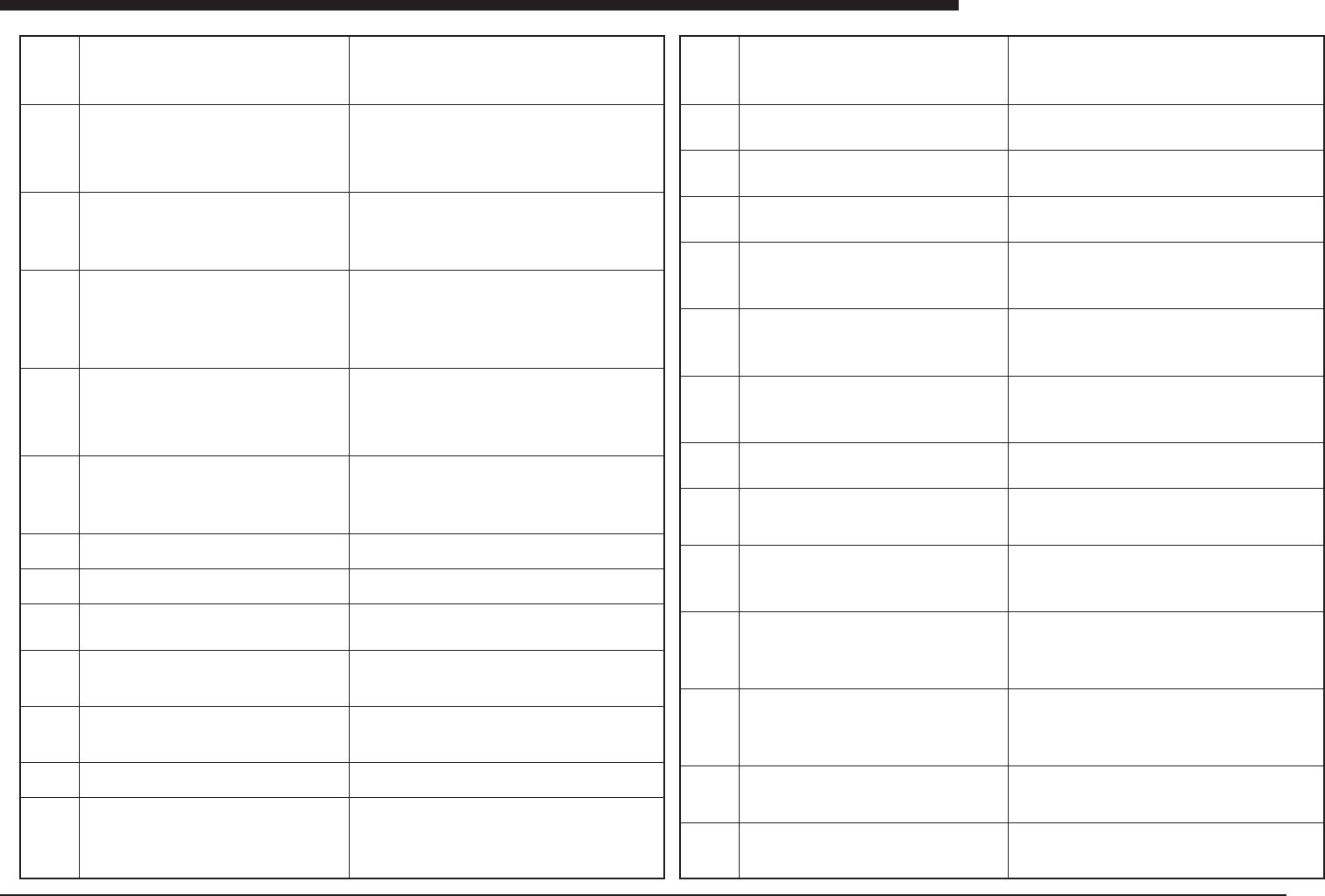
Ea00352
Ea00399
Ea00405
Ea00430
Ea00431
Ea00432
Ea00500
Ea00501
Ea00502
Ea00503
Ea00504
Ea00505
Ea00508
ORIGIN IMCOMPLETE
The tray unit pallet is out of the magazine. When you push
[READY], make sure followings.
1. Can you keep on safety for another persons?
2. Have you kept on machine moving area?
3. Have you returned a pallet to magazine?
Manual Tray changer error
No response from Manual Tray changer for more than
10sec.
NO DEFINED DOT WAS FOUND.
The dispense fluid may be in short or the nozzle may be
clogged up.
Head number
Remove cause of this error. Use FILL UP CYLINDER
command in 1/1/D4 RUNNING UTILITY to confirm the
glue is ready in the cylinder.
[Sp.Function] ERROR
This function is NOT available for this machine.
Because in [Position] page of [3/2/A1 SELECT TARGET],
R data of [Locate pin] and [Edge Clamp] is not between -
5 and +5.
Change [Sp.Function] to [NOT USE].
[Sp.Function] ERROR
To use this function, the R data of [Blk Repeat Info.] should
be between -5 and +5.Or change [Sp.Function] to [NOT
USE].
Component data
Name
[Sp.Function] ERROR
A component with its [Pick Angle] to be [0/SIM], should
be located on the front feeder plate.
Or change [Sp.Function] to [NOT USE].
Mount data SpDat[MNTnum_inf0]
Component data
Name
Now reading data. Please wait a moment....
Now reading data. Please wait a moment....
DATA READING ERROR
Failed to read data.
PCB DATA ERROR
Failed to write data.
PCB DATA ERROR
No PCB has been selected. Select PCB by [D1 SWITCH
PCB DATA]
Creating new PCB data now. Please wait a moment.....
<PCB Information> cannot open SUB-WINDOW except
dispense machine.
(meaning)The pallet has been forcibly ejected from the magazine.
(cause)None
(remedy)Press the Emergency Stop button and return the pallet to
the magazine.
(Meaning)During using special function to handle manual tray feeder
automatic exchanging system, the system do not turn on the ready
signal for 10 second.
(Cause)qSpend out of tray.wStuck of tray.eThe power of the sys-
tem is off.rThe air pressure is not supplied for the system.tSome
trouble in the system.
(Remedy)qSupply tray.wAlign the tray.ePower on.rSupply
air.tAdjust the system.
(meaning) Specified position is outside of soft limit.
(cause) Axis cannot move outside of soft limit.
(remedy) Enter correct position.
(Meaning)Although the special function for SIMM/DIMM 8head si-
multaneous picking, is used, 5 degrees or more value is in the R
data of [locate pin position] or [PCB corner], which prevent the spe-
cial function to be used.
(Cause)If the PCB has actually 5 or more degrees on the working
position, this function is not available.
(Remedy)Turn off the special function, or correct the wrong angle
data, or adjust conveyor units so that the PCB angle to be less than
5 degrees.
(Meaning)Although the special function for SIMM/DIMM 8head si-
multaneous picking, is used, 5 degrees or more value is in the R
data of [block repeat data], which prevent the special function to be
used.
(Cause)If the Block has actually 5 or more degrees on the working
position, this function is not available.
(Remedy)Turn off the special function, or correct the wrong angle
data.
(meaning)This indicates that the PCB data is being read.
(cause)None
(remedy)Please wait.
(meaning)This indicates that the PCB data is being read.
(cause)None
(remedy)Please wait.
(meaning)An error occurred in reading the data
(cause)The file may have been destroyed.
(remedy)The relevant data could not be read. If there is a backup
copy, copy the data from the backup and use it.
(meaning)An error occurred in writing the PCB data.
(cause)The hard disk is full, or there is a problem with the disk.
(remedy)First check the condition of the disk If there is a problem
with the number of files, delete any unnecessary files and then try
writing the data again.
(meaning)Please specify the PCB data first.
(cause)Another command was issued before specifying which PCB
is to be edited.
(remedy)First use the edit target switching command to specify the
file to be edited.
(meaning)This is an indication that new PCB data is being created.
(cause)None
(remedy)Please wait.
(meaning) Specified position is outside of soft limit.
(cause) Even though sub-window does not open, command has
been used in PCB information to open sub-window, or [F4] key has
been used.
(remedy) None
Ea00509
Ea00510
Ea00511
Ea00512
Ea00515
Ea00516
Ea00517
Ea00518
Ea00530
Ea00531
Ea00532
Ea00533
Ea00534
Ea00535
No more PCB files can be edited (Max 10 files).
In this menu, repeated patterns can be defined. Press
[ENTER] key to enter this menu. Press any other key to
abort.
In this menu, dispense actions can be defined. Press [EN-
TER] key to enter this menu. Press any other key to abort.
In this menu, point-fiducial, local-fiducial and 4-point-fi-
ducial can be defined. Press [ENTER] key to enter this
menu. Press any other key to abort.
CAUTION: Ready to load database information into Se-
lected records. Any adjusted parameters in the selected
records will be overwritten.
Push the [SPACE] key to execute.
Push the [ESC] key to cancel this operation.
CAUTION: Ready to save selected records of compo-
nent or mark data into the Database.
(Reverse of usual way)
Push the [SPACE] key to execute.
Push the [ESC] key to cancel this operation.
CAUTION: Ready to save all records of component or
mark data into the Database. (Reverse of usual way)
Push the [SPACE] key to execute.
Push the [ESC] key to cancel this operation.
Production History data will be deleted.
Press the [SPACE] key to execute, or any other key to
abort.
No Data base number is specified. If you would like to
perform a 'Set from Database', then please input a Data
base number in the SUB WINDOW.
0 : means that the DataBase number is not specified.
CAUTION : Ready to load Component information from
machine Data base to ALL components in the PCB com-
ponent data base. Any adjusted parameter in the current
PCB component data base will be lost. Push the [SPACE]
key to execute. Push the [ESC] key to cancel this opera-
tion.
CAUTION: Amount of data exceeded the limit for auto-
running. Reduce the number of data. Amount of 'Mount
Data', 'Component Info.', 'Mark Information', 'Block Re-
peat', 'Fiducial Mark', 'PreDispense' and 'DotDispense'
cannot exceed 2560. And 'Component Inf' cannot exceed
255.
ERROR:PRD HISTORY does not exist on the disk. Copy
to Machine first.
ERROR: If copy selected lines or insert 1 line, the end of
data will be over the maximum number of lines.
ERROR: Replace command cannot be executed in this
condition. Now Replace function is for MOUNT informa-
tion. If you want to execute Replace function, set current
window as MOUNT information.
(meaning)An attempt was made to edit 10 or more PCB files at
once.
(cause)A large number of PCB files were opened without saving
previous files first.
(remedy)Save PCB data files which have already been opened,
before opening another file.
(meaning)This notifies the user that editing of block repeat data is
beginning.
(cause)None
(remedy)Press the Enter key.
(meaning)This notifies the user that the editing screen for adhesive
dispensing is being accessed.
(cause)None
(remedy)Press the Enter key.
(meaning)This notifies the user that the editing screen for point fi-
ducial data is being accessed.
(cause)None
(remedy)Press the Enter key.
(Meaning)This is warning before the [SET FROM DATABASE] com-
mand for 2 or more component data at once.
(Cause)Operation to execute [SET FROM DATABASE] command
for 2 or more component data had been done.
(Remedy)Press [SPACE] to execute command, or press[ESC] to
cancel the command.
(Meaning)This is warning before reverse set of 2or more compo-
nent data into the database at once.
(Cause)The operation to execute reverse set of 2or more compo-
nent data into the database had been done.
(Remedy)Press [SPACE] to execute command, or press[ESC] to
cancel the command.
(Meaning)This is warning before reverse set of all component data
into the database at once.
(Cause)The operation to execute reverse set of all component data
into the database had been done.
(Remedy)Press [SPACE] to execute command, or press[ESC] to
cancel the command.
(Meaning)This is warning to initialize the production history data.
(Cause)Going to initialize the production history.
(Remedy)Press [SPACE] to execute command, or press[ESC] to
cancel the command.
(meaning) The database information setting command was issued,
or the F7 key pressed, without specifying the database number.
(cause)Same as above.
(remedy)Enter any value other than 0 for the database number on
the sub-screen (the right-hand screen).
(meaning)This notifies the user that all of the component data will
be overwritten by the database information.
(cause)None
(remedy)To execute the process, press the Space key. To cancel it,
press the ESC key.
(meaning)Too much PCB data exists.
(cause)Data has been copied or additions made, so that the result-
ing data exceeds the specifications.
(remedy)Delete any data which is not being used, or if the amount
of data exceeds the specifications, distribute the data between sev-
eral machines, so that data for any one machine is within the speci-
fications.
(meaning)There is no production history information.
(cause)An attempt was made to view the production history infor-
mation for a PCB for which there is no such information yet.
(remedy)With the YVOS2, read the production history information
from the machine. With the machine, there is no production history
information until PCBs have actually been produced, so do not try
to open the information.
(meaning) Too many data to exceed maximum data numbers.
(cause)If copying had executed, result is over of limited data num-
bers.
(remedy)Quit of this operation, or decrease data numbers that you
have selected.
(meaning)Replace command is not effective for this window.
(cause)Replace command can be executed in MOUNT information