00195760-0102_UM_D3_SR605_EN.pdf - 第126页
3 Technical data for the machine User Manual SIPLACE D3 3.7 PCB conveyor system From software version SR.605.xx 07/2008 EN Edition 126 3.7.3.4 Dual conveyor in Single conveyor mode The dual conveyor can be configur ed on…

User Manual SIPLACE D3 3 Technical data for the machine
From software version SR.605.xx 07/2008 EN Edition 3.7 PCB conveyor system
125
the PCB. The placement rate is thus independent of the PCB thickness. The PCB fiducial center-
ing can also be optimized. Since the distance between the PCB surface and the PCB camera re-
mains the same, the PCB camera is always focussed on the PCB surface with the same
sharpness. The PCB fiducial contours are optimally mapped on the CCD chip of the PCB camera.
The width of the circuit board conveyor is set and monitored by an integral control circuit. It can
be selected by calling up the program. The control circuit then actuates the stepping motors until
the desired width is reached. The width adjustment is therefore independent of other machine
components.
The conveyor height can be modified on the machine, thus allowing it to be integrated into lines
with a conveyor height of 830, 900, 930 or 950 mm.
The PCB conveyors communicate with the individual machines via the SMEMA interface or the
optional Siemens interface.
The fixed transport side can be located on the left or right for both the dual conveyor and the single
conveyor. With this conveyor, the fixed side can be easily switched from right to left and vice versa
using the station software.
The circuit board conveyor is monitored and controlled with optical sensors. If the board has
reached placement area and passed the light barrier, it is braked. A laser light barrier determines
the position of the board. As soon as the circuit board has reached its target position, the conveyor
belt is stopped and the board is clamped from below.
3.7.3 Definition of conveyor tracks and transport modes
The right conveyor track (viewed in the transport direction) is designated "Conveyor 1" and the left
as "Conveyor 2" (see Fig. 3.7 - 4
, page 127).
3.7.3.1 Definition of the conveyor track width
3.7.3.2 Standard width
The standard width of the conveyor track is the maximum conveyor width defined by the desired
position of the stationary conveyor side. It is no more than 216 mm per track.
3.7.3.3 Overwide conveyor track
The conveyor track can be widened to 250 mm maximum by moving the stationary conveyor side
wall out of its normal position.
3 Technical data for the machine User Manual SIPLACE D3
3.7 PCB conveyor system From software version SR.605.xx 07/2008 EN Edition
126
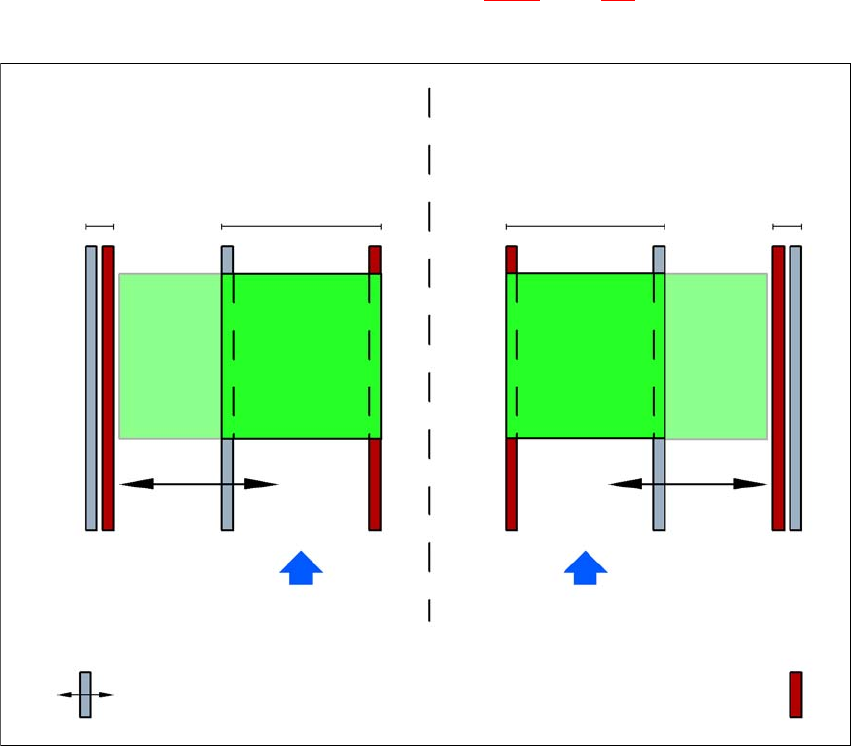
3.7.3.4 Dual conveyor in Single conveyor mode
The dual conveyor can be configured online to create a single conveyor. To do this, one conveyor
track is moved fully together and deactivated (see Fig. 3.7 - 3
, page 126). This gives a conveyor
track width of up to 450 mm.
3
Fig. 3.7 - 3 Flexible dual conveyor in Single conveyor mode
3.7.3.5 Transport modes
The flexible dual conveyor can be used in two modes:
– Synchronous transport mode
– Asynchronous transport mode
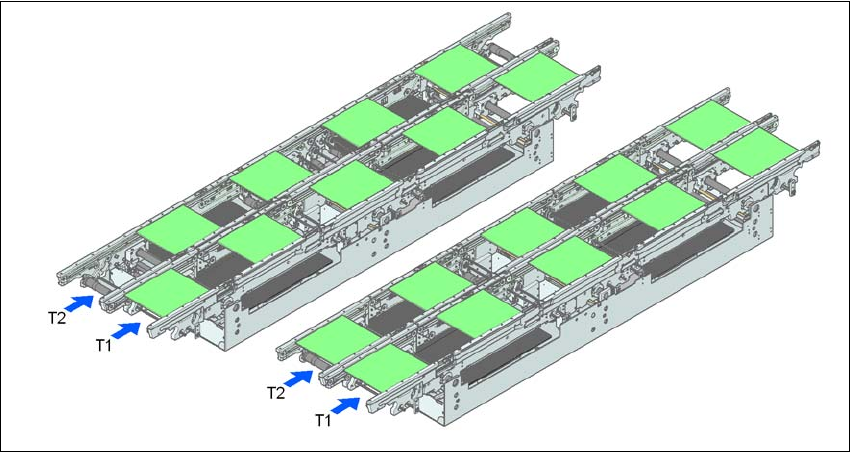
3.7.3.6 Asynchronous transport mode
Description 3
In asynchronous mode, only one PCB in a transport track is processed. At the same time, another
PCB in the second transport track is moved into the placement position. This saves the full con-
Dual conveyor with widened conveyor track 2
(stationary conveyor side wall on left)
Conveyor track 2
deactivated
Conveyor track 1 Conveyor track 2 Conveyor track 1
deactivated
PCB transport direction PCB transport direction
Stationary conveyor side wall
Dual conveyor with widened conveyor track 1
(stationary conveyor side wall on right)
Movable conveyor side wall
User Manual SIPLACE D3 3 Technical data for the machine
From software version SR.605.xx 07/2008 EN Edition 3.7 PCB conveyor system
127
veying time of one PCB, thus considerably increasing performance, particularly for PCBs with a
short cycle time.
Function 3
Once the machine has received the job data (panel, set-up), the PCBs on the feeding belts are
continuously transported to the available processing belt (provided that the processing belt is free)
throughout the placement operation. The placement sequence starts as soon as a PCB has
moved onto the processing belt. The PCBs are processed one after another.
If the placement sequence is interrupted, the conveyor interface will be disabled and the PCBs
currently on the processing belts will be completed.
The conveyor interface is disabled or enabled simultaneously for both transport tracks.
3
Fig. 3.7 - 4 Transport modes
3.7.3.7 Synchronous transport mode
Description 3
In synchronous mode, two PCBs of the same size are moved into the placement position at the
same time. They must be processed as a common panel.
In this way, the top and bottom of a PCB can be processed on a single line, and the time required
to transport the PCB is shorter since two PCBs are always transported at the same time. It also
ensures better utilization of the nozzle configuration.
Synchronous transport modeAsynchronous transport mode