00195760-0102_UM_D3_SR605_EN.pdf - 第264页
5 Tasks for the operating personnel User Manual SIPLACE D3 5.4 Changing shift From software version SR.605.xx 07/2008 EN Edition 264 5.4 C hanging shif t PLEASE NOTE: 5 Y ou will find additional information in the follow…

User Manual SIPLACE D3 5 Tasks for the operating personnel
From software version SR.605.xx 07/2008 EN Edition 5.3 Note operating status indicator lamp
263
unchanged flashes (7,7) unchanged Place PCB in input conveyor
flashes (1,10) flashes (7,7) unchanged Remove PCB from output conveyor
unchanged flashes (7,7) flashes (1,10) Remove PCB from output conveyor 2
flashes (1,10) flashes (7,7) flashes (1,10) Width adjustment
unchanged flashes (1,10) unchanged Transport PCB
flashes (1,10) flashes (7,7) flashes (1,10) Both output conveyors are cleared
on flashes (1,10) on Conveyor error
on off on Go to service position
on Placement
flashes (1,20) Waiting for processing data
Error display
on off unchanged Machine error, right
on off unchanged Track empty, right
on off unchanged Nozzle configuration, right
on off unchanged Transport error, right
on off on Fiducial error, left and right
on off on Fiducial error, left and right
unchanged off on Track empty, left
unchanged off on Nozzle configuration, left
unchanged off on Transport error, left
unchanged off on Machine error, left
Pick-up error display
unchanged unchanged flashes (1,20) First track empty, left
unchanged unchanged flashes (5,20) Further tracks empty, left
unchanged unchanged flashes (5,5) Penultimate track in use
unchanged unchanged flashes (1,2) Last track in use, right
flashes (1,20) unchanged unchanged First track empty, right
flashes (5,20) unchanged unchanged Further tracks empty, right
flashes (5,5) unchanged unchanged Penultimate track in use, right
flashes (1,2) unchanged unchanged Last track in use, right
L1 (white)
(right lamp)
L2 (green) L3 (white)
(left lamp)
Meaning

5 Tasks for the operating personnel User Manual SIPLACE D3
5.4 Changing shift From software version SR.605.xx 07/2008 EN Edition
264
5.4 Changing shift
PLEASE NOTE: 5
You will find additional information in the following manuals or data media:
– Getting Started with Station Software 605.xx
– SIPLACE D3 preventive maintenance manual
– Parts catalog on the product CD
5.4.1 Activities at shift change
→ Splice the tapes early. The feeder modules do not have to be refilled as soon as the new shift
starts. This minimizes extended down times.
→ At the shift change, pass important information on to the next operator. This includes, for in-
stance, changes to the placement program. Also read through the list of the descriptions of
the steps to take in Section 5.7
, page 273.
→ Carry out a set-up check.
Make sure that the feeder modules are equipped with the correct components, that they are
at the correct locations in the component trolley and that the conveyor increment is set cor-
rectly.
→ Hand over the line in the same state that you would want to find it in when starting your shift.
This means that:
– The rejection containers are empty.
– The waste tape containers are empty. Follow the safety instructions given in Section
5.4.2
, page 265.
– The feeder areas have been carefully cleaned with a vacuum cleaner.
User Manual SIPLACE D3 5 Tasks for the operating personnel
From software version SR.605.xx 07/2008 EN Edition 5.4 Changing shift
265
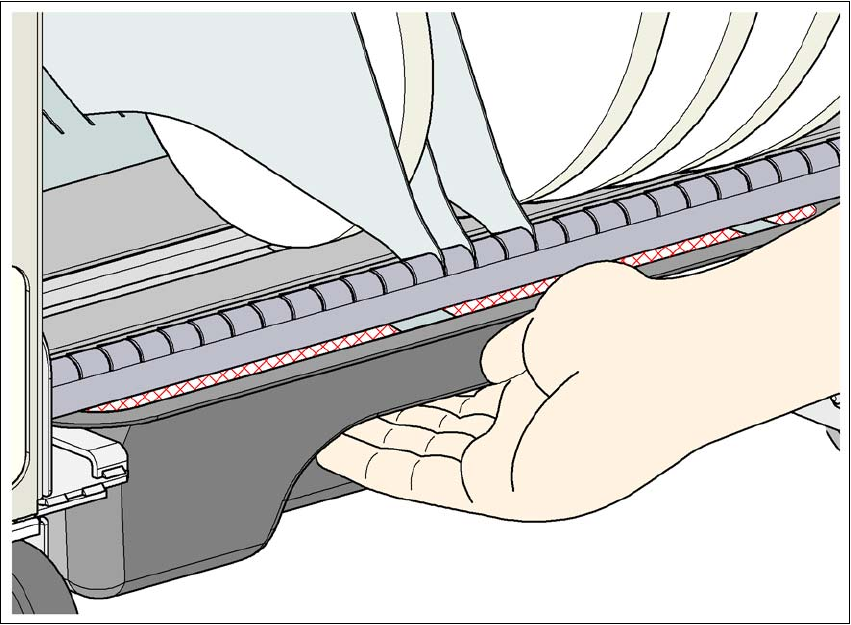
5.4.2 Safety instructions for emptying the waste tape container
5
Fig. 5.4 - 1 Safety instructions for emptying the waste tape container
The waste tape container must be pulled out of the component trolley for emptying. There is a risk
of catching your thumbs as you do so.
→ To avoid this risk, hold the waste tape container with your fingers on the underside of the han-
dle and place your thumb on the handle.
→ Do NOT put your thumbs in the gap between the tape container and waste tape container as
you could catch your thumbs if you do.