00196744-01 - VD SIPLACE Explorer 2.7_de_en.pdf - 第29页
Softw are Vers ionsbes c hreibung Softw are Vers ion Des cr iption SIPLAC E Ex plorer V2. 7 29 of 56 • OI S/S IS dat abase conf iguration inf ormat ion, suc h as databas e version num ber, line and st ation names. • Inf …
Software Versionsbeschreibung Software Version Description SIPLACE Explorer V2.7
28 von 56
7 Corrected Errors
Error
number
Description of error
D1-48004067
Filtering by shifts was not done correctly on the Websites Performance and
Production Summary.
D1-50636301 Installing SIPLACE Explorer sporadically failed if the Microsoft Terminal
Service is installed on the same computer.
D1-53868284 The error that factory reports of individual lines did not show any data
occurred sporadically.
D1-54108389 If in subsequent job definitions components were to be placed on a station in
one definition and after that no more, the error could occur that 'N/A in SIS'
was displayed on the Website Reject Rate instead of the components and
component shape names.
D1-54152013 If in subsequent job definitions components were to be placed on a station in
one definition and after that no more, the error could occur that the E10 state
Scheduled Downtime Bypass repeatedly popped up while the state
Productive was displayed.
8 Known Problems
None
9 SIPLACE Error Reporting
SIPLACE Explorer V 2.7 provides SIPLACE Error Reporting, which can be used to record production line
errors which occur in SIPLACE Explorer and Tomcat. The files recorded can then be sent for error
analysis to the Siemens hotline or given to a Siemens service technician.
The following files are compiled by SIPLACE Error Reporting.
Software Versionsbeschreibung Software Version Description SIPLACE Explorer V2.7
29 of 56
• OIS/SIS database configuration information, such as database version number, line and station
names.
• Information about the production lines configured in SIPLACE Explorer.
• Log files from SIPLACE Explorer
• Log files from Tomcat 5.5
• OIS/SIS databases,
• SIPLACE Explorer line databases
• SIPLACE Explorer factory databases
9.1 Log Files
9.1.1 SIPLACE Explorer Log Files
The following SIPLACE Explorer log files are recorded:
• config\version.cfg
• config\lines.xml
• Lines\Line1\SMA.gms
• Automatic Production Reporting Application.log
• FactoryConfigurationUtility.log
• logs\dev.log
• logs\dev_error.log
• logs\dev_process.log
• logs\FactoryConfigurationUtility.log
• logs\manager.log
• logs\runtime.log
• logs\runtime_error.log
• logs\runtime_process.log
• logs\ErrorReporting.log
9.1.2 Tomcat 5.5 Log Files
All files with the ending “log” will be recorded, provided their time stamp is not older than one month and
their size is < 50 MB.
Software Versionsbeschreibung Software Version Description SIPLACE Explorer V2.7
30 von 56
9.2 How to Start SIPLACE Error Reporting
• Start the SIPLACE Error Reporting from the Windows Start menu:
Start → Programs → SIPLACE Error Reporter.
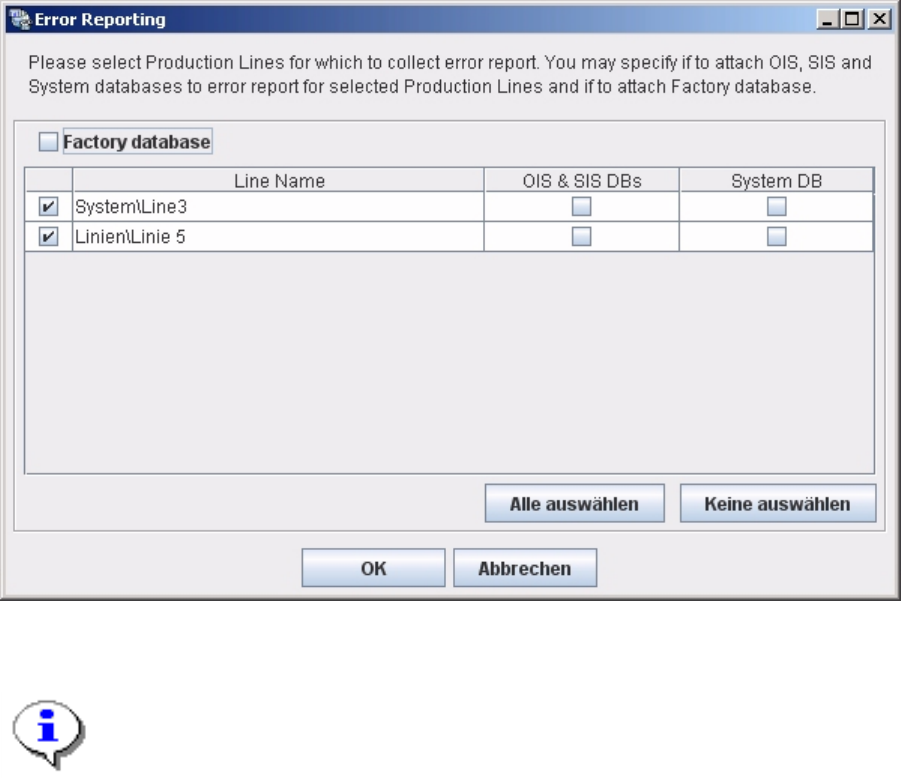
• SIPLACE Error Reporting will open:
• Select the production lines and databases for which you need error information.
Note:
Only select those production lines at which errors have occurred.
• Check your selection and confirm with OK. For further details of SIPLACE Error Reporting, see the
document “Navigation Guide for the Installation Procedure of SIPLACE Software Systems” (Item No.
00195050-xx).