00196044-05 - sg x und x4i fse_en.pdf - 第606页
MTC2 Masterdrives Downloading Parameter Sets S tudent Guide (FSE) SI PL ACE X Series and X4I MTC2 Edition 01/2009 EN 610 14.4.5 Downloading Parameter Sets 14.4.5.1 Requirement s CD ROM Drive Monitor Cables for laptop…
MTC2
Setting the CAN bus address at the master drive PMU Masterdrives
Student Guide (FSE) SIPLACE X Series and X4I
Edition 01/2009 EN MTC2
609
X Select , to go to the parameter index. You will see
001
, which is index 1. (an index is always
indicated by a small line).
X Select , to go to the parameter value. You will see
1
. This is the address of the lifting axis for
tower 1.
X Select , to return to the parameter numbers. You will see
P918
.
X Step with , until you reach the number
P060
. Now you are back in the menu selection.
X Select and set with
1
. You will be taken back to the
Parameter menu
.
X Select . You will see
009
.
X Select . You will see
P60
.
X Set
r000
.
X Select . The initial state will be restored.
NOTE:
For the PMU 2 (feed axis 1) setting, you will need to step with until you reach
2
.
MTC2
Masterdrives Downloading Parameter Sets
Student Guide (FSE) SIPLACE X Series and X4I
MTC2 Edition 01/2009 EN
610
14.4.5 Downloading Parameter Sets
14.4.5.1 Requirements
CD ROM Drive Monitor
Cables for laptop and master drives (03021720-01)
Parameter set for lifting axis Tower 1 and Tower 2
Parameter set for feed axis Tower 1 and Tower 2
Simovert Masterdrive for the Lifting axis (00354979-01)
Simovert Masterdrive for the Feed axis (00354980-01)
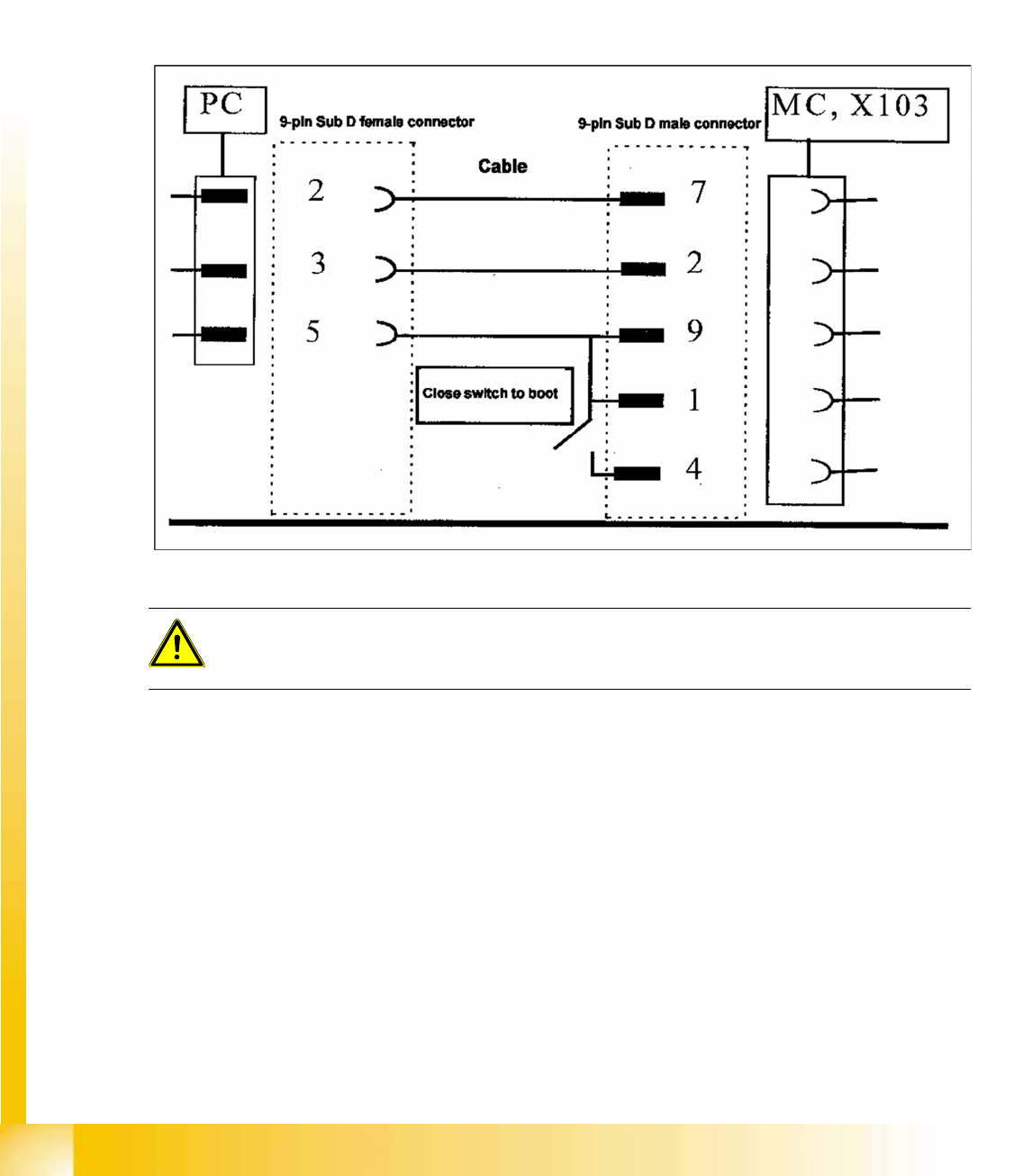
14-66: Cable configuration for the connection between the laptop and the master drive
ATTENTION:
Do not forget the jumper between pin 9 and 1. The switch is not necessary for downloading the
parameter sets.
MTC2
Downloading Parameter Sets Masterdrives
Student Guide (FSE) SIPLACE X Series and X4I
Edition 01/2009 EN MTC2
611
14.4.5.2 Installation Drive Monitor
NOTE:
The
Drive Monitor
software can also be used for the MTC1. The softwareversion on the MTC
1 is 1.5.
Installation can only be carried out with administrator rights.
Prior to installation, it may be necessary to create a directory with the name
Parameter sets
.
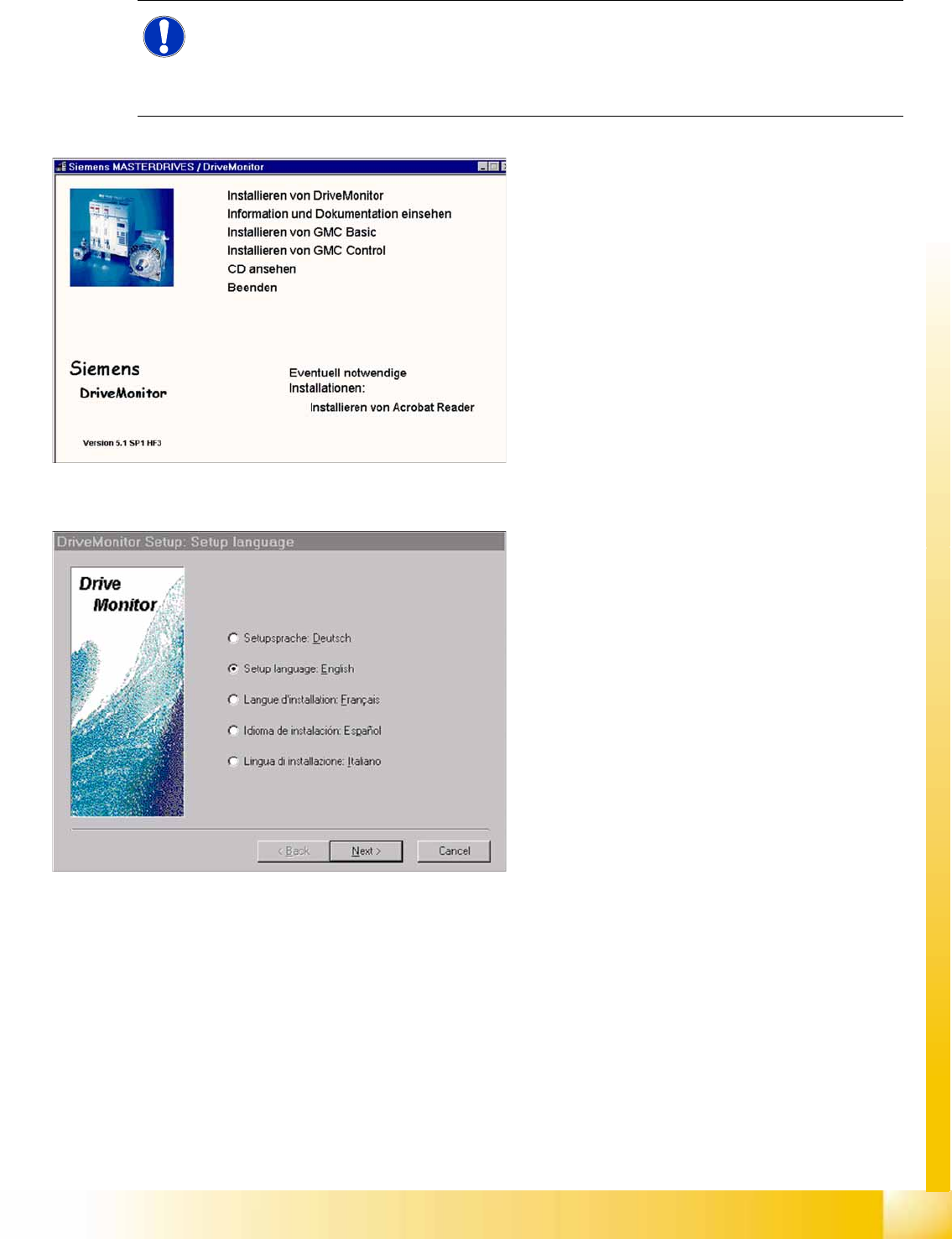
14-67: Installation Drive Monitor
X When you insert the CD-ROM , the installation
window will be automatically opened
or start the install.bat file from the Drive
Monitor folder.
X
Installation Drive Monitor
.
X After installation has been completed
successfully, a shortcut appears on the
desktop.
14-68: select language
X Select language (D, E, F, I, S)
X Select
Next
.
X Select
Next
.
X Agree to the software license with
YES
.