00196044-05 - sg x und x4i fse_en.pdf - 第121页
Communication and Control CAN I/O Module (SLIO) SIPLACE X CAN Bus S tudent Guide (FSE) SIPL ACE X Series and X4I Edition 01/2009 EN Communication and Control 121 4.3.10 CAN I/O Module (SLIO) SIPLACE X SIPLACE X machines …
Communication and Control
CAN Bus X Feeder - Communication
Student Guide (FSE) SIPLACE X Series and X4I
Communication and Control Edition 01/2009 EN
120
4.3.9 X Feeder - Communication
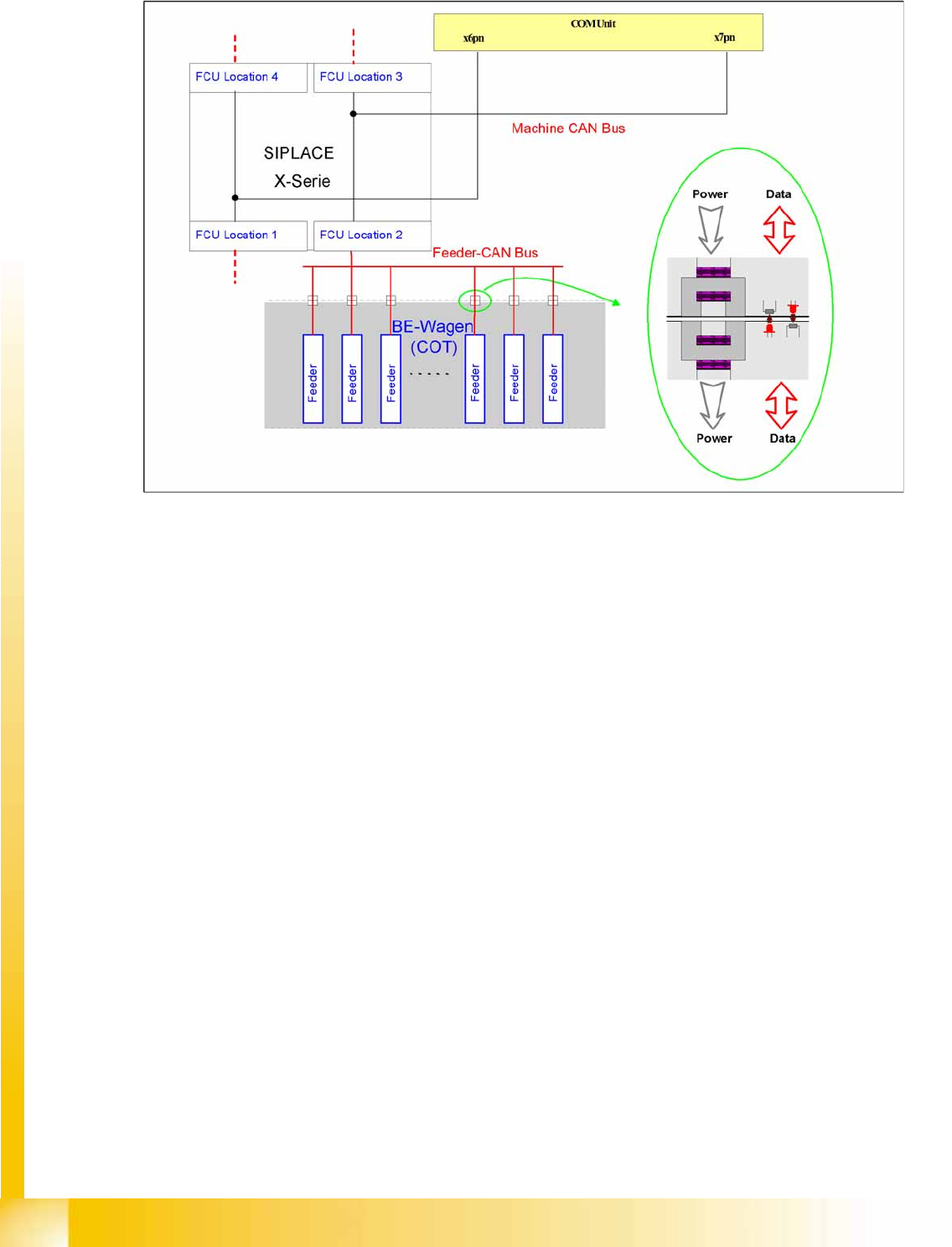
4-28: Communication X feeder
The communication between the Feeder Control Unit (FCU) and each X feeder is carried out via a CAN
bus. This CAN bus is only responsible for the communication between the FCU and the feeders and is
controlled by the machine CAN bus.
The data and power supply from the FCU to each feeder is contactless.
Communication and Control
CAN I/O Module (SLIO) SIPLACE X CAN Bus
Student Guide (FSE) SIPLACE X Series and X4I
Edition 01/2009 EN Communication and Control
121
4.3.10 CAN I/O Module (SLIO) SIPLACE X
SIPLACE X machines use 2 CAN I/O modules. Both modules are absolutely identical and are located in
sectors 2 (main distributor) and 4 (subdistributor). The introduction of the one wire bus system means
that there is now an additional board plugged into the I/O module (Interface 1-Wire CAT5).
Product characteristics:
Micro controller with integrated CAN controller
Data memory
Program memory (flash)
CAN interface with 9 pin connector and address alignment
16 digital Output 24 V with status LED
24 digital Input 24 V with status LED
Download interface
Power supply 24V
The 8 digital inputs can be logically linked with the help of a FPGA (freely programmable gate array).
The FPGA is used for incoming security messages.
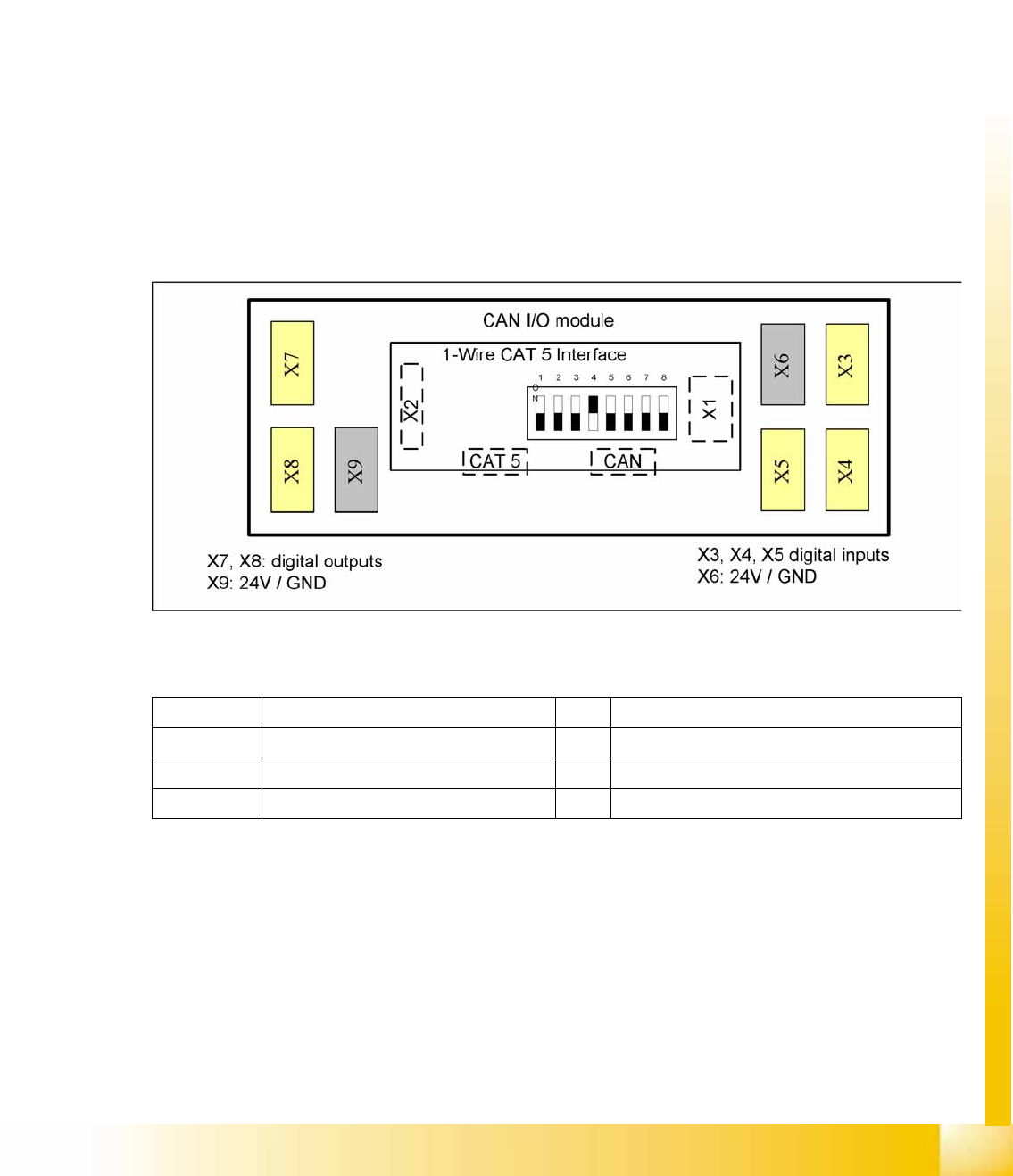
4-29: Example: Subdistributor
Legend
The jumper on the rear side activates the RS232 interface for service purposes.
X1 CAN Bus Interface to I/O module X2 RS232 interface
X3, X4, X5 Digital inputs 24V X6 24 V / GND
X7, X8 Digital outputs 24V X9 24 V / GND
CAT5 Interface 1-Wire connector CAT5 cable CAN CAN bus connector
Communication and Control
CAN Bus CAN I/O Module (SLIO) SIPLACE X
Student Guide (FSE) SIPLACE X Series and X4I
Communication and Control Edition 01/2009 EN
122
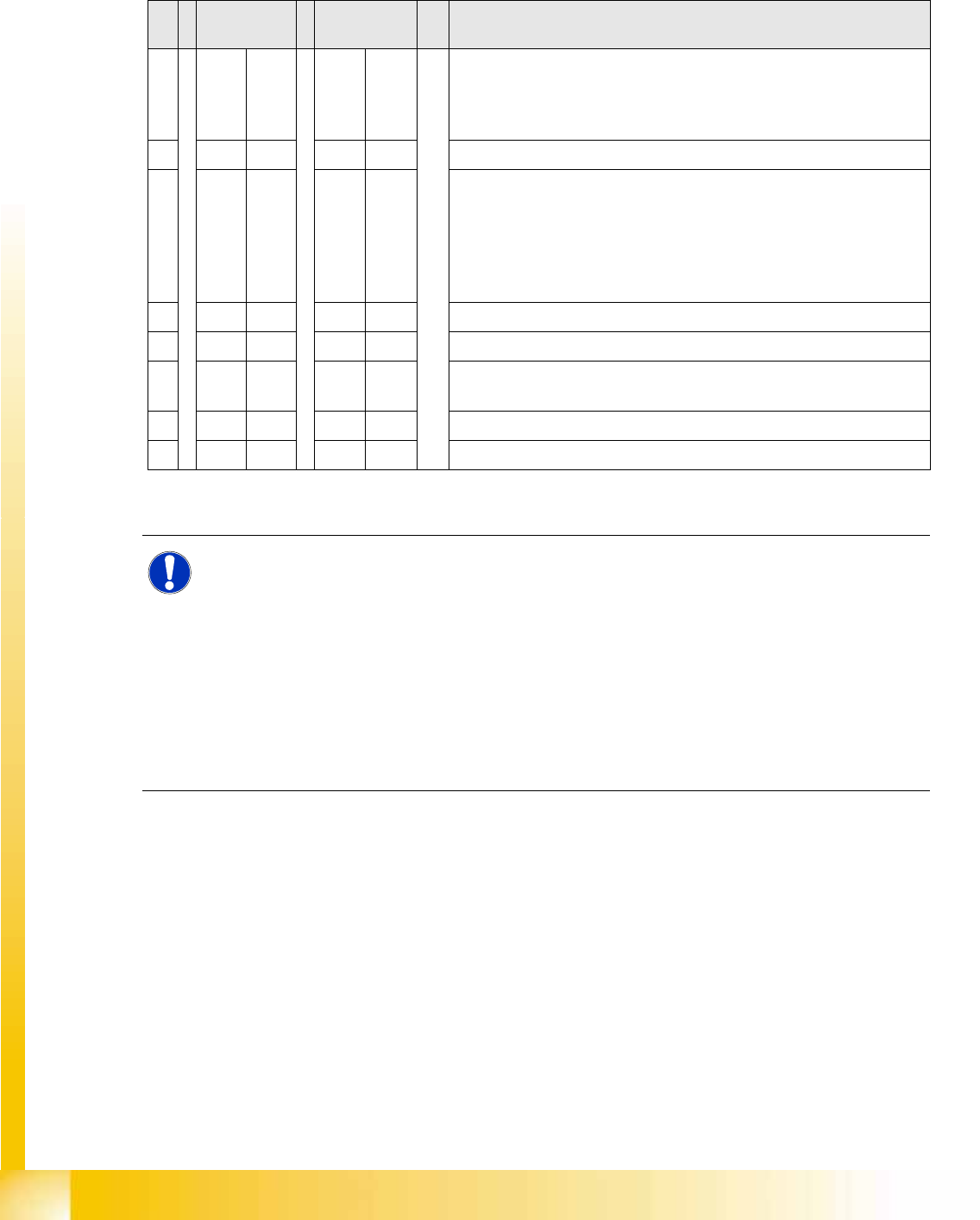
4.3.10.1 DIP Switch on Main and Subdistributor (for Version -03)
DIP switch on CAN I/O module (X-series from Ma No. B-326, X4I).
Applies for main distributors [03046225-xx] and subdistributors [03046226-xx].
Description of I/O Module
S Main
distributor
Subdistribut
or
Comments
1OFF OFF Gateway ON/OFF:
This switch opens the SUB CAN bus to address the tables and cutters
on the D1, D2 and D4 machines or the WPC on the X2 and X 3 from
SW 605.
2OFF OFF SW platform: ON: HF/HF3, OFF: D3, X series X4I
3OFF OFF Baudrate - ON = 1 MBit/s, OFF = 500 KBit/s:
This switch is only queried if switch S1 is set to ON.
D1, D2, X2, X3 with WPC (SW 605): ON
D4: OFF
X2, X3 without WPC, X4, X4I: The switch can be set to OFF here as
switch S1 is also set to OFF.
4OFF ON Location: ON: Subdistributor, OFF: Main distributor
5OFF OFF Not in use
6OFF OFF OFF: The connected Interface 1-Wire CAT5 board is active if the
switches on it are set to V2 and MA.
7OFF OFF HW reset for 1-Wire
8OFF OFF OFF: X series, X4I, D4, ON: D1/D2
NOTE: Description of I/O Module
The I/O assemblies of version 02 and 03 differ in that the "Interface 1-Wire CAT5" board is
integrated into version 03.
This means that this integrated "Interface 1-Wire CAT5" board can only be used for HF/HF3
machines.
X machines have the "Interface 1-Wire CAT5" connected as an additional module, due to the
CAT5 connection. By setting the switch on the interface to
MA
and
Version 02
the integrated
interface is switched off and the machine uses the additionally connected interface.
X The same I/O assembly is used for D series machines but with a different eSW. This results
in other DIP switch settings (see table above). The additionally connected interface is used
to address the components and cutters via a sub CAN bus.